🤖
画像処理100本ノックに挑戦|二値化(003/100)




これはなに?
画像処理100本ノックを、TypeScriptとlibvipsで挑戦してみる記事の3本目です。
前回
実装
お題
画像を二値化せよ。 二値化とは、画像を黒と白の二値で表現する方法である。 ここでは、グレースケールにおいて閾値を128に設定し、下式で二値化する。
y = { 0 (if y < 128)
     255 (else)
Coding
前回に引き続き imageProcessor.ts に、2値化用の処理を実装します。
便利な2値化用のAPIも用意されていますが、今回はTypeScriptの学習がメインなので利用しません。
import sharp from 'sharp';

export async function convertToBinary(inputPath: string, outputPath: string, threshold: number = 128): Promise<void> {
  try {
    // まず画像をグレースケールに変換
    const image = await sharp(inputPath)
      .grayscale()
      .raw()
      .toBuffer({ resolveWithObject: true });

    const { data, info } = image;
    const { width, height } = info;

    // 二値化処理用の新しいバッファーを作成
    const binaryData = Buffer.alloc(data.length);

    // 各ピクセルを二値化
    for (let i = 0; i < data.length; i++) {
      binaryData[i] = data[i] < threshold ? 0 : 255;
    }

    // 二値化した画像を保存
    await sharp(binaryData, {
      raw: {
        width,
        height,
        channels: 1
      }
    })
    .png()  // PNG形式で保存(ロスレス圧縮)
    .toFile(outputPath);

    console.log('二値化が完了しました');
  } catch (error) {
    console.error('画像処理中にエラーが発生しました:', error);
    throw error;
  }
}
Test
import { existsSync, unlinkSync } from 'fs';
import { join } from 'path';
import sharp from 'sharp';
import { convertToBinary } from './imageProcessor';

describe('Binary Image Conversion Tests', () => {
  const testInputPath = join(__dirname, '../test-images/test.jpeg');
  const testOutputPath = join(__dirname, '../test-images/test-binary.png');
  const threshold = 128;

  afterEach(() => {
    if (existsSync(testOutputPath)) {
      unlinkSync(testOutputPath);
    }
  });

  test('should successfully convert image to binary', async () => {
    await convertToBinary(testInputPath, testOutputPath);
    expect(existsSync(testOutputPath)).toBe(true);
  });

  test('should only contain black (0) and white (255) pixels - optimized', async () => {
    await convertToBinary(testInputPath, testOutputPath, threshold);

    const outputImage = await sharp(testOutputPath)
      .raw()
      .toBuffer({ resolveWithObject: true });

    // TypedArray に変換して高速化
    const pixels = new Uint8Array(outputImage.data);

    // 一度のチェックで全データを検証
    const invalidPixels = pixels.find(p => p !== 0 && p !== 255);
    expect(invalidPixels).toBeUndefined();

    // オプション: 0と255の分布も確認
    const blacks = pixels.filter(p => p === 0).length;
    const whites = pixels.filter(p => p === 255).length;
    expect(blacks + whites).toBe(pixels.length);
  });

  test('should correctly apply threshold', async () => {
    const width = 256;
    const height = 1;

    // グラデーションデータの作成
    const gradientData = Buffer.alloc(width * height);
    for (let i = 0; i < width; i++) {
      gradientData[i] = i;
    }

    const gradientPath = join(__dirname, '../test-images/gradient.png');
    const gradientBinaryPath = join(__dirname, '../test-images/gradient-binary.png');

    try {
      // 1チャネルのグレースケール画像として保存
      await sharp(gradientData, {
        raw: {
          width,
          height,
          channels: 1
        }
      })
      .toColourspace('b-w')  // 明示的に白黒カラースペースを指定
      .toFormat('png')
      .toFile(gradientPath);

      // デバッグ用:生成された画像の情報を確認
      const debugImage = await sharp(gradientPath)
        .raw()
        .toBuffer({ resolveWithObject: true });
      console.log('Debug - Generated image info:', {
        ...debugImage.info,
        firstPixels: Array.from(debugImage.data.slice(0, 3)),
        midPixels: Array.from(debugImage.data.slice(127, 130)),
        lastPixels: Array.from(debugImage.data.slice(-3))
      });

      // 二値化を実行
      await convertToBinary(gradientPath, gradientBinaryPath, threshold);

      // 結果を検証
      const binaryImage = await sharp(gradientBinaryPath)
        .raw()
        .toBuffer({ resolveWithObject: true });

      console.log('Debug - Binary image info:', {
        ...binaryImage.info,
        firstPixels: Array.from(binaryImage.data.slice(0, 3)),
        midPixels: Array.from(binaryImage.data.slice(127, 130)),
        lastPixels: Array.from(binaryImage.data.slice(-3))
      });

      // チャネル数に基づいてステップサイズを調整
      const step = binaryImage.info.channels || 1;

      // データを1ピクセルずつ検証(チャネル数を考慮)
      for (let i = 0; i < width; i++) {
        const pixelIndex = i * step;  // チャネル数を考慮したインデックス
        const expectedValue = i < threshold ? 0 : 255;
        const actualValue = binaryImage.data[pixelIndex];

        if (actualValue !== expectedValue) {
          console.log(`Mismatch at pixel ${i}: expected=${expectedValue}, actual=${actualValue}`);
        }

        expect(actualValue).toBe(expectedValue);
      }

    } finally {
      // テスト用の一時ファイルを削除
      if (existsSync(gradientPath)) unlinkSync(gradientPath);
      if (existsSync(gradientBinaryPath)) unlinkSync(gradientBinaryPath);
    }
  });

  test('should maintain image dimensions', async () => {
    await convertToBinary(testInputPath, testOutputPath);

    const inputMetadata = await sharp(testInputPath).metadata();
    const outputMetadata = await sharp(testOutputPath).metadata();

    expect(outputMetadata.width).toBe(inputMetadata.width);
    expect(outputMetadata.height).toBe(inputMetadata.height);
  });
});
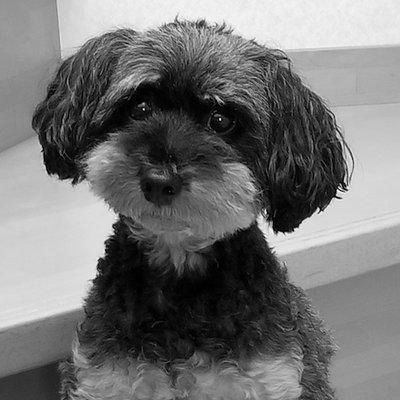
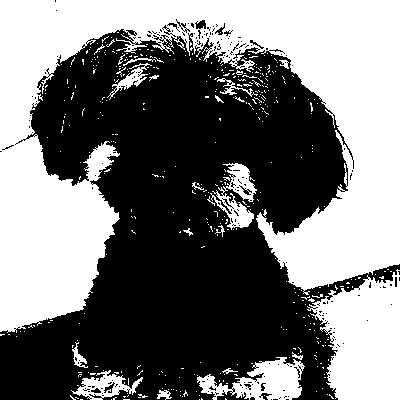
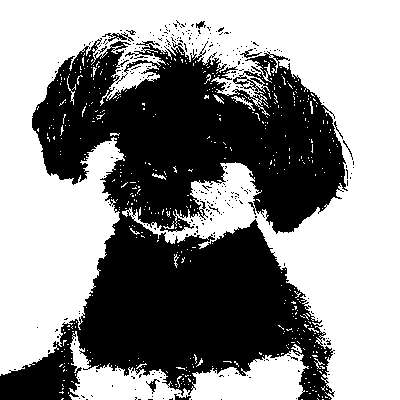
結果
| 入力 | 結果(デフォルトの閾値) | 結果(任意の閾値:100) |
|---|---|---|
 |
 |
 |
おまけ
.threshold() を利用する場合は、以下のように実装できます。
現実的には下記のような実装にすることがシンプルかつ頑健で良いかと思います。
export async function convertToBinary(inputPath: string, outputPath: string, threshold: number = 128): Promise<void> {
  try {
    await sharp(inputPath)
      .grayscale()          // まずグレースケールに変換
      .threshold(threshold) // 指定した閾値で二値化
      .toFile(outputPath);

    console.log('二値化が完了しました');
  } catch (error) {
    console.error('画像処理中にエラーが発生しました:', error);
    throw error;
  }
}
Discussion