iTranslated by AI
Silent Installation of Visual Studio Code


Introduction
I will introduce installer options for performing a silent installation of Visual Studio Code on Windows.
This is useful when you want to integrate with File Explorer while installing via a package manager.
If you are using winget as your package manager, please also see this article for how to specify parameters.
Basics
Download the Visual Studio installer from the official website and run it as follows:
VSCodeSetup-x64-1.60.2.exe /VERYSILENT /NORESTART /MERGETASKS=!runcode
By specifying /VERYSILENT, you can install it without showing the installation dialog. If you want to see the dialog, specify the /SILENT option.
/NORESTART prevents the OS from restarting after installation.
With /MERGETASKS, you can specify various installation options for Visual Studio. In the example above, it specifies not to launch Visual Studio Code after the installation is complete.
Conversely, if you want to launch Visual Studio Code after installation, specify it as follows:
VSCodeSetup-x64-1.60.2.exe /VERYSILENT /NORESTART /MERGETASKS=runcode
If you specify "!" at the beginning of an option, it negates that option.
If you want to specify multiple options, separate them with commas as follows:
VSCodeSetup-x64-1.60.2.exe /VERYSILENT /NORESTART /MERGETASKS=!runcode,addtopath
Parameter List
| Parameter | Description |
|---|---|
| desktopicon | Create an icon on the desktop |
| addcontextmenufiles | Add "Open with Code" action to the file context menu in File Explorer |
| addcontextmenufolders | Add "Open with Code" action to the directory context menu in File Explorer |
| associatewithfiles | Register Code as an editor for supported file types |
| addtopath | Add to PATH (available after restart) |
The available parameters correspond to the following selections in the installer GUI.
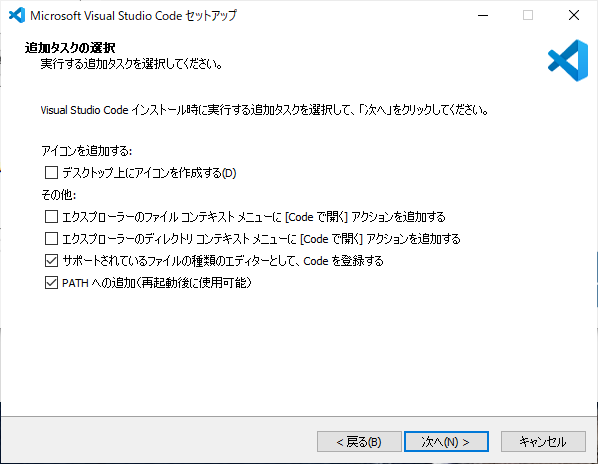
My personally recommended settings are as follows:
.\VSCodeSetup-x64-1.60.2.exe /VERYSILENT /NORESTART /MERGETASKS=!runcode,addcontextmenufiles,addcontextmenufolders,associatewithfiles,addtopath
Discussion