iTranslated by AI
Generate AI commit messages in the CLI (cz-git, czg)



Introduction
I decided to try out cz-git after it was introduced to me in a comment on Popular Git Management (gh, ghq, git-cz, lazygit).
What is cz-git?
cz-git is a tool that allows you to easily generate commit messages following a specific format.
Since it can generate commit messages using AI in English, it's also perfect for practicing English! 😎

Creating a commit message with AI
The commit message format follows the Angular commit message standard, which is the basis for Conventional Commits.
While there are similar tools like git-cz or Commitizen, cz-git resolves complex dependencies and is much more lightweight.
148 MB node_modules/git-cz
1.9 MB node_modules/cz-git
Recommended points of cz-git
I used to use git-cz, but I migrated to cz-git because of the following advantages:
- Easily toggle emoji on/off
- Commit message generation by AI
What is czg?
Looking at the official page, it seems there is something called czg in addition to cz-git.
czg is a version of cz-git made available as a CLI tool.
You should use cz-git if you want to introduce it on a per-project basis, and czg if you want to use it easily as a global CLI tool.
While cz-git is executed with cz or git cz, czg can be executed with czg or git czg.
In this article, I will introduce how to install czg to use it as a CLI tool.
Installing cz-git
Uninstalling git-cz
Since I have git-cz installed in my environment, I'm going to uninstall it.
npm uninstall -g git-cz
Installation
Since czg cannot be used on its own, you also need to install cz-git.
# For npm
npm install -g czg cz-git

# For Volta
volta install czg cz-git
Reference: czg | Interactive Commitizen CLI that generate standardized git commit message
cz-git Format Configuration
Configuration files are placed in either the home directory or the project root.
The priority is Configuration file in the project root > Configuration file in the home directory.
const { defineConfig } = require('cz-git')

module.exports = defineConfig({
    rules: {
        // @see: https://commitlint.js.org/#/reference-rules
    },
    prompt: {
        alias: { fd: 'docs: fix typos' },
        messages: {
            type: 'Select the type of change that you\'re committing:',
            scope: 'Denote the SCOPE of this change (optional):',
            customScope: 'Denote the SCOPE of this change:',
            subject: 'Write a SHORT, IMPERATIVE tense description of the change:\n',
            body: 'Provide a LONGER description of the change (optional). Use "|" to break new line:\n',
            breaking: 'List any BREAKING CHANGES (optional). Use "|" to break new line:\n',
            footerPrefixesSelect: 'Select the ISSUES type of changeList by this change (optional):',
            customFooterPrefix: 'Input ISSUES prefix:',
            footer: 'List any ISSUES by this change. E.g.: #31, #34:\n',
            generatingByAI: 'Generating your AI commit subject...',
            generatedSelectByAI: 'Select suitable subject by AI generated:',
            confirmCommit: 'Are you sure you want to proceed with the commit above?',
        },
        types: [
            { value: 'feat', name: 'feat:     ✨  A new feature', emoji: ':sparkles:' },
            { value: 'fix', name: 'fix:      🐛  A bug fix', emoji: ':bug:' },
            { value: 'docs', name: 'docs:     📝  Documentation only changes', emoji: ':memo:' },
            { value: 'style', name: 'style:    💄  Changes that do not affect the meaning of the code', emoji: ':lipstick:' },
            { value: 'refactor', name: 'refactor: ♻️   A code change that neither fixes a bug nor adds a feature', emoji: ':recycle:' },
            { value: 'perf', name: 'perf:     ⚡️  A code change that improves performance', emoji: ':zap:' },
            { value: 'test', name: 'test:     ✅  Adding missing tests or correcting existing tests', emoji: ':white_check_mark:' },
            { value: 'build', name: 'build:    📦️   Changes that affect the build system or external dependencies', emoji: ':package:' },
            { value: 'ci', name: 'ci:       🎡  Changes to our CI configuration files and scripts', emoji: ':ferris_wheel:' },
            { value: 'chore', name: 'chore:    🔨  Other changes that don\'t modify src or test files', emoji: ':hammer:' },
            { value: 'revert', name: 'revert:   ⏪️  Reverts a previous commit', emoji: ':rewind:' },
        ],
        useEmoji: true,
        emojiAlign: 'center',
        useAI: false,
        aiNumber: 1,
        themeColorCode: '',
        scopes: [],
        allowCustomScopes: true,
        allowEmptyScopes: true,
        customScopesAlign: 'bottom',
        customScopesAlias: 'custom',
        emptyScopesAlias: 'empty',
        upperCaseSubject: false,
        markBreakingChangeMode: false,
        allowBreakingChanges: ['feat', 'fix'],
        breaklineNumber: 100,
        breaklineChar: '|',
        skipQuestions: [],
        issuePrefixes: [{ value: 'closed', name: 'closed:   ISSUES has been processed' }],
        customIssuePrefixAlign: 'top',
        emptyIssuePrefixAlias: 'skip',
        customIssuePrefixAlias: 'custom',
        allowCustomIssuePrefix: true,
        allowEmptyIssuePrefix: true,
        confirmColorize: true,
        scopeOverrides: undefined,
        defaultBody: '',
        defaultIssues: '',
        defaultScope: '',
        defaultSubject: '',
    },
})
However, with the default settings, emojis are displayed as text strings instead of actual icons.
(✨ becomes :sparkles:)

By changing the emoji field as follows, emojis will be reflected in the commit messages.
const { defineConfig } = require("cz-git");

module.exports = defineConfig({
  rules: {
    // @see: https://commitlint.js.org/#/reference-rules
  },
  prompt: {
    alias: { fd: "docs: fix typos" },
    messages: {
      type: "Select the type of change that you're committing:",
      scope: "Denote the SCOPE of this change (optional):",
      customScope: "Denote the SCOPE of this change:",
      subject: "Write a SHORT, IMPERATIVE tense description of the change:\n",
      body: 'Provide a LONGER description of the change (optional). Use "|" to break new line:\n',
      breaking:
        'List any BREAKING CHANGES (optional). Use "|" to break new line:\n',
      footerPrefixesSelect:
        "Select the ISSUES type of changeList by this change (optional):",
      customFooterPrefix: "Input ISSUES prefix:",
      footer: "List any ISSUES by this change. E.g.: #31, #34:\n",
      generatingByAI: "Generating your AI commit subject...",
      generatedSelectByAI: "Select suitable subject by AI generated:",
      confirmCommit: "Are you sure you want to proceed with the commit above?",
    },
    types: [
      {
        value: "feat",
        name: "feat:     ✨  A new feature",
        emoji: "✨",
      },
      { value: "fix", name: "fix:      🐛  A bug fix", emoji: "🐛" },
      {
        value: "docs",
        name: "docs:     📝  Documentation only changes",
        emoji: "📝",
      },
      {
        value: "style",
        name: "style:    💄  Changes that do not affect the meaning of the code",
        emoji: "💄",
      },
      {
        value: "refactor",
        name: "refactor: ♻️   A code change that neither fixes a bug nor adds a feature",
        emoji: "♻️",
      },
      {
        value: "perf",
        name: "perf:     ⚡️  A code change that improves performance",
        emoji: "⚡️",
      },
      {
        value: "test",
        name: "test:     ✅  Adding missing tests or correcting existing tests",
        emoji: "✅",
      },
      {
        value: "build",
        name: "build:    📦️   Changes that affect the build system or external dependencies",
        emoji: "📦️",
      },
      {
        value: "ci",
        name: "ci:       🎡  Changes to our CI configuration files and scripts",
        emoji: "🎡",
      },
      {
        value: "chore",
        name: "chore:    🔨  Other changes that don't modify src or test files",
        emoji: "🔨",
      },
      {
        value: "revert",
        name: "revert:   ⏪️  Reverts a previous commit",
        emoji: "⏪️",
      },
    ],
    useEmoji: true,
    emojiAlign: "center",
    useAI: false,
    aiNumber: 1,
    themeColorCode: "",
    scopes: [],
    allowCustomScopes: true,
    allowEmptyScopes: true,
    customScopesAlign: "bottom",
    customScopesAlias: "custom",
    emptyScopesAlias: "empty",
    upperCaseSubject: false,
    markBreakingChangeMode: false,
    allowBreakingChanges: ["feat", "fix"],
    breaklineNumber: 100,
    breaklineChar: "|",
    skipQuestions: [],
    issuePrefixes: [
      { value: "closed", name: "closed:   ISSUES has been processed" },
    ],
    customIssuePrefixAlign: "top",
    emptyIssuePrefixAlias: "skip",
    customIssuePrefixAlias: "custom",
    allowCustomIssuePrefix: true,
    allowEmptyIssuePrefix: true,
    confirmColorize: true,
    scopeOverrides: undefined,
    defaultBody: "",
    defaultIssues: "",
    defaultScope: "",
    defaultSubject: "",
  },
});

Have AI write your commit messages
If you want AI to write commit messages for you, additional configuration is required.
Supported models: https://cz-git.qbb.sh/recipes/openai
If you use GitHub Models, you can configure it with the following command:
czg --api-key="ghp_xxxxxx" --api-endpoint="https://models.inference.ai.azure.com" --api-model="gpt-4o-mini"
You can create an API key on the following page:
https://github.com/settings/tokens
When you run the command, a file named ~/.config/.czrc is created.
{
  "openAIToken": "ghp_XXXXXXXXXXXXXXXXXXXXXXXXXXXXXXXXXXXX",
  "apiEndpoint": "https://models.inference.ai.azure.com",
  "apiModel": "gpt-4o-mini"
}
Since this file contains token information, those of you maintaining dotfiles must add it to .gitignore.
+ .config/.czrc
I want to change the message written by AI
Messages generated by AI do not include a scope.
What should you do in this case?

Checking the screen, there are some mysterious characters: (Ynemh).
Let's try typing m here...

Believe it or not, it switched to a screen where you can add a scope!
Let's try entering nvim for the scope.

It changed to feat(nvim):! Great!
Setting up execution from Lazygit
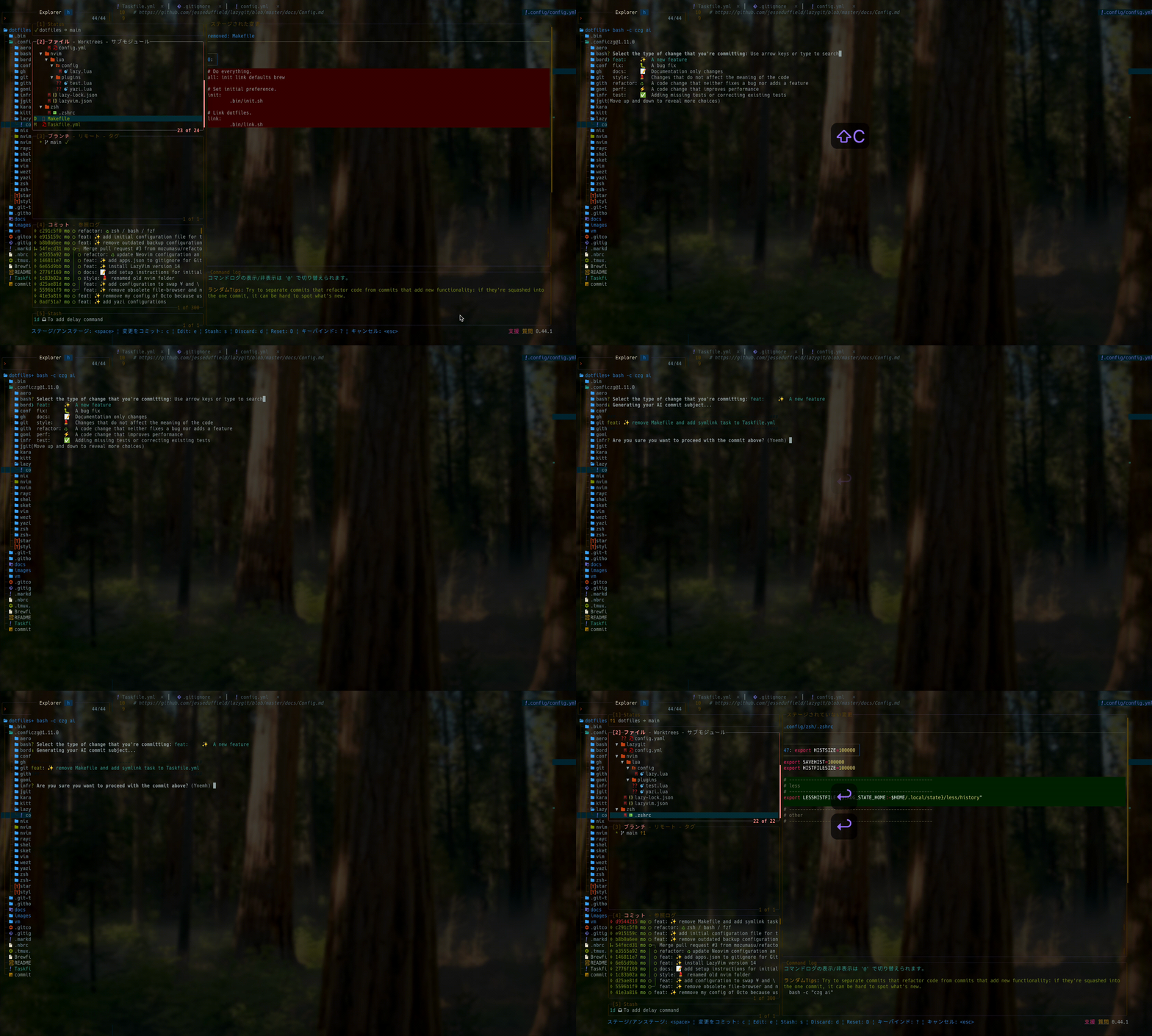
You'll be much happier if you set it up to run from Lazygit as well.
If you want to execute commands from Lazygit, you can configure it using customCommands.
# https://github.com/jesseduffield/lazygit/blob/master/docs/Config.md

customCommands:
  - command: czg
    context: files
    subprocess: true
    key: c
  - command: czg ai
    context: files
    subprocess: true
    key: C
Once set up, it's very easy to commit without leaving Neovim like this! 🙌
Not Using Emojis
If you don't want to use emojis, you can change it by setting useEmoji: false.
Executing with a Specified Configuration File
If you want to place the configuration file somewhere other than the project root, you can specify it using czg --config.
# Example: Commit using the settings in ./config/cz.json
czg --config="./config/cz.json"
Conclusion
cz-git is great
Discussion