iTranslated by AI
Designing Drag and Drop Logic for Tree Structures




DnD (Drag and Drop) involves a lot of considerations. Most libraries are tied too closely to specific use cases, often forcing you to write your own implementation every time.
In particular, representing DnD for tree structures is challenging. Since implementing filer-like UIs on the web is a frequent task and the required implementation differs every time, I will try to generalize my thoughts here.
Please note that this article is not intended to be "copy-pasteable" code, but rather a conceptualization translated into code.
As a premise, I was building something like this:
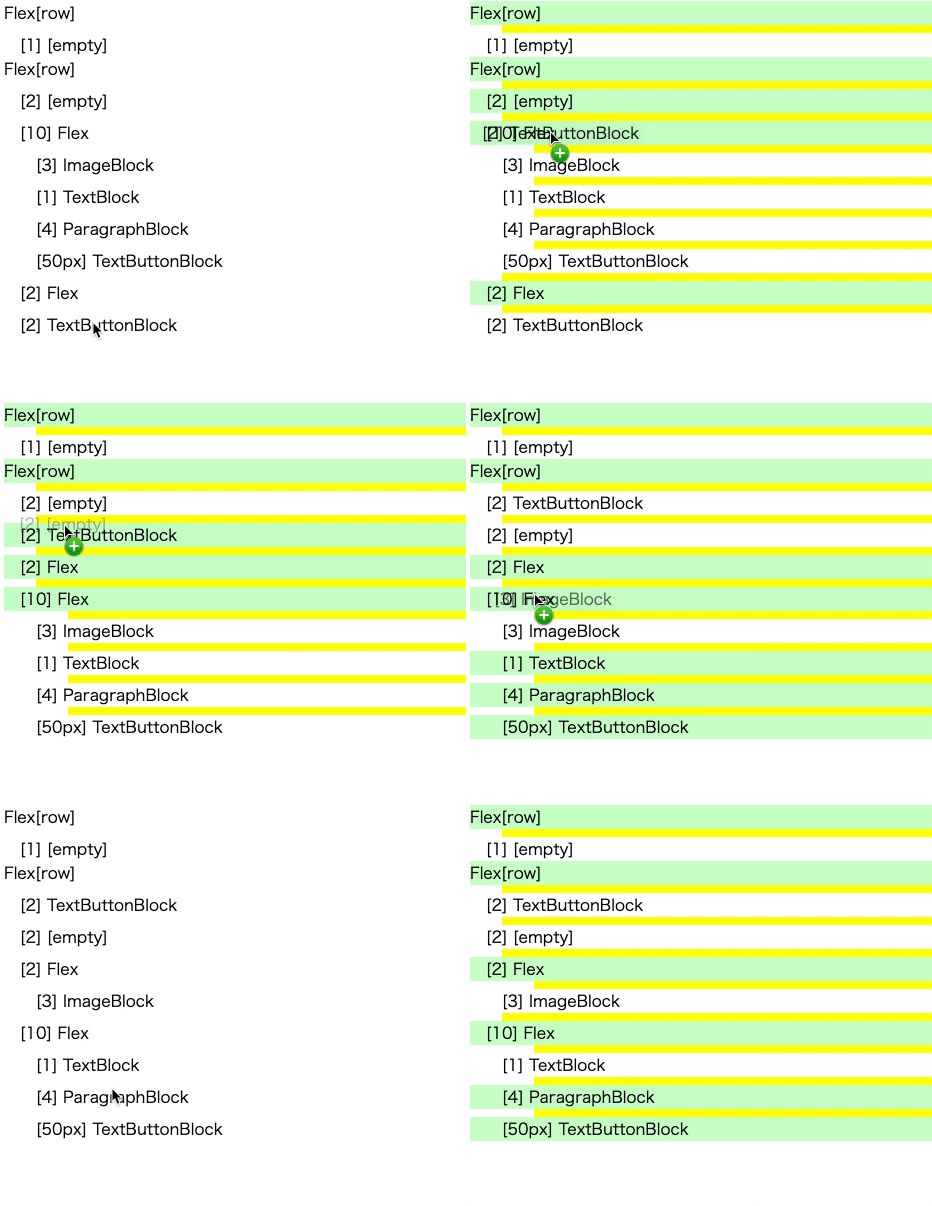
DnD Requirements
- There are many DOM-based sortable libraries, but many treat the DOM as the master data, which doesn't mesh well with modern frameworks. I want to represent everything based on data as much as possible and simply render the final modified data.
- I want to extract framework-independent logic to write tests without going through the UI and make it portable.
- Even if the target is a tree structure, expanding it recursively when implementing DnD makes event bubbling difficult to control, so it's easier to handle if flattened into a one-dimensional data structure.
Converting Tree Structure => One-dimensional Data Structure
Convert the target tree structure into data with depth information and parent IDs.
// Some kind of tree structure data
type Node = {
  id: string;
  type: string,
  data: number;
  children: Node[];
}

type FlatNode = {
  id: string;
  parentId: string,
  type: string,
  data: number;
  depth: number;
}

// Flatten into a tree
function toFlat(root: Node): FlatNode[] {
  let list: FlatNode[] = [];
  function walk(node: Node, parent: Node, depth: number = 0) {
    list.push({
      id: node.id,
      parentId: parent?.id,
      type: node.type,
      data: node.data,
      depth: depth
    });
    node.children.forEach(c => walk(c, node, depth + 1));
  }
  walk(root, null, 0);
  return list;
}

// Operate
const tree = {...}; // Data to handle
const items = toFlat(tree);
Before rendering these flattened items as a one-dimensional List View... let's implement the operation logic.
Implementing DnD Logic
Implement the logic by focusing on the source (drag target) and target (drop target) within the operations of the flattened list.
- Define a function to determine if the source can be dropped onto the target.
- When dropping, implement a transformation on the original data structure rather than the flattened one.
- Once the transformation is complete, flatten the data again.
Here, I am using Immer to handle the data as if it were mutable.
import {produce} from "immer";

type Rule = {
  ruleName: string;
  canDrop: (source: FlatNode, target: FlatNode) => boolean;
  transform: (root: Node, source: FlatNode, target: FlatNode) => Node;
};

// Only allow swapping between siblings
const swapRule: Rule = {
  ruleName: 'swap',
  canDrop(source, target) {
    return (
      source.parentId === target.parentId &&
      source.id !== target.id
    );
  },
  transform(root, source, target) {
    return produce(root, draft => {
      function walk(node: Node, parent: Node, depth: number = 0) {
        if (parent.id === target.id) {
          const aIndex = parent.children.findIndex(c => (c.id === aid);
          const bIndex = parent.children.findIndex(c => (c.id === bid);
          const a = parent.children[aIndex];
          const b = parent.children[bIndex];
          parent.children[aIndex] = b;
          parent.children[bIndex] = a;
        }
        node.children.forEach(c => walk(c, node, depth + 1));
      }
    });
  },
};

const dndRules: Rule[] = [swapRule, moveToOtherNodeRule];

// Prepare a function to find which rule matched
function matchRule(source: FlatNode, target: FlatNode): Rule | void {
  return dndRules.find(r => r.canDrop(source, target));
}
I've written a concrete example for swapping here. (It might not work as-is since I extracted it from existing code. It's just a sample.)
In this example, I'm using a simplified data structure, but in a real scenario, you'd need to write rules for things like "Files vs. Directories," "Files can only be swapped with Files," or "Files can only go inside Directories." Any necessary data should be added to the Node object.
The reason for separating canDrop is so it can be used to highlight droppable targets when you start dragging a source.
Using these, we can construct the actual View.
View Implementation
From here on, the processing becomes framework-dependent, but the basic idea is simply to retrieve the IDs you want to exchange via DnD and pass them to the previously defined DnD rules.
To preview droppable areas, you might implement something where you check each list element with canDrop when an item is grabbed and highlight it accordingly.
<script lang="ts">
  // ...
  let root: Node = {...};
  let items: FlatNode[] = toFlat(root);

  // Currently dragging
  let draggingSource: FlatNode | null = null;
  const onDrop = (target: FlatNode) => {
    if (draggingSource) {
      for (const rule of dndRules) {
        if (rule.canDrop(draggingSource, target)) {
          root = rule.transform(root, draggingSource, target);
          items = toFlatNodeList(root);
          break;
        }
      }
    }
  }
</script>

<div style="width: 500px; ">
  {#each items as item, index (item.id)}
    <div
      style="display: flex; width: 100%"
      draggable={true}
      on:drop={onDrop}
      on:dragstart={event => {
        draggingSource = item;
        // Calling setData enables dragging
        event.dataTransfer.setData('text/plain', item.id);
      }}
      on:dragstart={() => {
        draggingSource = null;
      }}
      on:dragover={ev => {
        if (draggingSource && matchRule(draggingSource, item)) {
          // Calling preventDefault on dragover allows dropping
          ev.preventDefault();
        }
      }}
    >
      <!-- Represent indentation based on depth -->
      <div style="width: {item.depth}rem;" />
      <div style="flex: 1">
        <!-- Render the actual view content here -->
      </div>
    </div>
  {/each}
</div>
Node Extension and Drop Spacers
As development progressed, I found myself wanting to create empty rows for DnD spacers. This allows for dropping items between elements.
// ...
type FlatNode = {
  type: 'draggable',
  id: string;
  parentId: string,
  data: number;
  depth: number;
} & {
  id: string,
  parentId: string,
  type: 'spacer',
  index: number,
  depth: number
}


function toFlat(root: Node): FlatNode[] {
  let list: FlatNode[] = [];
  function walk(node: Node, parent: Node, depth: number = 0) {
    list.push({
      id: node.id,
      parentId: parent?.id,
      type: node.type,
      data: node.data,
      depth: depth
    });
    const selfIndex = parent?.children.findIndex((c) => c.id === node.id);
    list.push({
      type: 'spacer',
      index: selfIndex,
      id: node.id + ":spacer",
      parentId: parent?.id,
      depth: depth
    });
    node.children.forEach(c => walk(c, node, depth + 1));
  }
  walk(root, null, 0);
  return list;
}
By inserting spacer data like this, you can implement the logic by adding dndRules while rendering the list.
Discussion