






この記事は MICIN Advent Calendar 2025 の 6 日目の記事です。 前回は Hideo Kinami さんの 「脱・肥満」ガジェット&アプリ運用術 でした。
はじめに
時に人は Google ドキュメントを Google Apps Script で操作したくなります。
そこで検索してみると Google Apps Script で「Google スプレッドシート」を操作する記事は豊富に出てきます。
ところが、 Google ドキュメントを操作する記事はあまり存在しません。
(単に需要がないからかもしれませんが)
ここは 「無ければ作ればいい」 のスタートアップ精神。
ということで Google Apps Script での Google ドキュメント操作方法をまとめた記事を書きました。
各コマンドの解説は省き、利用用途に合わせた逆引きリファレンス形式で記載しています。
基礎編(基本操作編)
文字を書き込む

function myFunction() {
  const body = DocumentApp.getActiveDocument().getBody();
  body.appendParagraph("吾輩は猫である。名前はまだ無い。");
}
段落を追加する

function myFunction() {
  const body = DocumentApp.getActiveDocument().getBody();
  body.appendParagraph("吾輩は猫である。名前はまだ無い。");
  body.appendParagraph("どこで生れたかとんと見当がつかぬ。何でも薄暗いじめじめした所でニャーニャー泣いていた事だけは記憶している。");
}
見出し 1 を設定する

function myFunction() {
  const body = DocumentApp.getActiveDocument().getBody();
  const heading = body.appendParagraph("吾輩は猫である");
  heading.setHeading(DocumentApp.ParagraphHeading.HEADING1);
}
文字を太字にする

function myFunction() {
  const body = DocumentApp.getActiveDocument().getBody();
  const p = body.appendParagraph("吾輩は猫である。名前はまだ無い。");
  p.editAsText().setBold(true);
}
文字を斜体にする

function myFunction() {
  const body = DocumentApp.getActiveDocument().getBody();
  const p = body.appendParagraph("吾輩は猫である。名前はまだ無い。");
  p.editAsText().setItalic(true);
}
文字に下線をつける

function myFunction() {
  const body = DocumentApp.getActiveDocument().getBody();
  const p = body.appendParagraph("吾輩は猫である。名前はまだ無い。");
  p.editAsText().setUnderline(true);
}
文字に色をつける

function myFunction() {
  const body = DocumentApp.getActiveDocument().getBody();
  const p = body.appendParagraph("吾輩は猫である。名前はまだ無い。");
  p.editAsText().setForegroundColor("#ff0000");
}
文字に背景色をつける
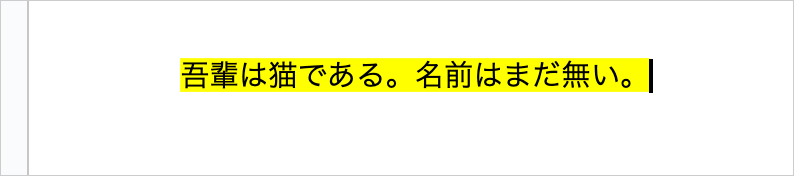
function myFunction() {
  const body = DocumentApp.getActiveDocument().getBody();
  const p = body.appendParagraph("吾輩は猫である。名前はまだ無い。");
  p.editAsText().setBackgroundColor("#ffff00");
}
文字のフォントを変える

function myFunction() {
  const body = DocumentApp.getActiveDocument().getBody();
  const p = body.appendParagraph("吾輩は猫である。名前はまだ無い。");
  p.editAsText().setFontFamily("M PLUS 1p");
}
文字のサイズを変える

function myFunction() {
  const body = DocumentApp.getActiveDocument().getBody();
  const p = body.appendParagraph("吾輩は猫である。名前はまだ無い。");
  p.editAsText().setFontSize(18);
}
文字の装飾をまとめて変える

function myFunction() {
  const highlightStyle = {
    [DocumentApp.Attribute.BOLD]: true,
    [DocumentApp.Attribute.FONT_SIZE]: 20,
    [DocumentApp.Attribute.FOREGROUND_COLOR]: "#ff0000",
  };

  const body = DocumentApp.getActiveDocument().getBody();
  const p = body.appendParagraph("");
  p.appendText("吾輩は猫である。名前はまだ無い。").setAttributes(highlightStyle);
}
文字にリンクをつける

function myFunction() {
  const body = DocumentApp.getActiveDocument().getBody();
  const p = body.appendParagraph("吾輩は猫である。名前はまだ無い。");
  p.editAsText().setLinkUrl("https://www.aozora.gr.jp/cards/000148/card789.html");
}
文字を中央揃えにする

function myFunction() {
  const body = DocumentApp.getActiveDocument().getBody();
  const p = body.appendParagraph("吾輩は猫である");
  p.setAlignment(DocumentApp.HorizontalAlignment.CENTER);
}
文字を右揃えにする

function myFunction() {
  const body = DocumentApp.getActiveDocument().getBody();
  const p = body.appendParagraph("吾輩は猫である");
  p.setAlignment(DocumentApp.HorizontalAlignment.RIGHT);
}
文字を左揃えにする

function myFunction() {
  const body = DocumentApp.getActiveDocument().getBody();
  const p = body.appendParagraph("吾輩は猫である");
  p.setAlignment(DocumentApp.HorizontalAlignment.LEFT);
}
箇条書きを追加する

function myFunction() {
  const body = DocumentApp.getActiveDocument().getBody();
  body.appendListItem("吾輩は猫である。").setGlyphType(DocumentApp.GlyphType.BULLET);
  body.appendListItem("名前はまだ無い。").setGlyphType(DocumentApp.GlyphType.BULLET);
}
番号付きリストを追加する

function myFunction() {
  const body = DocumentApp.getActiveDocument().getBody();
  body.appendListItem("どこで生れたかとんと見当がつかぬ。").setGlyphType(DocumentApp.GlyphType.NUMBER);
  body.appendListItem("ただ泣いていた事だけは記憶している。").setGlyphType(DocumentApp.GlyphType.NUMBER);
}
画像を挿入する

function myFunction() {
  // Googleドライブ上の画像ファイルIDを指定
  // 例)https://drive.google.com/file/d/【この部分】/view
  const fileId = "画像ファイルのIDを記入";

  const body = DocumentApp.getActiveDocument().getBody();
  const imageBlob = DriveApp.getFileById(fileId).getBlob();
  body.appendImage(imageBlob);
}
表を追加する
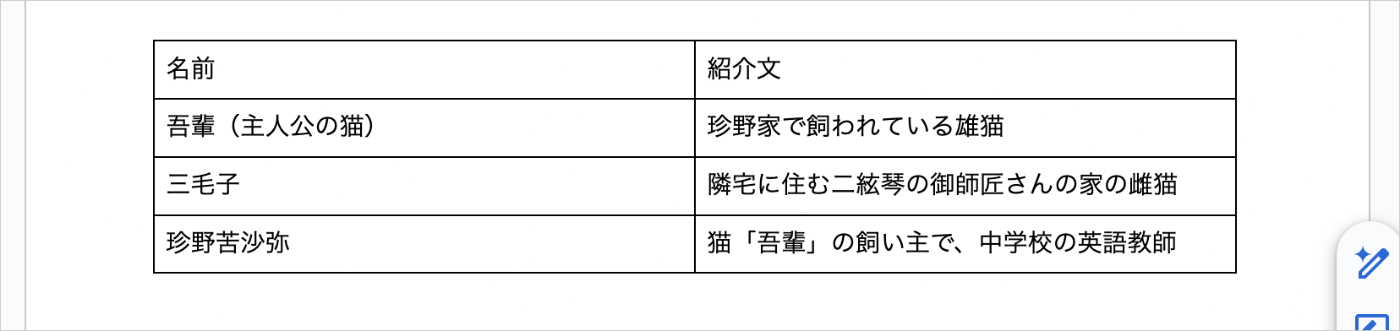
function myFunction() {
  const body = DocumentApp.getActiveDocument().getBody();
  body.appendTable([
    ["名前", "紹介文"],
    ["吾輩(主人公の猫)", "珍野家で飼われている雄猫"],
    ["三毛子", "隣宅に住む二絃琴の御師匠さんの家の雌猫"],
    ["珍野苦沙弥", "猫「吾輩」の飼い主で、中学校の英語教師"],
  ]);
}
区切り線を入れる

function myFunction() {
  const body = DocumentApp.getActiveDocument().getBody();
  body.appendParagraph("吾輩は猫である。名前はまだ無い。");
  body.appendHorizontalRule();
  body.appendParagraph("どこで生れたかとんと見当がつかぬ。何でも薄暗いじめじめした所でニャーニャー泣いていた事だけは記憶している。");
}
改ページする


function myFunction() {
  const body = DocumentApp.getActiveDocument().getBody();
  body.appendParagraph("吾輩は猫である。名前はまだ無い。");
  body.appendPageBreak();
  body.appendParagraph("どこで生れたかとんと見当がつかぬ。何でも薄暗いじめじめした所でニャーニャー泣いていた事だけは記憶している。");
}
基礎編(ページ設定編)
ページの余白を設定する

function myFunction() {
  const body = DocumentApp.getActiveDocument().getBody();
  body.setMarginTop(cm2pt(1));
  body.setMarginBottom(cm2pt(1));
  body.setMarginLeft(cm2pt(1));
  body.setMarginRight(cm2pt(1));
}

// cmをptに変換する関数
// cmで設定したいのですが、pt単位で設定する必要があるため
function cm2pt(cm) {
  return cm * 28.3465; // 1cm = 28.3465pt;
}
ヘッダーを設定する

function myFunction() {
  const doc = DocumentApp.getActiveDocument();
  const header = doc.addHeader();
  header.appendParagraph("吾輩は猫である");
}
フッターを設定する

function myFunction() {
  const doc = DocumentApp.getActiveDocument();
  const footer = doc.addFooter();
  footer.appendParagraph("著・夏目漱石");
}
応用編
段落中の文字の一部を装飾する
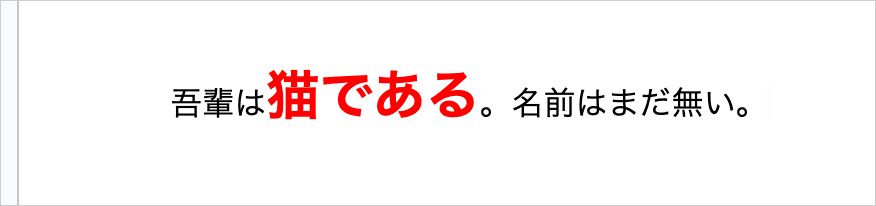
function myFunction() {
  // 通常用スタイル
  const normalStyle = {
    [DocumentApp.Attribute.BOLD]: false,
    [DocumentApp.Attribute.FONT_SIZE]: 12,
    [DocumentApp.Attribute.FOREGROUND_COLOR]: "#000000",
  };

  // 強調用スタイル
  const highlightStyle = {
    [DocumentApp.Attribute.BOLD]: true,
    [DocumentApp.Attribute.FONT_SIZE]: 20,
    [DocumentApp.Attribute.FOREGROUND_COLOR]: "#ff0000",
  };

  const body = DocumentApp.getActiveDocument().getBody();
  const p = body.appendParagraph("");
  p.appendText("吾輩は").setAttributes(normalStyle);
  p.appendText("猫である").setAttributes(highlightStyle);
  p.appendText("。名前はまだ無い。").setAttributes(normalStyle);
}
スプレッドシートの内容を差し込む
| スプレッドシート | ドキュメントの出力結果 |
|---|---|
 |
 |
function myFunction() {
  const SPREADSHEET_ID = "スプレッドシートIDを記入";

  const doc = DocumentApp.getActiveDocument();
  const body = doc.getBody();

  const sheet = SpreadsheetApp.openById(SPREADSHEET_ID).getSheetByName("シート1");
  const data = sheet.getRange(2, 1, sheet.getLastRow() - 1, sheet.getLastColumn()).getValues();

  data.forEach((row) => {
    const [id, name, mail, job, dept] = row;

    const heading = body.appendParagraph(name);
    heading.setHeading(DocumentApp.ParagraphHeading.HEADING1);

    body.appendParagraph(`社員番号: ${id}`);
    body.appendParagraph(`メール: ${mail}`);
    body.appendParagraph(`職種: ${job}`);
    body.appendParagraph(`部署: ${dept}`);
  });
}
JSON ファイルの内容を差し込む
| JSON | ドキュメントの出力結果 |
|---|---|
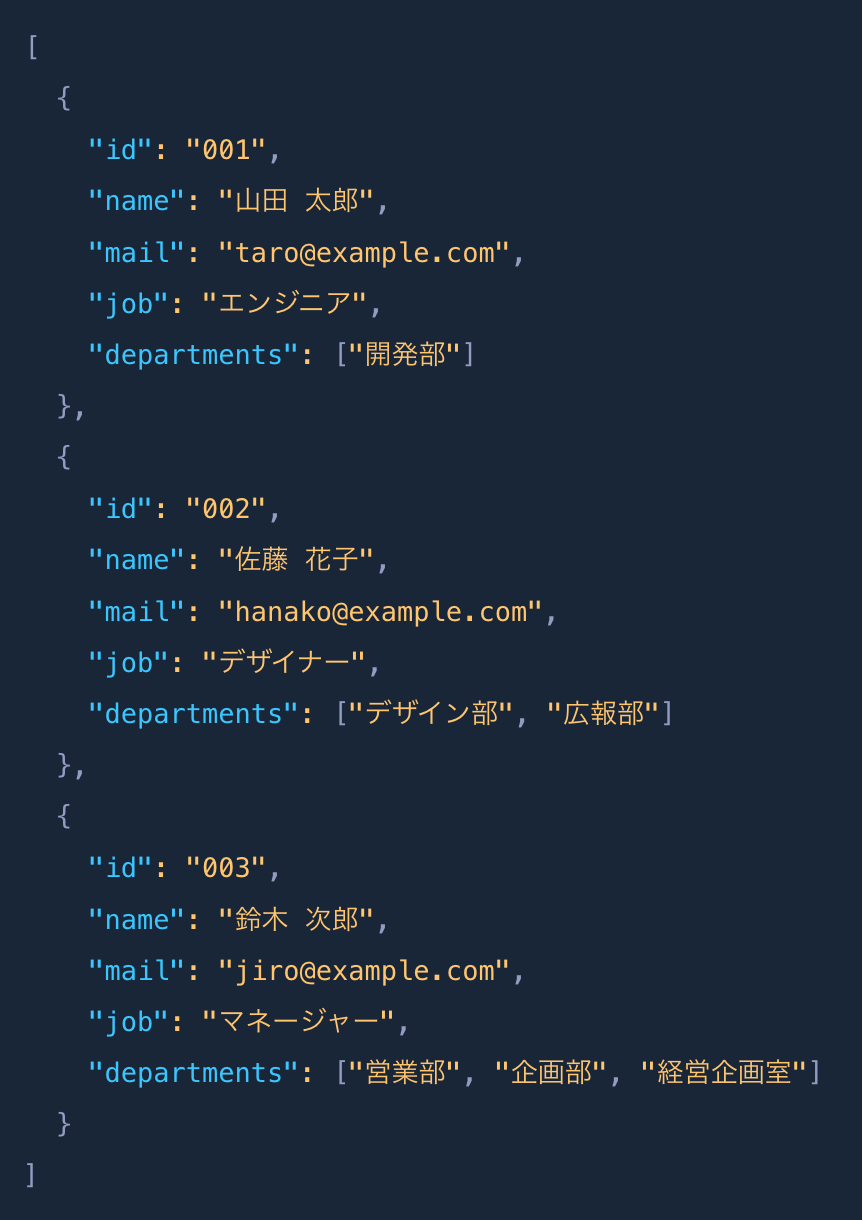 |
 |
function myFunction() {
  // Googleドライブ上のJSONファイルIDを指定
  // 例)https://drive.google.com/file/d/【この部分】/view
  const fileId = "JSONファイルのIDを記入";

  const body = DocumentApp.getActiveDocument().getBody();

  const file = DriveApp.getFileById(fileId);
  const jsonText = file.getBlob().getDataAsString("UTF-8");
  const employees = JSON.parse(jsonText);

  employees.forEach((emp) => {
    const heading = body.appendParagraph(emp.name);
    heading.setHeading(DocumentApp.ParagraphHeading.HEADING1);

    body.appendParagraph(`社員番号: ${emp.id}`);
    body.appendParagraph(`メール: ${emp.mail}`);
    body.appendParagraph(`職種: ${emp.job}`);
    body.appendParagraph(`部署: ${emp.departments.join(" / ")}`);
  });
}
MICIN ではメンバーを大募集しています。
「とりあえず話を聞いてみたい」でも大歓迎ですので、お気軽にご応募ください!

Discussion