iTranslated by AI
Turning StreamDeck into a Camera Monitor


This article is for Day 24 of the Go Advent Calendar 2021.
Introduction
Are you all familiar with StreamDeck?
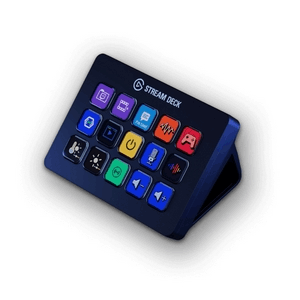
StreamDeck is a device equipped with LCD keys that can trigger numerous actions. It eliminates the need to map or memorize keyboard shortcuts for operations such as switching scenes, launching applications or media, and adjusting audio. While it is primarily used by YouTubers, it seems that engineers also find it useful for launching editors and browsers, or executing specific tasks with a single button press.
Now, in 2021, I was selected for GitHub Stars. I received various gifts from GitHub, and among them was a StreamDeck.
I already knew about StreamDeck's existence and was thinking about trying it out at some point, so the timing was perfect.
Controlling StreamDeck from Go
As a programmer, whenever I get my hands on a device like this, I feel the urge to build something. Looking through the official documentation, I found a plugin system. StreamDeck communicates with its plugins via websocket/json through the StreamDeck application. StreamDeck plugins exchange information such as text and images with the StreamDeck application and receive events like button presses on the StreamDeck or property changes in the application.

Upon searching, I found that there were already several packages for controlling StreamDeck from Go. Among them, samwho/streamdeck seemed the most practical.
I tried making a "Lupin dies twice button."
The mechanism is very simple: it just switches image files loaded via embed every time the button is pressed.
action.RegisterHandler(streamdeck.KeyDown, func(ctx context.Context, client *streamdeck.Client, event streamdeck.Event) error {
	s, ok := settings[event.Context]
	if !ok {
		return fmt.Errorf("couldn't find settings for context %v", event.Context)
	}

	s.Counter++
	if s.Counter > 7 {
		s.Counter = 0
	}
	if err := client.SetSettings(ctx, s); err != nil {
		return err
	}

	in, err := local.Open(fmt.Sprintf("static/%d.png", s.Counter+1))
	if err != nil {
		return err
	}
	defer in.Close()
	bi, _, err := image.Decode(in)
	if err != nil {
		return err
	}

	img, err := streamdeck.Image(bi)
	if err != nil {
		return err
	}

	return client.SetImage(ctx, img, streamdeck.HardwareAndSoftware)
})
I was surprised by how clean the images look. Having realized that, for some reason, I started wanting to display real-time video on the StreamDeck.
Let me say that again: for some reason, I started wanting to display real-time video on the StreamDeck.
Let's Try Displaying Camera Video
To handle camera video in Go, it's best to use the OpenCV cgo package, gocv.
The implementation example is as follows:
cam, err := gocv.OpenVideoCapture(0)
if err != nil {
	return
}
defer cam.Close()

frame := gocv.NewMat()
defer frame.Close()

if ok := cam.Read(&frame); !ok {
	continue
}
This reads the frame into OpenCV's Mat. To set an image on the StreamDeck LED, you need to use streamdeck.Image(img) and pass Go's image.Image, so we convert the frame.
nbuf, err := gocv.IMEncode(".jpg", frame)
if err != nil {
	continue
}
img, err := jpeg.Decode(bytes.NewReader(nbuf.GetBytes()))
if err != nil {
	continue
}
One thing to note here is that StreamDeck plugins are launched from the StreamDeck application. Therefore, the search path for DLLs required by gocv (OpenCV) may differ from the path you use in a command prompt or Windows Terminal opened for development. In my case, since I have paths set to msys2/mingw64 for development, I needed to copy the required DLLs to the deployment destination to make this plugin work. Specifically, I copied the following DLLs to the deployment destination (the plugin installation folder):
libopencv_features2d452.dll
libopencv_calib3d452.dll
libopencv_dnn452.dll
libopencv_core452.dll
libopencv_highgui452.dll
libopencv_imgcodecs452.dll
libopencv_objdetect452.dll
libopencv_imgproc452.dll
libopencv_photo452.dll
libopencv_video452.dll
libopencv_videoio452.dll
libstdc++-6.dll
libgcc_s_seh-1.dll
libopencv_flann452.dll
libwinpthread-1.dll
tbb.dll
libprotobuf.dll
zlib1.dll
libopenblas.dll
libIlmImf-2_5.dll
libjpeg-8.dll
libpng16-16.dll
libopenjp2-7.dll
libtiff-5.dll
libwebp-7.dll
libgfortran-5.dll
libHalf-2_5.dll
libIex-2_5.dll
libIlmThread-2_5.dll
libImath-2_5.dll
libdeflate.dll
libjbig-0.dll
liblzma-5.dll
libLerc.dll
libzstd.dll
libquadmath-0.dll
Let's Detect Faces While We're At It
Once you've come this far, it doesn't really matter what you were originally trying to achieve. Let's load haarcascade_frontalface_default.xml and create a Classifier.
classifier := gocv.NewCascadeClassifier()
defer classifier.Close()

classifier.Load(filepath.Join(filepath.Dir(exepath), "haarcascade_frontalface_default.xml"))

if ok := cam.Read(&frame); !ok {
	continue
}

rects := classifier.DetectMultiScale(frame)
Paste an image file onto the obtained rectangles.
canvas := image.NewRGBA(img.Bounds())
draw.Draw(canvas, img.Bounds(), img, image.Point{0, 0}, draw.Over)
for _, rect := range rects {
	pt := image.Point{rect.Min.X, rect.Min.Y}
	fimg := resize.Resize(uint(rect.Dx()), uint(rect.Dy()), maskImg, resize.NearestNeighbor)
	draw.Copy(canvas, pt, fimg, fimg.Bounds(), draw.Over, nil)
}
I've set it up so that the built binary and dependent DLLs are deployed with:
$ make install

Real-time video was successfully displayed on the StreamDeck's LED. Now I can feel safe even if my monitor breaks. Although the size is only 72x72 (pixels). It runs at about 6 to 7 fps, so the experience is actually not that bad.
Summary
I displayed real-time camera stream video on the LED of a StreamDeck (hold on a second), which normally allows action registration via LED buttons, and pasted an anonymous mask over the face (I don't even know what I'm doing). StreamDeck is wonderful because it functions perfectly even on such a small LED.
I've put what I made here:
Discussion