iTranslated by AI
Lexical Development Log: Implementing Mention Features


Introduction
I am currently developing an editor using Lexical.
In this post, I will talk about the feature development I did last week.
Please take a look if you're interested.
Note that I have occasionally omitted some steps necessary to actually run the code.
I am writing this assuming that the environment setup is already complete.
Thank you.
Showing Elements When Hovering Over the Mention Feature
Demo
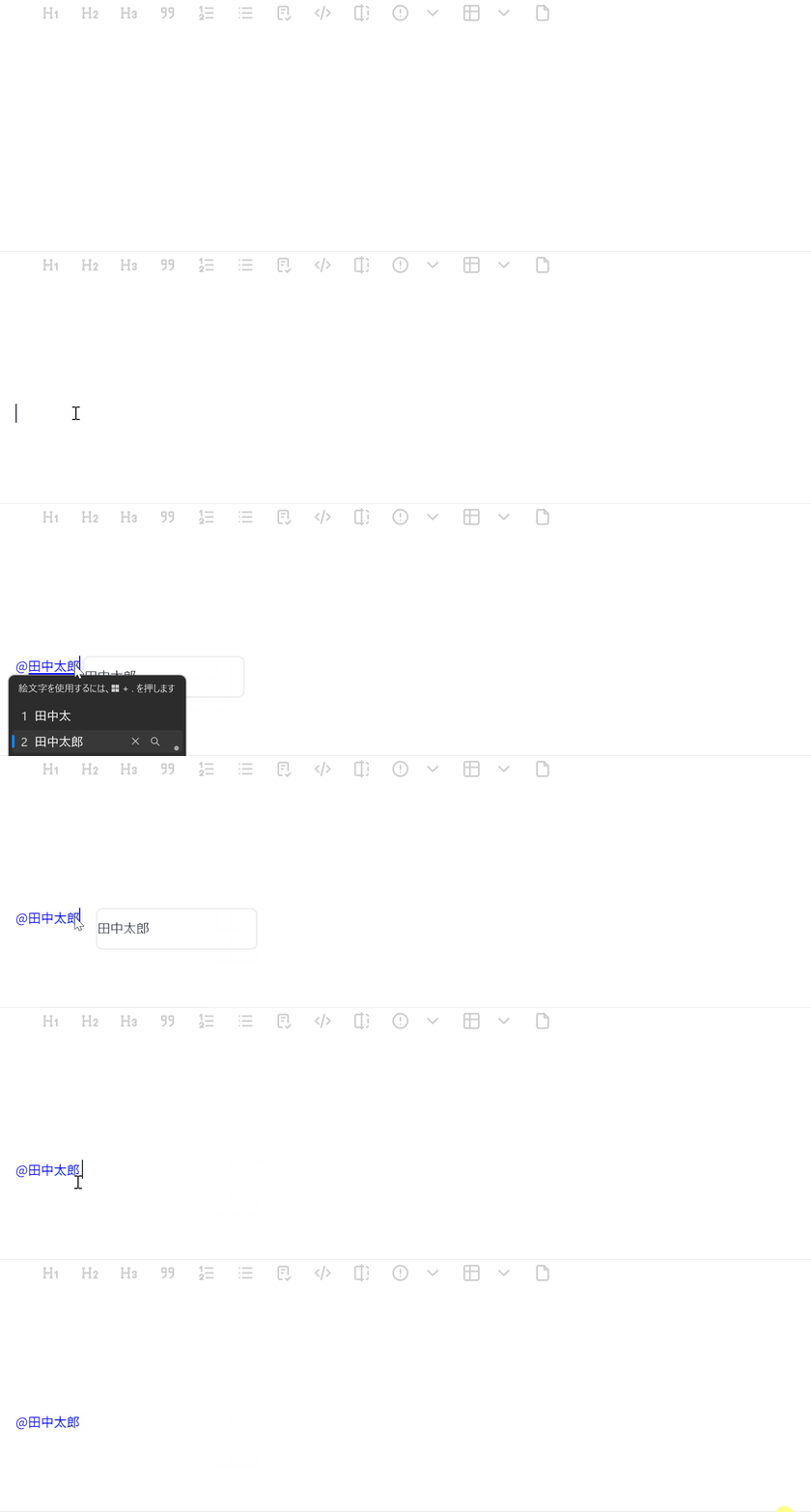
The Plugin Part in Lexical
Overall Code
import { useLexicalComposerContext } from "@lexical/react/LexicalComposerContext";
import {
  $createTextNode,
  $getSelection,
  $insertNodes,
  $isRangeSelection,
  $isTextNode,
  TextNode,
  KEY_ESCAPE_COMMAND,
  COMMAND_PRIORITY_HIGH,
} from "lexical";
import { $isLinkNode } from "@lexical/link";
import { mergeRegister } from "@lexical/utils";
import { useEffect, useState } from "react";
import { getSelectedNode } from "../../utils/getSelectedNode";
import {
  $createDisableMentionNode,
  $createMentionNode,
  $isDisableMentionNode,
  $isMentionNode,
} from "./node";
import SelectsFloating from "./SelectsFloating";
import HoverInfo from "./HoverInfo";
export default function MentionPlugin({
  anchorElm,
}: {
  anchorElm?: HTMLElement | null;
}) {
  const [editor] = useLexicalComposerContext();
  const [mentionText, setMentionText] = useState("");
  const [mentionElm, setMentionElm] = useState<HTMLElement | null>(null);
  useEffect(() => {
    /** Register multiple events at once */
    return (
      mergeRegister(
        /** Fire when the editor is updated */
        editor.registerUpdateListener(() => {
          editor.update(() => {
            /** Get the Selection object containing information about the currently selected text and Node */
            const selection = $getSelection();
            /** Do nothing if the selection object does not exist (meaning no operations like typing are happening in the editor) */
            if (!$isRangeSelection(selection)) {
              return null;
            }
            /** Get the Node being operated on */
            const node = getSelectedNode(selection);
            /** MentionNode inherits from ElementNode, so the text part is a TextNode.
             * Therefore, to get the MentionNode part, we retrieve the parent Node of the target Node.
             */
            const parent = node.getParent();
            /** Get the text content within the Node */
            const text = node.getTextContent();
            /** Get the character to the left of the caret */
            const nearestText = text.substring(
              selection.anchor.offset - 1,
              selection.anchor.offset
            );
            /** Get the text on the same line that is two or more positions to the left of the caret */
            const prevText = text.substring(0, selection.anchor.offset - 1);
            /** Get the text on the same line to the right of the caret */
            const afterText = text.substring(selection.anchor.offset + 1);
            if ($isMentionNode(parent)) {
              /** If two spaces are entered at the end within a MentionNode, a new TextNode is created behind it and the focus moves there */
              const escapePattern = /\\s\\s$/gi;
              if (escapePattern.test(node.getTextContent())) {
                parent.insertAfter($createTextNode(" "));
                const replaceNode = $createTextNode(
                  node.getTextContent().trim()
                );
                node.replace(replaceNode);
                parent.selectNext();
                return;
              }
              /** Retrieve the HTML element of the target MentionNode,
               * and set the text (excluding @) and the HTML element into the State.
               * */
              const mentionElmByKey = editor.getElementByKey(parent.getKey());
              const searchText = node.getTextContent().substring(1);
              setMentionElm(() => mentionElmByKey);
              setMentionText(() => searchText);
              return;
            }
            /** Do nothing if it's an element where the mention feature was canceled by pressing ESC */
            if ($isDisableMentionNode(parent)) {
              return;
            }
            /** Enable mention functionality when @ is typed in plain text */
            if (
              nearestText === "@" &&
              $isTextNode(node) &&
              !$isLinkNode(parent)
            ) {
              /** Convert the parts before and after @ into normal text respectively */
              /** Note that special text like LinkNode is not targeted, so it should not be affected */
              const prevTextNode =
                prevText.length > 0 ? $createTextNode(prevText) : null;
              const afterTextNode =
                afterText.length > 0 ? $createTextNode(afterText) : null;
              /** Treat the @ part as a MentionNode */
              const mentionNode = $createMentionNode().append(
                $createTextNode("@")
              );
              const insertNodes = [
                prevTextNode,
                mentionNode,
                afterTextNode,
              ].filter((n): n is TextNode => n !== null);
              /** Remove the existing Node and insert the group of Nodes constructed above */
              node.remove();
              $insertNodes(insertNodes);
              /** Move the caret after the @ */
              mentionNode.select(1);
              return;
            }
            setMentionElm(() => null);
          });
        })
      ),
      /** Execute the event when the ESC key is pressed */
      editor.registerCommand(
        KEY_ESCAPE_COMMAND,
        () => {
          const selection = $getSelection();
          if (!$isRangeSelection(selection)) {
            return false;
          }
          const node = getSelectedNode(selection);
          const parent = node.getParent();
          if ($isMentionNode(parent)) {
            /** If the ESC key is pressed in a MentionNode, replace it with a Node that has mentions disabled */
            const disableMentionNode = $createDisableMentionNode().append(
              $createTextNode(parent.getTextContent())
            );
            parent.insertAfter(disableMentionNode);
            parent.remove();
            disableMentionNode.selectEnd();
            setMentionElm(() => null);
            return true;
          }
          return false;
        },
        COMMAND_PRIORITY_HIGH
      )
    );
  }, [editor]);
  return (
    <>
      {!!anchorElm && !!mentionElm && (
        <SelectsFloating
          anchorElm={anchorElm}
          searchText={mentionText}
          mentionElm={mentionElm}
        ></SelectsFloating>
      )}
      {!!anchorElm && <HoverInfo anchorElm={anchorElm}></HoverInfo>}
    </>
  );
}
Essentially, it controls the display when showing mentions and the behavior when canceling mention functionality.
Part for Registering Mention Functionality
We use editor.registerUpdateListener to set up the events for when mentions are displayed. In the following part, we set up the conversion to a Mention Node and the configuration of the text it holds.
/** Get the Selection object containing information about the currently selected text and Node */
const selection = $getSelection();
/** Do nothing if the selection object does not exist (meaning no operations like typing are happening in the editor) */
if (!$isRangeSelection(selection)) {
  return null;
}
/** Get the Node being operated on */
const node = getSelectedNode(selection);
/** MentionNode inherits from ElementNode, so the text part is a TextNode.
 * Therefore, to get the MentionNode part, we retrieve the parent Node of the target Node.
 */
const parent = node.getParent();
/** Get the text content within the Node */
const text = node.getTextContent();
/** Get the character to the left of the caret */
const nearestText = text.substring(
  selection.anchor.offset - 1,
  selection.anchor.offset
);
/** Get the text on the same line that is two or more positions to the left of the caret */
const prevText = text.substring(0, selection.anchor.offset - 1);
/** Get the text on the same line to the right of the caret */
const afterText = text.substring(selection.anchor.offset + 1);
Since we want @ to be the string that triggers the mention functionality, we capture @ and the strings before and after it in advance. Then, processing is performed according to the following branches.
/** If already on text that has mention functionality
 * In this case, we enable searching within the mention and
 * implement a feature to allow entering text after the mention functionality, such as by pressing space twice.
 */
if ($isMentionNode(parent)) {
  /** If two spaces are entered at the end within a MentionNode, a new TextNode is created behind it and the focus moves there */
  const escapePattern = /\s\s$/gi;
  if (escapePattern.test(node.getTextContent())) {
    return;
  }
  return;
}
/** Do nothing if it's an element where the mention feature was canceled by pressing ESC */
if ($isDisableMentionNode(parent)) {
  return;
}
/** Enable mention functionality when @ is entered in plain text */
if (nearestText === "@" && $isTextNode(node) && !$isLinkNode(parent)) {
  return;
}
The branches are as follows:
- If it already has mention functionality: Escape from the mention or retrieve the text for searching.
- If the mention functionality has been canceled: Do nothing.
- If
@is entered in normal text: Convert it to mention functionality.
While the internal logic for each is written quite explicitly, the above are the goals to be achieved.
Resolving the Mention Feature
We will register an event for the behavior when the ESC key is pressed.
/** Execute the event when the ESC key is pressed */
editor.registerCommand(
  KEY_ESCAPE_COMMAND,
  () => {
    const selection = $getSelection();
    if (!$isRangeSelection(selection)) {
      return false;
    }
    const node = getSelectedNode(selection);
    const parent = node.getParent();
    if ($isMentionNode(parent)) {
      /** If the ESC key is pressed in a MentionNode, replace it with a Node that has mentions disabled */
      const disableMentionNode = $createDisableMentionNode().append(
        $createTextNode(parent.getTextContent())
      );
      parent.insertAfter(disableMentionNode);
      parent.remove();
      disableMentionNode.selectEnd();
      setMentionElm(() => null);
      return true;
    }
    return false;
  },
  COMMAND_PRIORITY_HIGH
);
In Lexical, you can pre-register processing for specific operations using editor.registerCommand.
Typically, you use a function called createCommand to register key operations, but for KEY_ESCAPE_COMMAND, the operation is already registered by Lexical, so we use it as is.
Next, if the Selection object at the time of execution (which holds information like the Node where the caret is located) contains a Mention Node, we replace it with a DisableMentionNode to prevent the mention feature from appearing.
This allows it to be treated like a plain string.
MentionNode and DisableMentionNode
Overall Code
import {
  $applyNodeReplacement,
  type DOMConversionMap,
  type DOMConversionOutput,
  type EditorConfig,
  type LexicalNode,
  type NodeKey,
  type Spread,
  ElementNode,
  SerializedElementNode,
} from "lexical";
export type SerializedMentionNode = Spread<
  { desidedText?: string },
  SerializedElementNode
>;
function $convertMentionElement(
  domNode: HTMLElement
): DOMConversionOutput | null {
  const textContent = domNode.textContent;
  if (textContent !== null) {
    const node = $createMentionNode();
    return {
      node,
    };
  }
  return null;
}
function $convertDisableMentionElement(
  domNode: HTMLElement
): DOMConversionOutput {
  const node = $createDisableMentionNode();
  return {
    node,
  };
}
export class MentionNode extends ElementNode {
  __desidedText?: string;
  static getType(): string {
    return "mention";
  }
  static clone(node: MentionNode): MentionNode {
    return new MentionNode(node.__desidedText, node.__key);
  }
  constructor(desidedText?: string, key?: NodeKey) {
    super(key);
    this.__desidedText = desidedText ?? undefined;
  }
  createDOM(config: EditorConfig): HTMLSpanElement {
    const element = document.createElement("span");
    element.setAttribute("data-lexical-mention", "true");
    element.style.color = "blue";
    return element;
  }
  updateDOM() {
    return false;
  }
  static importDOM(): DOMConversionMap | null {
    return {
      span: (node: Node) => ({
        conversion: $convertMentionElement,
        priority: 0,
      }),
    };
  }
  static importJSON(serializedNode: SerializedMentionNode): MentionNode {
    const node = $createMentionNode(serializedNode.desidedText);
    return node;
  }
  exportJSON(): SerializedMentionNode {
    return {
      ...super.exportJSON(),
      desidedText: this.getDesidedText(),
      type: "mention",
      version: 1,
    };
  }
  isInline(): boolean {
    return true;
  }
  setDesidedText(arg: string | undefined) {
    const writable = this.getWritable();
    writable.__desidedText = arg;
  }
  getDesidedText() {
    return this.__desidedText;
  }
}
export function $createMentionNode(desidedText?: string): MentionNode {
  const mentionNode = new MentionNode(desidedText);
  return $applyNodeReplacement(mentionNode);
}
export function $isMentionNode(
  node: LexicalNode | null | undefined
): node is MentionNode {
  return node instanceof MentionNode;
}
export type SerializedDisableMentionNode = SerializedElementNode;
export class DisableMentionNode extends ElementNode {
  static getType(): string {
    return "disable-mention";
  }
  static clone(node: MentionNode): DisableMentionNode {
    return new DisableMentionNode(node.__key);
  }
  updateDOM() {
    return false;
  }
  static importDOM(): DOMConversionMap | null {
    return {
      span: (node: Node) => ({
        conversion: $convertDisableMentionElement,
        priority: 0,
      }),
    };
  }
  static importJSON(
    serializedNode: SerializedDisableMentionNode
  ): DisableMentionNode {
    const node = $createDisableMentionNode();
    return node;
  }
  constructor(key?: NodeKey) {
    super(key);
  }
  createDOM(config: EditorConfig): HTMLSpanElement {
    const element = document.createElement("span");
    element.setAttribute("data-lexical-disable-mention", "true");
    return element;
  }
  exportJSON(): SerializedDisableMentionNode {
    return {
      ...super.exportJSON(),
      type: "disable-mention",
      version: 1,
    };
  }
  isInline(): true {
    return true;
  }
}
export function $createDisableMentionNode(): DisableMentionNode {
  const disableMentionNode = new DisableMentionNode();
  return $applyNodeReplacement(disableMentionNode);
}
export function $isDisableMentionNode(
  node: LexicalNode | null | undefined
): node is DisableMentionNode {
  return node instanceof DisableMentionNode;
}
We define a Node that has mention functionality and a Node where mention functionality does not appear, respectively.
I won't go deep into the internals, but we basically define the following:
- Definition of a Key that can uniquely identify the Node type
- Definition of the HTML element to be displayed on the screen
- Lexical uses "Editor State" as its data format, so we define JSON to allow Node information to be passed in a way that aligns with it
- Definition of utility functions to create Nodes
- Definition of utility functions for type guards
We have created MentionNode and DisableMentionNode with the settings above. While what we're doing is not complex, I am still studying the meaning of each return value. I will continue learning and share as I understand.
Elements that appear when hovering over a mention element
Overall code
import { useLexicalComposerContext } from "@lexical/react/LexicalComposerContext";
import { $getNearestNodeFromDOMNode } from "lexical";
import { CSSProperties, useEffect, useRef, useState } from "react";
import { createPortal } from "react-dom";
import { $isMentionNode } from "./node";
let isLoading = false;
/**
 * Element that appears when hovering over a MentionNode
 */
export default function HoverInfo({ anchorElm }: { anchorElm: HTMLElement }) {
  const hoverInfoRef = useRef<HTMLDivElement | null>(null);
  const [editor] = useLexicalComposerContext();
  /** Holds the styles of the hover element */
  const [menuStyles, setMenuStyles] = useState<CSSProperties | null>();
  useEffect(() => {
    /** Triggers when the editor content is updated or operated on */
    return editor.registerUpdateListener(({ editorState }) => {
      /** Extract Node parts from the current Editor State (≒ information within the editor) */
      [...Array.from(editorState._nodeMap.values())].forEach((val) => {
        /** Do nothing if it is not a MentionNode */
        if (!$isMentionNode(val)) {
          return;
        }
        /** Retrieve the HTML element using the Key that uniquely identifies the Node type */
        const mentionElm = editor.getElementByKey(val.getKey());
        if (!mentionElm) {
          return;
        }
        /** Clear existing events
         * It has not been verified whether this clearing is actually effective
         */
        mentionElm.removeEventListener("click", (e) => {
          showInfo(e.target);
        });
        mentionElm.removeEventListener("mouseenter", (e) => {
          showInfo(e.target);
        });
        mentionElm.removeEventListener("mouseleave", (e) => {
          if (e.relatedTarget === hoverInfoRef.current) {
            return;
          }
          setMenuStyles(() => null);
        });
        /**
         * Register various event handlers for the HTML element representing a MentionNode
         */
        mentionElm.addEventListener("click", (e) => {
          showInfo(e.target);
        });
        mentionElm.addEventListener("mouseenter", (e) => {
          showInfo(e.target);
        });
        mentionElm.addEventListener("mouseleave", (e) => {
          if (e.relatedTarget === hoverInfoRef.current) {
            return;
          }
          setMenuStyles(() => null);
        });
      });
    });
  }, [editor]);
  const getMentionHoberElmStyles = (
    nowMentionElm: HTMLElement
  ): CSSProperties | null => {
    if (!anchorElm || !nowMentionElm) {
      return null;
    }
    /**
     * Subtract the bottom of the target MentionNode from the bottom of the editor itself
     * And it is set to display above the MentionNode by the height of the MentionNode to avoid overlapping
     */
    const bottom =
      anchorElm.getBoundingClientRect().bottom -
      nowMentionElm.getBoundingClientRect().bottom +
      nowMentionElm.getBoundingClientRect().height;
    const left =
      nowMentionElm.getBoundingClientRect().left -
      anchorElm.getBoundingClientRect().left;
    return {
      bottom: `${bottom}px`,
      left: `${left}px`,
      position: "absolute",
      zIndex: 1,
      borderRadius: "8px",
      backgroundColor: "#fff",
      border: "2px solid #efefef",
      maxWidth: "200px",
      height: "fit-content",
      maxHeight: "200px",
      padding: "0.75rem 0",
      overflowY: "auto",
    };
  };
  const showInfo = (eventElm: EventTarget | null) => {
    // Retrieve the element of the clicked link
    const mentionDom = eventElm as HTMLElement;
    if (mentionDom === null) {
      return;
    }
    editor.update(() => {
      /**
       * Retrieve the Lexical Node to which the DOM obtained via the event belongs.
       * If the DOM itself was generated from something registered as a Lexical Node, it returns that Node.
       * Otherwise, it searches through parent nodes and returns the Lexical Node.
       * Library source code below:
       * https://github.com/facebook/lexical/blob/28b3f901445d730748361e008033d876991379d3/packages/lexical/src/LexicalUtils.ts#L440
       */
      const mentionNode = $getNearestNodeFromDOMNode(mentionDom);
      if (!$isMentionNode(mentionNode)) {
        return setMenuStyles(() => null);
      }
      setMenuStyles(() => getMentionHoberElmStyles(mentionDom));
    });
  };
  return (
    <>
      {createPortal(
        <>
          {menuStyles ? (
            <div
              ref={hoverInfoRef}
              style={menuStyles}
              onMouseLeave={(e) => {
                setMenuStyles(() => null);
              }}
            >
              {isLoading ? (
                <div
                  className="flex justify-center h-full"
                  aria-label="Loading"
                >
                  <div className="animate-spin h-10 w-10 border-4 border-blue-500 rounded-full border-t-transparent"></div>
                </div>
              ) : (
                <div>Hover element</div>
              )}
            </div>
          ) : null}
        </>,
        anchorElm
      )}
    </>
  );
}
This is a component that displays information held by the mention element when hovered over.
Specifically, this is the behavior at the following time:
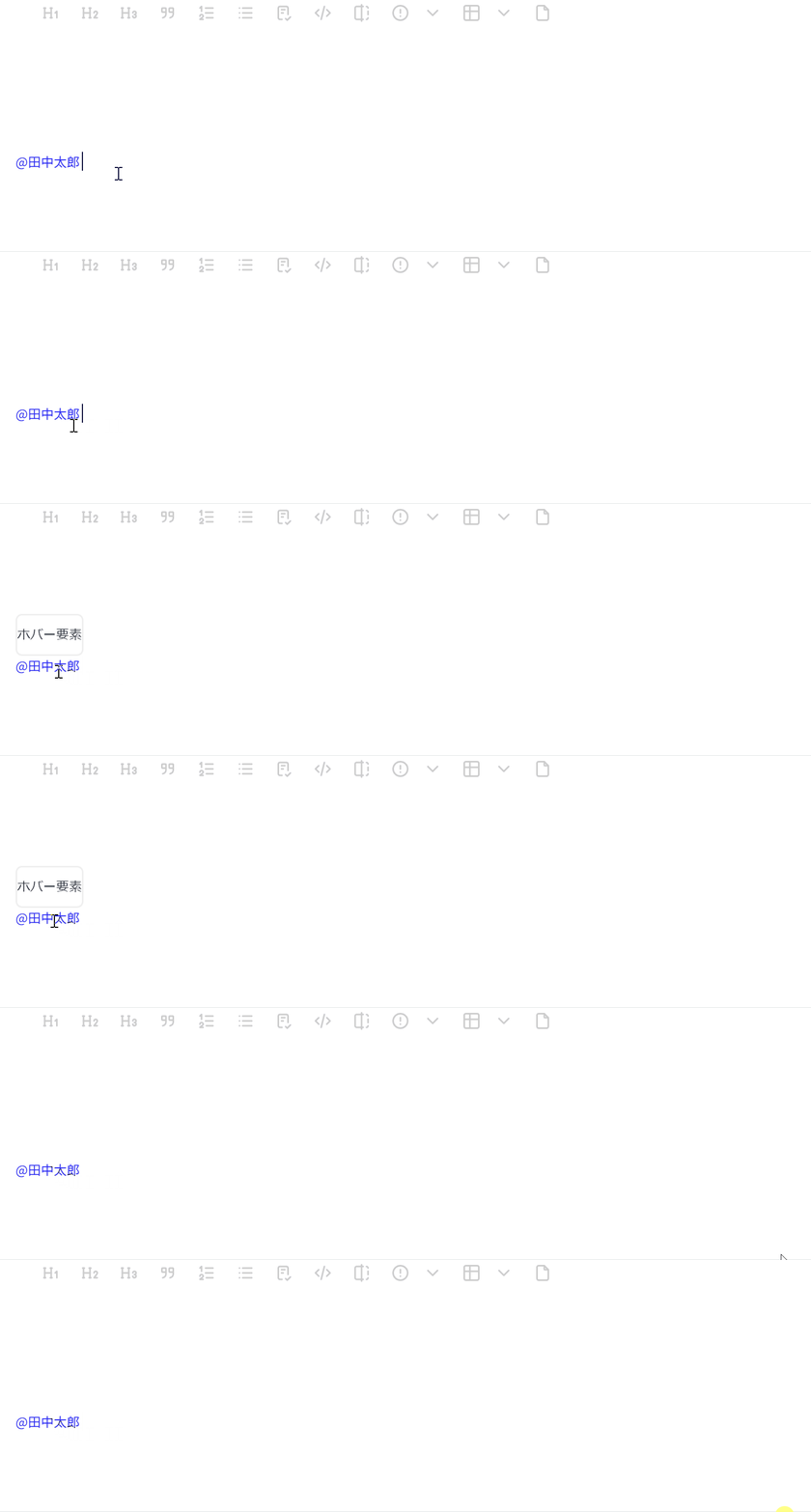
Actually, I should retrieve information from the MentionNode and configure various settings based on that information, but for now, I'm displaying static elements.
I think you can get an idea by looking at the code, so I'll mention only the parts I worked hard on.
Specifically, it's the following part:
[...Array.from(editorState._nodeMap.values())].forEach((val) => {
  /** Do nothing if it is not a MentionNode */
  if (!$isMentionNode(val)) {
    return;
  }
  /** Retrieve the HTML element using the Key that uniquely identifies the Node type */
  const mentionElm = editor.getElementByKey(val.getKey());
  if (!mentionElm) {
    return;
  }
  /** Omitted */
  /**
   * Register various event handlers for the HTML element representing a MentionNode
   */
  mentionElm.addEventListener("click", (e) => {
    showInfo(e.target);
  });
  mentionElm.addEventListener("mouseenter", (e) => {
    showInfo(e.target);
  });
  mentionElm.addEventListener("mouseleave", (e) => {
    if (e.relatedTarget === hoverInfoRef.current) {
      return;
    }
    setMenuStyles(() => null);
  });
});
Lexical maintains the editor content as data called EditorState, and I'm registering event handlers for each mention element within it.
When event handlers are set on the entire editor in Lexical, they react to all registered events within the editor.
Therefore, it's not easy to register handlers for individual elements.
Furthermore, since custom nodes are limited to static definitions, it's difficult to set up event handlers dynamically.
So, I extract MentionNodes from the latest EditorState, convert those Nodes into HTML elements, and register event handlers.
This ensures that the hover element is displayed only when a mention element is hovered over.
While it feels a bit like a brute-force approach, being able to introduce a mechanism for registering event handlers only for specific elements is a major takeaway for me.
Displaying Search Elements for Mention Elements
Overall Code
import { getUsers } from "@/app/actions";
import { useLexicalComposerContext } from "@lexical/react/LexicalComposerContext";
import { $createTextNode, $getSelection, $isRangeSelection } from "lexical";
import { CSSProperties, useEffect, useRef, useState } from "react";
import { createPortal } from "react-dom";
import { getSelectedNode } from "../../utils/getSelectedNode";
import { $isMentionNode } from "./node";
/**
 * Element to display string search results
 */
export default function SelectsFloating({
  anchorElm,
  mentionElm,
  searchText,
}: {
  anchorElm: HTMLElement;
  mentionElm: HTMLElement;
  searchText: string;
}) {
  /** Ref for setting the search result element */
  const mentionMenuRef = useRef<HTMLUListElement | null>(null);
  const [selectTexts, setSelectTexts] = useState<string[]>([]);
  const [editor] = useLexicalComposerContext();
  const [isLoading, setIsLoading] = useState(false);
  /** Function to define the styles of the search result element */
  const getMentionMenuStyles = (): CSSProperties | null => {
    if (!anchorElm) {
      return null;
    }
    /** Subtract the height of the editor from the browser from the height of the mention element from the browser.
     * This allows the search result element to appear near the target mention element.
     */
    const top =
      mentionElm.getBoundingClientRect().top -
      anchorElm.getBoundingClientRect().top;
    /**
     * Similar to height, shifting it by the width of the mention element allows it to be displayed without overlapping the mention element.
     */
    const left =
      mentionElm.getBoundingClientRect().left +
      mentionElm.getBoundingClientRect().width +
      20 -
      anchorElm.getBoundingClientRect().left;
    return {
      top: `${top}px`,
      left: `${left}px`,
      position: "absolute",
      zIndex: 1,
      borderRadius: "8px",
      backgroundColor: "#fff",
      border: "2px solid #efefef",
      width: "200px",
      height: "fit-content",
      maxHeight: "200px",
      padding: "0.75rem 0",
      overflowY: "auto",
    };
  };
  const [menuStyles, setMenuStyles] = useState<CSSProperties | null>(null);
  useEffect(() => {
    setIsLoading(() => true);
    /** Execute search function */
    getUsers(searchText)
      .then((res) => {
        /** Add return value to state to display in search result element */
        setSelectTexts(() => res);
        setMenuStyles(() => getMentionMenuStyles());
      })
      .finally(() => {
        setIsLoading(() => false);
      });
  }, [searchText]);
  /** Behavior when clicking a search result */
  const handleClick = (text: string) => {
    /** Rewrite state inside the editor
     * Utility functions available for Lexical operations are prefixed with $.
     * And these utility functions can only be used within the callback functions of editor.update or editor.read.
     */
    editor.update(() => {
      /** Get the Selection object containing information about the currently selected text and Node */
      const selection = $getSelection();
      /** Do nothing if the selection object does not exist (meaning no operations like typing are happening in the editor) */
      if (!$isRangeSelection(selection)) {
        return null;
      }
      /** Get the Node being operated on */
      const node = getSelectedNode(selection);
      /** MentionNode inherits from ElementNode, so the text part is a TextNode.
       * Therefore, to get the MentionNode part, we retrieve the parent Node of the target Node.
       */
      const parent = node.getParent();
      /** Only replace internal text if clicked within a mention element */
      if ($isMentionNode(parent)) {
        node.replace($createTextNode(`@${text}`));
        parent.setDesidedText(`@${text}`);
        parent.insertAfter($createTextNode(" "));
        parent.selectNext();
        setMenuStyles(() => null);
      }
      /** Since it's registered, clear the search result element */
      if (mentionMenuRef?.current) {
        mentionMenuRef.current = null;
      }
    });
  };
  return (
    <>
      {!!menuStyles
        ? createPortal(
            <div style={menuStyles}>
              {isLoading ? (
                <div
                  className="flex justify-center h-full"
                  aria-label="Loading"
                >
                  <div className="animate-spin h-10 w-10 border-4 border-blue-500 rounded-full border-t-transparent"></div>
                </div>
              ) : (
                <ul ref={mentionMenuRef}>
                  {selectTexts.map((text) => (
                    <li
                      key={text}
                      className="hover:bg-blue-300  cursor-pointer"
                      onClick={() => {
                        handleClick(text);
                      }}
                    >
                      {text}
                    </li>
                  ))}
                </ul>
              )}
            </div>,
            anchorElm
          )
        : null}
    </>
  );
}
This is the process to display an element that allows string searching when the mention feature is triggered.
Specifically, it refers to the following behavior.
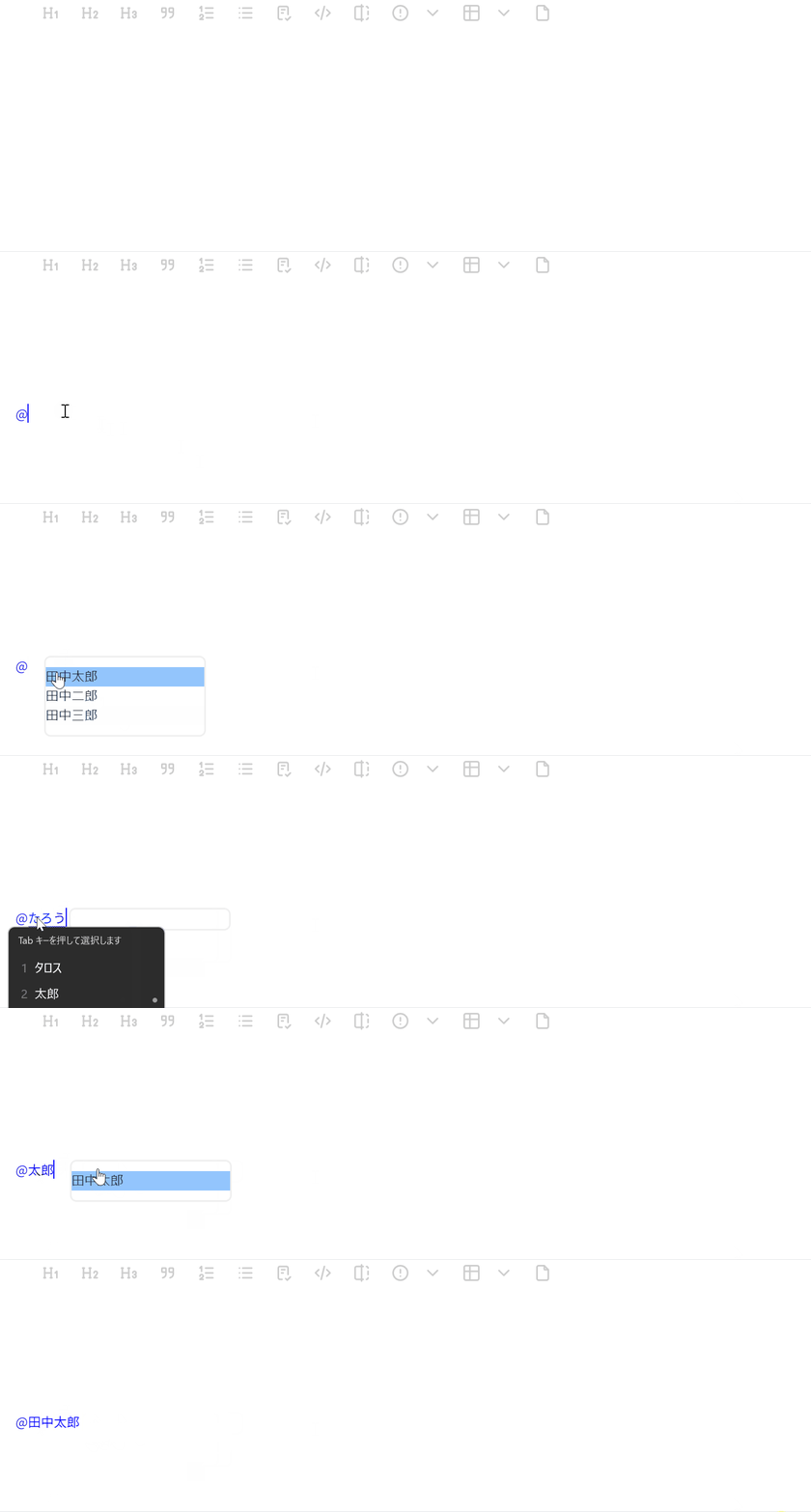
The code itself is quite similar to the hover element part.
The differences are the part that replaces the text when a search result is selected and...
if ($isMentionNode(parent)) {
  node.replace($createTextNode(`@${text}`));
  parent.setDesidedText(`@${text}`);
  parent.insertAfter($createTextNode(" "));
  parent.selectNext();
  setMenuStyles(() => null);
}
...the part that executes the search process based on the text within the mention element.
useEffect(() => {
  setIsLoading(() => true);
  /** Execute search function */
  getUsers(searchText)
    .then((res) => {
      /** Add return value to state to display in search result element */
      setSelectTexts(() => res);
      setMenuStyles(() => getMentionMenuStyles());
    })
    .finally(() => {
      setIsLoading(() => false);
    });
}, [searchText]);
Conclusion
In this post, we explored the development of Lexical, specifically focusing on the mention feature.
Looking back at it this way, there seems to be surprisingly little code involved.
However, there were many twists and turns to get to this point, so I am glad I managed to finish writing it.
Thank you for reading this far.
Discussion