iTranslated by AI
Building a LINE Image Echo Bot by Saving Images to Gyazo


Greeting
Hello. I'm Maguro, and I'm a bit surprised (and nervous) by the unexpectedly positive response to my previous article.
Last time, I made a video parrot bot.
This time, I will create a LINE image parrot bot using the image hosting service Gyazo.
Also, this article assumes you have the following knowledge:
- Experience running a LINE Bot with Google Apps Script.
- A general understanding of API requests and responses.
Background
Text parrotting is the foundation of LINE Bots.
I think it's perfect for beginners because you can learn how to extract data and make requests.
However, you don't hear much about image parrotting. Why is that?
Let's take a quick look at the official LINE reference.
The link above explains the JSON content when a LINE Bot receives an image.
It says:
contentProvider.type
String
Source of the image file.line: The image file was sent by a LINE user. You can get the binary data of the image file by calling the API with the message ID. For more information, see "Get content".
external: The image file was sent using the liff.sendMessages() method of LIFF. For more information, see "liff.sendMessages()" in the LIFF API reference.
I see. You can determine the source from here.
Since it's sent by a LINE user, it returns line.
Now, how to get the image... wait, what?
You can get the binary data of the image file by calling the API with the message ID.
It seems it's handled as binary data.
Hmm, that sounds a bit tedious.
To get the binary data, it seems I need to include the messageId in the URL for the request.
GET https://api-data.line.me/v2/bot/message/{messageId}/content
So, I just need to turn that into an image file and have the bot send it.
Maybe it's easier than I thought??
Alright, let's send it!!
type
String Required
imageoriginalContentUrl
String Required
URL of the image (Max characters: 2000)
HTTPS (TLS 1.2 or later)
JPEG or PNG
Max file size: 10MBThe URL should be percent-encoded using UTF-8. For more information, see "About encoding the URL specified in the request body property".
previewImageUrl
String Required
URL of the preview image (Max characters: 2000)
HTTPS (TLS 1.2 or later)
JPEG or PNG
Max file size: 1MBThe URL should be percent-encoded using UTF-8. For more information, see "About encoding the URL specified in the request body property".
Wha- What!!???
You're telling me I have to send an https image URL to send an image!!??
Serious Background
Sorry, I lost my cool for a second.
As mentioned above, when sending an image with a LINE Bot, you need to send it via an https image URL.
Why is this a hassle?
- You need to save the image and share it via a URL.
- However, LINE handles the image as binary data and deletes it after a certain period. (It cannot be referenced via https)
I have to add a step to save the image to some storage service via API and share it.
Platforms like Twitter or Discord normally save them on the server side, making them easy to reference, but...
So, what do we do?
I will use an image hosting service, considering the following points:
- Privacy-focused (preventing third parties from seeing the images)
- Unlimited capacity
- Free
- API available for posting
(Personally, I think) It's better to assume long-term operation for anything, so I'm considering upload limits based on capacity and operational costs.
But is there such a convenient service...

Ensures privacy,
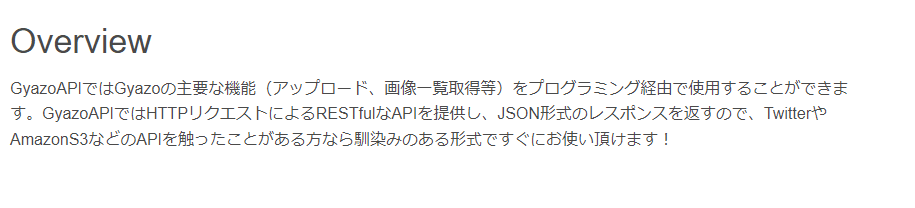
Has an API for uploading,


Ideally can send binary data directly,
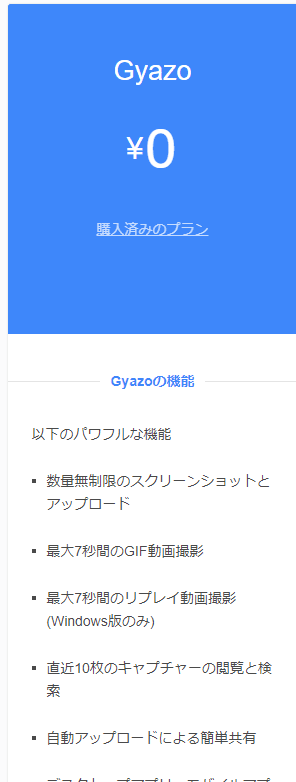
And unlimited capacity...
I found it!!!!
And you can even upload binary data directly!!!
So, I'll be using Gyazo, which meets all the above requirements.
Design
The services used are as follows:
- LINE Messaging API
- Gyazo
- Google Apps Script
We will operate the LINE Bot serverlessly using Google Apps Script (commonly known as GAS).
The workflow is as follows:
- Send an image to the LINE Bot.
- Obtain the image's binary data using the received message ID.
- Send the image to Gyazo as binary data.
- Reply with the image URL included in the response.
I was quite surprised that you can send it as binary data. This is convenient because it eliminates the need to create a physical file.
Before writing the code, let's obtain a Gyazo token.
Coding
const TOKEN = ""; // LINE token
const LINE_ENDPOINT = 'https://api.line.me/v2/bot/message/reply';

function doPost(e) {
  try{
    // Extract the received event
    const json = JSON.parse(e.postData.contents);

    // Get the event content and reply token
    const event = json.events[0];
    const reply_token= event.replyToken;

    // In the case of an image message
    if(event.message.type === 'image'){
      // Obtain image binary data
      const image = getImage('https://api-data.line.me/v2/bot/message/'+event.message.id+'/content');
      const gyazo = JSON.parse(gyazoup(image.getBlob()));

      // Reply with message
      UrlFetchApp.fetch(LINE_ENDPOINT, {
        'headers': {
          'Content-Type': 'application/json; charset=UTF-8',
          'Authorization': 'Bearer ' + TOKEN,
        },
        'method': 'post',
        'payload': JSON.stringify({
          'replyToken': reply_token,
          "messages" : [
            {
              'type': 'image',
              'originalContentUrl': gyazo.url,
              'previewImageUrl': gyazo.url
            }
          ]
        })
      })
    }
    return ContentService.createTextOutput(
        JSON.stringify(
            {'content': 'post ok'}
        )
    ).setMimeType(ContentService.MimeType.JSON);
  }catch{
    return
  }

}

// Obtain the image sent from LINE as binary data
function getImage(url) {
    return UrlFetchApp.fetch(url, {
        "method": "get",
        'headers': {
            'Content-Type': 'application/json; charset=UTF-8',
            'Authorization': 'Bearer ' + TOKEN
        }
    });
}
// Send the binary image data to Gyazo and get the URL
function gyazoup(image){
  const options  = {
    "method": "post",
    "payload": {
      "access_token": '', // Gyazo access token
      "imagedata": image
    }
  };

  return UrlFetchApp.fetch("https://upload.gyazo.com/api/upload",options);
}
The process is simple, so I'll omit the explanation of the code.
Completed!!
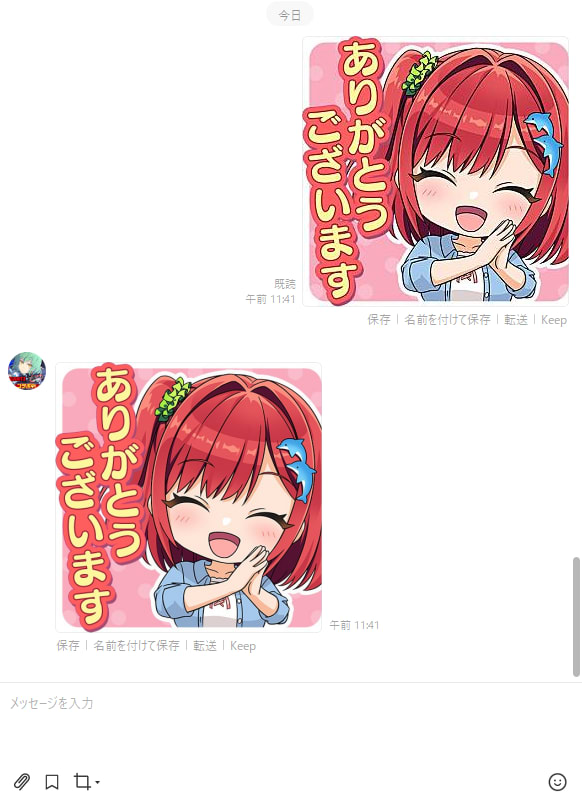
Let's try sending an image!!
If the image is parrotted back, it's a success!!
Wrap Up
What did you think??
It might seem like a promotion for Gyazo, but I think it's very helpful to be able to share images easily while maintaining privacy.
Furthermore, I'm planning to use this mechanism for sharing LINE images in an upcoming article I'm writing about integrating Discord and LINE.
I hope this helped you understand the overall flow.
Discussion