iTranslated by AI
[UE5] Implementing Logic in Blueprints while using Subsystems


Overview
This article describes (probably) the shortest way to use Unreal Engine's SubSystems while implementing detailed logic on the Blueprint side.
Environment
| Environment | Version | Remarks |
|---|---|---|
| Unreal Engine | 5.4.4 | |
| OS | Windows 11 | |
| Dev Tools | Rider 2024.1.4 | I believe the compiler is Visual Studio 2022 |
C++ Code Side
I've tried to keep the C++ side as simple as possible.
The names aren't great, so please change them to something appropriate.
The BLANK_CPP_API attached to the class name is the project name. Please change this as well.
(I think it will work even without it.)
#pragma once

#include "CoreMinimal.h"
#include "Subsystems/GameInstanceSubsystem.h"
#include "SubSystemTest.generated.h"

// Helper class for the BP side
UCLASS(Blueprintable, meta = (ShowWorldContextPin))
class BLANK_CPP_API UCallBlueprintTest : public UObject
{
	GENERATED_BODY()

public:
	// Function to be implemented on the BP side
	UFUNCTION(BlueprintImplementableEvent, BlueprintCallable)
	void PrintOnlyTest();
};

// SubSystem to add
UCLASS()
class BLANK_CPP_API USubSystemTest : public UGameInstanceSubsystem
{
	GENERATED_BODY()
public:
	UPROPERTY(BlueprintReadWrite, Transient, Category = "SubSystemTest")
	UCallBlueprintTest* SubSystemTestHelper;
};
The .cpp side doesn't need any implementation content, so the following is sufficient.
#include "SubSystemTest.h"
Blueprint Side
Since the logic side is managed in Blueprints, this part involves a bit more effort.
Implementing the Function for Use in the SubSystem
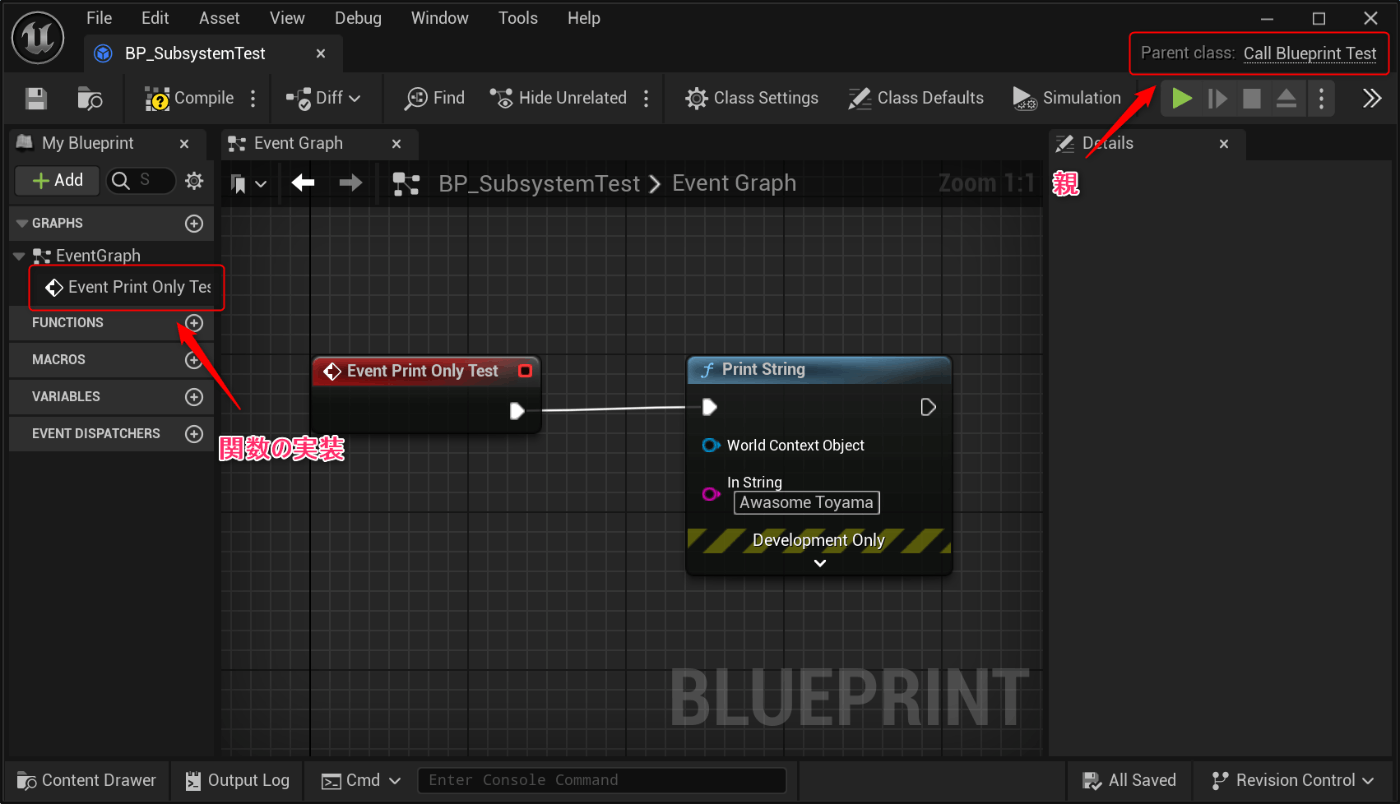
Create a Blueprint class that inherits from UCallBlueprintTest and override the PrintOnlyTest function.
The Blueprint will look like the image below:
Creating the Helper Property within the SubSystem
Create the helper class in a system-related part of the game, such as the GameMode or Level Blueprint, and pass it to the SubSystem.
In this example, I created a Blueprint called BP_CustomGameMode, instantiated the helper class within it, and passed it to the SubSystem.
The Blueprint will look like the image below:

Calling the Implemented Function in the Game
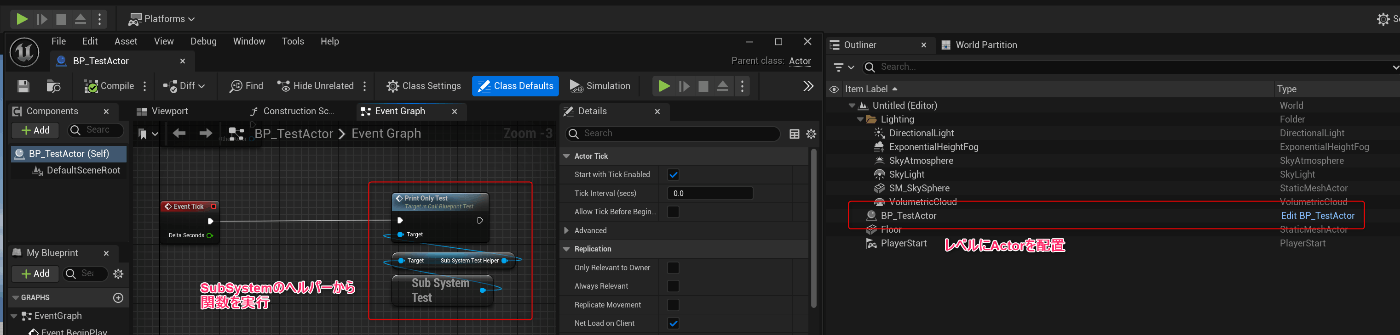
Call the PrintOnlyTest function through the created helper class.
For now, I tried calling it every tick in an Actor's Tick event.
The Blueprint will look like the image below:
Execution Result
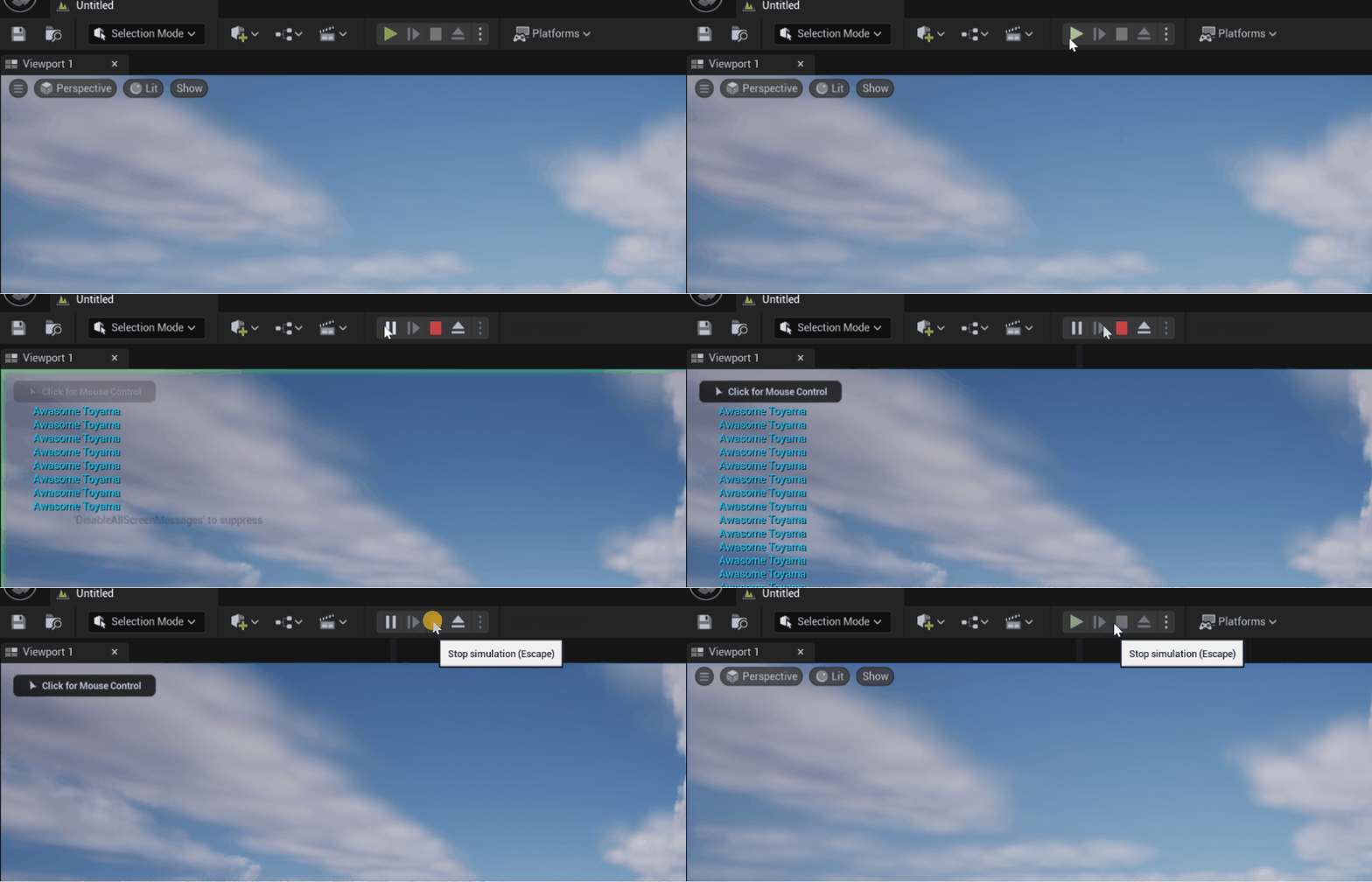
When executed, PrintString is called every tick, as shown in the image below:
Summary
This article demonstrates that it is possible to separate the system-level interface in C++ from the actual execution logic on the Blueprint side.
In this example, I used GameInstanceSubsystem on the C++ side, but you should choose the appropriate SubSystem depending on the lifecycle you want to use.
References
- Subsystems introduced since UE4.22 for beginners 【4th UE4 Anything Study Group in Tokyo 2020】 | Docswell
- 【UE5】Let's use Subsystems! - main() blog
- Touching SubSystems now (for C++ beginners) #C++ - Qiita
- [UE5] I tried introducing GameInstanceSubsystem
- Programming Subsystems in Unreal Engine | Unreal Engine 5.5 Documentation | Epic Developer Community
Discussion