iTranslated by AI
The Technologies Behind SmoothCSV: The Ultimate CSV Editor





I have released my own CSV editor, SmoothCSV (v3), as Generally Available, so I am writing about some of the technical details and ingenuity behind it.
Also, it will be launching on Product Hunt for 24 hours starting from 16:00 on July 1st, so I would appreciate your support.
About Me
I work as an engineer at Henry Inc. while doing individual development.
About SmoothCSV
SmoothCSV is a CSV editor for macOS and Windows. (Linux support is coming soon)
I developed the original SmoothCSV 15 years ago and started developing v3 last year.

Intuitive use with an Excel-like feel

Equipped with basic to advanced tools necessary for handling CSVs

Supports various formats and character encodings. Can handle CSVs with varying numbers of columns

Fast! Handles even large files smoothly
Background of the development can be found here:
Technical Elements
Main Tech Stack
- Desktop App
- Framework: Tauri
- Backend: Rust
- Frontend: TypeScript + React + Vite + pnpm
- Styling: Tailwind CSS
- State Management: MobX
- Testing: Node.js built-in test runner
- Formatter, Linter: Biome
- Website (kohii/smoothcsv-website)
- Static Site Generator: Astro
- Hosting: Cloudflare
- Distribution, Communication (kohii/smoothcsv3)
- GitHub Issues, Releases
Technical Architecture
Since it is a desktop app, the technical structure is very simple. There is no external communication other than checking for and downloading updates.
1. Techniques for Building Complex Desktop Apps
SmoothCSV aims to be an application that is feature-rich yet simple and highly extensible.
Tauri is Great
Tauri is a desktop app framework that serves as an alternative to Electron. (Since Tauri v2, it also supports mobile apps.)
While Electron uses Node.js for the backend and Chromium for the frontend, Tauri uses Rust for the backend and the OS-provided Web renderer for the frontend. As a result, it features smaller distribution sizes and lower memory usage.
Tauri has a wealth of various APIs and plugins, allowing you to quickly achieve what you want to do.
Separation of Concerns through Package Extraction
It is managed as a monorepo using pnpm workspaces + Turborepo.
(root)
├─ apps
│  └─ desktop             # SmoothCSV core desktop app (depends on packages/*)
└─ packages
   ├─ csv                 # CSV parsing and stringification
   ├─ grid-editor         # React component library for the grid editor
   ├─ result              # TypeScript implementation of the Result type
   ├─ utils               # General-purpose utilities
   ├─ js-sql              # SQL parser and evaluation engine made with TypeScript
   ├─ framework           # General-purpose desktop app foundation. Command system, keybindings, settings, etc.
   ├─ context-expression  # VS Code-compatible conditional expression parser
   └─ l10n                # VS Code-compatible localization API
Inside packages, independent concerns that do not depend on the specific context of SmoothCSV are extracted as libraries. This makes individual concerns easier to handle while reducing the complexity of the desktop core.
Even within desktop, I try to organize the code for each independent concern as much as possible (similar to "package by feature").
Command-Centric Mechanism
In SmoothCSV, operations that users can perform on the application are defined as commands. This was also the case in the previous version of SmoothCSV, but this time I created it as an API resembling VS Code.
A command consists of a handler function and metadata (ID, title, available conditions, etc.).
Conceptual image of a command to close a tab:
aCommand = {
  command: "view.closeEditor",
  title: "Close Editor",
  category: "View",
  handler: async () => {
    // Logic when the command is called
  }
}
Commands are mapped to and triggered by UI elements such as keyboard shortcuts, context menus, and buttons. You can also search for and execute any command from the "Command Palette".
Example of assigning a shortcut key to the close tab command:
{
  "keybindings": [{
    "command": "view.closeEditor",
    "key": "ctrl+w",
    "mac": "cmd+w"
  }]
}
Example of executing from the command palette:
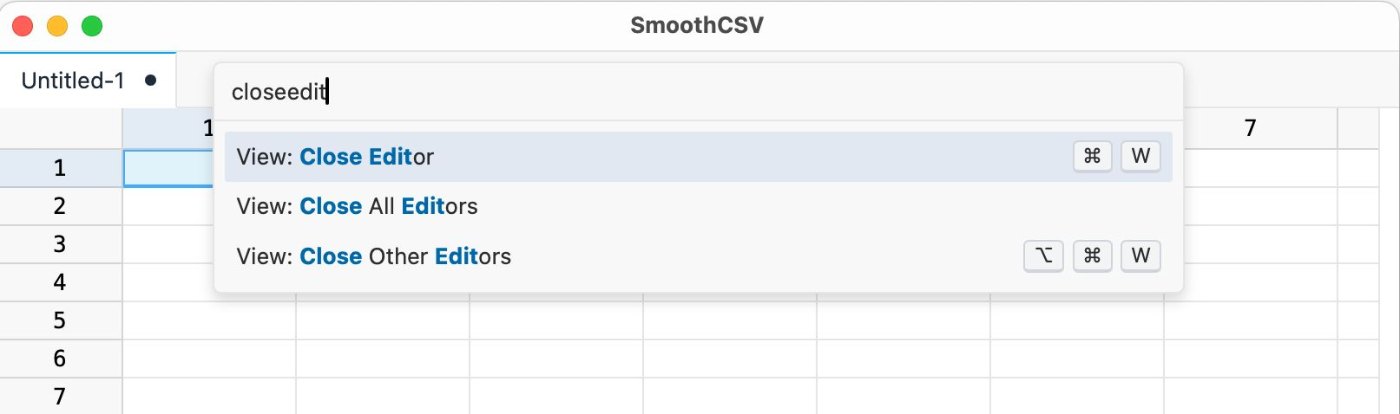
For an application with a certain degree of complexity, providing extension points centered on commands makes it easier to add features.
Mechanism for Declaring Enablement Conditions for Commands and Menus
This is also a mechanism modeled after VS Code's when clause contexts.
Every command, menu, and keybinding has situations where it cannot be used. For example, a command to start editing a cell requires the Grid editor to have focus and to be in the state before cell editing begins. In SmoothCSV, we have prepared a notation to express such conditions declaratively.
{
  "command": "cellEditor.startEditingCell", // Command to start editing a cell
  "enablement": "gridEditorCellFocus && inReadyMode", // The command is available when the Grid editor is focused and not in cell-editing mode
  ...
}
While the implementation of the parsing logic is somewhat difficult, having such a mechanism allows requirements to be defined as configuration, making future extensions and customizations easier.
Preparing Extension APIs from the Early Stages
As mentioned in the discussion about commands, I prioritized creating extension APIs rather than immediately jumping into building individual features.
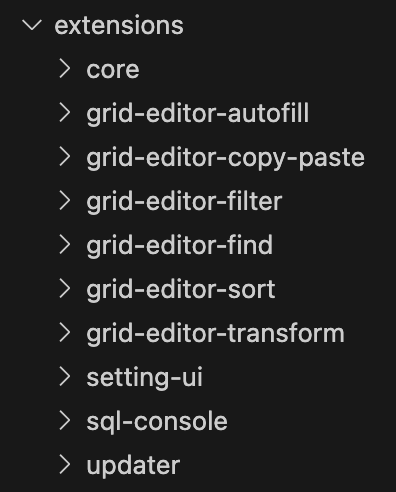
While one reason is to allow users to create extensions in the future, the main goal is to make it easier to build standard features. Having a stable API makes development much smoother, and in fact, several features are built as system extensions.
Things built as extensions within SmoothCSV:
Benefits
-
Separation of Concerns
- Concerns are confined to each extension's directory.
- It's organized and easy to read.
-
Easier for AI to Generate
- Even if the design or code structure is a bit messy, it doesn't matter much as long as it's contained within the extension.
- If you don't like it anymore, you can just discard the whole extension and rebuild it.
-
Lazy Loading
- Delaying the loading of code until the extension's features are actually used → Improves performance.
However, the effectiveness of this approach might be limited to specific situations. This is because it's often difficult to see what kind of APIs are needed in the early stages, leading to a high risk of wasting time. (Since SmoothCSV was a rewrite, it was relatively easy to have a clear vision.)
Adopting MobX for State Management
For state management in the frontend, I settled on MobX after trying various approaches, including a simple custom store, then Zustand, and then another custom solution.
In the early stages of development, I insisted on handling state as plain objects. However, doing so increased the number of steps required to implement logic for each use case and made it difficult to manage computed values.
These problems were successfully resolved by using MobX. With MobX, state is managed using class-based objects, which can be reactively reflected in React components.
// MobX object that holds state
class FindWidget { // Model that governs the widget for search and replace
  @observable mode: "find" | "replace" | "hidden"; // By adding @observable, property changes become observable
  @observable.ref findParams: FindParams; // @observable.ref observes only reference changes. (FindParams is a readonly object, so it's replaced entirely when updated)
  @observable.ref replaceParams: ReplaceParams;

  @computed // Derived property (value is cached)
  get isVisible() { return this.mode !== "hidden" }

  @action.bound // Use @action to change the state
  hide() { this.mode = "hidden" }
}

// Usage from a React component (By wrapping with observer, it's rendered reactively to state changes)
const FindWidgetComponent = observer(() => {
  const model: FindWidget = ...
  if (!model.isVisible) return null;
  return <FindWidgetForm findParams={model.findParams} onHide={model.hide} />; // Calling a pure component
});
On the other hand, I try to keep the scope of dependency on MobX to a minimum.
-
Container/Presentational Pattern
- Basically, components are created as pure and controllable functional components (Presenters).
- Only top-level components (Containers) depend on MobX, mapping MobX objects to the props of Presenter components.
-
Keep important and complex logic as independent pure functions as much as possible
- Creating them as methods of a MobX object creates unnecessary dependencies on properties (most functions do not need the entire object).
Components and functions without unnecessary dependencies have high stability and become assets. In SmoothCSV, I am committed to accumulating these assets.
Automatic Updates
SmoothCSV has a mechanism that automatically detects when a new version is released, notifies the user, and allows them to download and install it directly.
This mechanism is extremely important for rapidly adding features and fixing bugs.
Tauri has an updater plugin, which makes it easy to implement these processes. In SmoothCSV, I upload a JSON file containing update information along with the distribution artifacts and signatures to GitHub Releases. The application then checks for new versions upon startup.
2. Techniques for Building a Grid Editor
SmoothCSV implements an Excel-like grid editor. The core React component is developed as a private library independent of SmoothCSV.
Cell Rendering
Cells are rendered by arranging div tags, but CSV files can involve massive amounts of data, sometimes millions of rows. Since rendering all cells at once is unrealistic, SmoothCSV uses virtual scrolling. However, standard virtual scrolling has its limits, so the scrolling mechanism itself was built from scratch.
Details can be found here:
Cell Editing
In Excel or Google Sheets, typing characters immediately triggers cell editing mode.
This behavior is common in many grid editors, but few work correctly with Japanese input.
Common Implementation
- Monitor
keydownto start cell editing. - Set the typed character as the initial value of the cell editor and display it.
In this case, typing "あ" (a) in Japanese input results in "a" being entered incorrectly.
SmoothCSV Implementation
- Place an invisible
textareaand keep it in a focused state. - When characters are entered, display this
textareaas-is as the cell editor.
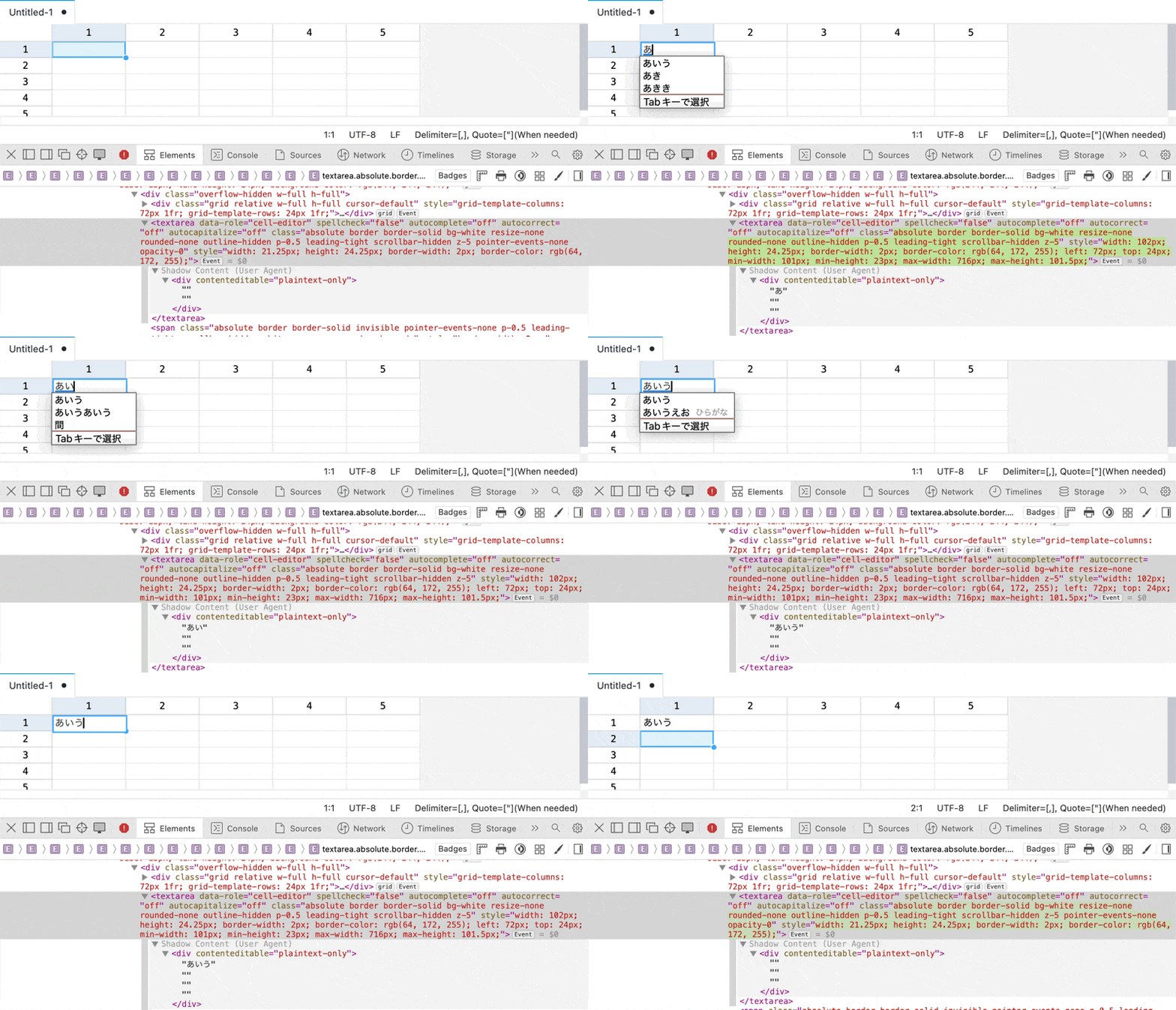
The <textarea> exists and has focus even before cell editing starts
Dynamic Resizing of the Cell Editor Based on Content
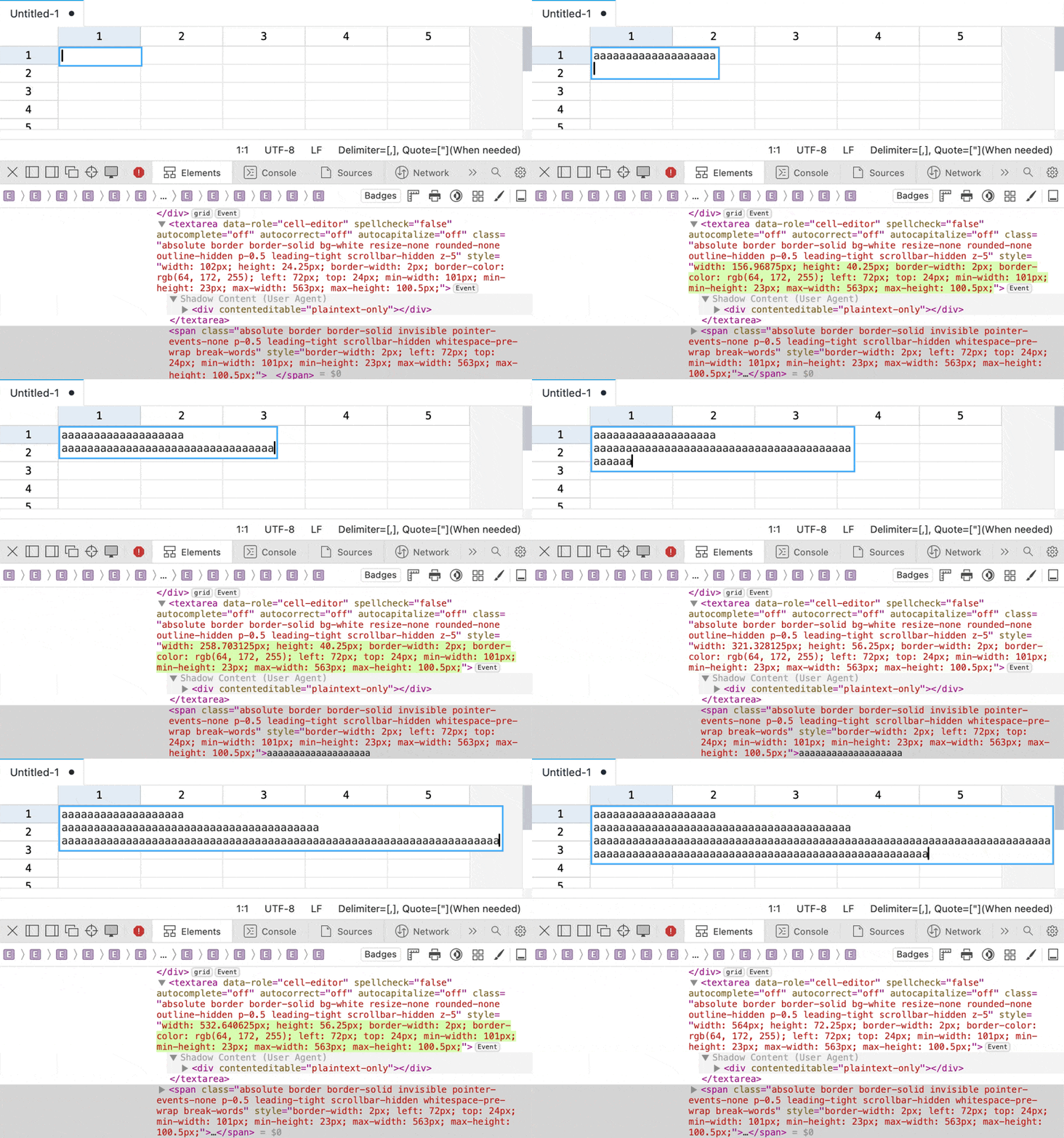
As text is entered into the cell editor, its width and height change according to the content.
The mechanism involves placing an invisible span with the exact same style as the textarea, and copying the input from the textarea into it. The width and height of the span are then measured and applied to the textarea's style.
3. Techniques for Building SQL Integration Features
SmoothCSV has two features that utilize SQL.
Filters
This is a feature that displays only the rows that match the specified criteria and hides the others. While Excel and Google Sheets also have filter functions, SmoothCSV allows criteria to be specified using SQL WHERE clauses to enable more flexible filtering.
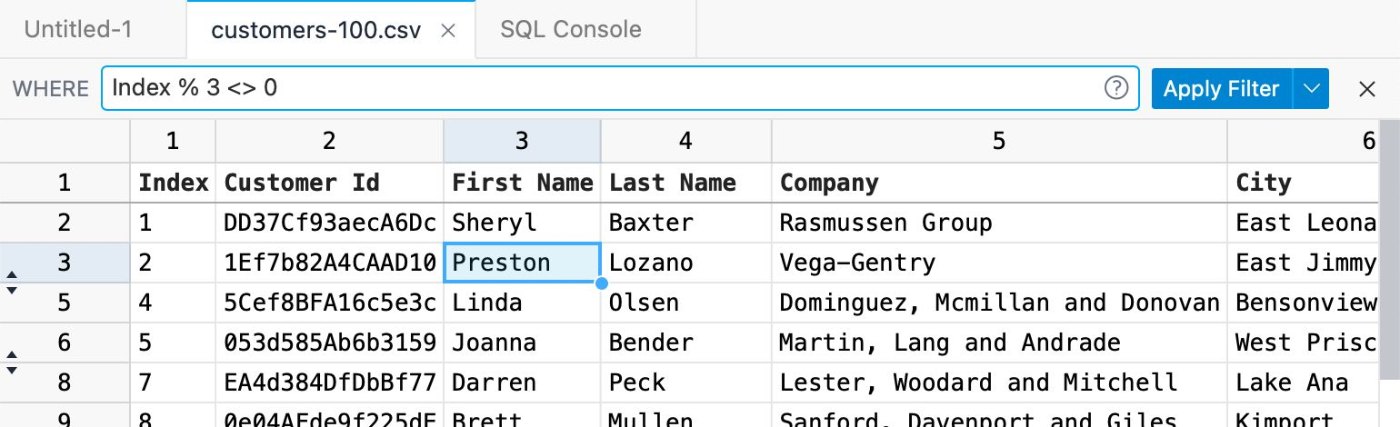
The primary goal is to be able to express filter conditions as strings, and for that reason, I borrowed the widely familiar SQL notation.
- Since filter conditions are strings, they are easy to save and reuse via copy and paste.
- Easy for AI to generate.
- Can be handled as structured data if parsed.
There is also a feature to edit conditions via a GUI, making it easy for non-technical users to use.
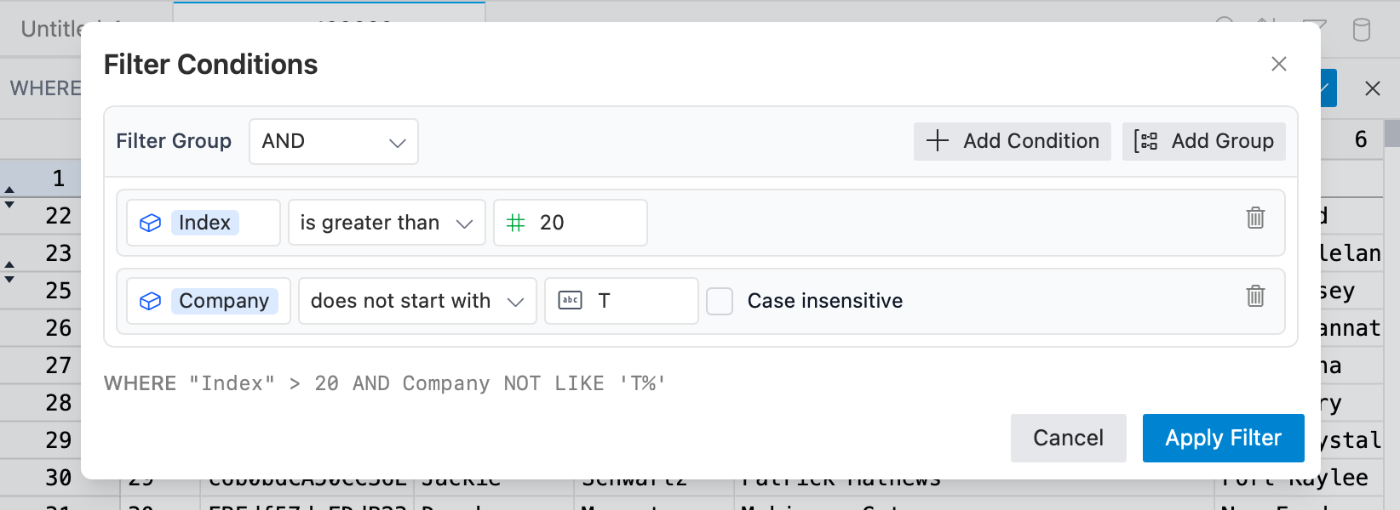
Internally, conversions like SQL ↔ AST ↔ GUI model are performed.
SQL Console
The SQL Console is a feature for issuing SQL SELECT statements against files open in SmoothCSV or local CSV files. Using notation like "@file:/Path/To/File.csv", you can treat CSV files as tables.

How it Works
It uses an embedded version of SQLite. When you enter and execute a SQL statement, it extracts the table notation from the SQL, creates a corresponding temporary table, loads the data, and then executes the actual SQL.
CREATE TEMPORARY TABLE "@file:/Path/To/File.csv" ( -- In SQLite, any table name can be used if enclosed in ""
  /* columns */
)
Conclusion
Thank you very much for reading to the end 🙇♂️
Since there was a lot I wanted to write, the explanations ended up being quite brief. If you have any questions like "How does this part work?", please feel free to ask and I will be happy to answer.
If you have any questions, requests, or feedback, please let me know through the comments or GitHub Issues.
Bonus
I would appreciate it if you could support the development.
Discussion
パッケージ切り出しによる関心の分離や、コマンドを中心とした仕組みってどうやって学びましたか?
IDE の設計に影響受けてると思います。(15年ほど前ですがプラグインシステムには感動した覚えがあります。)
あとは大規模なコードを自分で作って自分で運用するなかで、いろいろ工夫して行き着いた感じだと思います。
コピペが出来るようになりましたか?
こちらのリリースで修正済みです。
良かった!ありがとうございます。使わせていただきますね。
こんにちは。使わせていただいております。(ver:3.3.0)
1点改善が出来れば...
1セルごとのドラッグ&ペーストは出来るのですが、
複数セルのドラッグ&ペーストが出来ません(例A2A3A4A5ドラッグor切り取り→A1A2A3A4へペースト)
csvファイルのセルが1つずれてしまう場合があり、複数セルのドラッグ&ペーストが出来ると便利です。
よろしくお願いいたします。
度々すみません。
縦列の複数セルのコピー&ペーストが出来ません(例A1A2A3A4A5コピーor切り取り→B1B2B3B4B5へペースト)
アップデートしていただけるとありがたく、よろしくお願いいたします。
コメント大変ありがたいのですが、こちらは技術的な知見の共有を目的としたプラットフォームなので、SmoothCSVに対する不具合報告は https://github.com/kohii/smoothcsv3/issues でお願いします。
また、どのようにすれば再現するのかを記載して頂けると助かります。(スクショなどで構いません)