openapi-typescript で型安全なAPIクライアントを作成する



以前に OpenAPI の紹介をしました。
今回はその続編として、OpenAPI スキーマ定義を活用し、TypeScript で型安全に API 通信を実現する方法を紹介します。
最終的な成果物を先に見たい方は、末尾の動画をご覧ください。
TypeScriptにおける型安全とは
TypeScriptにおける型安全とは、型の不一致をコンパイル時に検出し、ランタイムエラーの発生を未然に防ぐプログラミングスタイルです。
例えば、次のように文字列型の変数に数値を代入しようとすると、コンパイルエラーが発生します。
let name: string = "Taro";
name = 123;  // ❌ コンパイルエラー: number型はstring型に代入できない
このように型の不一致をプログラムの実行前に検出することで、意図しないデータが混入することを防ぎ、安全に記述することができます。
API通信では型安全性を担保しづらい
HTTP による API 通信を行うには、次のようにデータ送受信の取り決めを守る必要があります。
- リクエストパラメータの型がサーバ側の期待通りであること
- 必須パラメータが設定されていること
- HTTPメソッドが期待通りであること
- レスポンスの型がクライアント側の期待通りであること
これらのうち一つでも間違っていると、APIが正しく動作しなかったり、予期しないエラーが発生したりします。
上記内容を型安全に記述する方法の一つが『API 仕様を定義し、それを元にして型定義を生成・使用すること』です。
この記事では OpenAPI によるスキーマ定義を用意し、openapi-typescript で生成した型定義を使ってAPI 通信を実装していきます。
openapi-typescript とは
openapi-typescript は Node.js を使って OpenAPI 3.0 および 3.1 スキーマを TypeScript の型定義に変換してくれるものです。
OpenAPI 仕様を TypeScript 型定義に変換する類似ツールはいくつかありますが、次の点が特徴として挙げられます。
- Node.js のみで実行可能で、Java など他の依存が不要。
- npm trends においてトップである。
- openapi-fetch という fetch クライアントを提供している。これを組み合わせることで型安全な fetch クライアントを作成することが可能。
openapi-typescript を使った型定義の生成
まずは openapi-typescript と typescript をインストールします。
npm i -D openapi-typescript typescript
tsconfig.json を公式ドキュメントに記載の設定にします。
{
  "compilerOptions": {
    "module": "ESNext", // or "NodeNext"
    "moduleResolution": "Bundler", // or "NodeNext",
    "noUncheckedIndexedAccess": true
  }
}
OpenAPI スキーマ定義を YAML ファイルで作成します。
POSTメソッドに /pet、GETメソッドに/pet/{petId}を用意しています。
openapi: 3.0.0
info:
  title: Sample Petstore
  description: This is a sample Pet Store Server based on the OpenAPI 3.0 specification.
  version: 1.0.0
tags:
  - name: pet
    description: Everything about your Pets
paths:
  /pet:
    post:
      tags:
        - addPet
      description: Add a new pet to the store.
      operationId: addPet
      requestBody:
        description: Create a new pet in the store
        required: true
        content:
          application/json:
            schema:
              $ref: '#/components/schemas/Pet'
      responses:
        200:
          description: Successful operation
          content:
            application/json:
              schema:
                $ref: '#/components/schemas/Pet'
              example:
                id: 1
                name: "American Shorthair"
                photoUrls: [ ]
                isAvailable: true

        400:
          $ref: "#/components/responses/BadRequest"
        500:
          $ref: "#/components/responses/InternalServerError"

  /pet/{petId}:
    get:
      tags:
        - getPet
      description: Returns a single pet.
      operationId: getPetById
      parameters:
        - name: petId
          in: path
          description: ID of pet to return
          required: true
          schema:
            type: integer
            format: int64
      responses:
        200:
          description: Successful operation
          content:
            application/json:
              schema:
                $ref: '#/components/schemas/Pet'
              example:
                id: 2
                name: "Sphynx"
                photoUrls: [ ]
                isAvailable: false
        400:
          $ref: "#/components/responses/BadRequest"
        500:
          $ref: "#/components/responses/InternalServerError"

components:
  schemas:
    Pet:
      required:
        - name
        - photoUrls
      type: object
      properties:
        id:
          type: integer
          format: int64
          description: ペットのID
        name:
          description: ペットの名前
          type: string
        photoUrls:
          description: 写真のURLリスト
          type: array
          items:
            type: string
        isAvailable:
          description: 利用可能かどうか
          type: boolean
    ErrorResponse:
      required:
        - error
      type: object
      properties:
        error:
          type: string
          description: エラーメッセージ
      example:
        error: "This is a sample error message."

  responses:
    BadRequest:
      description: 400 Bad Request
      content:
        application/json:
          schema:
            $ref: '#/components/schemas/ErrorResponse'
    InternalServerError:
      description: Internal Server Error
      content:
        application/json:
          schema:
            $ref: '#/components/schemas/ErrorResponse'
openapi-typescript のコマンドを package.json に定義します。
{
  "scripts": {
    "openapi": "openapi-typescript ./path/to/my/schema.yaml -o ./path/to/my/schema.d.ts"
  }
}
npm run openapi を実行すると、型定義ファイル path/to/my/schema.d.ts が作成されます。
この型定義が API 仕様を表したものになっています。
型定義ファイルの中身
export interface paths {
    "/pet": {
        parameters: {
            query?: never;
            header?: never;
            path?: never;
            cookie?: never;
        };
        get?: never;
        put?: never;
        /** @description Add a new pet to the store. */
        post: operations["addPet"];
        delete?: never;
        options?: never;
        head?: never;
        patch?: never;
        trace?: never;
    };
    "/pet/{petId}": {
        parameters: {
            query?: never;
            header?: never;
            path?: never;
            cookie?: never;
        };
        /** @description Returns a single pet. */
        get: operations["getPetById"];
        put?: never;
        post?: never;
        delete?: never;
        options?: never;
        head?: never;
        patch?: never;
        trace?: never;
    };
}
export type webhooks = Record<string, never>;
export interface components {
    schemas: {
        Pet: {
            /**
             * Format: int64
             * @description ペットのID
             */
            id?: number;
            /** @description ペットの名前 */
            name: string;
            /** @description 写真のURLリスト */
            photoUrls: string[];
            /** @description 利用可能かどうか */
            isAvailable?: boolean;
        };
        /** @example {
         *       "error": "This is a sample error message."
         *     } */
        ErrorResponse: {
            /** @description エラーメッセージ */
            error: string;
        };
    };
    responses: {
        /** @description 400 Bad Request */
        BadRequest: {
            headers: {
                [name: string]: unknown;
            };
            content: {
                "application/json": components["schemas"]["ErrorResponse"];
            };
        };
        /** @description Internal Server Error */
        InternalServerError: {
            headers: {
                [name: string]: unknown;
            };
            content: {
                "application/json": components["schemas"]["ErrorResponse"];
            };
        };
    };
    parameters: never;
    requestBodies: never;
    headers: never;
    pathItems: never;
}
export type $defs = Record<string, never>;
export interface operations {
    addPet: {
        parameters: {
            query?: never;
            header?: never;
            path?: never;
            cookie?: never;
        };
        /** @description Create a new pet in the store */
        requestBody: {
            content: {
                "application/json": components["schemas"]["Pet"];
            };
        };
        responses: {
            /** @description Successful operation */
            200: {
                headers: {
                    [name: string]: unknown;
                };
                content: {
                    /** @example {
                     *       "id": 1,
                     *       "name": "American Shorthair",
                     *       "photoUrls": [],
                     *       "isAvailable": true
                     *     } */
                    "application/json": components["schemas"]["Pet"];
                };
            };
            400: components["responses"]["BadRequest"];
            500: components["responses"]["InternalServerError"];
        };
    };
    getPetById: {
        parameters: {
            query?: never;
            header?: never;
            path: {
                /** @description ID of pet to return */
                petId: number;
            };
            cookie?: never;
        };
        requestBody?: never;
        responses: {
            /** @description Successful operation */
            200: {
                headers: {
                    [name: string]: unknown;
                };
                content: {
                    /** @example {
                     *       "id": 2,
                     *       "name": "Sphynx",
                     *       "photoUrls": [],
                     *       "isAvailable": false
                     *     } */
                    "application/json": components["schemas"]["Pet"];
                };
            };
            400: components["responses"]["BadRequest"];
            500: components["responses"]["InternalServerError"];
        };
    };
}
主な型定義は次のようになっています。
-
paths:エンドポイントごとにパラメータやHTTPメソッドが定義されており、存在するHTTPメソッドにはoperations型が当てられています。 -
operations:OpenAPI のoperationIdをキーとして、エンドポイントのリクエストやレスポンスに関わる型が定義されています。 -
components:OpenAPI の Components Object に該当する型が定義されており、具体的にはPetやErrorResponseなどがあります。
openapi-fetch を使ったAPIクライアントの作成
openapi-fetch をインストールします。
npm i openapi-fetch
使い方は、まず openapi-fetch が提供する createClient() を呼び出してAPIクライアントを作成します。その際、先ほど作成された paths を渡すことで、OpenAPI スキーマに基づいた API クライアントが生成され、利用可能なエンドポイントやメソッドが型レベルで制約されます。
次に、APIクライアントの POST()やGET()を呼び出すことでリクエストを送信します。
import createClient from "openapi-fetch";
import type {paths} from "./path/to/my/schema";

// APIクライアントの作成
const client = createClient<paths>({baseUrl: "http://127.0.0.1:4010"});

async function callAddPet() {
    // POSTリクエストの送信
    const {data, error} = await client.POST("/pet", {
        body: {
            name: "sample pet",
            photoUrls: [],
        },
    })
    if (error) {
        console.log('error', error.error);
        throw error;
    }
    if (data) {
        console.log(data.name)
        return
    }
    throw new Error("Unexpected API response: both data and error are undefined");
}

async function callGetPet() {
    // GETリクエストの送信
    const {data, error} = await client.GET("/pet/{petId}", {
        params: {
            path: {
                petId: 1
            }
        },
    })
    if (error) {
        console.log('error', error.error);
        throw error;
    }
    if (data) {
        console.log(data.name)
        return
    }
    throw new Error("Unexpected API response: both data and error are undefined");
}
ポイントは送受信に使用する次の値にはschema.d.tsで定義された型が当てられており、その型に反する値を記述するとコンパイルエラーになります。
URLパス
POST() や GET() の第一引数には、OpenAPI スキーマで定義されているパスかつ、該当する HTTP メソッドが定義されているエンドポイントのみを指定できます。
今回の例では、POST メソッドが定義されているのは /pet のみなので、client.POST() に渡せるのは "/pet" のみです。
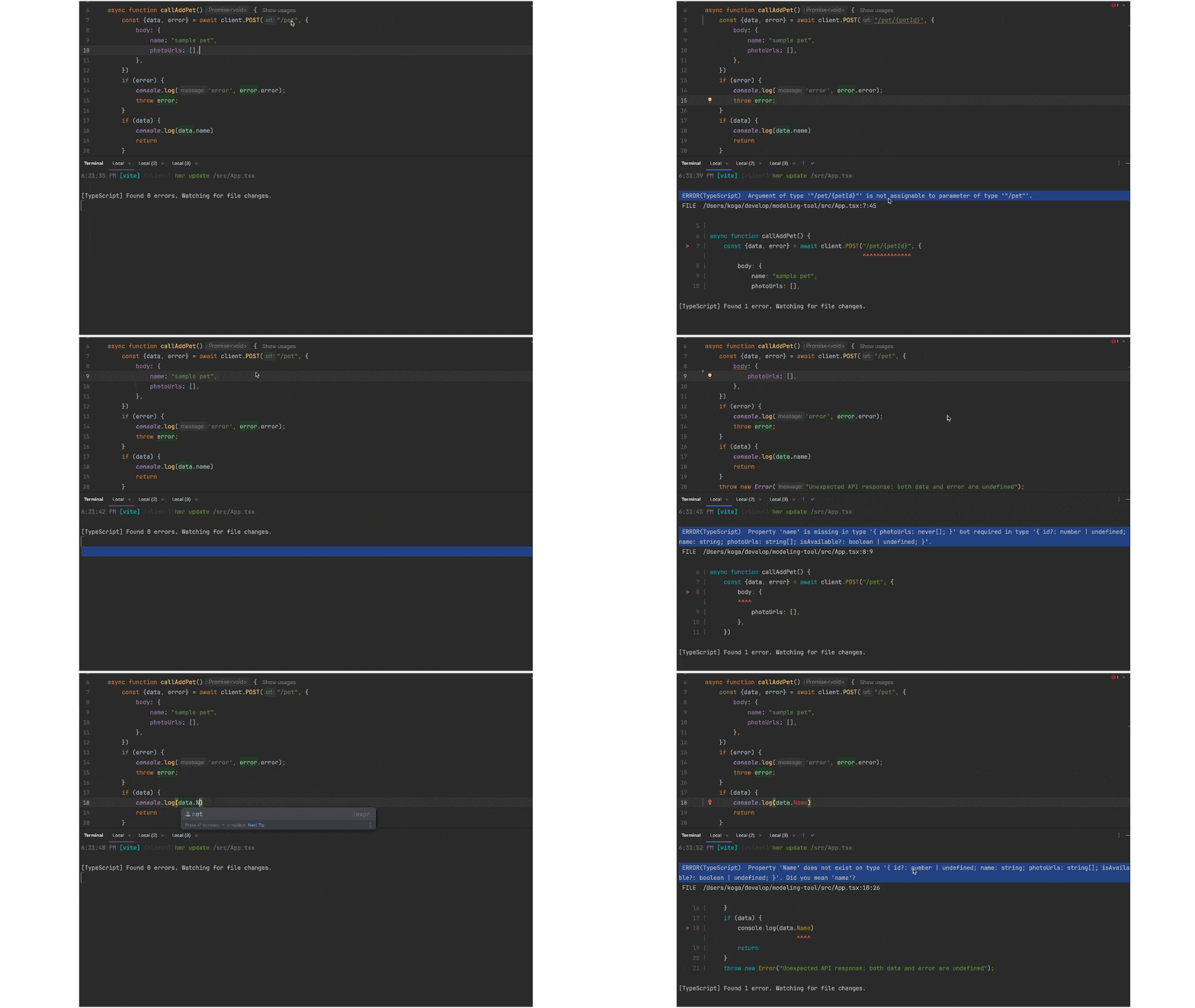
存在しない組み合わせである client.POST("/pet/123") や client.POST("/pet/{petId}") を指定すると、型エラーとしてコンパイル時に検出されます。
body
リクエストボディ。components["schemas"]["Pet"]型。
POST("/pet") で新しいペットを登録する際に使用され、name と photoUrls は必須項目です。
型定義により、これらの必須フィールドが欠けているとコンパイルエラーになります。
data
200 成功レスポンス時に入るレスポンスボディ。components["schemas"]["Pet"]型。
登録されたペットの情報(id, name など)がこの data に格納されます。
error
400 or 500 エラー時に入るレスポンスボディ。components["schemas"]["ErrorResponse"]型。
error.error にサーバから返されたエラーメッセージ文字列が格納されます。
params
リクエストパラメータ。GET("/pet/{petId}") において、パスパラメータとして { petId: number } を指定します。
定義されたパラメータ以外を指定したり、型が異なる場合はコンパイルエラーになります。
クエリパラメータなども定義すれば型付けされ、同様に型安全に扱えます。
成果物
作成したコードに対して、vite-plugin-checker を使った型チェックをホットリロード中に実行しておくと、スキーマに反するコードを記述した際に即座にエラーを検出してくれます。これにより、型の不一致を早期に発見でき、型安全性を維持したまま快適に開発を進められます。
これでAPI通信を型安全に記述することができるようになりました!
Discussion