iTranslated by AI
The content below is an AI-generated translation. This is an experimental feature, and may contain errors. View original article
📅
How to Filter by the Month Before Last in Customine



Article Overview
In Customine, you may want to specify a date condition for "the month before last" when retrieving records for aggregation. This article explains how to achieve this.
If you would like to implement the contents of this article in your own company, please feel free to contact us via the kintone Spot Development Free Consultation Form.
Basic Flow
- Retrieve the first day of last month.
- Retrieve "the day before the first day of last month" (this is the last day of the month before last).
- Retrieve "the first day of the current month" relative to "the day before the first day of last month" (this is the first day of the month before last).
- Retrieve records using a query statement.
Details of the Date Retrieval Part
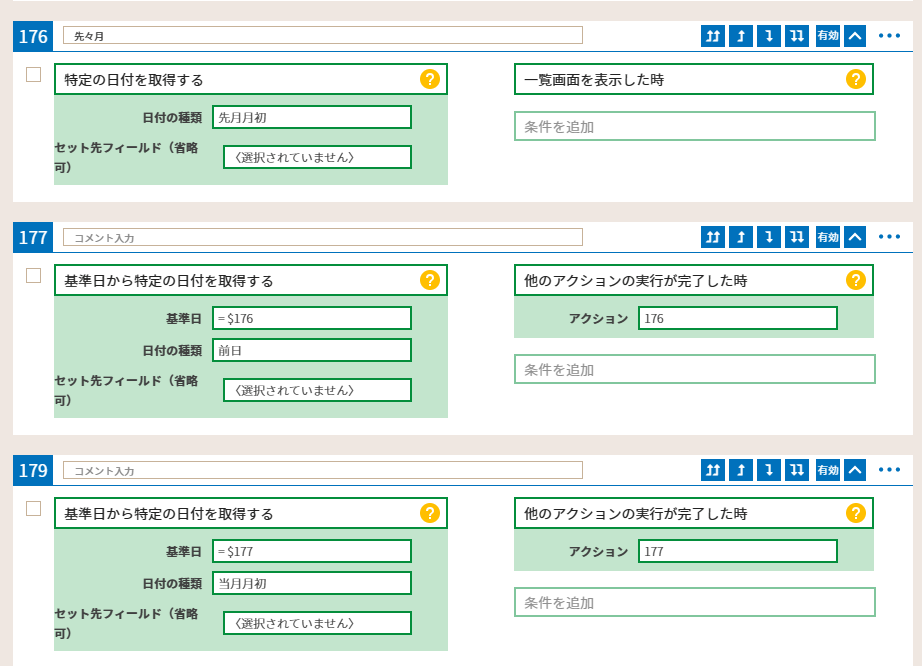
The image below illustrates the process.
Points
- Specify "First day of last month" in "Get a specific date" (No.176)
- Specify "Day before (No.176)" in "Get a specific date from a reference date" (No.177)
- Specify "First day of the current month" for (No.177) in "Get a specific date from a reference date" (No.179)
Details of the Query Statement Part
After the date retrieval is complete, use the "Get records by specifying conditions with a query" action to retrieve the records. The search conditions should look something like the image below.

I hope this information is helpful.
Contact us via the form here: kintone Spot Development Free Consultation Form
Discussion