iTranslated by AI
How to handle missing flow names in Power Automate cloud flow execution reports


Article Overview
There are times when you want to check the execution count for each cloud flow in Power Automate. However, in my environment, flow names are not displayed correctly, making it impossible to identify which flow ran how many times.
I will explain how to deal with this, but it's a very "brute force" method. If anyone knows a better way, please let me know.
If you would like to implement the content of this article in your company, please contact us via the kintone Spot Development Free Consultation Form.
How to View the Execution Count for Each Cloud Flow
Open the Power Platform admin center.
Select Analytics -> Power Automate.

When you select Environment view -> Usage, the execution counts for each flow are displayed as shown below.

Now, here is the problem mentioned in the title: at least in my environment, these flow names have not been displayed correctly for a long time. To be precise, the ones at the top appear correctly, but the ones further down don't, looking like the image below.
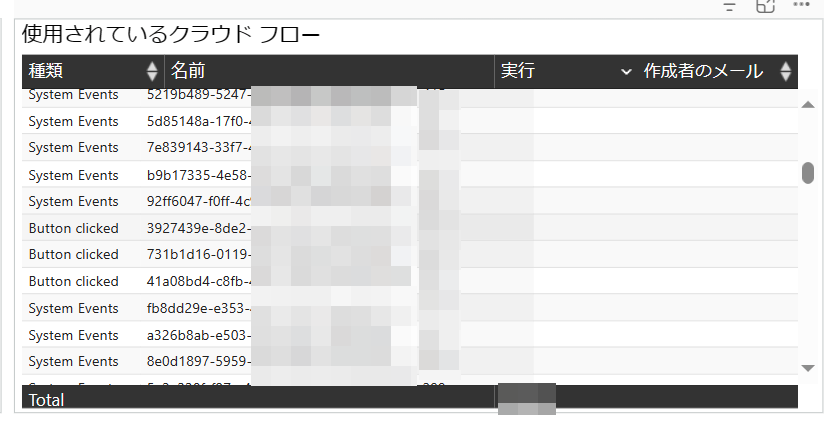
It's just a string of alphanumeric characters, so it's impossible to tell which is which. Even if I download it to Excel for analysis, it still looks like this.

So, what should we do?
The conclusion is to manually create a comparison table in Excel between these alphanumeric strings and the flow names, and then join them using VLOOKUP. It's such a brute-force method that it's a bit embarrassing.
In other words, you create an Excel sheet like this.

How to Create It
Of course, you open each flow one by one and copy-paste.
Open the flow.

Look at the URL bar. It should have a structure like the one shown below. This [very long string 2] is the string we need.

Repeat this for each flow. Once you've created the comparison table, you can continue to use it in the future, so don't forget to save it.
Final Result
Once you reference the flow names from the downloaded records, your table showing the execution counts for each Power Automate cloud flow is complete.

Closing
I'm sure there is a more proper way to do this, so I would really appreciate it if someone could let me know.
Contact us via the form here: kintone Spot Development Free Consultation Form
Discussion