iTranslated by AI
Riverpod Generator: Supported Provider Types and Syntax (v1.2.0)


Introduction
riverpod_generator is a package that allows you to code-generate Riverpod Providers.
Recently, when I used riverpod_generator in a personal project, I found myself wondering, "How do I write that usual pattern again?", so I've written this article about the types of Providers that can be generated and how to write them.
This article is recommended for those who have used Riverpod before but are just getting started with code generation.
Generatable Providers
According to this Issue, riverpod_generator supports the generation of four types of Providers 👀
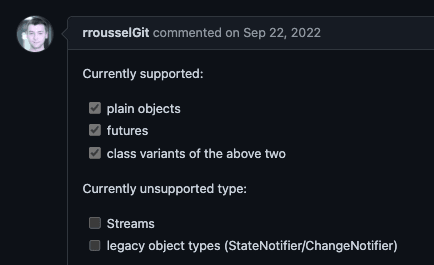
- plain objects
Provider - futures
FutureProvider - class variants of the above two
NotifierProvider and AsyncNotifierProvider
These are the four.
StreamProvider and StateNotifierProvider/ChangeNotifierProvider do not seem to be supported at this time.
Here is how to write each Provider.
Provider
Adding a Riverpod annotation to a function turns it into a Provider.
Writing it as follows will generate a Provider<String>. (To be precise, an AutoDisposeProvider<String>)
// When creating hogeProvider
@riverpod
String hoge(HogeRef ref) {
  return "hoge";
}

// Writing using arrow syntax
@riverpod
String hoge(HogeRef ref) => "hoge";
```text

### FutureProvider

Like Provider, you add the Riverpod annotation to a function, but if the return value is a `Future`, it becomes a `FutureProvider`.

Writing it as follows will generate a `FutureProvider<String>`. (To be precise, an `AutoDisposeFutureProvider<String>`)

```dart
// When creating hogeProvider
@riverpod
Future<String> hoge(HogeRef ref) async {
  return "hoge";
}

// Writing using arrow syntax
@riverpod
Future<String> hoge(HogeRef ref) async => "hoge";
```text

### NotifierProvider

In cases where you previously used `StateNotifierProvider`, you now use `NotifierProvider` or `AsyncNotifierProvider`. Use `AsyncNotifierProvider` when you want to initialize the state asynchronously, and `NotifierProvider` otherwise.

It is slightly more complex than the previous ones.

1. Create a class that inherits `_${ClassName}`
2. Add the Riverpod annotation
3. Override the `build` method

With these steps, it becomes a `NotifierProvider`.

Writing it as follows will generate a `NotifierProvider<Hoge, HogeState>`. (To be precise, an `AutoDisposeNotifierProvider<Hoge, HogeState>`)

```dart
class HogeState {
  const HogeState();
}

// When creating hogeProvider
@riverpod
class Hoge extends _$Hoge {
  @override
  HogeState build() {
    return const HogeState();
  }

  void huga() {}
}
```text

### AsyncNotifierProvider

It is basically the same as `NotifierProvider`, but when the return value of the `build` method is a `Future`, it becomes an `AsyncNotifierProvider`.

Writing it as follows will generate an `AsyncNotifierProvider<Hoge, HogeState>`. (To be precise, an `AutoDisposeAsyncNotifierProvider<Hoge, HogeState>`)

```dart
class HogeState {
  const HogeState();
}

// When creating hogeProvider
@riverpod
class Hoge extends _$Hoge {
  @override
  Future<HogeState> build() async {
    return const HogeState();
  }

  void huga() {}
}
```text

:::message
When creating an `AsyncNotifierProvider`, always perform the initialization process within the `build` method. This allows you to use `ref.invalidate` and other methods in the same way as with a `FutureProvider`.
:::

---

## Family and AutoDispose

The syntax for traditional Modifiers (.family, .autoDispose) has changed significantly in riverpod_generator.

### Family

Family, which allows passing external parameters to a Provider, offers increased flexibility in code generation.

When using functions (Provider, FutureProvider), defining function arguments makes it a Family. The arguments are highly flexible, as shown below:

```dart
@riverpod
String hoge(HogeRef ref, String fuga) {
  return "hoge";
}

@riverpod
String hoge2(Hoge2Ref ref, {String? fuga}) {
  return "hoge";
}

@riverpod
String hoge3(Hoge3Ref ref, {required String fuga}) {
  return "hoge";
}

@riverpod
String hoge4(Hoge4Ref ref, {String fuga = 'huga'}) {
  return "hoge";
}

@riverpod
String hoge5(Hoge5Ref ref, {String fuga = 'huga', String? piyo}) {
  return "hoge";
}
```text

When using classes (NotifierProvider, AsyncNotifierProvider), defining arguments for the `build` method makes it a Family.

```dart
@riverpod
class Hoge extends _$Hoge {
  @override
  HogeState build(String piyo) {
    return const HogeState();
  }

  void huga() {}
}
```text

### AutoDispose

When using code generation, Providers are generated as AutoDispose by default. This is why I specifically mentioned "AutoDispose..." in the first half of this article.

To create a Provider that is not AutoDispose, change the annotation to `@Riverpod(keepAlive: true)`.

```dart
@Riverpod(keepAlive: true)
String hoge(HogeRef ref) {
  return "hoge";
}
Summary
This was a brief overview of the types of Providers that can be generated with riverpod_generator and how to write them.
I hope this proves useful as a reference when you start using code generation.
Discussion