iTranslated by AI
[CloudFormation/S3/Lambda] Triggering Lambda on S3 File Uploads: Deployment Edition


1. Introduction
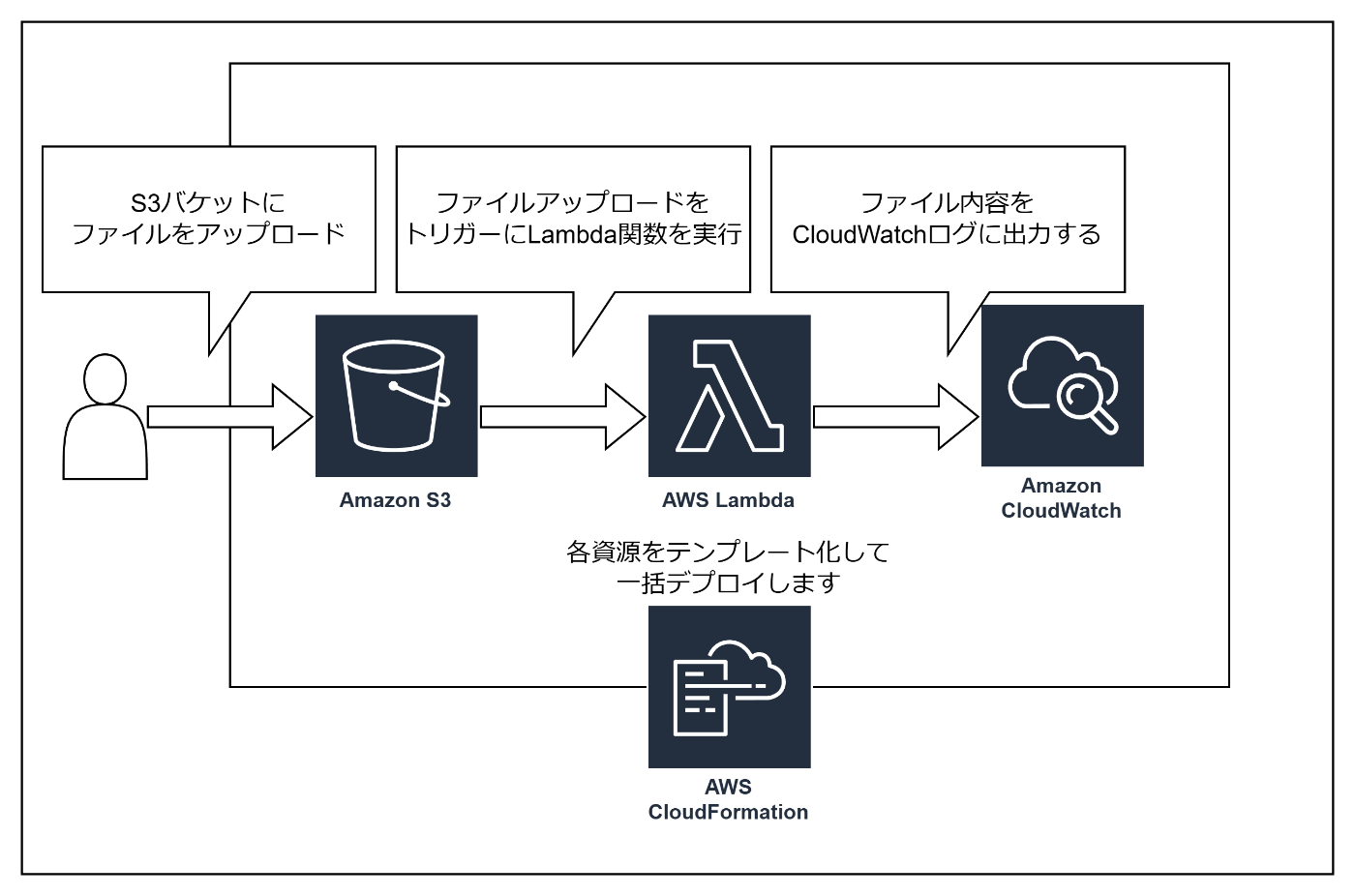
In this deployment edition, we will deploy the Lambda function created in the implementation edition to the AWS environment.
Additionally, we will template each resource and deploy them together using CloudFormation.
This article assumes the content of the implementation edition, so if you haven't seen it yet, I would appreciate it if you could take a look at the following article as well.
This article consists of two parts: the implementation edition and the deployment edition.
- Implementation Edition: Focuses on Lambda function implementation in Python.
- Deployment Edition: Focuses on how to write "template.yaml" and how to verify operations after deployment.
Since this is the deployment edition, I will explain how to write template.yaml and the operation verification methods during deployment.
Implementation for this article is available in the following repository:
2. Preparation
This article assumes the following:
- You have an AWS environment.
- The Lambda function from the implementation edition has already been implemented.
- AWS SAM environment setup is complete.
- Preparation for using AWS SAM CLI is done.
■ Directory Structure
The directory structure for this article is as follows:
Parent Directory
┣ samconfig.toml ← Created in the deployment edition
┣ template.yaml ← Created in the deployment edition
┣ common_layer
┃ ┗ requirements.txt ← Created in the implementation edition
┗ s3_lambda_functions
┗ lambda_function.py ← Created in the implementation edition
3. Creating template.yaml
This time, we will create each resource from CloudFormation based on "template.yaml".
The resources to be created are as follows:
| Resource to Create | Description |
|---|---|
| S3 Bucket | The S3 bucket that serves as the file storage destination |
| Lambda Function | A function executed with file storage in S3 as a trigger. It retrieves the content of the file stored in S3. |
The entire "template.yaml" to be created is as follows:
Entire template.yaml
AWSTemplateFormatVersion: "2010-09-09"
Transform: AWS::Serverless-2016-10-31
Description: S3 Lambda Application

# Specify the SAM template version and define the serverless application
Globals:
  Function:
    Timeout: 5              # Default timeout for Lambda function (5 seconds)
    MemorySize: 128          # Default memory size (128MB)
    Runtime: python3.11      # Use Python 3.11 as the runtime
    Architectures:
      - arm64                # Run the Lambda function on ARM64 architecture
    LoggingConfig:
      LogFormat: JSON        # Set log format to JSON
      ApplicationLogLevel: INFO # Set log level to INFO
    Environment:
      Variables:
        POWERTOOLS_SERVICE_NAME: S3Application  # Specify Powertools service name
        AWS_REGION_NAME: ap-northeast-1         # AWS region to use

# Parameters section: Custom parameters passed during deployment
Parameters:
  OverridesParam:
    Type: String            # Set parameter type to String
    Description: OverridesParam # Parameter description

# Resources section: Define AWS resources such as Lambda functions, S3 buckets, layers, etc.
Resources:
  # Define common Lambda Layer
  CommonLayer:
    Type: AWS::Serverless::LayerVersion
    Properties:
      LayerName: CommonLayer               # Define layer name
      Description: Common Layer            # Layer description
      ContentUri: common_layer/            # Location of layer source code
      CompatibleRuntimes:
        - python3.11                      # Compatible with Python 3.11 runtime
      RetentionPolicy: Delete              # Automatically delete old layer versions
    Metadata:
      BuildMethod: python3.11              # Build settings for SAM
      BuildArchitecture: arm64             # Build with ARM64 architecture

  # Define Lambda function that interacts with S3
  S3LambdaFunction:
    Type: AWS::Serverless::Function
    Properties:
      Handler: lambda_function.lambda_handler  # Lambda function entry point (handler)
      CodeUri: src/s3_lambda_functions/        # Path to function code
      Description: S3 Lambda function          # Function description
      Layers:
        - !Ref CommonLayer                    # Apply common layer to the function
      Policies:
        - Statement:                          # Set access permissions for S3 bucket
            Effect: Allow
            Action:                           # Allowed actions
              - s3:ListBucket                 # Retrieve bucket list
              - s3:GetObject                  # Allow object retrieval
            Resource:                         # Permitted resource (S3 bucket)
              - !Sub "arn:aws:s3:::lambda-bucket-${OverridesParam}"
              - !Sub "arn:aws:s3:::lambda-bucket-${OverridesParam}/*"
      Events:
        S3Event:                              # Set S3 event trigger
          Type: S3                            # S3 event type
          Properties:
            Bucket: !Ref S3LambdaBucket       # Specify the bucket that triggers the event
            Events: s3:ObjectCreated:*        # Trigger on object creation
            Filter:                           # Event filter (limit to specific prefix)
              S3Key:
                Rules:
                  - Name: prefix
                    Value: public/            # Target only objects starting with "public/" prefix
      Tags:
        Name: "s3-lambda-function"            # Add "s3-lambda-function" tag to the Lambda function
      Timeout: 300                            # Timeout (300 seconds)

  # Set permissions for S3 to trigger the Lambda function
  LambdaInvokePermissionForS3:
    Type: AWS::Lambda::Permission
    Properties:
      FunctionName: !GetAtt S3LambdaFunction.Arn  # Get the ARN of the Lambda function
      Action: "lambda:InvokeFunction"             # Grant function execution permission
      Principal: "s3.amazonaws.com"               # Limit the caller to S3
      SourceArn: !GetAtt S3LambdaBucket.Arn       # ARN of the S3 bucket that is granted execution permission

  # Define S3 bucket
  S3LambdaBucket:
    Type: AWS::S3::Bucket
    Properties:
      BucketName: !Sub "lambda-bucket-${OverridesParam}" # Specify bucket name based on parameter
─ Step 1: Defining Globals
Now, let's create the "template.yaml" for resource creation.
First, define "Globals".
"Globals" allows you to define common settings for resources defined within the template.
This enables you to apply common settings collectively even if there are multiple Lambda functions.
Globals:
  Function:
    Timeout: 5
    MemorySize: 128
    Runtime: python3.11
    Architectures:
      - arm64
    LoggingConfig:
      LogFormat: JSON
      ApplicationLogLevel: INFO
    Environment:
      Variables:
        POWERTOOLS_SERVICE_NAME: S3Application
        AWS_REGION_NAME: ap-northeast-1
| Upper Level | Item | Description | Value |
|---|---|---|---|
| Function | Common settings for Lambda functions | ||
| Timeout | Maximum execution time for the Lambda function (seconds) | Set to 5 seconds | |
| MemorySize | Memory size allocated to the Lambda function (MB) | Set to 128MB. | |
| Runtime | Runtime to use | Specify python3.11 | |
| Architectures | Architecture of the Lambda function | Specify arm64 | |
| LoggingConfig | Settings related to Lambda function logs | ||
| LogFormat | Log format output to CloudWatch | Specify JSON format | |
| ApplicationLogLevel | Log output level | Specify INFO | |
| Environment | Environment settings | ||
| POWERTOOLS_SERVICE_NAME | Lambda service name | S3Application | |
| AWS_REGION_NAME | AWS region | Specify ap-northeast-1 |
─ Step 2: Defining Parameters
Define "Parameters".
"Parameters" allow you to set custom parameters in the template.
Custom parameters can be referenced from "samconfig.toml".
Parameters:
  OverridesParam:
    Type: String
    Description: OverridesParam
| Upper Level | Item | Description | Value |
|---|---|---|---|
| Parameters | Group of parameters defined as variables | ||
| OverridesParam | Defined as a string-type parameter. Used this time for generating the S3 bucket name. Calls settings from "samconfig.toml". |
Type: String |
─ Step 3: Defining Resources
Define "Resources".
"Resources" allow you to define AWS resources (Lambda functions, S3 buckets, etc.).
CommonLayer
In "CommonLayer", we define common libraries used by the Lambda function.
In the implementation edition, we created "requirements.txt" under "common_layer". The following resource is defined so that libraries are installed from "requirements.txt" under "common_layer" when the Lambda function is deployed.
 CommonLayer:
    Type: AWS::Serverless::LayerVersion
    Properties:
      LayerName: CommonLayer
      Description: Common Layer
      ContentUri: common_layer/
      CompatibleRuntimes:
        - python3.11
      RetentionPolicy: Delete
    Metadata:
      BuildMethod: python3.11
      BuildArchitecture: arm64
| Upper Level | Item | Description | Value |
|---|---|---|---|
| Type | Use common libraries in Lambda functions as a layer | AWS::Serverless::LayerVersion | |
| Properties | |||
| LayerName | Layer name | CommonLayer | |
| ContentUri | Specify the directory containing files to be included in the layer | common_layer/ | |
| CompatibleRuntimes | Specify compatible runtimes | python3.11 | |
| RetentionPolicy | Retention policy. If set to Delete, it will be deleted when the resource is deleted. |
Delete |
S3LambdaFunction
This is the definition of the Lambda function created in the implementation edition, which is executed upon receiving a trigger from S3.
  S3LambdaFunction:
    Type: AWS::Serverless::Function
    Properties:
      Handler: lambda_function.lambda_handler
      CodeUri: src/s3_lambda_functions/
      Description: S3 Lambda function
      Layers:
        - !Ref CommonLayer
      Policies:
        - Statement:
            Effect: Allow
            Action:
              - s3:ListBucket
              - s3:GetObject
            Resource:
              - !Sub "arn:aws:s3:::lambda-bucket-${OverridesParam}"
              - !Sub "arn:aws:s3:::lambda-bucket-${OverridesParam}/*"
      Events:
        S3Event:
          Type: S3
          Properties:
            Bucket: !Ref S3LambdaBucket
            Events: s3:ObjectCreated:*
            Filter:
              S3Key:
                Rules:
                  - Name: prefix
                    Value: public/
      Tags:
        Name: "s3-lambda-function"
      Timeout: 300
| Upper Level | Item | Description | Value |
|---|---|---|---|
| Type | Defines the Lambda function | AWS::Serverless::Function | |
| Properties | |||
| Handler | Lambda function entry point | lambda_function.lambda_handler Specified as "file_path.function_name". |
|
| CodeUri | Location of the Lambda function code | Specifies "src/s3_lambda_functions/" | |
| Layers | Refers to and uses the previously defined CommonLayer | !Ref CommonLayer | |
| Policies | Lambda function policy | ||
| Statement | Grants "ListBucket" and "GetObject" permissions for S3 Can access the specified S3 bucket |
Effect: Allow Action: "ListBucket" and "GetObject" Resource: !Sub "arn:aws:s3:::lambda-bucket-${OverridesParam}" |
|
| Events | Execution conditions for the Lambda function | ||
| S3Event | Sets file storage in S3 as a trigger *File storage under the "S3 bucket/public/" directory is targeted as the trigger |
Events: s3:ObjectCreated:* Rules: - Name: prefix Value: public/ |
LambdaInvokePermissionForS3
Permission setting for S3 to call the Lambda function.
  LambdaInvokePermissionForS3:
    Type: AWS::Lambda::Permission
    Properties:
      FunctionName: !GetAtt S3LambdaFunction.Arn
      Action: "lambda:InvokeFunction"
      Principal: "s3.amazonaws.com"
      SourceArn: !GetAtt S3LambdaBucket.Arn
| Upper Level | Item | Description | Value |
|---|---|---|---|
| Type | Sets permission for S3 to call a specific Lambda function | AWS::Lambda::Permission | |
| Properties | |||
| FunctionName | Gets and specifies the ARN of S3LambdaFunction | !GetAtt S3LambdaFunction.Arn | |
| Action | Allows execution of the Lambda function | lambda:InvokeFunction | |
| Principal | Specifies s3.amazonaws.com as the caller | s3.amazonaws.com | |
| SourceArn | Specifies the ARN of S3LambdaBucket to allow events only from a specific bucket | !GetAtt S3LambdaBucket.Arn |
S3LambdaBucket
The S3 bucket used in the Lambda function.
  S3LambdaBucket:
    Type: AWS::S3::Bucket
    Properties:
      BucketName: !Sub "lambda-bucket-${OverridesParam}"
| Upper Level | Item | Description | Value |
|---|---|---|---|
| Type | Defines an S3 bucket | AWS::S3::Bucket | |
| Properties | |||
| BucketName | Bucket name Dynamically set using the ${OverridesParam} parameter |
BucketName: !Sub "lambda-bucket-${OverridesParam}" |
4. Creating samconfig.toml
Next, we will create "samconfig.toml".
"samconfig.toml" is a file used to manage SAM CLI command settings when using AWS SAM (Serverless Application Model).
This file allows you to explicitly specify options and settings for deployment and building.
Major use cases include:
- Automation of deployment settings: By saving deployment settings in "samconfig.toml", you can easily deploy using the same settings.
- Environment-specific settings: You can manage settings separately for different environments, such as development and production.
The entire "samconfig.toml" to be created is as follows:
Entire samconfig.toml
# More information about the configuration file can be found here:
# https://docs.aws.amazon.com/serverless-application-model/latest/developerguide/serverless-sam-cli-config.html
version = 0.1

[default]
[default.global.parameters]
stack_name = "s3-application"

[default.build.parameters]
cached = true
parallel = true

[default.validate.parameters]
lint = true

[default.deploy.parameters]
capabilities = "CAPABILITY_IAM"
confirm_changeset = true
resolve_s3 = true
parameter_overrides = ["OverridesParam='20240919'"]

[default.package.parameters]
resolve_s3 = true

[default.sync.parameters]
watch = true

[default.local_start_api.parameters]
warm_containers = "EAGER"

[default.local_start_lambda.parameters]
warm_containers = "EAGER"
■ Defining Parameters for the S3 Bucket Name in samconfig.toml
Regarding the explanation of samconfig.toml, I will only cover the "Defining parameters for the S3 bucket name" part.
In template.yaml, the S3 bucket name is defined as "lambda-bucket-${OverridesParam}".
This "${OverridesParam}" part is called from the following section in samconfig.toml.
parameter_overrides = ["OverridesParam='20240919'"]
Therefore, in the above case, the S3 bucket name will be "lambda-bucket-20240919".
5. Build & Deploy
Now, we will build and deploy the implementation.
Note: This assumes that the AWS SAM CLI is available for use.
You can build and deploy to the AWS environment by running the following commands:
$ sam build
$ sam deploy --config-file samconfig.toml
Verify that the deployment completed successfully.
Open the AWS Management Console and navigate to the following screen:
- CloudFormation → Stacks → s3-application
Confirm that the status is "CREATE_COMPLETE".
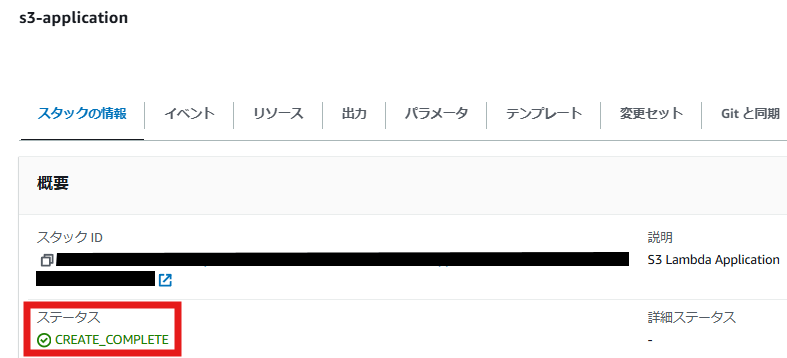
Additionally, you can check each resource defined in template.yaml from the Resources tab.

Note: If you want to delete the stack, you can do so with the following command.
aws cloudformation delete-stack --stack-name s3-lambda-app
6. Operation Verification
We will verify the operation of the Lambda function.
It is a success if the following can be confirmed:
- Create a "public" folder in the S3 bucket (lambda-bucket-20240919).
- Upload a file into the "public" folder.
- Confirm that the Lambda function is executed.
- Confirm that the file information is output to the CloudWatch logs.
■ Create a "public" folder in the S3 bucket
Create a "public" folder in the S3 bucket (lambda-bucket-20240919).
Open the AWS Management Console and navigate to the following screen:
- Amazon S3 → Buckets → lambda-bucket-20240919
Create a "public" folder using "Create folder".
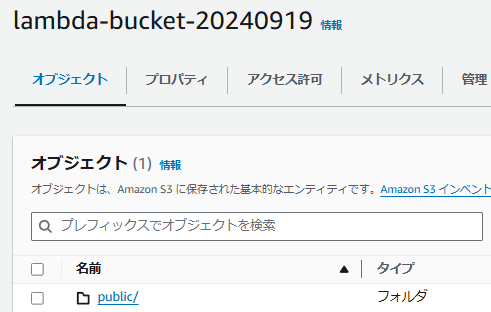
The reason for creating a "public" folder is that the "public/" prefix is specified as the trigger for Lambda function execution in template.yaml.
      Events:
        S3Event:
          Type: S3
          Properties:
            Bucket: !Ref S3LambdaBucket
            Events: s3:ObjectCreated:*
            Filter:
              S3Key:
                Rules:
                  - Name: prefix
                    Value: public/ #
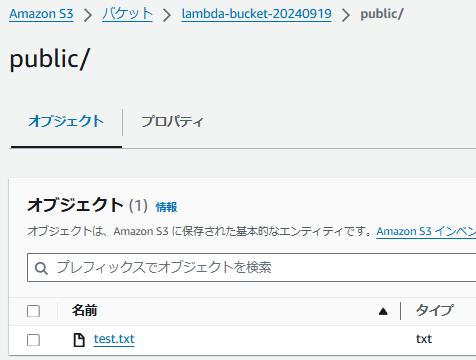
■ Upload a file to the "public" folder
Upload a file into the "public" folder.
In this example, let's try uploading a text file.
■ Confirm that the Lambda function is executed
Confirm that the Lambda function is executed.
Open the AWS Management Console and navigate to the following screen:
- Lambda → Functions → s3-application-S3LambdaFunction-XXXXXX
- Click the "Monitoring" tab → Click "View CloudWatch logs"
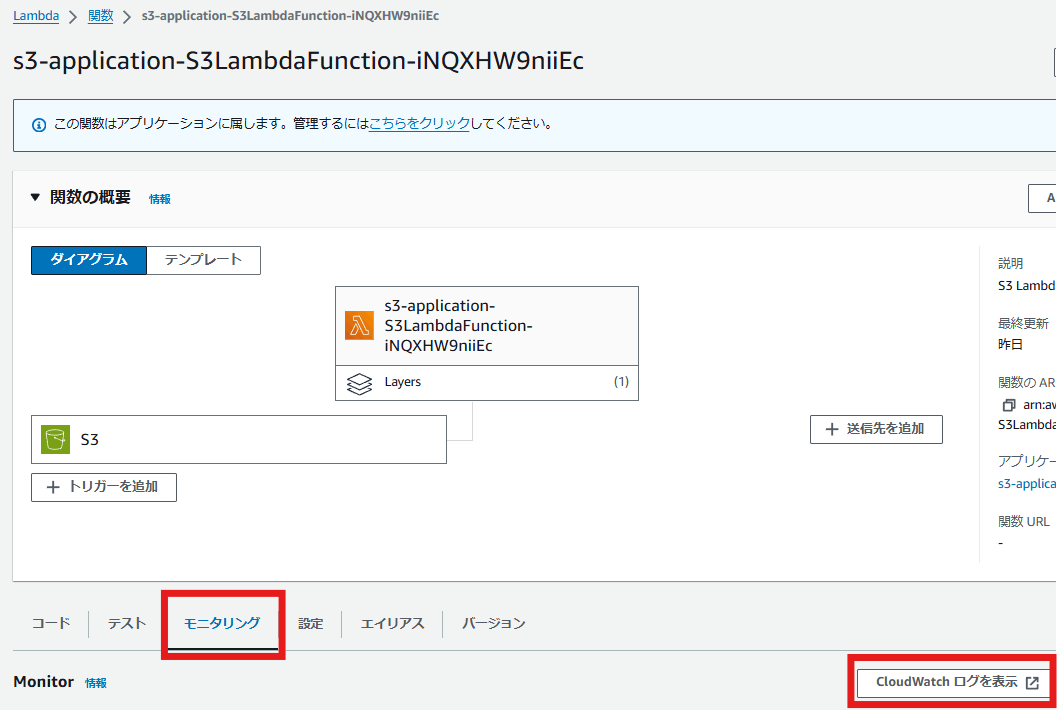
If a log stream is output as shown below, the Lambda function has been executed.

■ Confirm that the file information is output to the CloudWatch logs
Confirm that the file information is output to the CloudWatch logs.
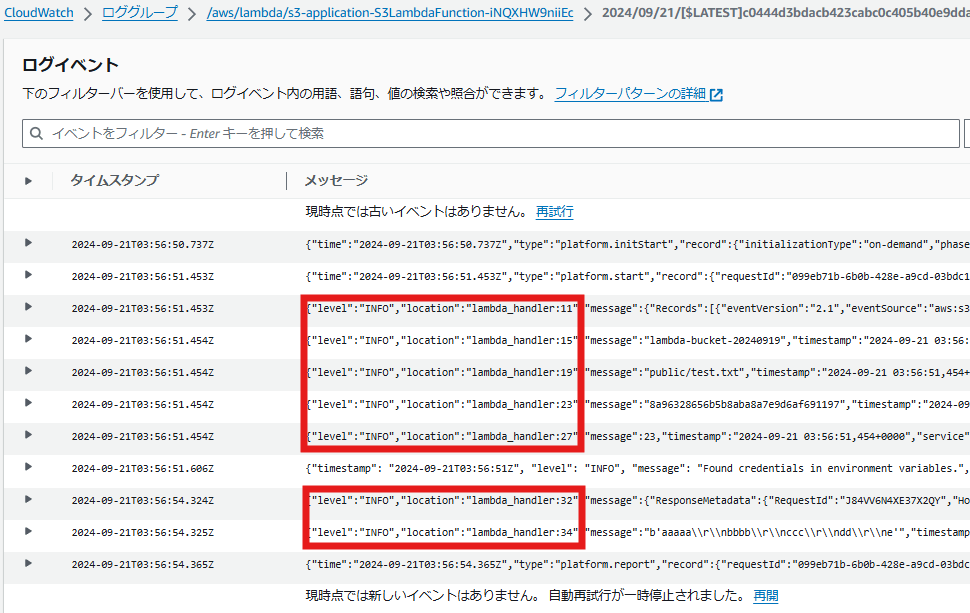
Click on the target log stream to display the following screen.
The red boxed area shows the logs output by the Lambda function's logger.info().
7. Examining the Logs
We will check the logs output by each logger in the source code.
Entire Source Code
import json
from urllib.parse import unquote_plus

import boto3
from aws_lambda_powertools import Logger

logger = Logger()


def lambda_handler(event, context):
    logger.info(json.dumps(event))

    # Bucket name
    bucket_name = event["Records"][0]["s3"]["bucket"]["name"]
    logger.info(bucket_name)

    # Object key
    object_key = unquote_plus(event["Records"][0]["s3"]["object"]["key"])
    logger.info(object_key)

    # ETag
    etag = event["Records"][0]["s3"]["object"]["eTag"]
    logger.info(etag)

    # Size
    size = event["Records"][0]["s3"]["object"]["size"]
    logger.info(size)

    # Retrieve the content of the file uploaded to S3
    s3_client = boto3.client("s3")
    response = s3_client.get_object(Bucket=bucket_name, Key=object_key)
    logger.info(response)
    file_content = response["Body"].read()
    logger.info(file_content)
■ event log: logger.info(json.dumps(event))
First, let's check the event log.
This is the corresponding part in the source code:
def lambda_handler(event, context):
    logger.info(json.dumps(event))
Looking at the event log, you can see it is output in the following JSON format.
This is because "LogFormat: JSON" is specified in template.yaml.
Entire event content
{
    "level": "INFO",
    "location": "lambda_handler:11",
    "message": {
        "Records": [
            {
                "eventVersion": "2.1",
                "eventSource": "aws:s3",
                "awsRegion": "ap-northeast-1",
                "eventTime": "2024-09-19T15:23:44.430Z",
                "eventName": "ObjectCreated:Put",
                "userIdentity": {
                    "principalId": "Dummy"
                },
                "requestParameters": {
                    "sourceIPAddress": "Dummy"
                },
                "responseElements": {
                    "x-amz-request-id": "Dummy",
                    "x-amz-id-2": "Dummy"
                },
                "s3": {
                    "s3SchemaVersion": "1.0",
                    "configurationId": "Dummy",
                    "bucket": {
                        "name": "lambda-bucket-20240919",
                        "ownerIdentity": {
                            "principalId": "Dummy"
                        },
                        "arn": "arn:aws:s3:::lambda-bucket-20240919"
                    },
                    "object": {
                        "key": "public/test.txt",
                        "size": 23,
                        "eTag": "qawsedrftghyujikolp123456789",
                        "sequencer": "0123456789ABCDEFG"
                    }
                }
            }
        ]
    },
    "timestamp": "2024-09-19 15:23:46,659+0000",
    "service": "S3Application",
    "xray_trace_id": "Dummy"
}
Additionally, you can see that the bucket name, object key, and other information are also output in the "s3" section.
"s3": {
    "s3SchemaVersion": "1.0",
    "configurationId": "Dummy",
    "bucket": {
        "name": "lambda-bucket-20240919",
        "ownerIdentity": {
            "principalId": "Dummy"
        },
        "arn": "arn:aws:s3:::lambda-bucket-20240919"
    },
    "object": {
        "key": "public/test.txt",
        "size": 23,
        "eTag": "qawsedrftghyujikolp123456789",
        "sequencer": "0123456789ABCDEFG"
    }
}
And you can access each element of the S3 log as follows:
# Bucket name
bucket_name = event["Records"][0]["s3"]["bucket"]["name"]
logger.info(bucket_name)

# Object key
object_key = unquote_plus(event["Records"][0]["s3"]["object"]["key"])
logger.info(object_key)

# ETag
etag = event["Records"][0]["s3"]["object"]["eTag"]
logger.info(etag)

# Size
size = event["Records"][0]["s3"]["object"]["size"]
logger.info(size)
■ File Content Log
Finally, let's check the log of the file content retrieved using boto3.
This is the corresponding part in the source code:
s3_client = boto3.client("s3")
response = s3_client.get_object(Bucket=bucket_name, Key=object_key)
logger.info(response)
file_content = response["Body"].read()
logger.info(file_content)
First, let's check "logger.info(response)".
Entire response content
{
    "level": "INFO",
    "location": "lambda_handler:32",
    "message": {
        "ResponseMetadata": {
            "RequestId": "Dummy",
            "HostId": "Dummy",
            "HTTPStatusCode": 200,
            "HTTPHeaders": {
                "x-amz-id-2": "Dummy",
                "x-amz-request-id": "Dummy",
                "date": "Thu, 19 Sep 2024 16:18:25 GMT",
                "last-modified": "Thu, 19 Sep 2024 16:18:21 GMT",
                "etag": "\"qawsedrftghyujikolp123456789\"",
                "x-amz-server-side-encryption": "AES256",
                "accept-ranges": "bytes",
                "content-type": "text/plain",
                "server": "AmazonS3",
                "content-length": "23"
            },
            "RetryAttempts": 0
        },
        "AcceptRanges": "bytes",
        "LastModified": "2024-09-19 16:18:21+00:00",
        "ContentLength": 23,
        "ETag": "\"qawsedrftghyujikolp123456789\"",
        "ContentType": "text/plain",
        "ServerSideEncryption": "AES256",
        "Metadata": {},
        "Body": "<botocore.response.StreamingBody object at 0xffff813ab820>"
    },
    "timestamp": "2024-09-19 16:18:24,746+0000",
    "service": "S3Application",
    "xray_trace_id": "Dummy"
}
Looking at the "Body" section, we can see that a StreamingBody object has been retrieved.
This object allows the file data to be read as a stream.
"Body": "<botocore.response.StreamingBody object at 0xffff813ab820>"
Then, when the "Body" is referenced and logged as follows:
file_content = response["Body"].read()
logger.info(file_content)
you can see that the file content (Hello World!) is output as shown below.
{
    "level": "INFO",
    "location": "lambda_handler:34",
    "message": "b'Hello World!'",
    "timestamp": "2024-09-19 16:18:24,747+0000",
    "service": "S3Application",
    "xray_trace_id": "Dummy"
}
8. Conclusion
In this deployment edition, we explained the procedure for deploying the results of the implementation edition to an AWS environment.
We also confirmed that the Lambda function was triggered by uploading a file to S3 and verified the processing results while monitoring the CloudWatch logs.
Together with the implementation edition, we have explained the following series of workflows:
- How to implement a Lambda function
- Automated deployment of AWS resources using SAM
- How to implement a sequence of automated processes triggered by S3 events
If you haven't seen it yet, I would be happy if you could also check out the implementation edition.
Appendix
When deleting a stack, it cannot be deleted unless the S3 bucket is empty.
You can recursively delete the contents of an S3 bucket using the following command:
aws s3 rm s3://bucket-name --recursive
After emptying the S3 bucket, you can delete the stack with the following command:
aws cloudformation delete-stack --stack-name stack-name
You can check the status of the stack with the following command:
aws cloudformation describe-stacks --stack-name stack-name
If the deletion is successful, a message like the following will be displayed:
An error occurred (ValidationError) when calling the DescribeStacks operation: Stack with id s3-application does not exist
Discussion