iTranslated by AI
[Widgetbook] Managing Internal Design Packages with Storybook for Flutter





Introduction
I have made Widgetbook, the Flutter version of Storybook, accessible to everyone within the company via the web, so I've written this article to document the process.
What is Widgetbook?
It is a custom UI catalog library developed for Flutter by a German startup.
If you are familiar with Storybook, it should be easy to imagine; in fact, the official Widgetbook documentation mentions that it is inspired by Storybook.js.
Discover Widgetbook, a powerful Flutter package inspired by Storybook.js that simplifies the process of cataloging widgets, testing them across various devices and themes, and sharing them effortlessly with designers and clients.
I think it's faster to see something actually working, so please try out the Official Widgetbook Demo.
Background of Introducing Widgetbook
In my current company, designers create master data on Figma that serves as parent components.
The image is similar to Material Design's Figma files.

Since Figma components are built with the premise of being reused, we implement Widgets at the same level of granularity.
However, it is difficult to find components just by looking at the code, and there is a possibility of accidentally creating the same Widget twice.
This issue becomes more serious as the number of team members increases.
Therefore, I wanted to improve development efficiency by making implemented Widgets viewable as a UI catalog.
How to Install Widgetbook
I would like to briefly touch upon the installation process.
At SNKRDUNK, we have created a directory called /snkrdunk_design to manage our UI components as a multi-package.
Since /snkrdunk_design is created with --template=plugin, we cannot run flutter build web directly within it.
Therefore, we created a new Flutter project for Widgetbook at /snkrdunk_design/widgetbook.
To visualize the structure, it looks like this:
.
├── lib
├── pubspec.yml
└── snkrdunk_design # Plugin for shared components
    ├── lib
    ├── pubspec.yml
    ├── test
    └── widgetbook # Flutter project for Widgetbook
        ├── lib
        │   ├── main.dart
        │   ├── main.directories.dart
        │   └── src
        │       └── button.dart
        └── pubspec.yml
By doing this, each directory (package) can list only the necessary packages in its pubspec.yml, keeping the dependencies clear and clean.
Also, when hosting Widgetbook (as described later), it is efficient because we only need to run the process when there are changes in /snkrdunk_design.
pubspec.yml
We add three packages. Although it is possible to develop with widgetbook alone, we introduce widgetbook_annotation and widgetbook_generator to improve development efficiency.
dependencies:
  widgetbook: ^3.7.1
  widgetbook_annotation: ^3.1.0

  snkrdunk_design:
    path: ../

dev_dependencies:
  widgetbook_generator: ^3.7.0
  build_runner:
Click here for the latest versions:
snkrdunk_design/widgetbook/main.dart
Next is the content of main.dart, which contains the void main() function for Widgetbook. For clarity, the addons mentioned later are left empty, but it will work for now.
import 'package:flutter/material.dart';
import 'package:widgetbook/widgetbook.dart';
import 'package:widgetbook_annotation/widgetbook_annotation.dart' as widgetbook;

import 'widgetbook.directories.g.dart';

void main() {
  runApp(const WidgetbookApp());
}

@widgetbook.App()
class WidgetbookApp extends StatelessWidget {
  const WidgetbookApp({super.key});

  @override
  Widget build(BuildContext context) {
    return Widgetbook.material(
      // Use the generated directories variable
      directories: directories,
      addons: [],
      integrations: [
        // To make addons & knobs work with Widgetbook Cloud
        WidgetbookCloudIntegration(),
      ],
    );
  }
}
Additionally, you can describe the components you want to display in the UI catalog as follows. This is an example of a FilledButton.
import 'package:flutter/material.dart';
import 'package:widgetbook_annotation/widgetbook_annotation.dart' as widgetbook;

@widgetbook.UseCase(
    name: 'FilledButton',
    type: FilledButton,
Widget filledButtonUseCase(BuildContext context) {
  return Container(
    padding: const EdgeInsets.only(top: 100),
    width: double.infinity,
    alignment: Alignment.center,
    child: Column(
      children: [
        FilledButton(
          onPressed: () {},
          child: const Text("Enabled"),
        ),
        const SizedBox(height: 16),
        const FilledButton(
          onPressed: null,
          child: Text('Disabled'),
        ),
      ],
    ),
  );
}
Finally, let's run the build_runner!
$ flutter pub run build_runner build --delete-conflicting-outputs
flutter run -d chrome -t [relevant_main.dart] With this, you should see a screen like the one below.

For detailed explanations of each part, please refer to the official documentation, as it is very easy to follow.
Utilizing Widgetbook (Addons)
While it's useful as is, you can make it even more convenient by using a feature called Addons.
Addons refer to the items displayed in the sidebar on the right side of the screen, which allow you to toggle dark mode, change the text scale to 2x, and more.

Here are some recommended Addons:
- DeviceFrameAddon
- TextScaleAddon
- MaterialThemeAddon
- InspectorAddon
Sharing Widgetbook with Everyone
Development efficiency won't improve if you have to run flutter run every time you want to view Widgetbook, and it also prevents anyone other than Flutter engineers from seeing it.
To allow developers and non-developers within the company to easily view it, I considered three hosting environments.
Widgetbook Cloud
Hosting would likely be easy using the official Widgetbook Cloud.
However, since it is currently invitation-only, I applied, but it has been almost two months since I was told I was on the waiting list.
GitHub Pages
Since Flutter Web is a web technology, GitHub Pages can be used. However, I decided against it because managing viewing permissions on GitHub seemed like it would be a hassle.
It seems to be a good fit for public personal development repositories.
I actually set up a GitHub Action to deploy to GitHub Pages for this project.
AWS S3 — We Chose This
Another possibility is an external hosting environment like S3, and fortunately, we already had an S3 environment available for anyone within the company to use.
Regarding accessibility, it is an environment that anyone can view as long as they are connected to the VPN.
Therefore, we decided to use S3 this time.
S3 can also be deployed via GitHub Actions, and we have set up an Action like the one below.
The trigger is set to when a merge occurs in the develop branch, and it only runs when there are changes in "snkrdunk_design/**".
Also, you must specify the path with the --base-href option during the build, otherwise, you won't be able to view it on S3.
name: deploy widgetbook for s3 only develop branch and widgetbook directory changes

on:
  push:
    branches:
      - develop
    paths:
      - "snkrdunk_design/**"

jobs:
  deploy_widgetbook:
    runs-on: ubuntu-latest
    permissions:
      id-token: write
      contents: read
    steps:
      - uses: actions/checkout@v3.3.0

      - name: Install dependencies
        uses: ./.github/actions/install_dependencies

      - uses: aws-actions/configure-aws-credentials@v4.0.1
        with:
          role-to-assume: arn:aws:iam::xxxxxxxxxx:role/xxxx
          aws-region: ap-northeast-1
          role-duration-seconds: 3600
          role-session-name: xxx

      # Specify the S3 bucket name in --base-href
      - name: build web
        run: |
          cd snkrdunk_design/widgetbook
          flutter build web --base-href=/xxx/xxx/

      - name: Copy files to s3
        run: |
          cd snkrdunk_design/widgetbook
          aws s3 cp ./build/web/ s3://xxx/xxx/xxx/ --acl public-read --recursive
For the Future of Widgetbook
Finally, although I haven't started yet, I'll write about what I want to do with Widgetbook in the future.
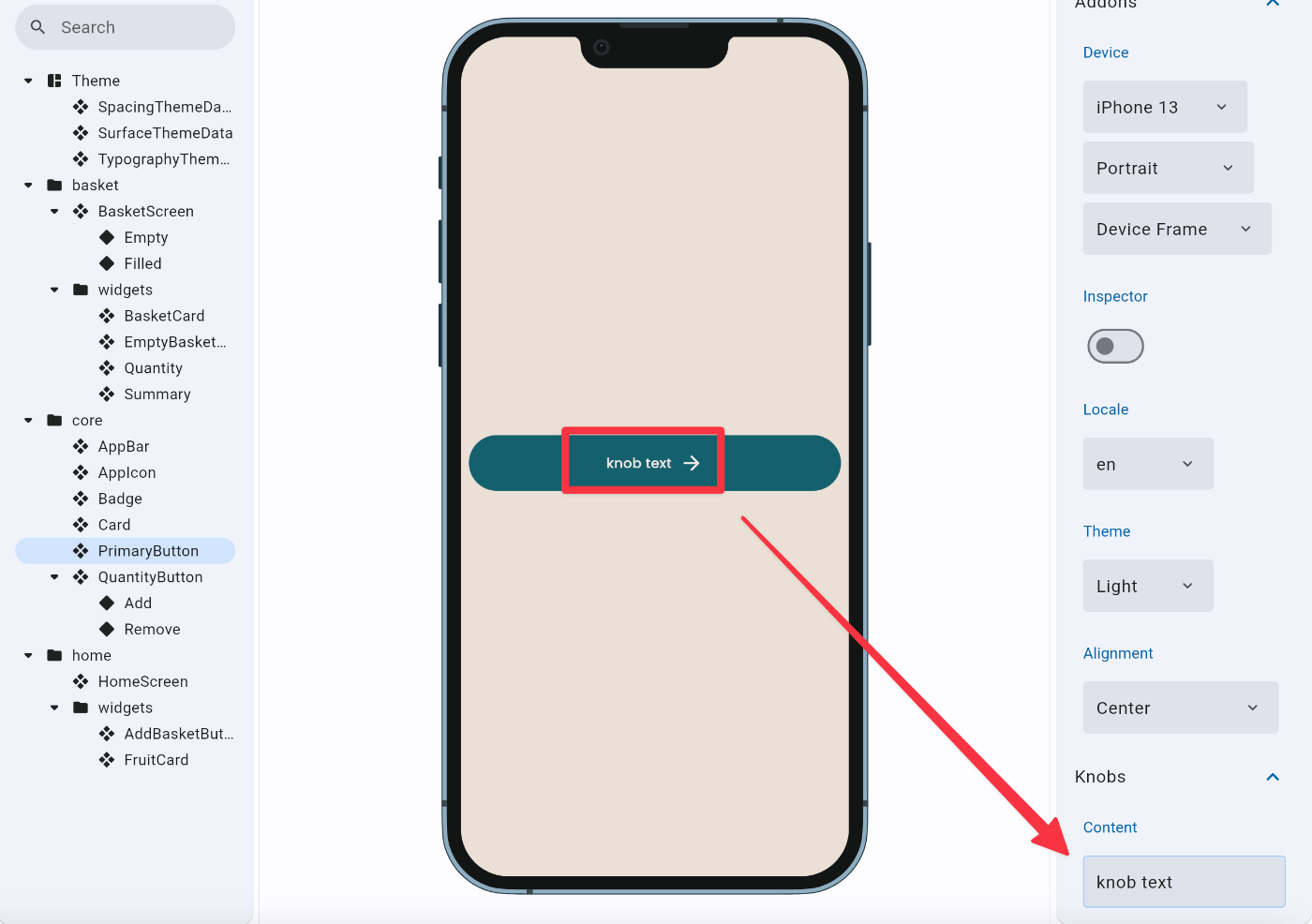
Knobs
This is a feature that allows you to change text, numerical values, and colors within the UI catalog from the right sidebar.
Button text is often variable, and there are many cases where you want to set and verify specific text at that moment, so this seems very helpful.
Could it be reused for Golden Tests?
At SNKRDUNK, we have recently started incorporating Golden tests.
For example, regarding the code I introduced earlier, I felt that the filledButtonUseCase part could potentially be reused for Golden tests.
However, it seems that using Knobs results in an error.
While searching through the official repositories, I found that the widgetbook_4 repository had information about making Golden test reuse easier.
I'll omit the details, but it seems highly likely to be implemented in the future.
import 'package:flutter/material.dart';
import 'package:widgetbook_annotation/widgetbook_annotation.dart' as widgetbook;

@widgetbook.UseCase(
    name: 'FilledButton',
    type: FilledButton,
Widget filledButtonUseCase(BuildContext context) {
  return Container(
    padding: const EdgeInsets.only(top: 100),
    width: double.infinity,
    alignment: Alignment.center,
    child: Column(
      children: [
        FilledButton(
          onPressed: () {},
          child: const Text("Enabled"),
        ),
        const SizedBox(height: 16),
        const FilledButton(
          onPressed: null,
          child: Text('Disabled'),
        ),
      ],
    ),
  );
}
Conclusion
Thank you for reading until the end.
I plan to continue sharing various things I do for work and personal development, so please feel free to follow me!
Discussion