iTranslated by AI
[VSCode] 17 Recommended Extensions for Flutter Engineers (2025 Edition)




Introduction
As an author who uses VSCode for Flutter development, I struggled in the early stages of learning, not knowing what extensions meant or which ones to install.
VSCode is highly customizable, and you can literally extend its functionality by installing extensions. It's an editor where installing extensions is a prerequisite, and you need to research and install the necessary ones yourself. Once you know which extensions you need and install them, it becomes an incredibly convenient editor.
With a year of practical experience, I've accumulated knowledge, so I'm writing this article to share my recommended extensions with you.
Target Audience
- Those developing Flutter with VSCode
- Flutter or VSCode beginners who want to know recommended extensions
- Those curious about what extensions others are using
My Environment at the Time of Writing
[✓] Flutter (Channel stable, 3.27.1, on macOS 15.1 24B2082 darwin-arm64, locale ja-JP)
[✓] Android toolchain - develop for Android devices (Android SDK version 35.0.0)
[✓] Xcode - develop for iOS and macOS (Xcode 16.1)
[✓] Chrome - develop for the web
[✓] Android Studio (version 2024.2)
[✓] VS Code (version 1.96.2)
Prerequisites
The following extensions are considered fundamental and are not mentioned in this article:
- Dart
- Flutter
- Japanese Language Pack for VS Code
Flutter & Dart-Specific Extensions
Flutter Utility Snippets
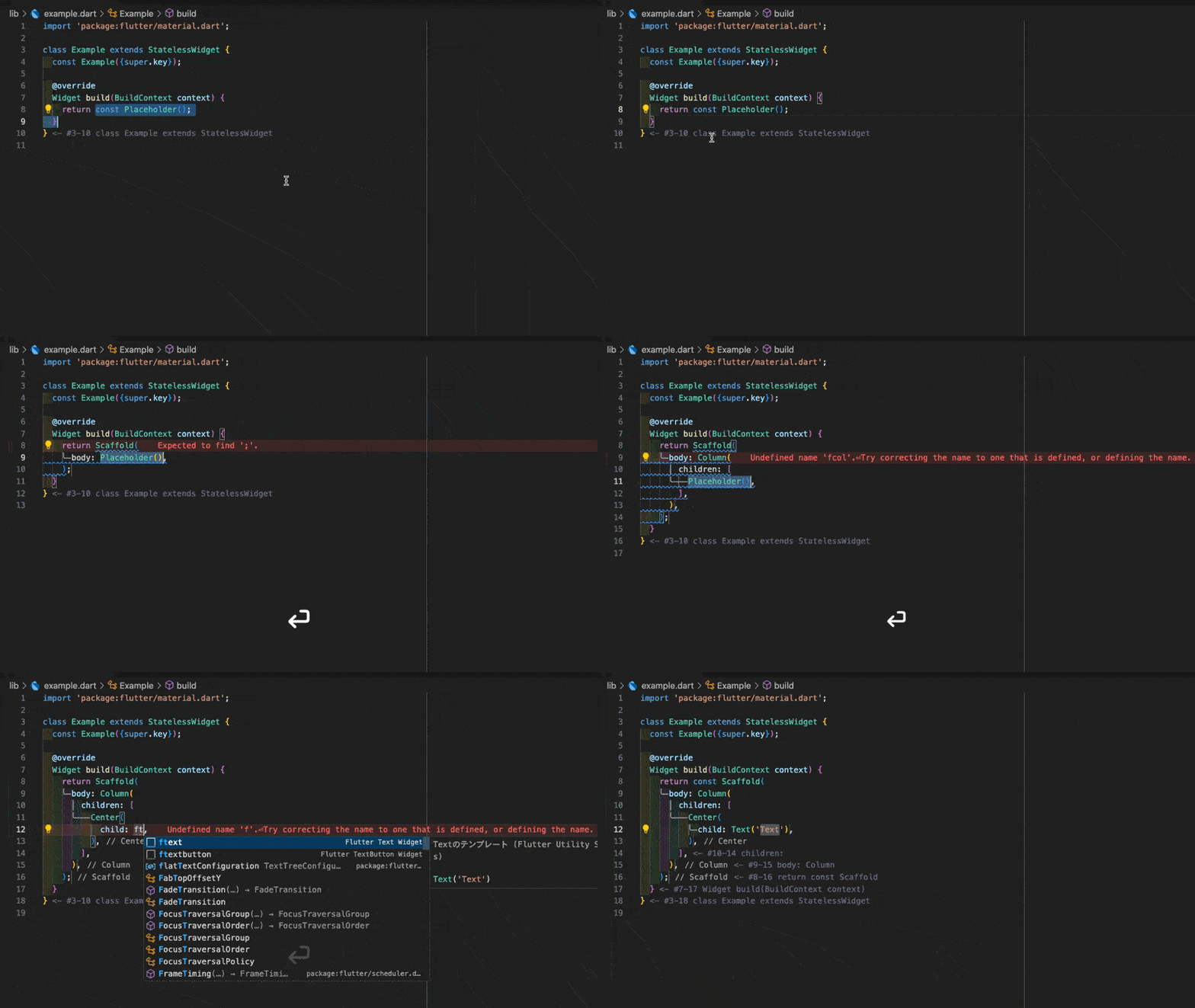
Flutter Utility Snippets is a collection of commonly used Flutter snippets. A snippet is a function that allows you to easily recall frequently used code templates. In the example above, Flutter-related widgets are called using words starting with f.
Input: fsc -> fcol -> fce -> ft
Snippet Registration: fscaffold -> fcolumn -> fcenter -> ftext
I apologize for the abruptness, but this is an extension I created myself (^^)!
I used to use snippet collections made by others, but I wanted to create my own, so I did. In addition to the Flutter-related snippets mentioned above, I have registered Dart-related, Riverpod-related, Hooks-related, Freezed-related, test-related, and comment-related snippets that I frequently use.
By the way, the original models for this extension were the following:
Both are well-known and highly recommended:
Widget Wrapper

Flutter's standard extension allows you to wrap a target Widget with an arbitrary Widget using ⌘ + . if you want to wrap it further. However, some frequently used Widgets are not available. Widget Wrapper allows you to wrap with Widgets not provided by the standard extension. The Widgets written in the green frame in the image above are examples of these.
Again, I apologize for praising my own work, but this is also an extension I created 🙈
The extension that inspired me for this one was Flutter Plus.
This extension is highly customizable and allows you to register your own wrapping Widgets. It also provides unique snippets. For more details, please refer to the article by the person who introduced it.
Code Quality Improvement
Code Spell Checker

This extension checks the spelling of class names, variable names, comments, and more. It highlights spelling mistakes with a blue wavy line and also shows them in the "Problems" tab at the bottom of VSCode.

Furthermore, if you press ⌘ + . at the problematic location, it will suggest corrections. You can also register project-specific words to avoid unnecessary warnings. Example: SUSHI or FUJIYAMA
Error Lens

This displays errors directly in your code. You can quickly check errors without having to look at the editor's problems tab.
Coding Assistance
Better Comments

This allows you to add styling to your comments. You can set up custom rules, for example, to display TODOs in orange text. This makes it easier to visually distinguish between regular comments and comments you want to highlight.
Bracket Lens

This adds annotations to the closing } of classes, methods, etc., indicating what they close. Flutter's standard functionality already adds annotations to the end of Widgets, but this extension provides even more detailed information. Since Flutter tends to involve deep nesting due to wrapping Widgets, this extension is subtly helpful.
GitHub Copilot
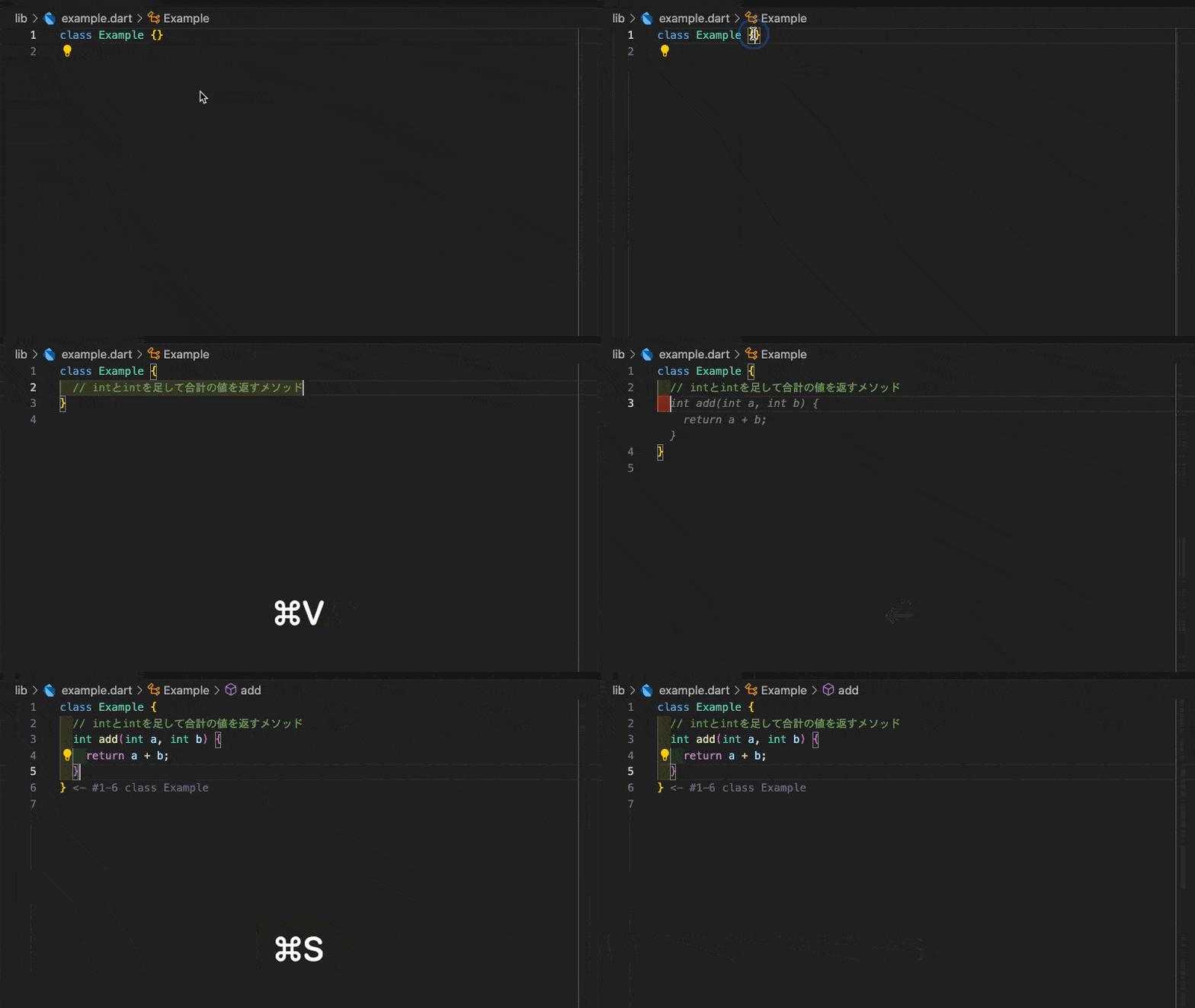
This is an AI tool that assists with coding. For example, if you write the processing details of a method in a comment, it suggests code. If you start declaring a variable, it looks at the class content and suggests completions.
So, honestly, Flutter Utility Snippets, which I introduced first, gets less use now lol. However, it's important to note that it's more about assisting you with your project context rather than writing code fully automatically. Furthermore, the suggested content isn't always exactly what you intend.
In my case, I usually write the method's processing details in comments first to get suggestions. It's especially helpful for array operations, for loops, and while loops. Also, if you use descriptive variable names, it improves the accuracy of the suggestions as it understands your intent better.
Another feature I often use is "Ask Copilot to explain" which appears when you press ⌘ + . on code with an error. This is better than pasting into ChatGPT as it allows for quicker error checking. If I can't quickly understand an error displayed by ErrorLends, asking Copilot usually provides a quick solution, which is very helpful.
In any case, GitHub Copilot significantly speeds up coding, so why not try the free version first?
indent-rainbow

This visualizes indentation with colors, making it easier to read. This also helps improve readability.
Version Lens
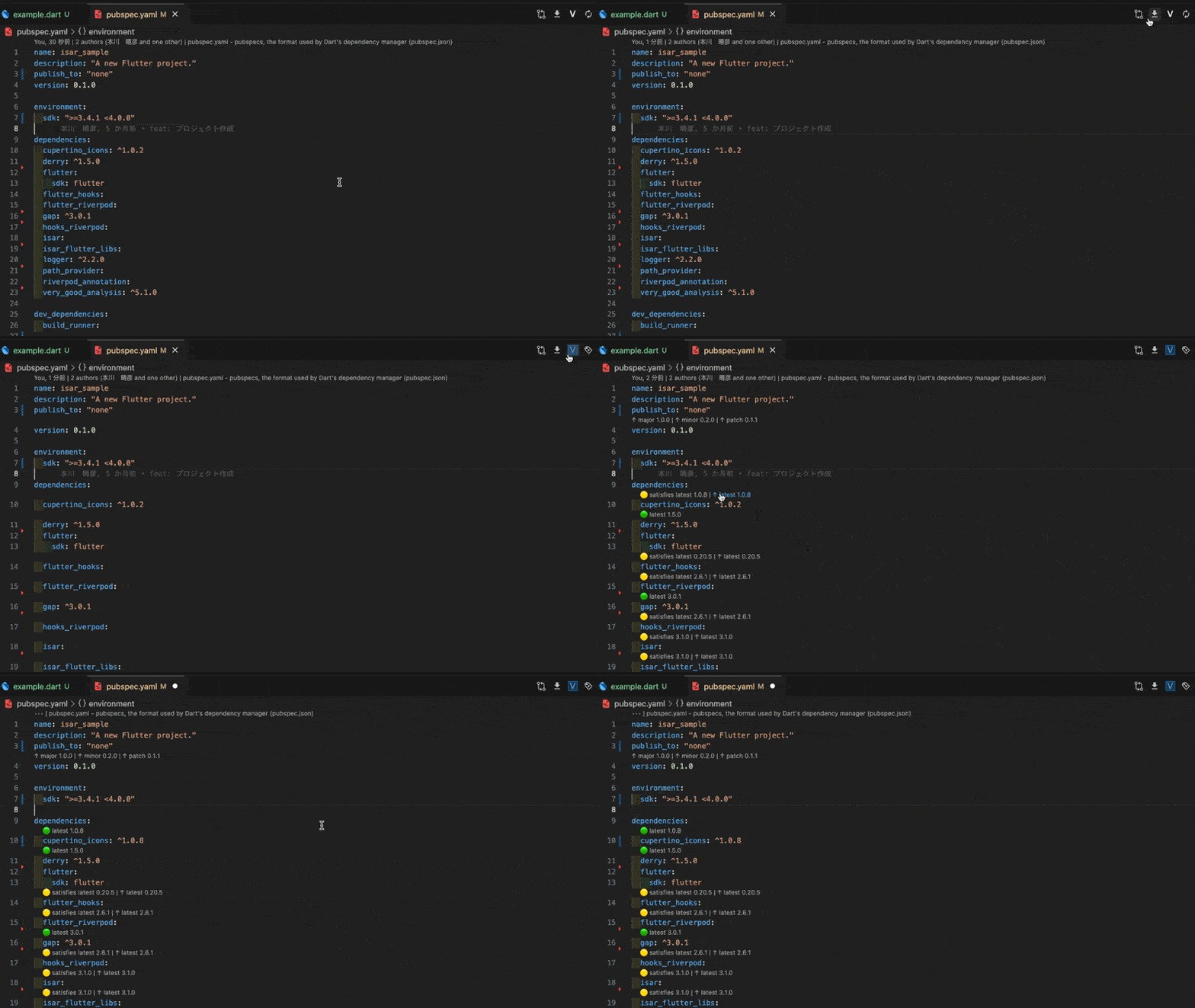
This displays the current and latest available versions of packages. It also allows you to update packages with a single click.
Todo Tree

This allows you to easily access comments with specific annotations by grouping and displaying them. You can use comments like bookmarks. In addition to the pre-registered TODOs, you can also set your own.
I previously wrote an article explaining how to make comments more useful by combining this with Better Comments, which I introduced earlier. Please do take a look.
YAML
This extension supports editing YAML files. It assists with YAML syntax checking, auto-completion, and auto-formatting. In Flutter, you often work with YAML files, not just pubspec.yaml, so this is a valuable extension to have.
Other Useful Features
Ascii Tree Generator
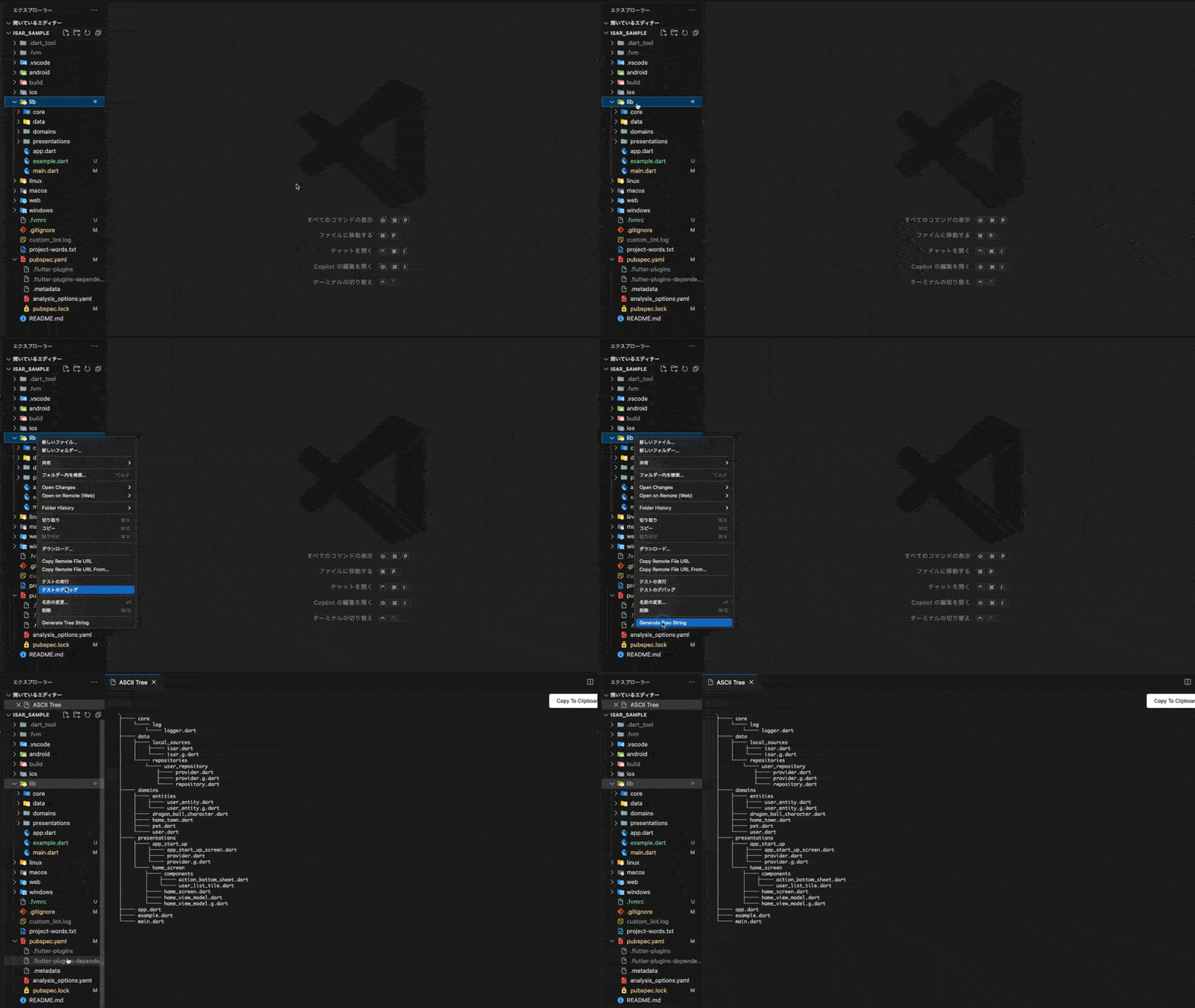
This extension easily creates directory structure trees. Having a directory tree in pull requests or articles for explanation makes them look better and easier to understand, which is very convenient.
CodeSnap
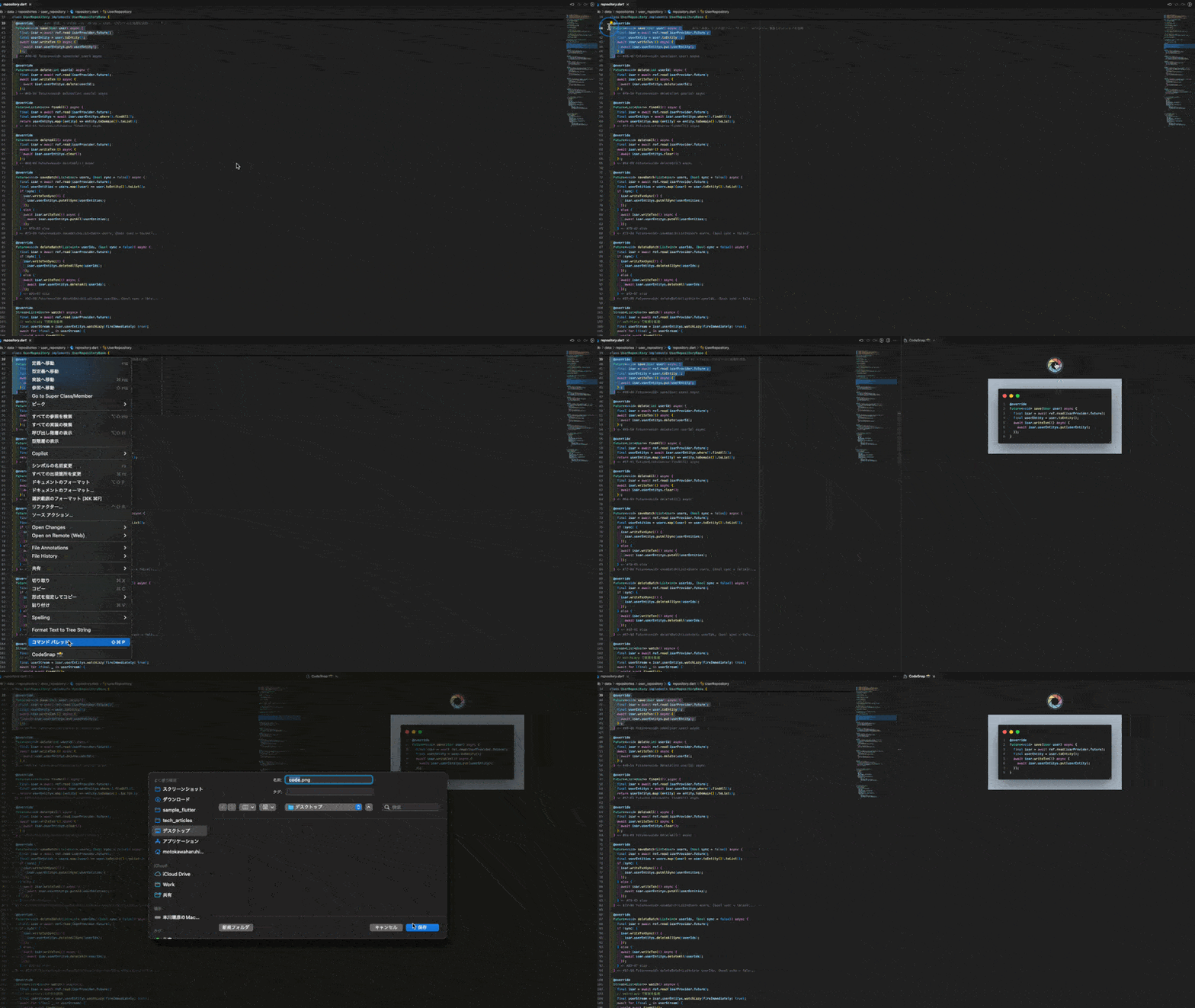

This extension allows you to select a range of code, right-click, and execute it to export it as a PNG image. It's useful for sharing code on social media or in presentation materials.
Material Icon Theme

This displays VSCode folder and file icons in Material Design style. Without it, the interface looks quite plain, so installing it improves visibility and makes it easier to find target files.
Git & GitHub Related
Git Graph

This extension visualizes Git branches. It is mainly used for understanding the current branch status, organizing, and switching branches.
- Check for differences between remote and local branches
- Double-click to move to any branch
- Right-click any branch to rename it
- Right-click any branch to delete unnecessary branches
GitHub Pull Requests
This allows you to review pull requests directly within VSCode. I used to struggle with code reviews on GitHub in the browser. It was difficult to grasp the overall picture or understand the diffs and their meaning. However, after discovering this extension, it became much easier to check diffs and understand the big picture. Since it's officially provided by GitHub, you can, of course, add comments and approve pull requests.
GitLens — Git supercharged

Commit history on code

File change history
This is a Git-related extension. It has so many features that I can't cover them all, but I mainly use the following:
- Check the history of when a code line was changed directly in the code
- See when and how a file was changed at a file level
- Review the diffs of changes made in the current branch
The following article provides a detailed introduction:
Conclusion
How was it? In this article, I introduced 17 VSCode extensions that are useful for Flutter engineers. These are all extensions that I actually use and have found to be very helpful. VSCode extensions, when used appropriately, can significantly improve development efficiency and code quality. However, installing too many extensions can slow down the editor or complicate settings, so it's recommended to select and install only what you need.
If you have any recommended extensions that I haven't mentioned, please let me know in the comments. I hope this article can help beginners and those struggling with extensions.
Discussion