iTranslated by AI
Essential Changes for Migrating to go_router_builder 3.x in Flutter




Introduction
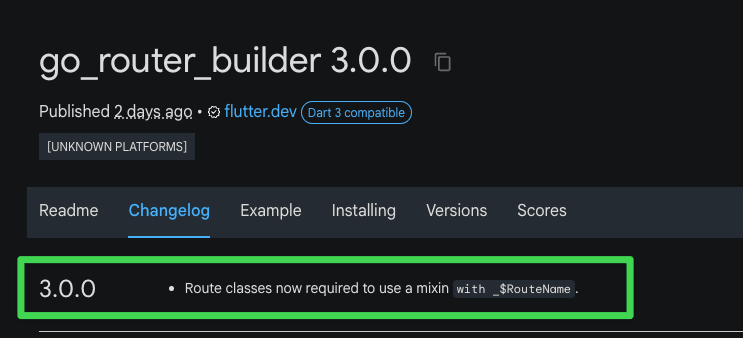
On June 6, 2025, go_router_builder was updated to version 3.0.0.
This update requires explicitly adding the with _$RouteName mixin to all route classes, meaning previous code styles will no longer build successfully.
I hope this helps those who suddenly find their builds failing or got stuck while referring to older articles.
My Environment at the Time of Writing
[✓] Flutter (Channel stable, 3.29.0, on macOS
    15.3.1 24D70 darwin-arm64, locale ja-JP)
[✓] Android toolchain - develop for Android
    devices (Android SDK version 35.0.0)
[✓] Xcode - develop for iOS and macOS (Xcode 16.1)
[✓] Chrome - develop for the web
[✓] Android Studio (version 2024.2)
[✓] VS Code (version 1.100.0)
How it was written up to version 2.x
Up to version 2.x of go_router_builder, route classes were defined as follows:
class HomeRoute extends GoRouteData {}
However, if you upgrade to version 3.x, automatic generation will fail as shown below:
[SEVERE] go_router_builder on lib/core/router/route/route.dart:

Missing mixin clause `with _$HomeRoute`
package:go_router_builder_sample/core/router/route/route.dart:84:7
   ╷
84 │ class HomeRoute extends GoRouteData {
   │
How to write after version 3.x
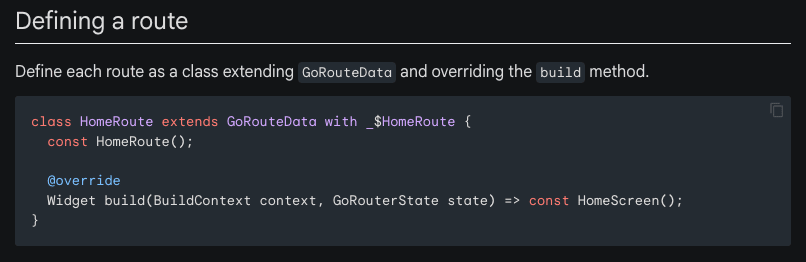
As the shell error message indicates, add with _$HomeRoute to the class.
class HomeRoute extends GoRouteData with _$HomeRoute {}
The documentation on pub.dev has also been updated.
Immediately after adding it, the error will remain, but if you run the code generation, the error will disappear, and code generation will proceed successfully.
flutter pub run build_runner build --delete-conflicting-outputs
Conclusion
In this article, we explained the mandatory addition of with _$RouteName when migrating go_router_builder to version 3.0.0.
When referencing older samples or articles, it's common to encounter build errors due to specification changes in new versions without realizing it. Even seemingly minor syntactical differences, as in this case, can prevent builds from succeeding, so caution is advised.
After package updates, regularly checking the official changelog and documentation is key to preventing problems.
I hope this article helps those struggling with similar errors.
Discussion