iTranslated by AI
Summary of Common Pitfalls in Skip Development


Recently, I've been challenging myself to develop an app for both iOS and Android using only Swift with a tool called "Skip" (I'll release the app once it's ready).
What is Skip?
It is a tool and framework that allows you to develop iOS and Android apps using Swift.
It can convert SwiftUI to Jetpack Compose, transpile Pure Swift code to Kotlin (Transpiled Mode, a mechanism where Swift code is translated into Kotlin), or run Pure Swift code directly on Android (Native Mode).
Currently, I am not using Native Mode but proceeding with Transpiled Mode (it makes it easier to understand issues since Kotlin code is generated).
Issues Encountered but Managed to Solve
There are various features that are simply not supported by Skip or the Jetpack Compose side.
However, there are many cases where things work out by changing the way you write it or adjusting the logic.
Issues with easily handling Asset colors and image resources
It currently does not support ImageResource or ColorResource, which normally allow you to use Asset contents automatically.
For example, if you add a color like mainText to xcassets, you cannot write Color(.mainText); instead, you need to write Color("mainText", bundle: .module).
There are also cases where features that typically work in SwiftUI are not supported.
I handle those by wrapping them in #if !SKIP ... #endif for now.
(Since gestures don't work well at all, I am ignoring them on Android, etc.)
Issue where Long type is required for Firestore limit
When I tried to use limit in firestore using SkipFirebase, the build failed.
Looking at the error, it was requiring a Long type.
I thought, "Swift doesn't have a Long type," and upon investigation, found that it can be handled with Int64 in Swift.
(The kind of issue that wouldn't have been a problem if I had just checked GitHub from the start)
So, the code ended up looking like this:
let query = firestore.collection("collections")
  #if SKIP
    .limit(to: Int64(pageSize)) // Skip requires Long type, so specify with Int64
  #else
    .limit(to: Int(pageSize)) // Standard Swift code is fine with Int type
  #endif
Issue where parameter types for where(in:) in Firestore do not match
Similarly, I wanted to use where(in:) in firestore using SkipFirebase, so I wrote the following code:
func search(_ values: [String]) async -> [Result] {
  Firestore.firestore().collection("collection")
    .where("key", in: values)
    ...
}
However, this did not pass the build. Perhaps because the argument type was [String], the build failed on the Kotlin side, so I modified it as follows:
func search(_ values: [any Sendable]) async -> [Result] {
  Firestore.firestore().collection("collection")
    .where("key", in: values)
    ...
}
Since [Any] causes an error in Swift 6, I was able to build it without issues by using any Sendable here.
Issue where behavior differs between iOS and Android
I am currently asking in the Skip Slack community about this as well, but with code like the following, the behavior differs between iOS and Android.
struct WelcomeView : View {
    @State var heartBeating = false
    @Environment(ViewModel.self) var viewModel: ViewModel

    var body: some View {
        @Bindable var viewModel = viewModel
        ScrollView {
            VStack(spacing: 0) {
                Text("Hello [\(viewModel.name)](https://skip.tools)!")
                    .padding()
                Image(systemName: "heart.fill")
                    .foregroundStyle(.red)
                    .scaleEffect(heartBeating ? 1.5 : 1.0)
                    .animation(.easeInOut(duration: 1).repeatForever(), value: heartBeating)
                    .onAppear { heartBeating = true }

                LazyVGrid(columns: [GridItem(.adaptive(minimum: 80))]) {
                    ForEach(0..<100) { index in
                        ZStack {
                            Color.yellow
                            Text(String(describing: index))
                        }
                        .frame(height: 80)
                    }
                }
            }
            .font(.largeTitle)
        }
    }
}
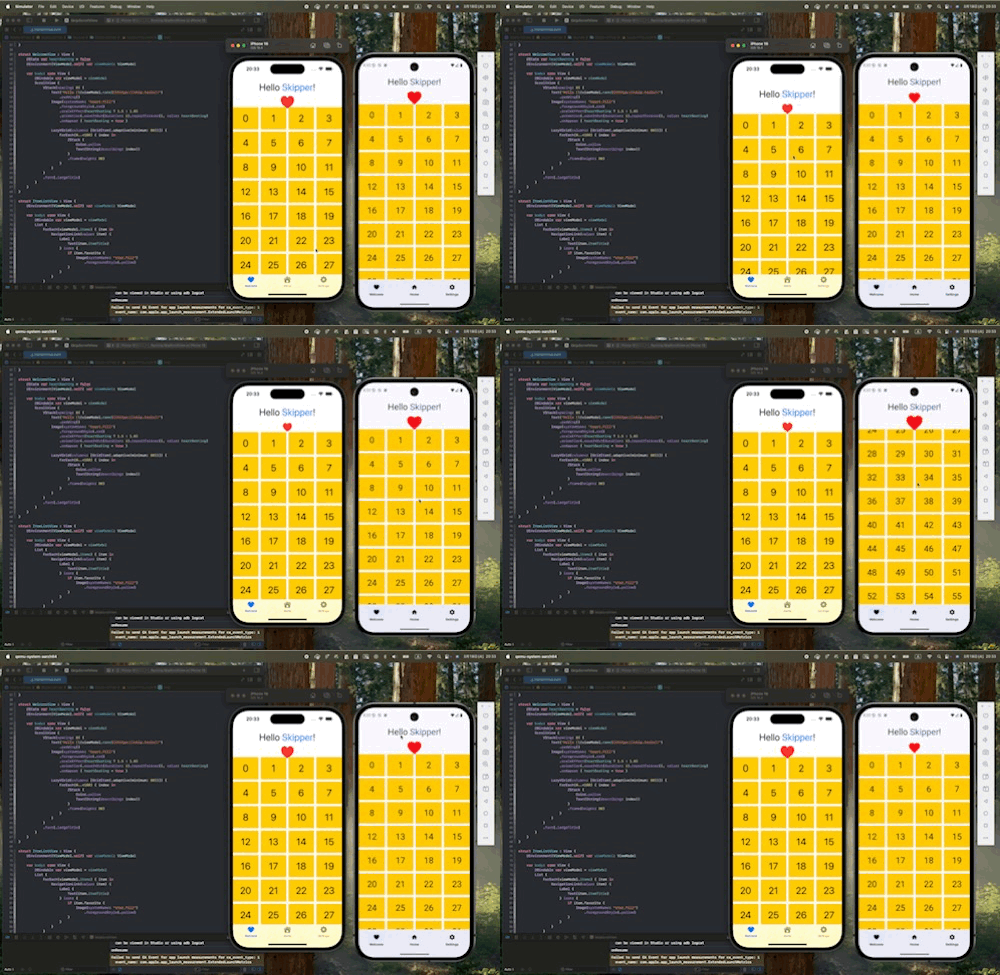
On iOS, the entire screen scrolls, but on Android, only the LazyVGrid part scrolls, and the screen as a whole does not scroll.
2025/03/19: Update
I was taught a solution for this in the Skip Slack community. They mentioned that if you utilize a Section Header like ScrollView { LazyVGrid { Section { ... } header: { ... } } }, it will scroll correctly.

Code after correction:
struct WelcomeView: View {
  @State var heartBeating = false
  @Environment(ViewModel.self) var viewModel: ViewModel

  var body: some View {
    @Bindable var viewModel = viewModel
    ScrollView {
      LazyVGrid(columns: [GridItem(.adaptive(minimum: 80))]) {
        Section {
          ForEach(0..<100) { index in
            ZStack {
              Color.yellow
              Text(String(describing: index))
            }
            .frame(height: 80)
          }
        } header: {
          VStack(spacing: 0) {
            Text("Hello [\(viewModel.name)](https://skip.tools)!")
              .padding()
            Image(systemName: "heart.fill")
              .foregroundStyle(.red)
              .scaleEffect(heartBeating ? 1.5 : 1.0)
              .animation(
                .easeInOut(duration: 1).repeatForever(), value: heartBeating
              )
              .onAppear { heartBeating = true }
          }
          .font(.largeTitle)
        }
      }
    }
  }
}
Issues Encountered but Could Not Be Resolved
Issue where RemoteConfig is unavailable
This is another SkipFirebase issue. Although RemoteConfig seems to exist, so I thought it should be usable, I gave up for now because the build failed completely when I tried to use it.
I'd love to know if there's a way to make it work.


Summary
I apologize that this article contains a fair amount of negative points, but the fact that Android works with just Swift and SwiftUI code is a dream come true for those who want to write code in Swift, and I personally feel its potential.
The documentation is quite solid, and since related code and sample code are available on GitHub, I think someone with iOS app development experience would be able to develop with it.
While there are still challenges, Skip, which allows for developing Android apps using only Swift code, is a very attractive tool for Swift engineers. Personally, I want to keep enjoying development while watching it grow alongside the Skip community. I'd be happy if more people started talking about Skip!
(I had ChatGPT refine some of the expressions, but I wrote about 90% of it myself.)
Discussion