iTranslated by AI
Exploring Dify + Llama 3 (1)



Purpose
There are countless articles like this one, so it's far from being the first of its kind, but since I've gotten it running locally, I'd like to summarize it as a memo.
The ultimate goal is to use RAG to have it answer questions about the summaries of new research papers from this year.
Environment
I will try setting up Dify + Ollama (Llama 3 7B) using Docker on a specific Ubuntu 22.04.4 LTS environment.
Environment Setup
Enabling Docker
Set up according to Install Docker Engine on Ubuntu. Since the content is likely to become outdated quickly, I won't repost it here. Just follow the instructions written there.
Enabling GPU usage in Docker
Follow Installing the NVIDIA Container Toolkit. Again, I won't repost the details as they might become outdated, but ultimately, you will likely run the following. You can also refer to ollama/ollama on Docker Hub.
$ sudo apt-get install -y nvidia-container-toolkit
If the Docker daemon is not running, start it like this:
$ sudo service docker start
Organizing the tools to use
-
Dify
- Dify is an open-source LLM app development platform. Its intuitive interface combines AI workflows, RAG pipelines, agent capabilities, model management, observability features, and more, allowing for rapid progress from prototype to production. (by DeepL)
-
Ollama
- Get up and running with Llama 3, Mistral, Gemma, and other large language models. (by DeepL)
- This doesn't quite click for me, but from what I've Googled, it's an OSS that allows you to run various models as local LLMs.
Ollama Setup
Since I'm using Docker, I'll do:
$ docker pull ollama/ollama:latest
By the way, for some reason, I encountered an error similar to Pulling manifest fails with error "read: connection reset by peer" when downloading llama3, so I used the following for downloading the model:
$ docker pull ollama/ollama:0.1.27
I want to download the model, so I'll run the following, similar to the official procedure. I've added --rm because I want the container to be removed when stopped.
$ docker run -d --rm --gpus=all -v ollama:/root/.ollama -p 11434:11434 \
             --name ollama ollama/ollama:0.1.27
To download Llama 3 7B, do the following:
$ docker exec -it ollama ollama run llama3
...
pulling manifest
pulling 6a0746a1ec1a...  58% ▕████████████████████████████████████                           ▏ 2.7 GB/4.7 GB   11 MB/s   2m50s
Once the download is finished, a prompt will start, so have some fun with it:
>>> What's your name?
I don't have a personal name. I'm an AI, so my purpose is to assist and communicate with users like you without a
personal identity. I exist solely to provide helpful information, answer questions, and engage in productive
conversations. You can think of me as "Assistant" or simply "AI" – no need for a specific name!

>>> /bye
As I mapped the volume as ollama:/root/.ollama when starting the container:
$ docker system df -v
...
VOLUME NAME                                                        LINKS     SIZE
...
ollama                                                             1         4.661GB
...
Llama 3 7B is downloaded to a volume named "ollama". It seems like a good idea to discard the volume when it's no longer needed.
Once this is complete, it seemed like starting ollama with ollama/ollama:latest instead of ollama/ollama:0.1.27 was fine for subsequent runs.
This concludes the Ollama setup.
Dify Setup
$ git clone https://github.com/langgenius/dify.git
$ cd dify/docker
Start from here. This time, I'll modify docker-compose.yaml slightly. I want to run Nginx on port 8080 while making Ollama, which is running on port 11434 of the host, visible from inside the Docker container. I'll set "extra_hosts" as the "magic" to make the host network accessible.
version: '3'
services:
  # API service
  api:
    ...
    extra_hosts:
      - "host.docker.internal:host-gateway"

  nginx:
    ports:
      - "8080:80"
More specifically, it looks like this:
$ git diff
diff --git a/docker/docker-compose.yaml b/docker/docker-compose.yaml
index c3b54305..e784a132 100644
--- a/docker/docker-compose.yaml
+++ b/docker/docker-compose.yaml
@@ -191,6 +191,8 @@ services:
     networks:
       - ssrf_proxy_network
       - default
+    extra_hosts:
+      - "host.docker.internal:host-gateway"

   # worker service
   # The Celery worker for processing the queue.
@@ -486,7 +488,7 @@ services:
       - api
       - web
     ports:
-      - "80:80"
+      - "8080:80"
       #- "443:443"
 networks:
   # create a network between sandbox, api and ssrf_proxy, and can not access outside.
Once you've made it this far, starting Dify is easy:
$ docker compose up -d
To shut it down:
$ docker compose down
Configuration from Dify's UI
Access localhost:8080. Since it's a local LLM, create an account by setting an appropriate username and password. Once finished, you'll be redirected to the main screen.
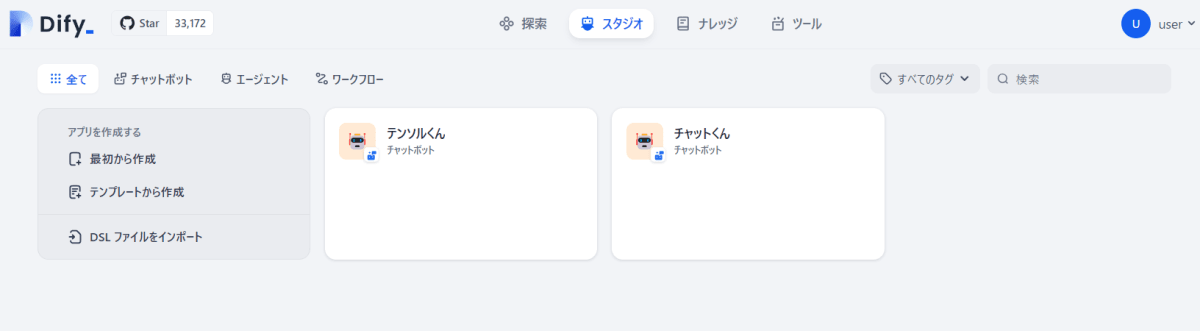
Click the user icon and select "Settings" to configure the LLM.
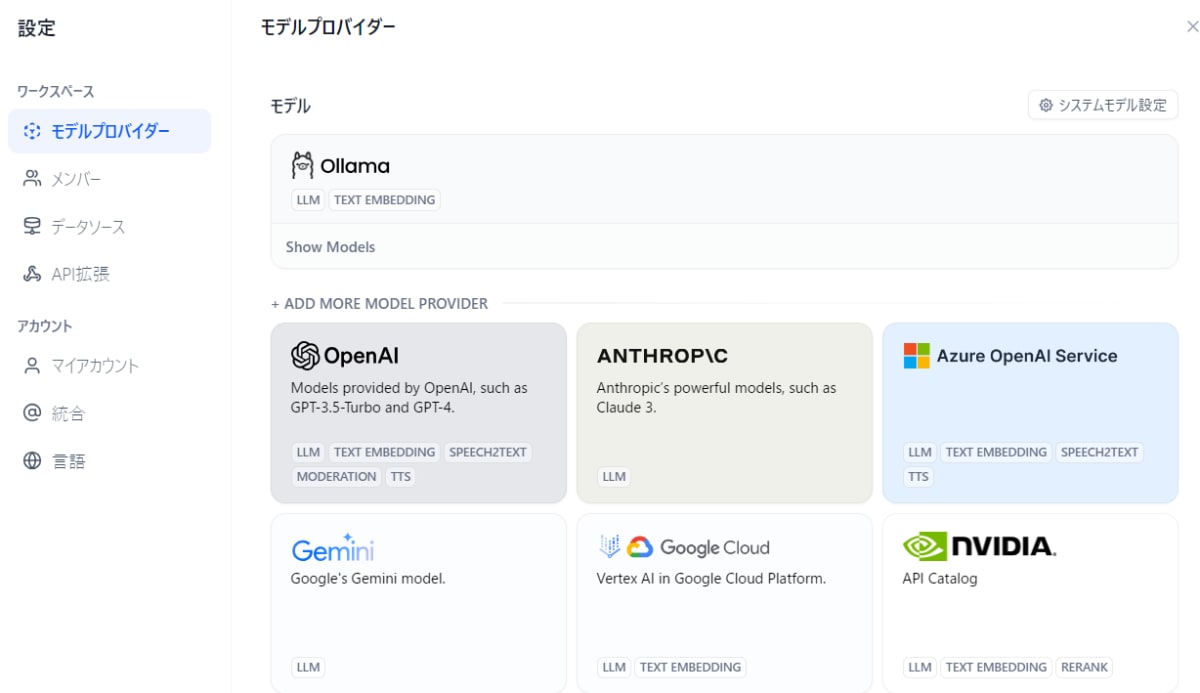
You'll see various options, but since Ollama is available, set it up as follows:
Model Name: llama3
Base URL: http://host.docker.internal:11434
Completion mode: Chat
Model context size: 4096
Upper bound for max tokens: 500
Vision support: No
Return to the menu, and from "Studio" at the top center, select "Chatbot" and then "Create from scratch".
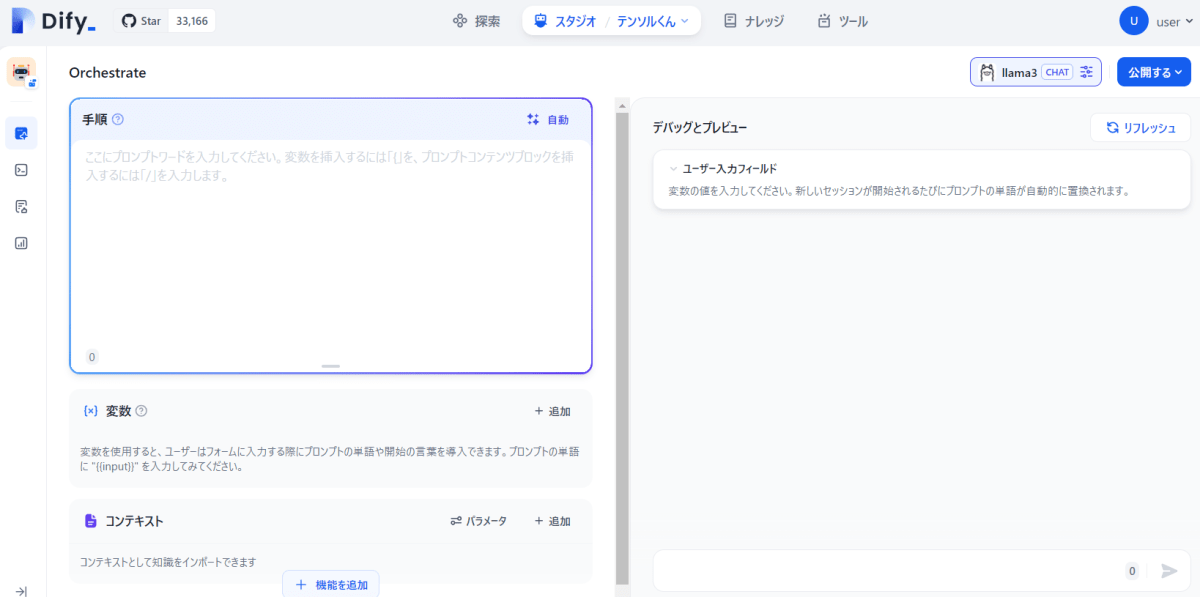
If you type something into the input field at the bottom right, you can chat just like ChatGPT. However, since it often responds in English, it's useful to specify "in Japanese."
RAG
This alone isn't very interesting, so let's try RAG. According to NRI's explanation of RAG:
What is RAG?
Retrieval-Augmented Generation (RAG) is a technique to improve the accuracy of answers by combining text generation from Large Language Models (LLMs) with the retrieval of external information.
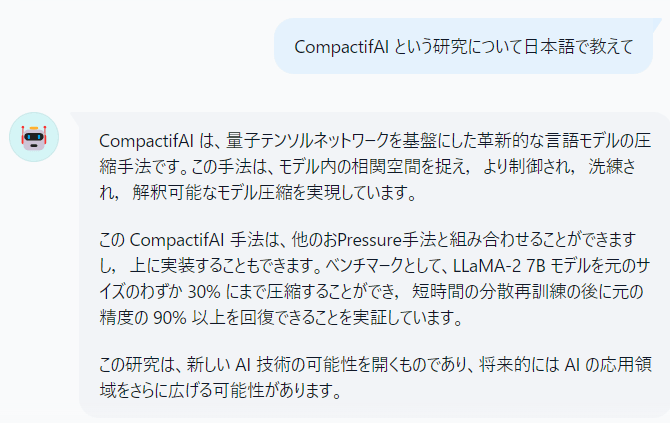
In the case of stock Llama 3, it gives rather vague or incorrect answers for things it doesn't know, as shown below:
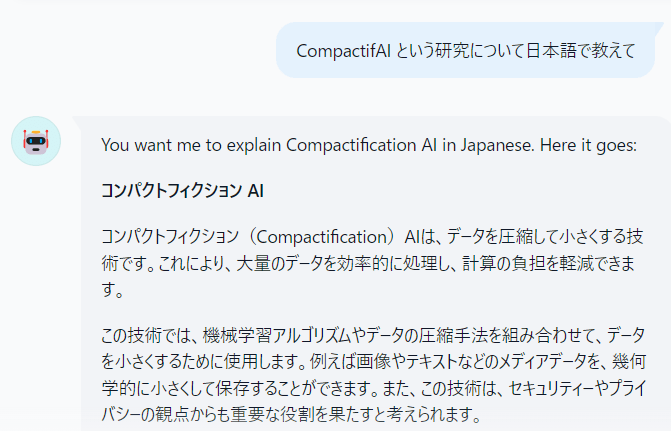
The "CompactifAI" being asked about here refers to this year's paper: CompactifAI: Extreme Compression of Large Language Models using Quantum-Inspired Tensor Networks, which discusses model compression using tensor network technology. It's unlikely that the model would have this knowledge out of the box.
In the Dify menu, to the right of "Studio" at the top center, there is "Knowledge," where you can extend the knowledge base. Clicking "Create Knowledge" brings up a floating window like the one below. Interestingly, you can upload PDFs directly, so drag and drop the file.

Once finished, return to the chatbot screen and register the uploaded PDF knowledge by clicking "+ Add" in the "Context" section at the bottom left.
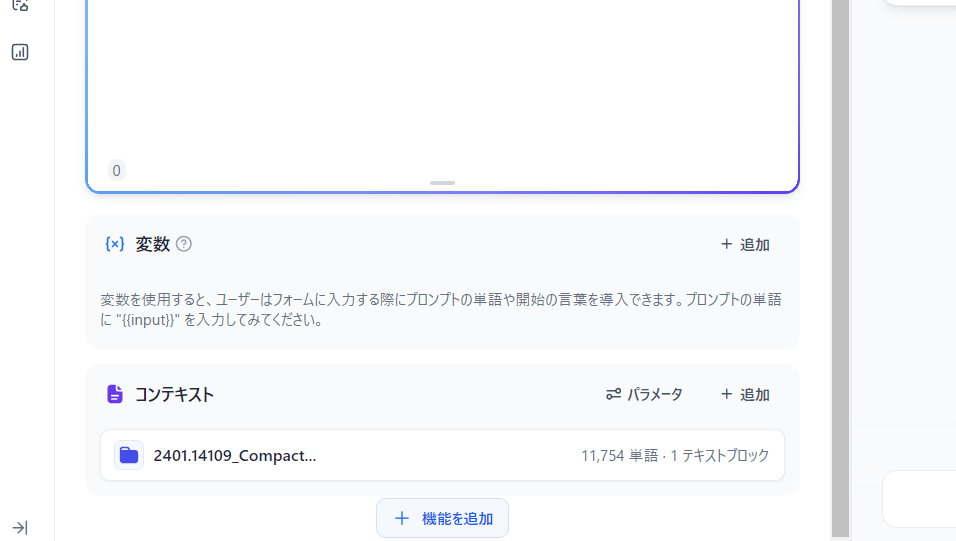
In this state, asking the exact same question as before yields a significantly different response.
Summary
By running Llama 3 with Dify + Ollama and adding RAG knowledge, I was able to have it provide a brief summary of a paper from this year. It consumes quite a bit of workspace—or rather, it eats up storage rapidly—so you'll likely want about 100GB of free space to be safe. If you don't use Docker, you might be able to keep it a bit more compact, but personally, I dislike cluttering my host environment.
Discussion
補足
ストレージの消費量は例えば以下のように推移する:
また、docker のイメージが沢山 pull される: