iTranslated by AI
CLI and Go package for generating files and directories from Markdown input


What is it?
It uses *, -, +, or # along with indentation to represent file and directory layouts in Markdown. By passing that Markdown as input to the CLI, it generates the corresponding files and directories in the current directory (from here on, I will focus the explanation on the CLI).
Also, you can find the CLI here.
Exporting a Sample Markdown
This CLI includes a feature to output a sample Markdown to standard output so that you can try it out immediately after installation. Let's actually run it.
$ gtree template
- gtree
        - cmd
                - gtree
                        - main.go
        - testdata
                - sample1.md
                - sample2.md
        - makefile
        - tree.go
Running a Dry Run
We were able to output the sample Markdown. Now, let's try generating the files and directories! ...But before that, you might want to check how they will be generated. Since this CLI also has a dry-run mode, let's try that feature first.
$ gtree template | gtree mkdir --dry-run
gtree
├── cmd
│   └── gtree
│       └── main.go
├── testdata
│   ├── sample1.md
│   └── sample2.md
├── makefile
└── tree.go

9 directories, 0 files
The output looks like this. Since it's a dry run, no actual files or directories are created. Also, if there are invalid names (e.g., a name containing /), it will be detected as an error.
By the way, this tree output feature partially reuses the logic used in "CLI/Web to output a tree from Markdown format input".
Generating Files and Directories
In the last line of the dry run result executed above, do you see 9 directories, 0 files?
As you might have noticed, the default behavior only generates directories. To generate files, you use the -e flag.
$ gtree template | gtree mkdir --dry-run -e .go -e .md -e makefile
gtree
├── cmd
│   └── gtree
│       └── main.go
├── testdata
│   ├── sample1.md
│   └── sample2.md
├── makefile
└── tree.go

4 directories, 5 files
The last line of the output changed to 4 directories, 5 files. This shows that .go, .md, and makefile are now recognized as files.
To make it a bit clearer, here is an image.
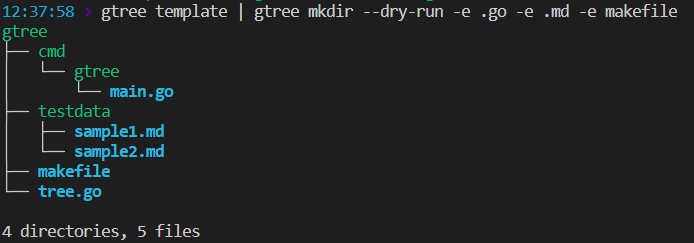
(I made the dry-run mode output colored. I like the natural-looking colors.)
Now that we're ready, let's generate the files and directories.
$ tree gtree
gtree [error opening dir]

0 directories, 0 files
$ gtree template | gtree mkdir -e .go -e .md -e makefile
$ tree gtree
gtree
├── cmd
│   └── gtree
│       └── main.go
├── makefile
├── testdata
│   ├── sample1.md
│   └── sample2.md
└── tree.go

3 directories, 5 files
First, we confirm that the directory doesn't exist with tree gtree.
Next, we generate the files and directories with gtree template | gtree mkdir -e .go -e .md -e makefile.
Finally, we confirm the actual generated state with tree gtree.
Final output image
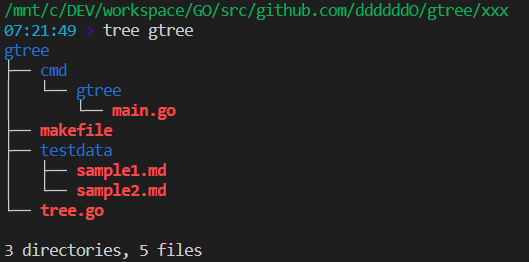
So far, we've looked at the specific usage.
When can it be used?
To be honest, I haven't come up with a great way to use it yet. If anything, if you have a directory structure that serves as a project template, it makes reproducing that structure easy and error-free... that's about it.
Additionally, it might be possible to use it with Ansible or other configuration management tools to generate the same files and directories across multiple remote environments.
How to install?
We provide the following three installation methods:
- go install
- Requires Go 1.18 or higher.
go install github.com/ddddddO/gtree/cmd/gtree@latest
- Homebrew
brew install ddddddO/tap/gtree
- binary download
- Please download from here, add it to your path, and use it.
Appendix
The features introduced in this article can also be used as a Go package. For details, please refer to the README in the repository.
Discussion