iTranslated by AI
The content below is an AI-generated translation. This is an experimental feature, and may contain errors. View original article
📝
Fixing "Duplicate class" Errors when Migrating from Java to Kotlin on Android


Overview
- During Android app builds,
Duplicate classerrors occur due to dependency issues. As the error message suggests, the same class exists in multiple libraries. - Locate where the dependencies are being loaded within
build.gradle, and if they are unnecessary, remove them.
Prerequisites
- I am working on enabling Kotlin in a Java-only project in Android Studio.
- Although not directly related to the main issue, I am developing an application that integrates native and Unity components by exporting a Unity-made app as UaaL (Unity as a Library).
Details
Migration from Java to Kotlin
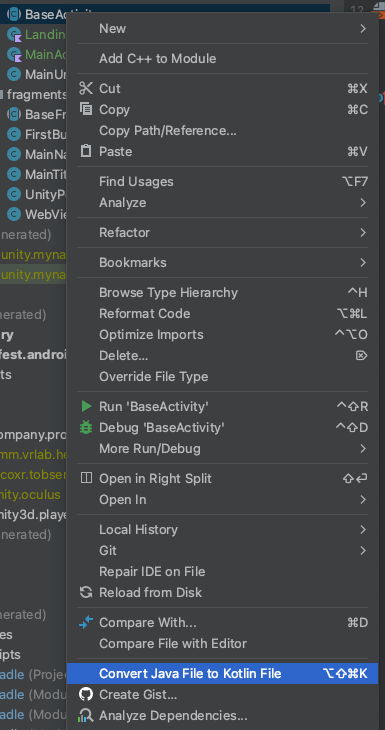
- Right-click a Java file and select the button to convert it to Kotlin.
build.gradle(Project ProjectName)
plugins {
    id 'com.android.application' version '7.2.2' apply false
    id 'com.android.library' version '7.2.2' apply false
+   id 'org.jetbrains.kotlin.android' version '1.9.0' apply false
}
build.gradle(Module app)
apply plugin: 'com.android.application'
+apply plugin: 'org.jetbrains.kotlin.android'

dependencies {
Errors Occurring
- A
Duplicate classerror occurs when attempting to build.
Example
Duplicate class kotlin.time.TimedValue found in modules jetified-kotlin-stdlib (kotlin-stdlib.jar) and jetified-kotlin-stdlib-1.9.0 (org.jetbrains.kotlin:kotlin-stdlib:1.9.0)
Duplicate class org.jetbrains.annotations.TestOnly found in modules jetified-annotations-13.0 (org.jetbrains:annotations:13.0) and jetified-kotlin-annotations (kotlin-annotations.jar)
...A large number of similar errors occurred

Solution
- The cause of the duplication was the set of files being loaded from where dependencies are defined in the
unityLibrarymodule.
build.gradle(Module unityLibrary)
apply plugin: 'com.android.library'

dependencies {
    implementation fileTree(dir: 'libs', include: ['*.jar']) // ← This
- It is configured to load all .jar files using a wildcard.
- Checking the loading destination (Unity build/unityLibrary/libs), the three files selected in the image below were present. This was the cause.

- After deleting these three files, I was able to build without any errors 🎉
(Supplementary) About the cause of the generation of kotlin-xxx.jar files
- It was found that the output was caused by a plugin called Bugsnag being used on the Unity side. (Bugsnag is an error detection tool.)
- When I deleted Bugsnag in the Package Manager on the Unity side and built it, these files were not included in the output.
- While Bugsnag was still being used on the Unity side, I intentionally caused an error by building after deleting the three files from unityLibrary/libs according to the solution above. As a result, the bug notification was still delivered. => Therefore, if the same functions (classes) exist in other libraries, it seems it will work without issues.
References
Discussion