iTranslated by AI
Building a Custom Next.js ISR: Cloudflare Workers Edition (Cache API Considerations)




Next.js has a rendering mechanism called Incremental Static Regeneration (hereafter: ISR). However, it is known that this does not function perfectly unless you use Next.js on Vercel. Nevertheless, this ISR mechanism is highly effective not only for reducing server processing costs compared to traditional SSR but also for response times due to its caching nature.
In this article, I will document the techniques for building this ISR independently.
You can find the continuation of this article here, so please check it out as well.
【Prerequisites】
- This article will not explain what ISR is.
- Due to the system configuration, the volume is too large to explain everything in one article, so it will be divided into multiple parts.
- There are some constraints on the system configuration detailed in this article.
- The Next.js (or equivalent) used does not render using data fetched in server-side processes like
getServerSideProps. - There are mechanisms locked into specific services, such as Cloudflare Workers. If you can replace them with other services, please consider doing so yourself.
- The Next.js (or equivalent) used does not render using data fetched in server-side processes like
Conclusion
It is possible to achieve ISR using Cloudflare Workers. However, when trying to get as close as possible to Next.js ISR on Cloudflare Workers, the Cache API is not ideal. In fact, the Cloudflare Workers Cache API may fail to hit the cache even with the same key.
If you are concerned about the cache hit rate, I recommend using fetch, Cloudflare KV, or Durable Objects.
System Overview
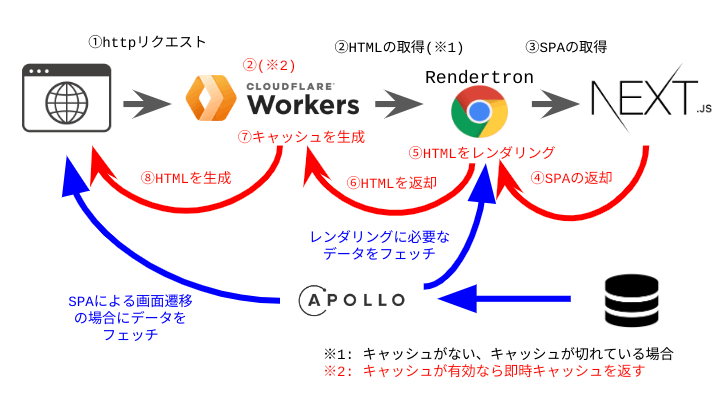
The Role of Cloudflare Workers
In this configuration, the role of Cloudflare Workers in achieving ISR is to retain the rendered results. The methods and precautions for performing that role are described below.
Retaining Cache
There are two main ways to cache requests in Cloudflare Workers. The first is to have the fetch process itself to the origin perform the caching. The second is to use the Cache API to save the fetched request as a cache. Since both might be confusing in words, I will explain them with code samples.
Caching using fetch itself
There is a sample on the Cloudflare Workers page, so I will use it for explanation.
The important part is here:
  let response = await fetch(request, {
    cf: {
      // Always cache this fetch regardless of content type
      // for a max of 5 seconds before revalidating the resource
      cacheTtl: 5,
      cacheEverything: true,
      //Enterprise only feature, see Cache API for other plans
      cacheKey: someCustomKey,
    },
  });
First, there is something called fetch here that makes requests in JavaScript or Node.js. However, you can see that this fetch is different from a regular fetch because it passes a cf option. This is an option that can be passed to fetch when used on Cloudflare Workers. Details about the types of options that can be passed can be found here.
In the above example, an option is passed to save the response as a cache for "5 seconds" for "all requests [1]" using the "specified cache key." Therefore, if there is a cache hit under these conditions, it returns the cache without performing a fetch to the origin. Conversely, if there is no cache hit, it accesses the origin and generates that response as a cache. This process seems fine at first glance, but it is slightly off in terms of achieving Next.js ISR. The behavior of Next.js ISR is the same in that it returns the cache as is if it exists, but the behavior when the cache does not exist is different. Next.js ISR sets an expiration date for the cache, and the expiration means "the cache has expired" rather than "there is no cache." In that case, it temporarily returns the expired cache to the client but regenerates the cache in the background. In short, Next.js ISR always returns a cache to the client, so there is no response delay when the cache has expired. In that respect, the caching of Cloudflare Workers' fetch itself is close but does not satisfy the requirements.
Method for caching using the Cache API
Caching in Cloudflare Workers is not limited to fetch. As seen in the documentation here, there is also something aptly named the Cache API. I will explain only the important parts here as well.
  // Construct the cache key from the cache URL
  const cacheKey = new Request(cacheUrl.toString(), request);
  // Check whether the value is already available in the cache
  // if not, you will need to fetch it from origin, and store it in the cache
  // for future access
  let response = await cache.match(cacheKey);

  if (!response) {
    ~~omitted~~
    // If not in cache, get it from origin
    response = await fetch(request);
    ~~omitted~~
    // Store the fetched response as cacheKey
    // Use waitUntil so you can return the response without blocking on
    // writing to cache
    event.waitUntil(cache.put(cacheKey, response.clone()));
  } else {
    console.log(`Cache hit for: ${request.url}.`);
  }
  return response;
In this process, cache.match is used to check if a cache exists. If it exists, it is returned as the response. If cache.match finds no cache, it performs a fetch and saves the response using cache.put. I won't explain event.waitUntil in detail, but you can think of it as something that executes processing asynchronously. For this Cache API used with cache.match, you can also set a cache expiration date. This corresponds to the Cache-Control and Expires headers in the response. Therefore, by modifying the response headers of the fetch result from the origin, you can freely set the expiration date of the cache stored in the Cache API. However, Cache-Control and Expires have a priority, and if both are set, the expiration is controlled by Cache-Control.
Looking at this alone, the behavior doesn't seem much different from caching via fetch, and it feels like it might not meet the requirements for achieving Next.js ISR. However, based on the priority of Cache-Control and Expires mentioned earlier, it is possible to set it similarly to the ISR cache. For example, by setting the actual expiration date of the cache in Expires and setting a very long time (say, 100 years) in Cache-Control, it seems possible to keep the cache enabled like ISR while updating it because the actual expiration date has passed.
Points to Note When Using the Cache API
From the previous explanation, it seems like a cache specification equivalent to Next.js ISR could be implemented using the Cache API. However, there is a very significant pitfall in this Cache API.
The Cache API Does Not Guarantee a Hit Just by Saving
Looking at the title alone, you might think, "Can't the cache be saved properly?" but that's not the case. The Cache API does save the cache correctly, but there is an issue with the location where it is saved. This is stated in this document as follows:
The Cache API is available globally but the contents of the cache do not replicate outside of the originating data center. A GET /users response can be cached in the originating data center, but will not exist in another data center unless it has been explicitly created.
To paraphrase very roughly, it says, "Data saved with the Cache API is only stored in the data center where it operated and is not synchronized to other data centers." What this means is that Cloudflare Workers is what's called edge computing, and this edge computing consists of various locations. For instance, even within Japan, there are multiple locations, and while they aren't exactly equivalent to data centers, as of now, Cloudflare has four data centers in Japan. Consequently, cache saved with the Cache API is stored in the data center where it operated and can be retrieved there, but it cannot be read from other data centers. In short, the Cache API alone does not fulfill its role as a cache.
Use KV or Durable Objects for Cache Retention
I have written extensively about Cloudflare's caching, so does that mean Next.js ISR cannot be achieved? That's not the case. There are still other storage options available to implement caching, such as Cloudflare KV or Durable Objects. I won't go into a detailed comparison here, but I believe the requirements can be met using Cloudflare KV for this configuration.
You can implement the ISR cache specification by saving the cache to Cloudflare KV as follows:
const restoreResponse = ({ body, headers }: { body: string, headers: HeadersInit }) => {
  return new Response(body, { headers: cacheResponseJson.headers })
}

const createCache = (cacheKey: Request, response: Response) => {
  await RESPONSE_CACHE_KV.put(
    `${cacheKey.url}`,
    JSON.stringify({
      headers: headerToHash(response), // Convert headers to an associative array and save
      body: await response.text(),
      cacheTtl: new Date(cacheTtl.toISOString()).getTime(),
    }),
    {
      expirationTtl: 60 * 60 * 24 * 365
    }
  )
}

const cacheResponseJson = await RESPONSE_CACHE_KV.get<{
  headers: HeadersInit,
  body: string,
  cacheTtl: string,
}>(
  `${cacheKey.url}`,
  { type: 'json' }
)

let response
let isCreateCache = false
if (!cacheResponseJson) {
  response = await fetch(request)
  isCreateCache = true
} else {
  response = restoreResponse(cacheResponseJson)
  if (new Date().getTime() > cacheResponseJson.cacheTtl) {
    isCreateCache = true
  }
}

if (isCreateCache) {
  event.waitUntil(createCache(cacheKey, response ?? await fetch(request)))
}
This is an example using Cloudflare KV. By setting a long expiration for the Cloudflare KV entry itself and storing the actual intended expiration date within the cache data, you can check if the cache has expired upon retrieval. If it has, you can then trigger a request to the origin to regenerate the cache.
Conclusion
I have covered the precautions regarding the Cache API when using Cloudflare Workers. While using Tiered Cache can improve the cache hit rate and alleviate these symptoms, it is still not a complete solution since it doesn't synchronize data between all data centers. When implementing caching with Cloudflare Workers, I recommend using it with a thorough understanding of whether the behavior aligns with your specific requirements.
Although not covered in this article, since we are caching the SPA generated by Next.js as full page HTML, ensuring data consistency with the GraphQL layer is also necessary. I plan to write a separate article about that.
Reference materials:
Improving Cache Hit Rate by Enabling Cloudflare Tiered Cache (Hierarchical Cache)
-
By default, Cloudflare is configured not to cache items where the
content-typeisapplication/html. ↩︎
Discussion