iTranslated by AI
Trying Out Tableau Langchain: Querying Tableau Data with Generative AI




I'm Tamai, a fledgling Customer Success Manager.
A colleague at work told me about the following:
So, I'm going to actually try it out (the intro is way too casual).
What is Tableau Langchain?
First of all, what is Langchain? According to the following, it is "a library for efficiently implementing functional extensions of large language models such as ChatGPT."
It feels natural to think, "So this is a library for creating something that combines Tableau and LLMs?" but in reality, it was more like an application that allows you to ask questions (execute queries) through an LLM against data sources published to Tableau Cloud (or Tableau Server).
Well, understanding progresses faster by touching it than by thinking about it, so let's get on with the verification.
Trying it out
Preparation
This app (?) is designed to work by combining various LLM-related services, and you need to prepare them in advance (it's quite a hassle). So, I'll list them out.
-
OpenAI API
- Create an account and make the API available.
- Yes, a paid subscription is required to run Tableau Langchain.
- I paid $10 while shedding tears of blood.
-
Langsmith
- Described as a useful tool for operating LangChain in production environments.
- Create an account and make the API available.
-
Pinecone
- A so-called vector database (stores text by vectorizing it).
- Create an account and make the API available.
-
Tavily
- A search engine built for LLMs.
- Create an account and make the API available.
In addition to the above, the following are also required:
- Tableau Cloud or Tableau Server
- I'll use Tableau Cloud for this. 2025.1.
- Set up a Connected App for Tableau Langchain.
- Heroku
- Required if you choose the Heroku deployment method among the usage methods described later.
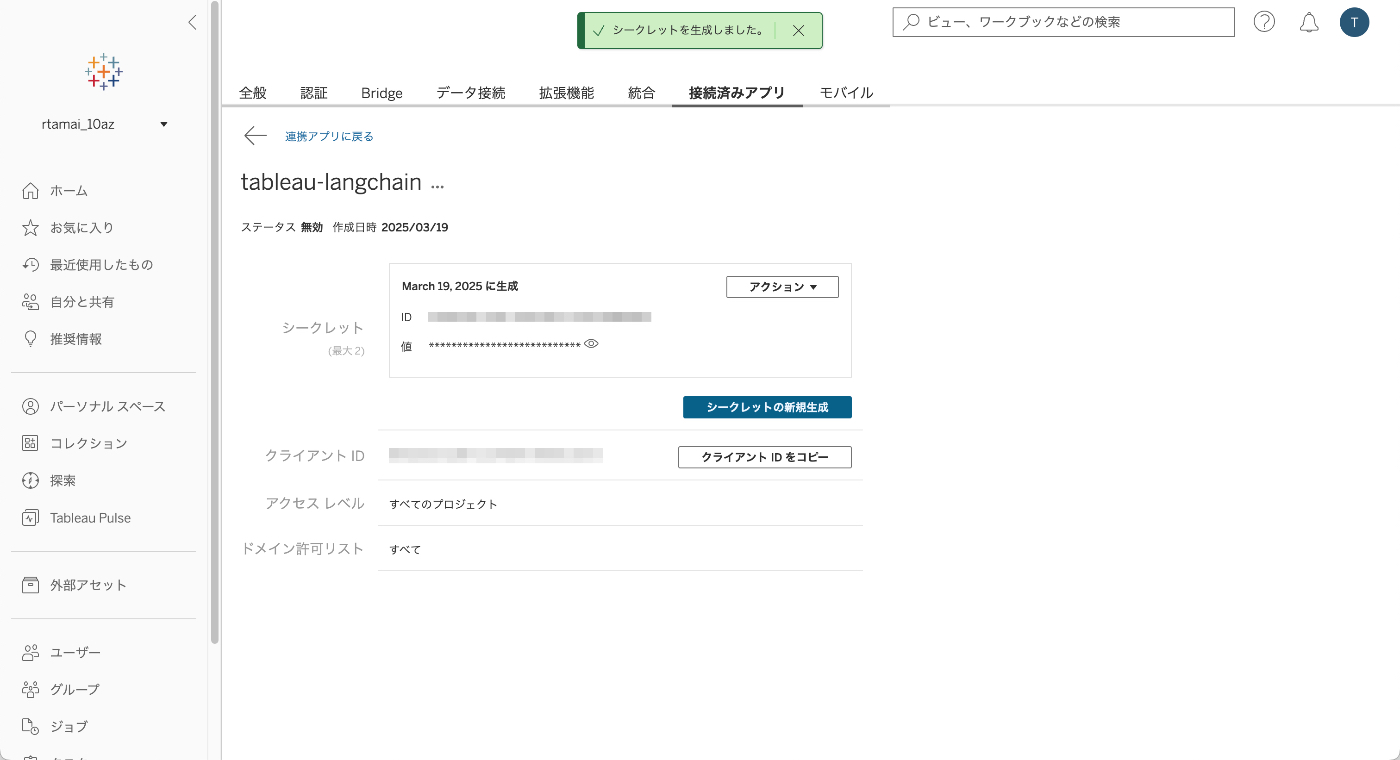
The connected app looks like this. Since it's a hassle, I just gave it full permissions♪
Since I'm not familiar with LLM development at all, this is just my personal impression, but these services seem to be quite major players in LLM app development using RAG. RAG is a technology that combines external information retrieval with LLM responses. Tableau Langchain is precisely an app (?) that provides answers by combining published data sources with LLM responses—pure RAG and LLM stuff—which is likely why it uses these services (again, this is a personal impression; there's a high possibility I'm wrong).
Choosing the usage (verification) method
At the time of writing this article, there seem to be three ways to try Tableau Langchain:
- Try it in some kind of Notebook (like Jupyter)
- There is a sample ipynb file in the repository.
- Deploy to Heroku and try it
- Deploy locally and try it
Reading the README, using a Notebook seemed like the easiest way, while the local environment seemed the most troublesome (setting up a dedicated Python environment looks like a nightmare).
Since doing the easiest thing is no fun, this time I'll try deploying to Heroku (after all, it's my company's product).
Deploying to Heroku
The README kindly provides a "Deploy to Heroku" button, so I'll use that. Clicking the button takes you to the Heroku setup screen.
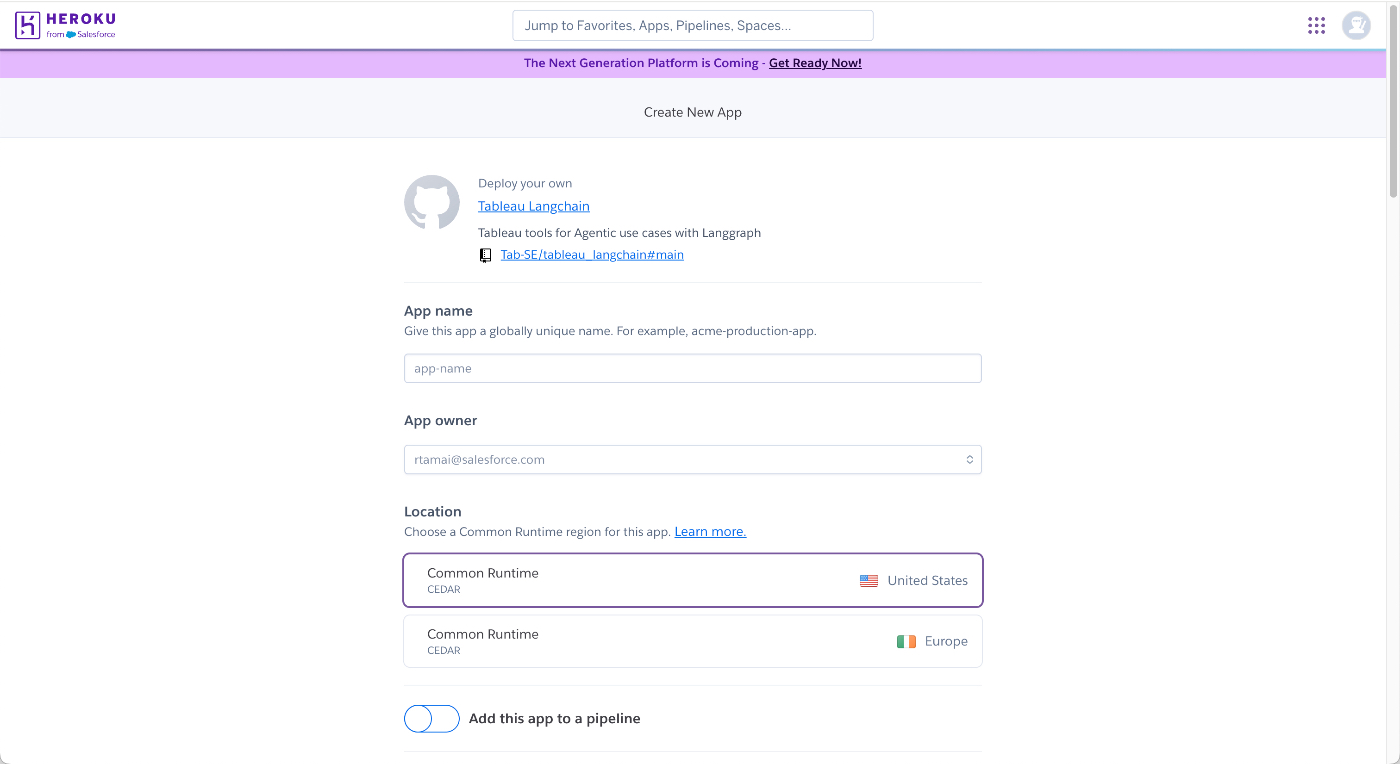
On this screen, you fill in values for the predefined environment variables. You can deploy immediately as long as you input them, but man, there are so many environment variables... Below is a list and explanation of them (in no particular order).
-
DEBUG: Specifies how much logging to output while the agent is running. Set to 1 or 0.- Usually 0
-
OPENAI_API_KEY: Literally what it says -
AGENT_MODEL: Specifies the LLM model used by the agent (e.g., gpt-4o-mini).- See OpenAI API documentation for details
-
RETRIEVER_MODEL: Specifies the embedding model used by the Retriever tool (e.g., text-embedding-3-small)- Honestly, I don't really understand this one
-
LANGCHAIN_TRACING_V2: A boolean (true or false) specifying whether to perform agent tracing in Langsmith.- Honestly (ry
- I just set it to true for now
-
LANGCHAIN_ENDPOINT: Langsmith endpoint- Default value is https://api.smith.langchain.com.
-
LANGCHAIN_API_KEY: Literally what it says -
LANGCHAIN_PROJECT: Langsmith project name -
TAVILY_API_KEY: Literally what it says -
PINECONE_API_KEY: Literally what it says -
PINECONE_ENVIRONMENT: The cloud environment where Pinecone is hosted- I wasn't sure how to check this, but I used the region and cloud name found in the sample code on the "Welcome to your project" screen that appears right after account creation (I'm not sure if this is correct)
- In my case, it was
us-east-1-aws
-
TABLEAU_DOMAIN: Hostname of the Tableau Cloud or Server environment- Up to
https://xxxxx.tableau.com/
- Up to
-
TABLEAU_SITE: Site name- You can check this in the URL.
-
TABLEAU_API: Tableau REST API version- I used the latest 3.25.
-
TABLEAU_JWT_CLIENT_ID: Client ID of the connected app -
TABLEAU_JWT_SECRET_ID: Secret ID of the connected app -
TABLEAU_JWT_SECRET: Secret value of the connected app -
TABLEAU_USER: Tableau username

Filling them in with all my heart
Struggles After Deployment
After inputting all the environment variables and deploying, it didn't work due to an error. (Even though I filled them in with all my heart)
The Chapter of Minor Code Fixes
First of all, there were some missing parts in the code itself, so I made some minor fixes (and secretly submitted my first-ever pull request[1]).
- The path to
main.pyspecified in the Procfile was incorrect. - Necessary libraries were missing from
requirements.txt.- tokenizers
- langchain_tableau
The Chapter of "Was it even designed as an API?"
I've come as far as deploying to Heroku with a burst of momentum, but first of all (I'm saying "first of all" too much), how is this app supposed to be used?
According to the README, it reads like "if you send a prompt via POST to the deployed app, you'll get an answer back." Judging from the commands in the Procfile that seem to run it in API mode, it appears to be intended to work as an API that receives a prompt as a request and returns an AI's answer as a response (internally, it executes queries against Tableau using VDS based on the received prompt).
However, looking at the app logs after deployment, it felt like the actual design didn't really assume it would work as an API.
Right after startup, messages like this appear in the log:
2025-03-24T06:53:42.496324+00:00 app[web.1]: Welcome to the Tableau Agent Staging Environment!
2025-03-24T06:53:42.496324+00:00 app[web.1]: Enter a prompt or type 'exit' to end
2025-03-24T06:53:42.496334+00:00 app[web.1]: User:
At first, I was excited, thinking, "Oh, I'm being welcomed," but on closer inspection, I'm concerned that there's a message that seems to be waiting for my input right there.
And then, it crashes with an error shortly after.
2025-03-24T06:53:42.496354+00:00 app[web.1]: An error occurred: EOF when reading a line
2025-03-24T06:53:42.497329+00:00 app[web.1]: Traceback (most recent call last):
2025-03-24T06:53:42.497521+00:00 app[web.1]: File "/app/main.py", line 94, in main
2025-03-24T06:53:42.497526+00:00 app[web.1]: user_input = input("User: \n").strip() # Use .strip() to remove leading/trailing whitespace
2025-03-24T06:53:42.497527+00:00 app[web.1]: ~~~~~^^^^^^^^^^^^
Regarding this error, it seems to be failing because it was supposed to wait for user input, but there is no user input (or it can't accept it).
If it were operating as an API, it should probably be waiting in a state where it can accept various HTTP requests instead of waiting for input at a prompt like this (not that I know for sure), but it seemed to me that it was clearly designed to have prompts typed directly into a CUI.
Direct Drive (Direct Execution) Chapter
So, wanting to get inside the deployed app, I first tried to connect via SSH normally. However, because the app itself was in an error state (as mentioned earlier), Heroku treated the app as being in a "Crashed" state (which is natural, I suppose...), and the SSH connection itself could not be executed.[2]
Just as I was at a loss for what to do, I found a certain feature in the Heroku menu.
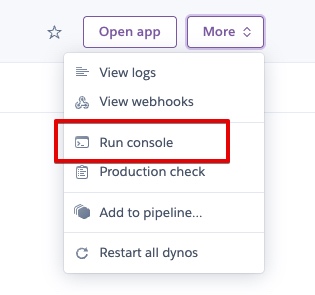
It looks like you can enter the deployed app (to be precise, a container called a Dyno) via CUI directly on the Web UI...! But then again, if the app is in a Crashed state, wouldn't this also be impossible...?
Since worrying won't get me anywhere, I tried running it anyway, and I got in.

This is the extent of the commands I know.
Throwing prompts
Once successfully inside, I'll first run the main program.
$ python main.py
[nltk_data] Downloading package punkt_tab to
[nltk_data]     /app/.heroku/python/lib/python3.13/site-
[nltk_data]     packages/llama_index/core/_static/nltk_cache...
[nltk_data]   Unzipping tokenizers/punkt_tab.zip.
Agent Graph saved as 'graph_visualization.png' | file size: 8936 bytes
<IPython.core.display.Image object>

Welcome to the Tableau Agent Staging Environment!
Enter a prompt or type 'exit' to end

User:
It finally started! ...But, as I wrote earlier, it really feels like it's only intended to be executed directly via CUI... Oh well.
Successful Example
In conclusion, the verification result was that it "succeeded when the prompt was in English and the data source was simple Japanese or English."
So, first, I'll post a screenshot of a successful result.

The data source I specified is the one from the famous Super Tamade, and in response to the prompt "List the stores," it actually returned a list of unique values for the dimension "店舗名" (Store Name) from the Super Tamade data on Tableau Cloud.
Here is the prompt I sent:
Please do not translate the dimension names into English, but use them as they are. List all the unique values for the dimension “店舗名”.
Regarding the first sentence, this LLM app has a tendency to translate the dimension names I write into English before interpreting them (none of your business), so I added it as a command to say "don't do that (use them as they are in Japanese)."
Examples that didn't go well
Next, let me introduce some examples that didn't go well.

In this Tamade data, there is a field for "distance from my previous employer's pre-relocation Osaka office (to each store)," and I'm asking a question using that.
The prompt itself seems fine in Japanese (well, it is an LLM after all), but surprisingly, "Osaka" was interpreted as "Oita"! And it's dutifully searching for a measure called "distance from Oita office" and repeatedly hitting an error saying "that data doesn't exist." My previous employer didn't have an Oita office!! (They did have a Fukuoka office.)
So, I tried saying something like "It's Osaka, not Oita," but then a new interpretation came where Oita was "Daibun" and Osaka was "Daito." There actually is a Daito City in Osaka, but is this just an incredibly high-level response?
When I tried changing how I wrote the prompt, it started giving answers, but they were just plain wrong (it returned addresses instead of store names, and instead of distance from the Osaka office, it brought back longitude...).


I tried various other things, but the only thing that worked was the store list mentioned earlier. If I used a data source that was entirely in English and used English prompts, it might work a bit better (but my verification energy has run out here).
Supplementary Information and Thoughts
Will it be introduced at Tableau Conference 2025?
TC25 will be held in San Diego this April, and there was one session that (I assume) will introduce Tableau Langchain.
If you're interested, register now and fly to the US!!
Products Realizing the Combination of BI and LLM
The idea of combining BI tools with LLMs is something everyone might think of, but here are a few products that have actually implemented it.
Looker
Looker, the BI tool acquired by Google Cloud, already features generative AI integration.
A colleague from my previous job thoroughly verified this in the article above, and it feels like it's close to realizing the "dream" of BI tools: "being able to ask questions about data in natural language." As mentioned in the article, since there is already a semantic layer defined in code called LookML, it feels like that is being leveraged for the accuracy of the generative AI's responses.
Omni
There is a feature called "AI-powered summarization" that can identify data anomalies and insights regarding trends. It seems you can ask various questions in a conversational format to something called "Blobby AI."
Tableau Next
Our beloved Tableau has announced "Tableau Next," which runs on Salesforce, as a separate line from the current Tableau.
This also has a feature to ask various questions about data using text. While Looker improves response accuracy through a semantic layer via LookML, Tableau Next builds a semantic layer by integrating with [Salesforce Data Cloud][3] and uses that to ensure accurate answers.
Thoughts
It’s just a hunch, but it still feels like it’s in its early stages (perhaps still under development?), and I wonder if it will become a bit more polished by the time of the TC25 session.
Nonetheless, the ability to ask analysis-related questions in natural language against Tableau (its data) is significant. This is because, currently, only the aforementioned Tableau Next is slated to support that (the "Tableau Agent" available in conventional Tableau is limited to letting the LLM create Vizzes or calculated fields). Since Tableau Next is a product that runs on Salesforce, it may be difficult to use for organizations or companies that don’t use Salesforce or whose analysis infrastructure exists separately from Salesforce. For such users, Tableau Langchain might be something that offers hope, considering the potential for future evolution.
Also, as a small request, I’d like to be able to ask questions against the entirety of the data on Tableau Cloud or Tableau Server (since you currently need to specify a data source).
Discussion