iTranslated by AI
The struggle of building a smooth editor for iOS browsers


Creating a WYSIWYG editor with a good user experience on iOS browsers (Safari, Chrome, etc.) is nearly impossible. There are various reasons, but I think the most frustrating one is the behavior when the virtual keyboard (on-screen keyboard) is displayed.
position: fixed doesn't work when the keyboard is displayed
In WYSIWYG editors, you often want to fix buttons for text styling or image insertion somewhere on the screen.

However, in iOS Safari, it is difficult to fix something on the screen using only CSS like position: fixed when the keyboard is visible.
Even if you use position: fixed with bottom: 0 or top: 0, the specification is such that the element will not be fixed to the screen (this is the same even with position: sticky).
Workarounds don't work well either
Services such as note and Scrapbox use brute force to ensure that elements can be fixed somewhere on the screen even while the keyboard is displayed. Specifically, they set event listeners for things like scrolling while the keyboard is up, calculate the distance from the window etc. each time, and adjust the top or transform values in px.
(Added in January 2024: I was told about a better-looking workaround)
However, there is a difficult problem with these workarounds as well. That is, even if the position is recalculated immediately in the event handler, there is a lag until it is reflected on the screen.
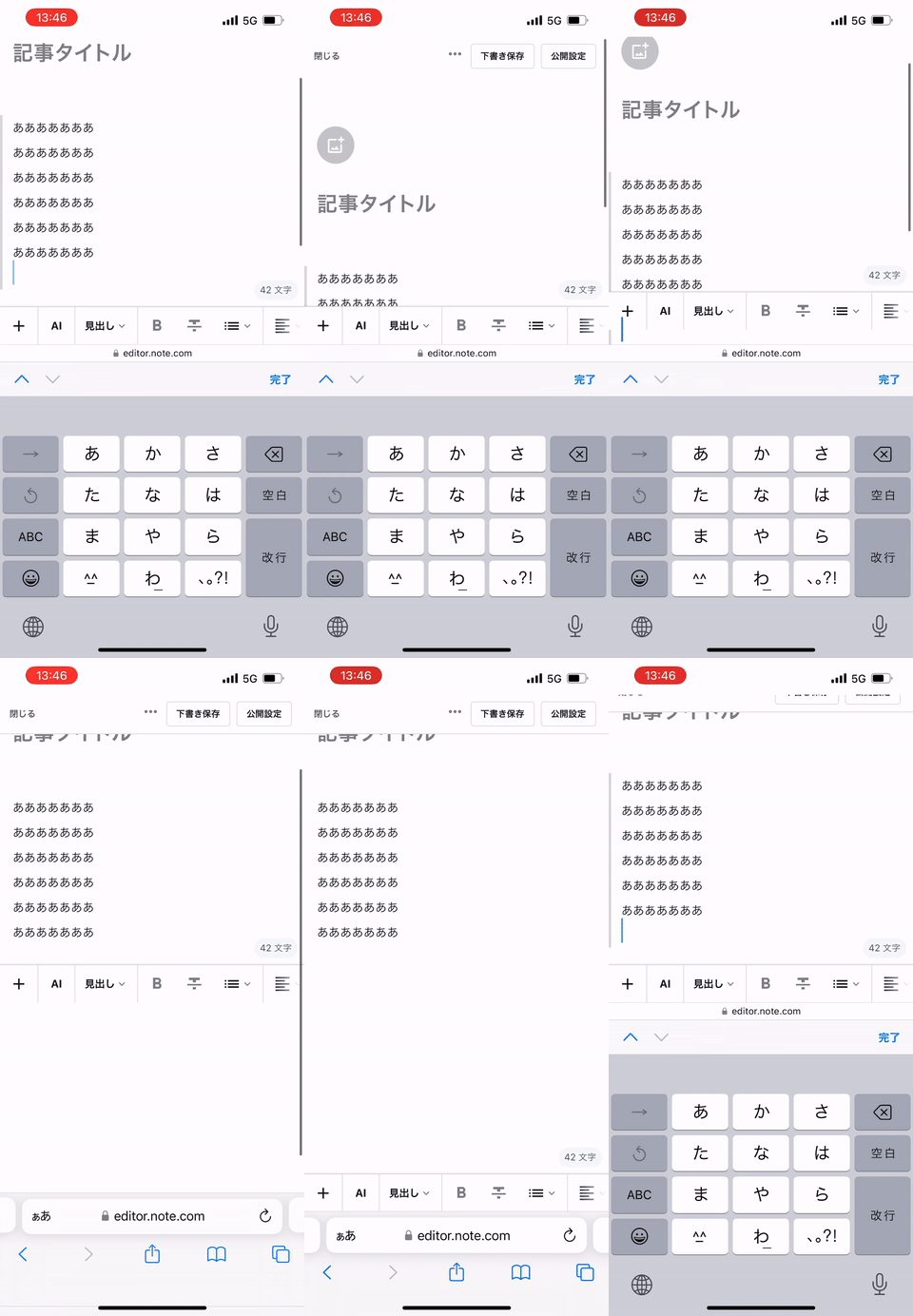
As shown here, the menu position shifts when scrolling, or the menu might stay near the middle of the screen for a while when the keyboard is closed.
I have never seen a service that handles this problem well in iOS Safari. While there are other painful issues unique to iOS Safari, this specific problem is especially frustrating because even the workarounds are difficult.
Solutions
If you want to pursue the best user experience, I think the current options are either "mobile editing via native apps" or "giving up on WYSIWYG editors." Major players like note, Substack, and Notion likely have the resources to provide native apps, but it's tough for those operating with a small team...
Discussion