iTranslated by AI
Enabling Recommended AWS Security Services with Terraform (Partially Manual)


Last time, I tried provisioning CloudFront and WAF using Terraform.
This time, I've created something like a template for configuring security-related services that are better left enabled, once again referencing Classmethod's blog (and YouTube).
Blog
YouTube
In terms of content, I think this falls into the intermediate category.
- CloudTrail
- Config
- GuardDuty
The setup involves enabling these services, aggregating the results into Security Hub, and then using AWS Chatbot to send Slack notifications.
Since CloudTrail needs to be enabled to activate AWS Config, and GuardDuty likely monitors CloudTrail logs using machine learning, I envision the setup as follows:
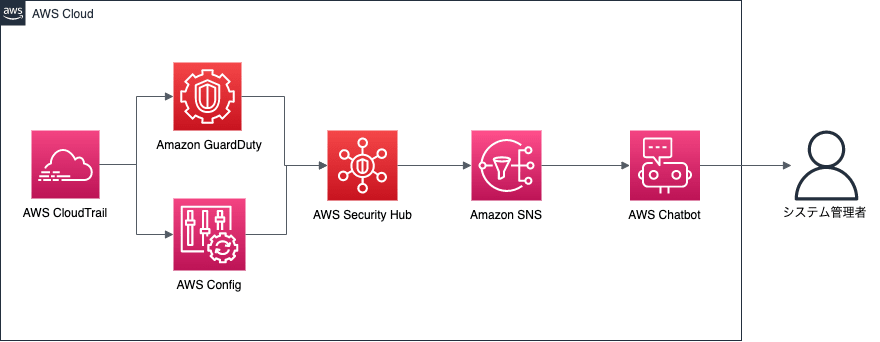
Scope of this Project
Prerequisites
- Implements detection and notification in a single account.
- Additional work is required to aggregate Security Hub results from multiple accounts into a single account.
- Includes some manual steps.
- Creating AWS Chatbot
- Because AWS Chatbot resources were not available in Terraform as of April 12, 2022.
- There is a method like this:
- https://zenn.dev/shonansurvivors/articles/894cae91806052
- Since it is expected that Terraform will support it once the AWS SDK (Go) supports Chatbot, I haven't replaced it with a Lambda function.
- Because AWS Chatbot resources were not available in Terraform as of April 12, 2022.
- Some Security Hub settings
- Only the activation of Security Hub is handled by Terraform.
- Standards to be applied must be configured manually.
- Creating AWS Chatbot
- All rules for Config etc. will be enabled across all regions.
- As this increases costs, you should limit the rules applied as necessary.
What we will do
- Provision the following resource groups and their associated resources with Terraform:
- CloudTrail
- Config
- GuardDuty
- SecurityHub
- EventBridge rules
- SNS topics
Implementation Details
Again, I won't write out the entire implementation here; instead, I'll excerpt the key points.
If you want to see the source code, please refer to this repository.
CloudTrail
/*
  Enable CloudTrail
*/

module "cloudtrail" {
  source = "./modules/cloudtrail/"

  prefix = local.default_prefix
  region = var.region
}
On the module side, CloudTrail is enabled for all regions as follows:
resource "aws_cloudtrail" "main" {
  name                          = "${var.prefix}-trail"
  s3_bucket_name                = aws_s3_bucket.cloudtrail.id
  include_global_service_events = true
  is_multi_region_trail         = true
  kms_key_id                    = aws_kms_key.cloudtrail.arn
  s3_key_prefix                 = "cloudtrail"
}
Config
Since Config and GuardDuty need to be enabled in all regions, I'm using a slightly unusual way to call them.
I used the method described in BASE's blog as a reference.
/* Enable Config in each region */
module "config_ap-northeast-1" {
  source = "./modules/config/"

  prefix         = local.default_prefix
  bucket_name    = aws_s3_bucket.config.bucket
  is_main_region = true
  config_role    = aws_iam_role.config.arn

}
module "config_us-east-1" {
  source = "./modules/config/"

  prefix         = local.default_prefix
  bucket_name    = aws_s3_bucket.config.bucket
  is_main_region = false
  config_role    = aws_iam_role.config.arn

  providers = {
    aws = aws.us-east-1
  }
}
# ...omitted, but enabled for all regions
Also, according to AWS Config best practices, monitoring global resources should only be enabled in one region, so I'm controlling this with a variable called is_main_region.
resource "aws_config_configuration_recorder" "main" {
  name     = "${var.prefix}-config-recorder"
  role_arn = var.config_role

  recording_group {
    all_supported                 = true
    # Only monitor global resources in the main region
    include_global_resource_types = var.is_main_region ? true : false
  }
}

resource "aws_config_configuration_recorder_status" "main" {
  name       = aws_config_configuration_recorder.main.name
  is_enabled = true
  depends_on = [aws_config_delivery_channel.main]
}

resource "aws_config_delivery_channel" "main" {
  name           = "${var.prefix}-config-delivery-channel"
  s3_bucket_name = var.bucket_name
  s3_key_prefix  = "config"
  depends_on     = [aws_config_configuration_recorder.main]
}
GuardDuty
Just like Config, GuardDuty modules are called for each region so that it can be enabled in all regions.
module "guardduty-us-east-1" {
  source = "./modules/guardduty/"

  providers = {
    aws = aws.us-east-1
  }
}

module "guardduty-us-east-2" {
  source = "./modules/guardduty/"

  providers = {
    aws = aws.us-east-2
  }
}
# ...omitted, but enabled for all regions
resource "aws_guardduty_detector" "guardduty" {
  enable = true
}
SecurityHub
We only perform the activation in Terraform.
resource "aws_securityhub_account" "main" {}
Creating EventBridge Rules, SNS Topics, etc.
We will create the SNS topics and other resources that will be used by the AWS Chatbot (which is created manually).
/* Create CloudWatch Event */
# Only pick up CRITICAL or HIGH findings that are NEW
resource "aws_cloudwatch_event_rule" "securityhub" {
  name        = "${var.prefix}-securityhub"
  description = "SecurutiHub High and Critical Events Event"

  event_pattern = <<EOF
{
  "source": [
    "aws.securityhub"
  ],
  "detail-type": [
    "Security Hub Findings - Imported"
  ],
  "detail": {
    "findings":
      {
        "Compliance": {
          "Status": [
            {
              "anything-but": "PASSED"
            }
          ]
        },
        "Severity": {
           "Label": [
             "CRITICAL",
             "HIGH"
           ]
        },
        "Workflow": {
          "Status": [
            "NEW"
          ]
        },
        "RecordState": [
          "ACTIVE"
        ]
      }
  }
}
EOF
}

resource "aws_cloudwatch_event_target" "sns-publish" {
  rule      = aws_cloudwatch_event_rule.securityhub.name
  target_id = aws_sns_topic.chatbot.name
  arn       = aws_sns_topic.chatbot.arn
}


/* Create SNS Topic */

# Specify this when using Chatbot from the Management Console
resource "aws_sns_topic" "chatbot" {
  name              = "${var.prefix}-topic"
  kms_master_key_id = aws_kms_key.for_encrypt_sns_topic.id
}

resource "aws_sns_topic_policy" "chatbot" {
  arn    = aws_sns_topic.chatbot.arn
  policy = data.aws_iam_policy_document.chatbot.json
}
# ...omitted
Procedures for Applying Terraform and Verifying Operation
Applying Terraform
Create the resource groups with Terraform using the following steps:
cd infra/global
terraform init
terraform plan
terraform apply
Enabling AWS Chatbot (Manual)
Regarding manual steps, there are many detailed blogs and articles available, so I configured the Slack notifications by referring to the following:
I created the Chatbot following the steps in the "Chatbot Configuration" section of this blog.
Perform the operations from the AWS Management Console.
Make sure to specify the SNS topic created in modules/notification.
- Note: You need to create the destination channel in Slack beforehand.
Security Hub Settings (Manual)
Configure Security Hub standards and other settings.
Perform the operations from the AWS Management Console.
- Navigate to the Security Hub service from the Management Console.
- Click Go to Security Hub.
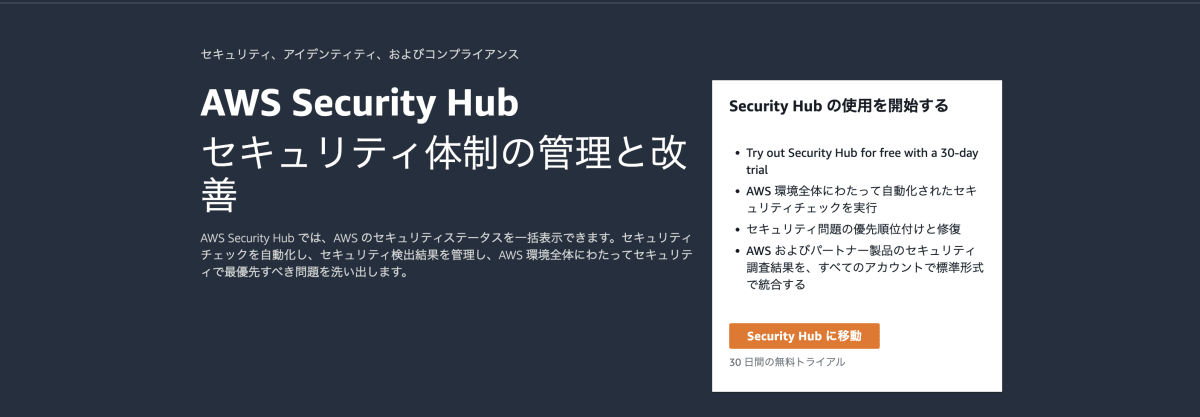
- Enable the standards you want to apply.
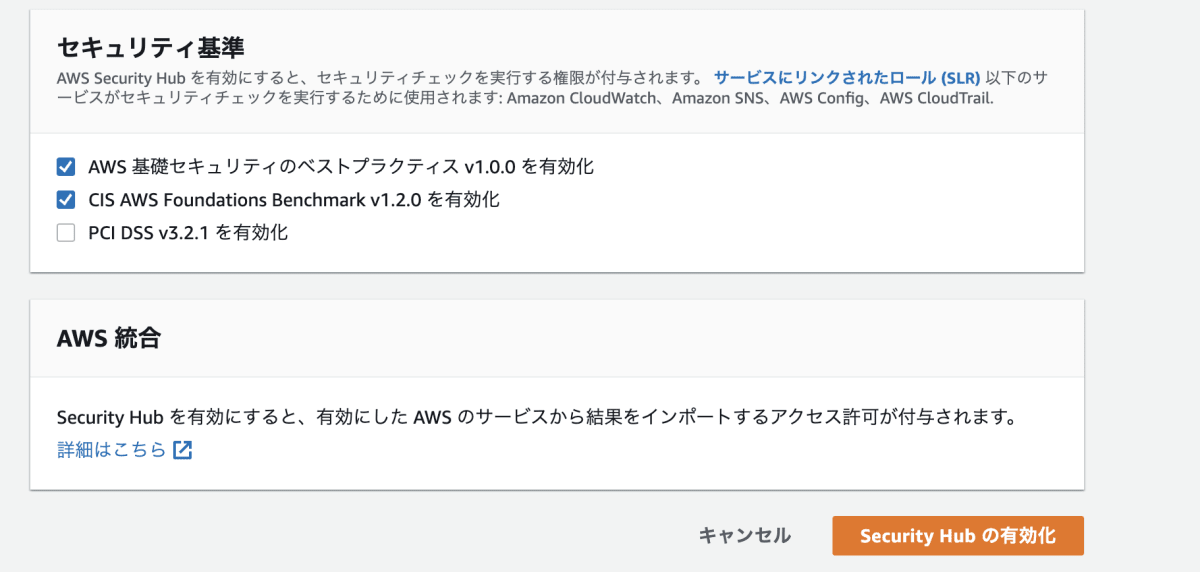
For this hands-on, enabling the following standard is sufficient:
- Enable AWS Foundational Security Best Practices v1.0.0.
Verification
If a new Critical or High issue is detected in Security Hub, a notification will be sent to Slack as follows:
To test this, you can create a temporary Security Group and set the inbound rule to allow SSH connections from anywhere (0.0.0.0/0), which will trigger detection.
Of course, remember to delete the created Security Group after testing.
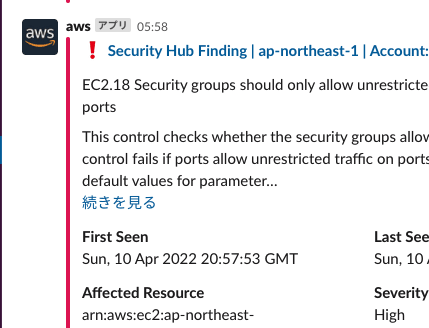
If Critical or High rules have already been detected, you can send a notification to Slack by setting the "Workflow status" to "New".

Discussion