iTranslated by AI
Creating Typed Links with UI Libraries and Routing Frameworks


Introduction
I want to use styled Link components provided by UI libraries.
But I also want to use typed href or to provided by frameworks!
To satisfy these ambitious requirements, I will create a Link component that allows both.
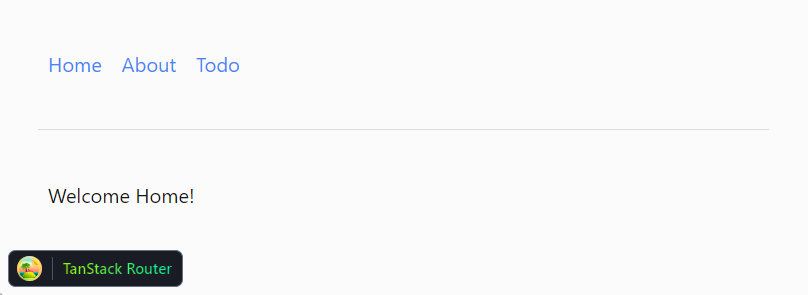
UI library components provide only design and style, and the rendered tag is a standard HTML <a> tag.
As it is, the transition will not be client-side navigation, resulting in flickering due to page loading.
On the other hand, Link components provided by routing frameworks have client-side navigation implemented, and some even allow you to catch errors through type checking when specifying a URL outside the application, but you need to apply the design yourself.
| Item | UI Library | Routing Framework |
|---|---|---|
| Provision of design and styles | 〇 | × |
| Client-side navigation support | × | 〇 |
| URL validation via type errors | × | 〇 |
Therefore, by implementing the framework's Link into the component library and adding types, we achieve both design, navigation, and type safety.
YamadaUI × Next.js
import { ComponentStyle, LinkProps } from "@yamada-ui/react";
import NextLink from "next/link";

export const Link: ComponentStyle<"Link", LinkProps> = {
  defaultProps: {
    as: NextLink,
  },
};
In Yamada UI, you can change the component rendered internally by specifying a component in the as prop.
Using this feature, we specify the Next.js Link component.
To ensure no omissions, we use the Theme feature to specify the Next.js Link component for all Link components.
In Next.js, all Link components become typed by enabling the typedRoutes feature.
/** @type {import('next').NextConfig} */
export default {
    experimental: {
      typedRoutes: true,
    },
  };
We will extend the type of the Yamada UI Link component using this Route type.
import type { Component, LinkProps } from "@yamada-ui/react";
import type NextLink from "next/link";

declare module "@yamada-ui/react" {
  declare const Link: <T>(
    props: ComponentProps<Component<typeof NextLink<T>, LinkProps>>,
  ) => React.JSX.Element;
}
It seemed like this would work, but for some reason, the Link type could not be overwritten...
The library-side type definition took priority.
import type { ThemeProps } from "@yamada-ui/react";
import type { Route } from "next";
import type { LinkProps as NextLinkProps } from "next/link";
import type { ComponentProps } from "react";

type LinkOptions = {
  /**
   * If `true`, the link will open in new tab.
   *
   * @default false
   */
  isExternal?: boolean;
};

declare module "@yamada-ui/react" {
  interface LinkProps<T = Route>
    extends Omit<NextLinkProps<T>, "as">,
      HTMLUIProps<"a">,
      ThemeProps<"Link">,
      LinkOptions {}
}
I was able to overwrite LinkProps, which is a type alias.
The file name can be anything in **.d.ts format as long as it is loaded by tsconfig.json.
Since LinkOptions on the Yamada UI side is not exported, if new types are added due to version updates, they must be manually added here each time.
If there is a better way, please let me know!
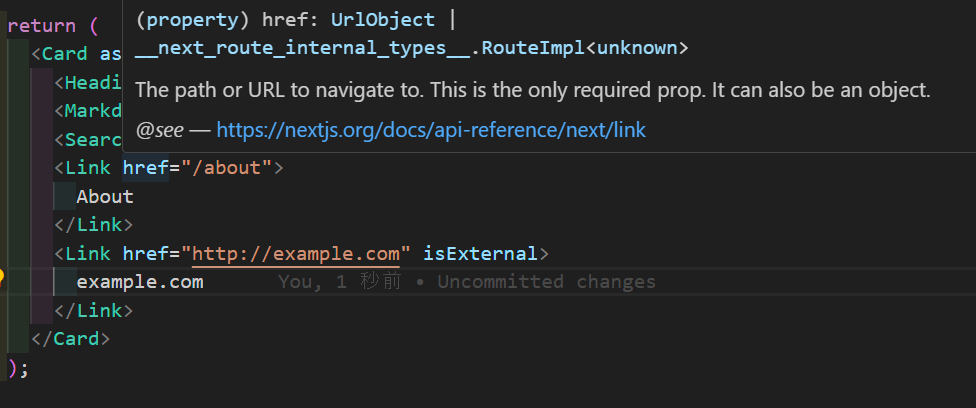
I have successfully overwritten the href type with Next.js's Route.
Yamada UI × TanStack Router
import { Link as TSRLink } from "@tanstack/react-router";
import { type ComponentStyle } from "@yamada-ui/react";

export const Link: ComponentStyle<"Link"> = {
  defaultProps: {
    as: TSRLink,
  },
};
TanStack Router provides a type called LinkComponent, and by passing the Link component to this type, you can create a typed Link component.
import { type LinkComponent } from "@tanstack/react-router";
import { type Component, type LinkProps } from "@yamada-ui/react";

declare module "@yamada-ui/react" {
  const Link: LinkComponent<Component<"a", LinkProps>>;
}
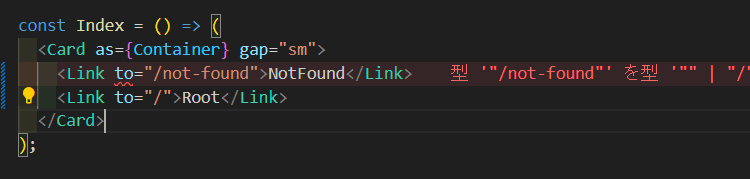
Now you can use transitions with to and params with type safety!
Also, in TanStack Router, you can create a typed Link component simply by wrapping the component with the createLink function.
import { createLink } from "@tanstack/react-router";
import { Button } from "@yamada-ui/react";

export const ButtonLink = createLink(Button);
Even for component libraries that do not have a mechanism like as, you can easily create typed Link components using this.
If the types are not working even after the setup, the d.ts file might not be loaded. Please add the following configuration.
{
  "compilerOptions": {
    ...
  },
    "include": ["yamada-ui.d.ts"]
}
Summary
I have introduced how to create typed Link components by combining Yamada UI and routing frameworks.
Links within an application are an area where mistakes are likely to happen, no matter how careful you are.
Previously, it was necessary to introduce external libraries to build such a mechanism, but recently frameworks have come to provide type-safe linking features, making it easy to adopt.
Let's manage link destinations safely using types!
Discussion