iTranslated by AI
Adding tab functionality to Inkdrop


Request for Tab Functionality
A feature request posted on the forum.
It would be convenient if Inkdrop had browser-like tab functionality.
- Since there's already a note list, and incorporating a tab feature would make it complex and everyone's needs vary, I want to keep it simple.
It would be convenient to see notes across different notebooks within a single window.
- It would get heavy and complex, so I still want to keep it simple.
I understand both sides.
vtab plugin
I thought tab functionality might be useful, but since I wasn't sure how practical it would be, I decided to build it.
vtab's "v" stands for virtual (roughly). For the visual, I added tabs to the bottom right of the window (the bottom part of the note) as shown below.
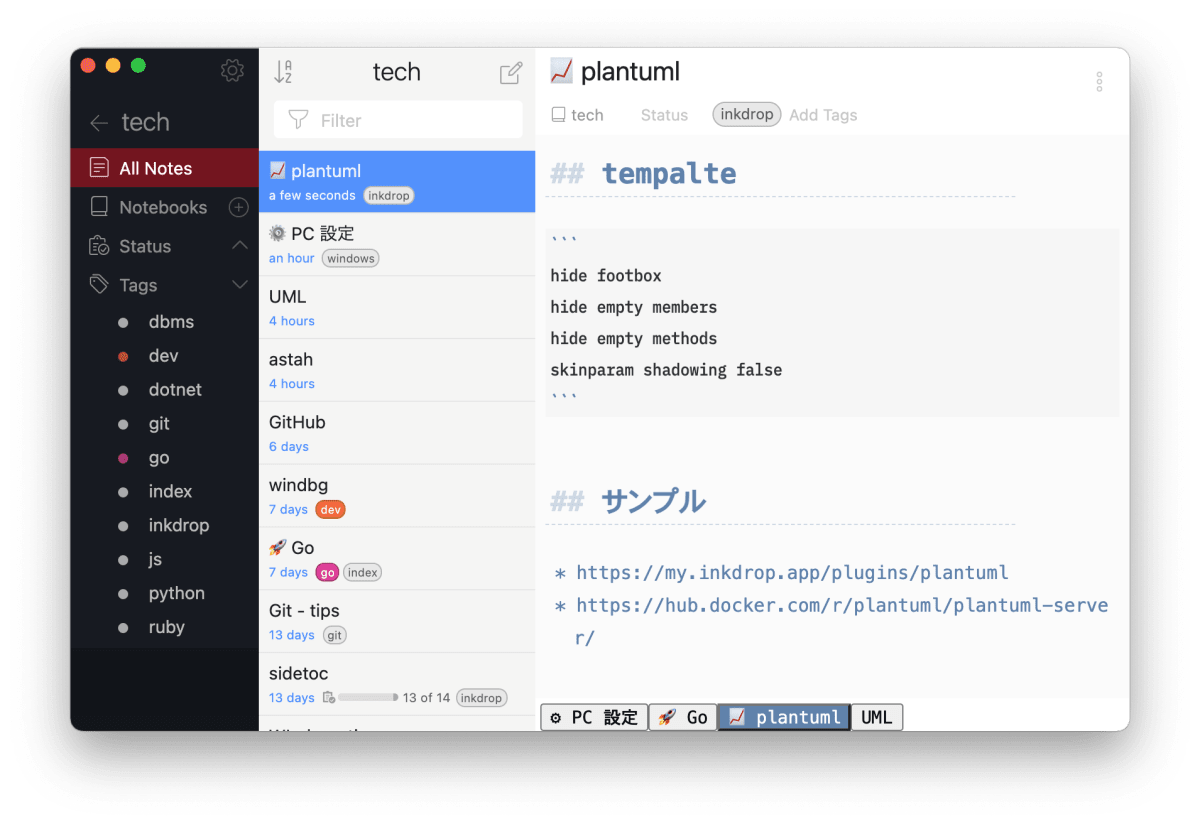
Tab information is saved as JSON in a note specified by a note ID in the settings (e.g., note:opQ-gZXdC).
[
  {
    "noteId": "note:pfvAtIgbD",
    "title": "⚙ PC 設定"
  },
  {
    "noteId": "note:AqcErCsc",
    "title": "🚀 Go"
  },
  {
    "noteId": "note:yuxRt3Dw",
    "title": "📈 plantuml"
  },
  {
    "noteId": "note:sBg2KwElb",
    "title": "UML"
  }
]
Deciding how to open tabs is tricky. While I could simply add a note to the tabs whenever it's double-clicked in the note list or displayed (opened), that seemed likely to result in a large number of unintended additions. So, I made it register via a command. Switching between notes added to the tabs is also done via commands (though switching by clicking a tab is also possible).
'.CodeMirror.vim-mode:not(.insert-mode):not(.key-buffering) textarea':
    'ctrl-t': 'vtab:add'
    'ctrl-f': 'vtab:next'
    'ctrl-b': 'vtab:prev'
I personally use the vim plugin, but if you don't, you would specify it for body or .mde-preview.
Impression after use
It can be convenient when you have multiple related notes you want to jump between, when you're working on several things in parallel, or when using it as a todo list instead of pins. However, since those cases aren't very frequent, you can just switch notes rapidly using the switch-note plugin (actually my own fork), or handle it by displaying them in separate windows. I ended up stopping using it because the reduction in the note's display area started to bother me more.
I feel like it could be great with a little more refinement.
Discussion