iTranslated by AI
Building a Custom UI for Portrait Expression Editing with Next.js and ComfyUI-AdvancedLivePortrait




Introduction
In my previous article, I tried the super powerful technology called "ComfyUI-AdvancedLivePortrait".
This technology serves as the foundation for services like the one shown below.
By using this technology, you can freely edit the facial expressions and compositions of AI-generated human images, as well as images you have taken yourself.
In my last article, I made it possible to run "ComfyUI-AdvancedLivePortrait"—originally an extension for the "ComfyUI" image generation AI Web UI—using a standard Python script without depending on the Web UI itself.
Since I had gone through the effort of making it run independently from the Web UI, I wanted to try running it on a front-end I built myself. So, this time, I used Next.js to create a custom UI for editing portrait expressions.
What I Built
Here is the result. Please watch the video below.
Since my front-end knowledge is still developing, the UI and functionality might feel a bit basic, but I believe it allows for very fast and stress-free image editing.
Although not shown in the video, you can save the created image by right-clicking the preview image and selecting save.
Tech Stack & Operating Environment
Tech Stack
I selected the following:
Front-end: Next.js (App Router)
Back-end: Python
Operating Environment
The operating environment is as follows:
Front-end server: M2 Mac
Back-end server: Ubuntu 20.04 (GPU: RTX 3060 12GB, RAM: 64GB)
(I have also confirmed it works on Google Colab, though it is slightly slower. Additionally, it will run on a CPU, albeit slowly.)
Deliverables
You can find it in the repository below.
How to Run
Environment Setup
It will work as long as you have an environment where Next.js+pnpm can be used for the front-end, and Python (or Google Colab) can be used for the back-end.
If you already have these available, please skip the steps below.
Environment Setup
Both Front-end and Back-end
If you have git installed, please clone the repository using the following command:
git clone https://github.com/personabb/AdvancedLivePortrait_Nextjs.git
If you do not have git installed, you can download it by clicking the green "Code" button on the following page and then clicking "Download ZIP" near the bottom.
After this, please execute your commands with this repository as the current directory.
You can place this repository on your Desktop or keep it in your Downloads folder, but make sure to set your terminal's current directory to this specific directory.
Front-end (Next.js Environment Setup)
The front-end uses Next.js (+ pnpm).
Please set up the environment as follows. (This assumes Mac; apologies to Windows users.)
(The materials and screenshots used here are from last year, so they might be a bit outdated. As long as you can eventually use Next.js (+ pnpm), you may use other methods for setup.)
Installing Homebrew (Skip if already installed)
We will install Homebrew, a package manager.
Launch the terminal and run the following command. You will be asked for a password, so please enter it.
/bin/bash -c "$(curl -fsSL https://raw.githubusercontent.com/Homebrew/install/HEAD/install.sh)"
You will be asked to press the Enter key at some point. Please press it.
Run the following commands to add the path to your environment variables (execute them line by line):
echo 'eval "$(/opt/homebrew/bin/brew shellenv)"'  >> ~/.zshrc
eval "$(/opt/homebrew/bin/brew shellenv)"
PATH=/usr/local/bin:$PATH
export PATH
Run the following command; if the Homebrew version is displayed, the installation was successful.
brew -v
Installing Node.js (Installing nodebrew)
Install nodebrew using the following command:
brew install nodebrew
Execute the command shown in the red box of the image below (please check carefully as it may vary from person to person):

If it looks like the image above, use this command:
/opt/homebrew/opt/nodebrew/bin/nodebrew setup_dirs

Next, add the path shown in the red box of the image above to your environment variables.
In the case of the image above, you can add it with the following command:
echo export PATH=$HOME/.nodebrew/current/bin:$PATH >> ~/.zshrc
However, please change the export PATH=$HOME/.nodebrew/current/bin:$PATH part to match your own execution screen (the red box part).
Afterward, update the settings to apply the environment variables:
source ~/.zshrc
Installing Node.js (Installing Node.js)
Use the installed nodebrew to install Node.js version 19.6.1.
(The version you install probably doesn't matter much. I'm writing this because I'm using the environment above, but I generally recommend the latest version.)
Run the following command:
nodebrew install v19.6.1
If "Installed successfully" is displayed, you're good to go.
Next, run the following command to make the installed version 19.6.1 usable:
nodebrew use v19.6.1
If "use v19.6.1" is displayed, it's successful.
By using nodebrew, you can install multiple versions and switch between them depending on your needs.
(Of course, as long as you can eventually use Next.js (+ pnpm), you may install it using other methods.)
Installing pnpm
Install pnpm using the following command:
npm install --global pnpm@8.6.0
With this, you can now use Next.js and pnpm.
Back-end (Using a Local PC)
Execute the following command to set the current directory to ./AdvancedLivePortrait_Nextjs/alp_backend.
cd alp_backend
Installing Python
As a prerequisite, we will use Python version 3.10 or 3.11.
We will install Python using pyenv to specify the version.
Python versions are managed with pyenv.
For information on how to install pyenv itself, please refer to the following:
Once pyenv is installed, you can specify the Python version with the following commands:
pyenv install 3.10.14 # or 3.11.9, etc.
pyenv local 3.10.14 # or pyenv global 3.10.14
This sets the Python version.
Use pyenv global when you want to apply this version system-wide.
Use pyenv local when you want to apply this version only within the current directory.
Run the following command to verify that the Python version has been updated:
python -V
# Python 3.10.14
Setting up the Python Virtual Environment
Next, we will set up a virtual environment to install the necessary packages.
We will use venv for this.
Since venv is the official Python virtual environment module, it can be used without additional installation if Python is available.
python -m venv env
source env/bin/activate
From now on, whenever you run the back-end, please enter this virtual environment.
To enter the virtual environment next time, you only need to run the following command:
source env/bin/activate
Back-end (Using Google Colab)
If you are using Google Colab, the environment is already set up, so no special processing is required.
At the very least, please create a Google account.
Execution Preparation
Front-end
The current directory is assumed to be ./AdvancedLivePortrait_Nextjs.
Configure the Back-end URL
Create .env.local in the root of the repository (./) and configure it as follows.
The URL is the back-end server's URL. (The following is an example.)
NEXT_PUBLIC_API_BASE_URL=http://192.168.0.xxx:8000
(Please check the private IP address of the back-end server in advance. The port is 8000.)
Specify the back-end server's URL in the http://192.168.0.xxx part.
Installation and Build of Necessary Packages for Next.js
Execute the following commands one by one.
pnpm i
pnpm build
Back-end (For Local PC)
For back-end preparation, set ./AdvancedLivePortrait_Nextjs/alp_backend as the current directory and execute the subsequent commands.
Installing Python Packages
Install the necessary Python packages. Execute the following commands.
# Package installation
git clone https://github.com/PowerHouseMan/ComfyUI-AdvancedLivePortrait.git
pip install fastapi\[all\]
cd ComfyUI-AdvancedLivePortrait
pip install -r requirements.txt
cd ..
Back-end (For Google Colab)
Uploading the Code
First, upload the necessary code to Google Drive.
Place only the alp_backend directory directly under MyDrive on Google Drive.
(Since it's for the back-end, front-end files are not required.)
The directory structure will be as follows:
MyDrive/
    └ alp_backend/
Obtain an ngrok Access Token
ngrok is a service that allows you to easily expose network services running on a local PC to the outside.
We will use this feature to expose the API server started on Google Colab and connect to it from the front-end server.
Please refer to the following article to obtain an access token:
Register the Obtained ngrok Access Token in Google Colab Environment Variables
Register the obtained access token in Colab's environment variables with the name NGROK.
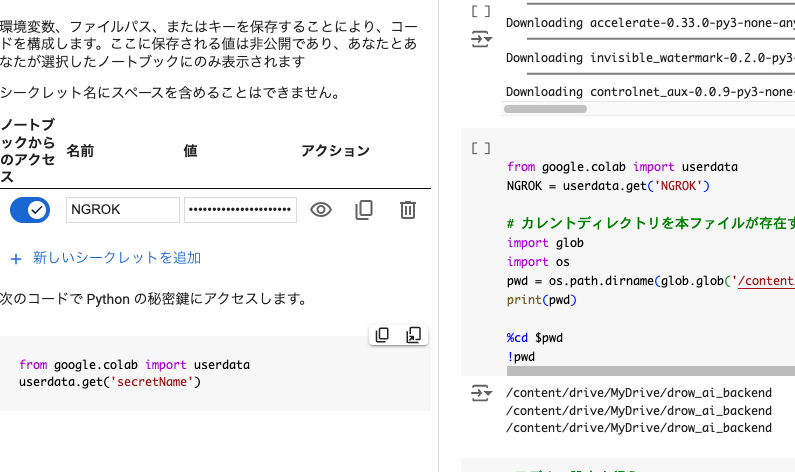
It should look like the image above.
The following article provides an easy-to-understand guide on how to register it:
Execution
Front-end
The current directory is assumed to be ./AdvancedLivePortrait_Nextjs.
Starting the Front-end Server
Execute the following command:
pnpm dev
Once the IP address for connection (only accessible from the same PC) is displayed in the terminal, the preparation for the front-end server is complete.
Connecting from a Device
From the same PC as the front-end server, you can access the Web app by connecting to http://localhost:3000/ through a browser.
Back-end (For Local PC)
For the back-end, set ./AdvancedLivePortrait_Nextjs/alp_backend as the current directory and execute the subsequent commands.
Starting the Back-end Server
Run the following command to start the back-end server:
python run.py
Once the connection IP address (you cannot connect to this specific address) is displayed in green text in the terminal, the back-end server is ready.
Back-end (For Google Colab)
Starting the Back-end Server
Run all cells in MyDrive/alp_backend/alp_api_backend.ipynb starting from the top.
(Google Drive authentication will be required, so please authorize it.)

It will take some time, but the last cell will produce an output like the one above.
Once this output appears, the back-end server is ready.
Here, a URL like the following will be displayed:
PUBLIC_URL: https://cefb-xx-xxx-xxx-xxx.ngrok-free.app
Please enter this URL into .env.local as follows:
NEXT_PUBLIC_API_BASE_URL=https://cefb-xx-xxx-xxx-xxx.ngrok-free.app
Execution
Front-end
The current directory is assumed to be ./AdvancedLivePortrait_Nextjs.
Starting the Front-end Server
Execute the following command:
pnpm dev
Once the connection IP address (only accessible from the same PC) is displayed in the terminal, the front-end server is ready.
Connecting from a Device
From the same PC as the front-end server, you can access the Web app by connecting to http://localhost:3000/ through a browser.
Back-end (For Local PC)
For the back-end, set ./AdvancedLivePortrait_Nextjs/alp_backend as the current directory and execute the subsequent commands.
Starting the Back-end Server
Run the following command to start the back-end server:
python run.py
Once the connection IP address (you cannot connect to this specific address) is displayed in green text in the terminal, the back-end server is ready.
Back-end (For Google Colab)
Starting the Back-end Server
Run all cells in MyDrive/alp_backend/alp_api_backend.ipynb starting from the top.
(Google Drive authentication will be required, so please authorize it.)
It will take some time, but the last cell will produce an output like the one above.
Once this output appears, the back-end server is ready.
Here, a URL like the following will be displayed:
PUBLIC_URL: https://cefb-xx-xxx-xxx-xxx.ngrok-free.app
Please enter this URL into .env.local as follows:
NEXT_PUBLIC_API_BASE_URL=https://cefb-xx-xxx-xxx-xxx.ngrok-free.app
Usage
Common
When you connect to the front-end server from a tablet or PC, a screen like the one below will be displayed.

You can select an image file by clicking the "Select File" button at the bottom of the screen.
Please select the image file you want to edit from here.
After that, as shown in the video at the beginning of the article, you can edit the image by moving the sliders or directly manipulating the numbers to the right.
Summary
In this article, I created a custom UI for editing portrait expressions using the technology from "ComfyUI-AdvancedLivePortrait".
I explained how to run "ComfyUI-AdvancedLivePortrait" programmatically without using the Web UI in my previous article, so please take a look at that as well.
Thank you for reading this far!
Acknowledgments
I have used a significant amount of the implementation code from this repository.
I would like to express my gratitude to the developers.
Code
I'm writing this down as a sort of memorandum.
If you are not interested, you can skip this part.
Full Front-end Code
AdvancedLivePortrait_Nextjs/src/app/page.tsx
"use client";

import { useState, useEffect, useCallback } from "react";
import debounce from "lodash/debounce";

export default function Home() {
  const [image, setImage] = useState<File | null>(null);
  const [preview, setPreview] = useState<string | null>(null);
  const [loading, setLoading] = useState(false); // Managing loading state
  const [isUpdating, setIsUpdating] = useState(false); // Flag to allow slider operation even during image processing
  const [isInitializing, setIsInitializing] = useState(false); // Managing initialization state

  // Obtain API base URL from environment variables
  const API_BASE_URL = process.env.NEXT_PUBLIC_API_BASE_URL;

  // Managing the state of parameters adjusted by sliders
  const [params, setParams] = useState({
    rotate_pitch: 0,
    rotate_yaw: 0,
    rotate_roll: 0,
    blink: 0,
    eyebrow: 0,
    wink: 0,
    pupil_x: 0,
    pupil_y: 0,
    aaa: 0,
    eee: 0,
    woo: 0,
    smile: 0, // Initial value is 0
  });

  const sliderDescriptions: { [key: string]: string } = {
    rotate_pitch: "Vertical rotation of the face (forward/backward)",
    rotate_yaw: "Horizontal rotation of the face (left/right)",
    rotate_roll: "Tilt of the face",
    blink: "Degree of blinking",
    eyebrow: "Eyebrow movement",
    wink: "Winking of one eye",
    pupil_x: "Horizontal movement of the pupils",
    pupil_y: "Vertical movement of the pupils",
    aaa: "Action of opening the mouth",
    eee: "Action of pronouncing the 'i' sound",
    woo: "Action of pronouncing the 'u' sound",
    smile: "Degree of smiling (0.5 = 50% smile)",
  };

  // Function called when parameters change
  const handleParamChange = (e: React.ChangeEvent<HTMLInputElement>) => {
    const { name, value } = e.target;
    setParams((prevParams) => ({
      ...prevParams,
      [name]: parseFloat(value),
    }));
    console.log(`Updated ${name} to ${value}`);
  };

  // Asynchronous function to send images and parameters to the API
  const sendUpdateToBackend = useCallback(
    debounce(async (newParams) => {
      if (image) {
        setIsUpdating(true); // Indicates that processing has started
        setLoading(true);

        const formData = new FormData();
        formData.append("file", image);
        Object.keys(newParams).forEach((key) => {
          formData.append(key, String(newParams[key as keyof typeof params]));
        });

        try {
          const response = await fetch(`${API_BASE_URL}/edit`, {
            method: "POST",
            body: formData,
          });

          if (!response.ok) {
            throw new Error(`API request failed with status ${response.status}`);
          }

          const blob = await response.blob();
          const editedImageURL = URL.createObjectURL(blob);
          setPreview(editedImageURL);
        } catch (error) {
          console.error("Error while sending API request:", error);
        } finally {
          setLoading(false); // End of loading
          setIsUpdating(false); // Indicates the end of image processing
        }
      }
    }, 200), // Set a 500ms delay
    [image, API_BASE_URL]
  );

  // Call debounced processing when parameters change
  useEffect(() => {
    if (image) {
      sendUpdateToBackend(params);
    }
  }, [params, sendUpdateToBackend]);

  // Added API request function for initialization
  const initializeImage = async (imageFile: File) => {
    const formData = new FormData();
    formData.append("file", imageFile);

    try {
      setIsInitializing(true); // Start initialization
      const response = await fetch(`${API_BASE_URL}/initialize`, {
        method: "POST",
        body: formData,
      });

      if (!response.ok) {
        throw new Error(`Initialization API request failed with status ${response.status}`);
      }

      const result = await response.json();  // Get JSON response
      console.log(result.message);  // Should display "Initialization completed"
    } catch (error) {
      console.error("Error during initialization API request:", error);
    } finally {
      setIsInitializing(false); // End initialization
    }
  };

  // Function to display preview when an image is selected
  const handleImageChange = (e: React.ChangeEvent<HTMLInputElement>) => {
    const file = e.target.files?.[0] || null;
    setImage(file);
    if (file) {
      initializeImage(file);
      const reader = new FileReader();
      reader.onloadend = () => {
        setPreview(reader.result as string);
      };
      reader.readAsDataURL(file);
    }
  };

  // Reset button handler
  const handleReset = () => {
    setParams({
      rotate_pitch: 0,
      rotate_yaw: 0,
      rotate_roll: 0,
      blink: 0,
      eyebrow: 0,
      wink: 0,
      pupil_x: 0,
      pupil_y: 0,
      aaa: 0,
      eee: 0,
      woo: 0,
      smile: 0,
    });
  };

  return (
    <div className="container mx-auto p-4">
      <h1 className="text-2xl font-bold mb-4">Image Editing Tool</h1>

      <div className="flex">
        {/* Image Preview */}
        {preview && (
          <img
            src={preview}
            alt="Preview"
            className="mb-4 h-auto object-contain mr-8" // Add space to the right of the image
          />
        )}

        {/* Arrange sliders vertically */}
        <div className="flex flex-col items-start justify-center w-1/2 space-y-4">
          {Object.keys(params).map((param) => (
            <div key={param} className="flex items-center space-x-4">
              {/* Slider Name */}
              <label className="w-32">{param}</label>

              {/* Slider */}
              <input
                type="range"
                name={param}
                min={param === "smile" ? "-2" : "-20"} // Only smile is -2 to 2, others are -20 to 20
                max={param === "smile" ? "2" : "20"}
                step={param === "smile" ? "0.1" : "1"} // Both are 0.1 steps
                value={params[param as keyof typeof params]}
                onChange={handleParamChange}
                className="w-48 h-4" // Wider and slightly thicker slider
                disabled={isInitializing} // Disable slider during initialization
              />

              {/* Numeric Input Field */}
              <input
                type="number"
                name={param}
                min={param === "smile" ? "-2" : "-20"} // Only smile is -2 to 2, others are -20 to 20
                max={param === "smile" ? "2" : "20"}
                step={param === "smile" ? "0.1" : "1"}
                value={params[param as keyof typeof params]}
                onChange={handleParamChange}
                className="w-16 p-1 border rounded"
                disabled={isInitializing} // Disable slider during initialization
              />

              {/* Supplementary explanation */}
              <span className="text-gray-500">{sliderDescriptions[param]}</span>
            </div>
          ))}

          {/* Reset Button */}
          <button
            onClick={handleReset}
            className="bg-blue-500 hover:bg-blue-700 text-white font-bold py-2 px-4 rounded mt-4"
            disabled={isInitializing} // Disable reset button during initialization
          >
            Reset
          </button>
        </div>
      </div>

      {/* Image Upload */}
      <input type="file" accept="image/*" onChange={handleImageChange} className="mt-4" />

      {loading && <p>Processing image...</p>}
      {isUpdating && !loading && <p>Processing new image...</p>}
    </div>
  );
}
On the backend side, time-consuming processes such as downloading models and detecting face areas are handled by initializeImage during initialization (at the time the image is uploaded).
Additionally, moving the sliders results in continuous API requests to the backend. To reduce the load even slightly, I have implemented debounce processing so that a request is sent only once, 200ms after the slider stops moving.
The following article provides a clear explanation of debounce processing:
Regarding the various parameters, the sliders are generally set to move within a range of -20 to 20, but the smile parameter specifically ranges from -2 to 2.
By pressing the reset button, all parameters can be returned to 0 in one go.
Full Back-end Code
AdvancedLivePortrait_Nextjs/alp_backend/run.py
import sys
sys.path.append("./ComfyUI-AdvancedLivePortrait")

from fastapi import FastAPI, UploadFile,File, Form
from fastapi import HTTPException
from fastapi.middleware.cors import CORSMiddleware
from PIL import Image
import io
import os
from fastapi.responses import FileResponse, JSONResponse, StreamingResponse
from module.advanced_live_portrait import AdvancedLivePortrait_execution_prepare, AdvancedLivePortrait_execution_main

app = FastAPI()

# CORS settings
origins = [
    "*" # Specify the front-end URL
    # Add other origins as needed
]

app.add_middleware(
    CORSMiddleware,
    allow_origins=origins,
    allow_credentials=True,
    allow_methods=["*"],  # Allow all HTTP methods
    allow_headers=["*"],  # Allow all headers
)

editor = None
img_tensor = None
prepared_face = None


@app.post("/initialize")
async def initialize_image_endpoint(file: UploadFile = File(...)):
    global editor, img_tensor, prepared_face
    # Save the uploaded image to a temporary file
    input_image_path = f"./tmp/{file.filename}"
    output_image_path = f"./tmp/initialized_{file.filename}"
    os.makedirs(os.path.dirname(input_image_path), exist_ok=True)

    with open(input_image_path, "wb") as f:
        f.write(await file.read())

    # Execute initialization process
    editor, img_tensor, prepared_face = AdvancedLivePortrait_execution_prepare(input_image_path, output_image_path)

    # Return initialization completion message
    return JSONResponse(content={"message": "Initialization completed", "status": "success"})

# Image editing function (wrapper for AdvancedLivePortrait_execution)
def edit_image(output_path, parameters):
    # Code to call the AdvancedLivePortrait_execution function goes here
    # parameters are parameters sent from Next.js
    edited_image_pil = AdvancedLivePortrait_execution_main(editor, img_tensor, prepared_face, output_path, parameters)
    # Save the image to a memory buffer
    img_byte_arr = io.BytesIO()
    edited_image_pil.save(img_byte_arr, format='PNG')  # Save in PNG format (JPEG is also possible)
    img_byte_arr.seek(0)  # Move the pointer to the beginning of the buffer

    return img_byte_arr

@app.post("/edit")
async def edit_image_endpoint(
    file: UploadFile = File(...),
    rotate_pitch: float = Form(0),
    rotate_yaw: float = Form(0),
    rotate_roll: float = Form(0),
    blink: float = Form(0),
    eyebrow: float = Form(0),
    wink: float = Form(0),
    pupil_x: float = Form(0),
    pupil_y: float = Form(0),
    aaa: float = Form(0),
    eee: float = Form(0),
    woo: float = Form(0),
    smile: float = Form(0.5),
):
    # Save the uploaded image to a temporary file
    input_image_path = f"./tmp/{file.filename}"
    output_image_path = f"./tmp/edited_{file.filename}"

    with open(input_image_path, "wb") as f:
        f.write(await file.read())

    # Pass parameters to AdvancedLivePortrait_execution to perform editing
    parameters = [
        rotate_pitch, rotate_yaw, rotate_roll, blink, eyebrow, wink,
        pupil_x, pupil_y, aaa, eee, woo, smile
    ]

    print(f"Received parameters: {parameters}")
    img_byte_arr = edit_image(output_image_path, parameters)

    # Return the edited image
    #return FileResponse(output_image_path)
    return StreamingResponse(img_byte_arr, media_type="image/png")


if __name__ == "__main__":
    import uvicorn
    uvicorn.run("run:app", host="0.0.0.0", port=8000, reload=True)
I have implemented two APIs: @app.post("/initialize") and @app.post("/edit").
@app.post("/initialize") is called when an image is uploaded on the front-end, and it pre-executes everything from downloading the face detection model to the face detection itself.
Next, when parameters are changed on the front-end, @app.post("/edit") is called to perform the image editing process.
The processed image is sent directly to the front-end.
AdvancedLivePortrait_Nextjs/alp_backend/module/advanced_live_portrait.py
import os
import sys
import numpy as np
import torch
import cv2
from PIL import Image
import time
import copy
import dill
import yaml
from ultralytics import YOLO
from module.utils import checkpoint_pickle
current_directory = "./ComfyUI-AdvancedLivePortrait"
models_dir = "./ComfyUI-AdvancedLivePortrait/models"
os.makedirs(models_dir, exist_ok=True)
import math
import struct
import safetensors.torch
import logging
import itertools
def load_torch_file(ckpt, safe_load=False, device=None):
if device is None:
device = torch.device("cpu")
if ckpt.lower().endswith(".safetensors") or ckpt.lower().endswith(".sft"):
sd = safetensors.torch.load_file(ckpt, device=device.type)
else:
if safe_load:
if not 'weights_only' in torch.load.__code__.co_varnames:
logging.warning("Warning torch.load doesn't support weights_only on this pytorch version, loading unsafely.")
safe_load = False
if safe_load:
pl_sd = torch.load(ckpt, map_location=device, weights_only=True)
else:
pl_sd = torch.load(ckpt, map_location=device, pickle_module=checkpoint_pickle)
if "global_step" in pl_sd:
logging.debug(f"Global Step: {pl_sd['global_step']}")
if "state_dict" in pl_sd:
sd = pl_sd["state_dict"]
else:
sd = pl_sd
return sd
from LivePortrait.live_portrait_wrapper import LivePortraitWrapper
from LivePortrait.utils.camera import get_rotation_matrix
from LivePortrait.config.inference_config import InferenceConfig
from LivePortrait.modules.spade_generator import SPADEDecoder
from LivePortrait.modules.warping_network import WarpingNetwork
from LivePortrait.modules.motion_extractor import MotionExtractor
from LivePortrait.modules.appearance_feature_extractor import AppearanceFeatureExtractor
from LivePortrait.modules.stitching_retargeting_network import StitchingRetargetingNetwork
from collections import OrderedDict
cur_device = None
def get_device():
global cur_device
if cur_device == None:
if torch.cuda.is_available():
cur_device = torch.device('cuda')
print("Uses CUDA device.")
"""elif torch.backends.mps.is_available():
cur_device = torch.device('mps')
print("Uses MPS device.")"""
else:
cur_device = torch.device('cpu')
print("Uses CPU device.")
return cur_device
def tensor2pil(image):
return Image.fromarray(np.clip(255. * image.cpu().numpy().squeeze(), 0, 255).astype(np.uint8))
def pil2tensor(image):
return torch.from_numpy(np.array(image).astype(np.float32) / 255.0).unsqueeze(0)
def rgb_crop(rgb, region):
return rgb[region[1]:region[3], region[0]:region[2]]
def rgb_crop_batch(rgbs, region):
return rgbs[:, region[1]:region[3], region[0]:region[2]]
def get_rgb_size(rgb):
return rgb.shape[1], rgb.shape[0]
def create_transform_matrix(x, y, s_x, s_y):
return np.float32([[s_x, 0, x], [0, s_y, y]])
def get_model_dir(m):
return os.path.join(models_dir, m)
def calc_crop_limit(center, img_size, crop_size):
pos = center - crop_size / 2
if pos < 0:
crop_size += pos * 2
pos = 0
pos2 = pos + crop_size
if img_size < pos2:
crop_size -= (pos2 - img_size) * 2
pos2 = img_size
pos = pos2 - crop_size
return pos, pos2, crop_size
def retargeting(delta_out, driving_exp, factor, idxes):
for idx in idxes:
#delta_out[0, idx] -= src_exp[0, idx] * factor
delta_out[0, idx] += driving_exp[0, idx] * factor
class PreparedSrcImg:
def __init__(self, src_rgb, crop_trans_m, x_s_info, f_s_user, x_s_user, mask_ori):
self.src_rgb = src_rgb
self.crop_trans_m = crop_trans_m
self.x_s_info = x_s_info
self.f_s_user = f_s_user
self.x_s_user = x_s_user
self.mask_ori = mask_ori
import requests
from tqdm import tqdm
class LP_Engine:
pipeline = None
detect_model = None
mask_img = None
temp_img_idx = 0
def get_temp_img_name(self):
self.temp_img_idx += 1
return "expression_edit_preview" + str(self.temp_img_idx) + ".png"
def download_model(_, file_path, model_url):
print('AdvancedLivePortrait: Downloading model...')
response = requests.get(model_url, stream=True)
try:
if response.status_code == 200:
total_size = int(response.headers.get('content-length', 0))
block_size = 1024 # 1 Kibibyte
# tqdm will display a progress bar
with open(file_path, 'wb') as file, tqdm(
desc='Downloading',
total=total_size,
unit='iB',
unit_scale=True,
unit_divisor=1024,
) as bar:
for data in response.iter_content(block_size):
bar.update(len(data))
file.write(data)
except requests.exceptions.RequestException as err:
print('AdvancedLivePortrait: Model download failed: {err}')
print(f'AdvancedLivePortrait: Download it manually from: {model_url}')
print(f'AdvancedLivePortrait: And put it in {file_path}')
except Exception as e:
print(f'AdvancedLivePortrait: An unexpected error occurred: {e}')
def remove_ddp_dumplicate_key(_, state_dict):
state_dict_new = OrderedDict()
for key in state_dict.keys():
state_dict_new[key.replace('module.', '')] = state_dict[key]
return state_dict_new
def filter_for_model(_, checkpoint, prefix):
filtered_checkpoint = {key.replace(prefix + "_module.", ""): value for key, value in checkpoint.items() if
key.startswith(prefix)}
return filtered_checkpoint
def load_model(self, model_config, model_type):
device = get_device()
if model_type == 'stitching_retargeting_module':
ckpt_path = os.path.join(get_model_dir("liveportrait"), "retargeting_models", model_type + ".pth")
else:
ckpt_path = os.path.join(get_model_dir("liveportrait"), "base_models", model_type + ".pth")
is_safetensors = None
if os.path.isfile(ckpt_path) == False:
is_safetensors = True
ckpt_path = os.path.join(get_model_dir("liveportrait"), model_type + ".safetensors")
if os.path.isfile(ckpt_path) == False:
self.download_model(ckpt_path,
"https://huggingface.co/Kijai/LivePortrait_safetensors/resolve/main/" + model_type + ".safetensors")
model_params = model_config['model_params'][f'{model_type}_params']
if model_type == 'appearance_feature_extractor':
model = AppearanceFeatureExtractor(**model_params).to(device)
elif model_type == 'motion_extractor':
model = MotionExtractor(**model_params).to(device)
elif model_type == 'warping_module':
model = WarpingNetwork(**model_params).to(device)
elif model_type == 'spade_generator':
model = SPADEDecoder(**model_params).to(device)
elif model_type == 'stitching_retargeting_module':
# Special handling for stitching and retargeting module
config = model_config['model_params']['stitching_retargeting_module_params']
checkpoint = load_torch_file(ckpt_path)
stitcher = StitchingRetargetingNetwork(**config.get('stitching'))
if is_safetensors:
stitcher.load_state_dict(self.filter_for_model(checkpoint, 'retarget_shoulder'))
else:
stitcher.load_state_dict(self.remove_ddp_dumplicate_key(checkpoint['retarget_shoulder']))
stitcher = stitcher.to(device)
stitcher.eval()
return {
'stitching': stitcher,
}
else:
raise ValueError(f"Unknown model type: {model_type}")
model.load_state_dict(load_torch_file(ckpt_path))
model.eval()
return model
def load_models(self):
model_path = get_model_dir("liveportrait")
if not os.path.exists(model_path):
os.mkdir(model_path)
model_config_path = os.path.join(current_directory, 'LivePortrait', 'config', 'models.yaml')
model_config = yaml.safe_load(open(model_config_path, 'r'))
appearance_feature_extractor = self.load_model(model_config, 'appearance_feature_extractor')
motion_extractor = self.load_model(model_config, 'motion_extractor')
warping_module = self.load_model(model_config, 'warping_module')
spade_generator = self.load_model(model_config, 'spade_generator')
stitching_retargeting_module = self.load_model(model_config, 'stitching_retargeting_module')
self.pipeline = LivePortraitWrapper(InferenceConfig(), appearance_feature_extractor, motion_extractor, warping_module, spade_generator, stitching_retargeting_module)
def get_detect_model(self):
if self.detect_model == None:
model_dir = get_model_dir("ultralytics")
if not os.path.exists(model_dir): os.mkdir(model_dir)
model_path = os.path.join(model_dir, "face_yolov8n.pt")
if not os.path.exists(model_path):
self.download_model(model_path, "https://huggingface.co/Bingsu/adetailer/resolve/main/face_yolov8n.pt")
self.detect_model = YOLO(model_path)
return self.detect_model
def resize_image_to_stride(self,image_tensor, stride=32):
# Get image height and width
_, _, h, w = image_tensor.shape
# Resize to dimensions divisible by the stride
new_h = (h // stride) * stride
new_w = (w // stride) * stride
# Convert tensor to NumPy and resize
image_np = image_tensor.squeeze(0).permute(1, 2, 0).cpu().numpy() # (B, C, H, W) -> (H, W, C)
resized_image_np = cv2.resize(image_np, (new_w, new_h), interpolation=cv2.INTER_LINEAR)
# Convert resized image back to tensor
resized_image_tensor = torch.from_numpy(resized_image_np).permute(2, 0, 1).unsqueeze(0).float() # (H, W, C) -> (B, C, H, W)
return resized_image_tensor
def get_face_bboxes(self, image_rgb):
detect_model = self.get_detect_model()
# Check if the image is loaded correctly
if image_rgb is None or image_rgb.size == 0:
raise ValueError("The input image is empty or invalid.")
# Ensure the image is 3-channel (RGB)
if len(image_rgb.shape) == 2: # If grayscale, convert to 3 channels
image_rgb = cv2.cvtColor(image_rgb, cv2.COLOR_GRAY2RGB)
elif len(image_rgb.shape) == 3 and image_rgb.shape[2] == 1: # Also convert 1-channel mono to 3 channels
image_rgb = cv2.cvtColor(image_rgb, cv2.COLOR_GRAY2RGB)
# Verify dimensions and expand to 4D (batch format expected by YOLO)
if len(image_rgb.shape) == 3:
image_rgb = np.expand_dims(image_rgb, axis=0) # (height, width, 3) -> (1, height, width, 3)
# Change dimensions to (batch_size, channels, height, width) format
image_rgb = torch.from_numpy(image_rgb).permute(0, 3, 1, 2).float() # (1, height, width, 3) -> (1, 3, height, width)
# Normalize pixel values from 0-255 to 0-1
image_rgb /= 255.0
# Check size for debugging
print(f"Image dimensions before YOLO: {image_rgb.shape}")
image_rgb = self.resize_image_to_stride(image_rgb, stride=32)
pred = detect_model(image_rgb, conf=0.7, device="") # Input to YOLO model
return pred[0].boxes.xyxy.cpu().numpy() # Return detected bounding boxes
def detect_face(self, image_rgb, crop_factor, sort = True):
bboxes = self.get_face_bboxes(image_rgb)
w, h = get_rgb_size(image_rgb)
print(f"w, h:{w, h}")
cx = w / 2
min_diff = w
best_box = None
for x1, y1, x2, y2 in bboxes:
bbox_w = x2 - x1
if bbox_w < 30: continue
diff = abs(cx - (x1 + bbox_w / 2))
if diff < min_diff:
best_box = [x1, y1, x2, y2]
print(f"diff, min_diff, best_box:{diff, min_diff, best_box}")
min_diff = diff
if best_box == None:
print("Failed to detect face!!")
return [0, 0, w, h]
x1, y1, x2, y2 = best_box
#for x1, y1, x2, y2 in bboxes:
bbox_w = x2 - x1
bbox_h = y2 - y1
crop_w = bbox_w * crop_factor
crop_h = bbox_h * crop_factor
crop_w = max(crop_h, crop_w)
crop_h = crop_w
kernel_x = int(x1 + bbox_w / 2)
kernel_y = int(y1 + bbox_h / 2)
new_x1 = int(kernel_x - crop_w / 2)
new_x2 = int(kernel_x + crop_w / 2)
new_y1 = int(kernel_y - crop_h / 2)
new_y2 = int(kernel_y + crop_h / 2)
if not sort:
return [int(new_x1), int(new_y1), int(new_x2), int(new_y2)]
if new_x1 < 0:
new_x2 -= new_x1
new_x1 = 0
elif w < new_x2:
new_x1 -= (new_x2 - w)
new_x2 = w
if new_x1 < 0:
new_x2 -= new_x1
new_x1 = 0
if new_y1 < 0:
new_y2 -= new_y1
new_y1 = 0
elif h < new_y2:
new_y1 -= (new_y2 - h)
new_y2 = h
if new_y1 < 0:
new_y2 -= new_y1
new_y1 = 0
if w < new_x2 and h < new_y2:
over_x = new_x2 - w
over_y = new_y2 - h
over_min = min(over_x, over_y)
new_x2 -= over_min
new_y2 -= over_min
return [int(new_x1), int(new_y1), int(new_x2), int(new_y2)]
def calc_face_region(self, square, dsize):
region = copy.deepcopy(square)
is_changed = False
if dsize[0] < region[2]:
region[2] = dsize[0]
is_changed = True
if dsize[1] < region[3]:
region[3] = dsize[1]
is_changed = True
return region, is_changed
def expand_img(self, rgb_img, square):
crop_trans_m = create_transform_matrix(max(-square[0], 0), max(-square[1], 0), 1, 1)
new_img = cv2.warpAffine(rgb_img, crop_trans_m, (square[2] - square[0], square[3] - square[1]),
cv2.INTER_LINEAR)
return new_img
def get_pipeline(self):
if self.pipeline == None:
print("Load pipeline...")
self.load_models()
return self.pipeline
def prepare_src_image(self, img):
h, w = img.shape[:2]
input_shape = [256,256]
if h != input_shape[0] or w != input_shape[1]:
if 256 < h: interpolation = cv2.INTER_AREA
else: interpolation = cv2.INTER_LINEAR
x = cv2.resize(img, (input_shape[0], input_shape[1]), interpolation = interpolation)
else:
x = img.copy()
if x.ndim == 3:
x = x[np.newaxis].astype(np.float32) / 255. # HxWx3 -> 1xHxWx3, normalized to 0~1
elif x.ndim == 4:
x = x.astype(np.float32) / 255. # BxHxWx3, normalized to 0~1
else:
raise ValueError(f'img ndim should be 3 or 4: {x.ndim}')
x = np.clip(x, 0, 1) # clip to 0~1
x = torch.from_numpy(x).permute(0, 3, 1, 2) # 1xHxWx3 -> 1x3xHxW
x = x.to(get_device())
return x
def GetMaskImg(self):
if self.mask_img is None:
path = os.path.join(current_directory, "LivePortrait/utils/resources/mask_template.png")
self.mask_img = cv2.imread(path, cv2.IMREAD_COLOR)
if self.mask_img is None:
raise FileNotFoundError(f"Mask image not found at path: {path}")
return self.mask_img
def crop_face(self, img_rgb, crop_factor):
crop_region = self.detect_face(img_rgb, crop_factor)
face_region, is_changed = self.calc_face_region(crop_region, get_rgb_size(img_rgb))
face_img = rgb_crop(img_rgb, face_region)
if is_changed: face_img = self.expand_img(face_img, crop_region)
return face_img
def prepare_source(self, source_image, crop_factor, is_video = False, tracking = False):
print("Prepare source...")
engine = self.get_pipeline()
source_image_np = (source_image * 255).byte().cpu().numpy()
img_rgb = source_image_np[0]
psi_list = []
for img_rgb in source_image_np:
if tracking or len(psi_list) == 0:
crop_region = self.detect_face(img_rgb, crop_factor)
face_region, is_changed = self.calc_face_region(crop_region, get_rgb_size(img_rgb))
s_x = (face_region[2] - face_region[0]) / 512.
s_y = (face_region[3] - face_region[1]) / 512.
crop_trans_m = create_transform_matrix(crop_region[0], crop_region[1], s_x, s_y)
mask_ori = cv2.warpAffine(self.GetMaskImg(), crop_trans_m, get_rgb_size(img_rgb), cv2.INTER_LINEAR)
mask_ori = mask_ori.astype(np.float32) / 255.
if is_changed:
s = (crop_region[2] - crop_region[0]) / 512.
crop_trans_m = create_transform_matrix(crop_region[0], crop_region[1], s, s)
face_img = rgb_crop(img_rgb, face_region)
if is_changed: face_img = self.expand_img(face_img, crop_region)
i_s = self.prepare_src_image(face_img)
x_s_info = engine.get_kp_info(i_s)
f_s_user = engine.extract_feature_3d(i_s)
x_s_user = engine.transform_keypoint(x_s_info)
psi = PreparedSrcImg(img_rgb, crop_trans_m, x_s_info, f_s_user, x_s_user, mask_ori)
if is_video == False:
return psi
psi_list.append(psi)
return psi_list
def prepare_driving_video(self, face_images):
print("Prepare driving video...")
pipeline = self.get_pipeline()
f_img_np = (face_images * 255).byte().numpy()
out_list = []
for f_img in f_img_np:
i_d = self.prepare_src_image(f_img)
d_info = pipeline.get_kp_info(i_d)
out_list.append(d_info)
return out_list
def calc_fe(_, x_d_new, eyes, eyebrow, wink, pupil_x, pupil_y, mouth, eee, woo, smile,
rotate_pitch, rotate_yaw, rotate_roll):
x_d_new[0, 20, 1] += smile * -0.01
x_d_new[0, 14, 1] += smile * -0.02
x_d_new[0, 17, 1] += smile * 0.0065
x_d_new[0, 17, 2] += smile * 0.003
x_d_new[0, 13, 1] += smile * -0.00275
x_d_new[0, 16, 1] += smile * -0.00275
x_d_new[0, 3, 1] += smile * -0.0035
x_d_new[0, 7, 1] += smile * -0.0035
x_d_new[0, 19, 1] += mouth * 0.001
x_d_new[0, 19, 2] += mouth * 0.0001
x_d_new[0, 17, 1] += mouth * -0.0001
rotate_pitch -= mouth * 0.05
x_d_new[0, 20, 2] += eee * -0.001
x_d_new[0, 20, 1] += eee * -0.001
#x_d_new[0, 19, 1] += eee * 0.0006
x_d_new[0, 14, 1] += eee * -0.001
x_d_new[0, 14, 1] += woo * 0.001
x_d_new[0, 3, 1] += woo * -0.0005
x_d_new[0, 7, 1] += woo * -0.0005
x_d_new[0, 17, 2] += woo * -0.0005
x_d_new[0, 11, 1] += wink * 0.001
x_d_new[0, 13, 1] += wink * -0.0003
x_d_new[0, 17, 0] += wink * 0.0003
x_d_new[0, 17, 1] += wink * 0.0003
x_d_new[0, 3, 1] += wink * -0.0003
rotate_roll -= wink * 0.1
rotate_yaw -= wink * 0.1
if 0 < pupil_x:
x_d_new[0, 11, 0] += pupil_x * 0.0007
x_d_new[0, 15, 0] += pupil_x * 0.001
else:
x_d_new[0, 11, 0] += pupil_x * 0.001
x_d_new[0, 15, 0] += pupil_x * 0.0007
x_d_new[0, 11, 1] += pupil_y * -0.001
x_d_new[0, 15, 1] += pupil_y * -0.001
eyes -= pupil_y / 2.
x_d_new[0, 11, 1] += eyes * -0.001
x_d_new[0, 13, 1] += eyes * 0.0003
x_d_new[0, 15, 1] += eyes * -0.001
x_d_new[0, 16, 1] += eyes * 0.0003
x_d_new[0, 1, 1] += eyes * -0.00025
x_d_new[0, 2, 1] += eyes * 0.00025
if 0 < eyebrow:
x_d_new[0, 1, 1] += eyebrow * 0.001
x_d_new[0, 2, 1] += eyebrow * -0.001
else:
x_d_new[0, 1, 0] += eyebrow * -0.001
x_d_new[0, 2, 0] += eyebrow * 0.001
x_d_new[0, 1, 1] += eyebrow * 0.0003
x_d_new[0, 2, 1] += eyebrow * -0.0003
return torch.Tensor([rotate_pitch, rotate_yaw, rotate_roll])
g_engine = LP_Engine()
class ExpressionSet:
def __init__(self, erst = None, es = None):
if es != None:
self.e = copy.deepcopy(es.e) # [:, :, :]
self.r = copy.deepcopy(es.r) # [:]
self.s = copy.deepcopy(es.s)
self.t = copy.deepcopy(es.t)
elif erst != None:
self.e = erst[0]
self.r = erst[1]
self.s = erst[2]
self.t = erst[3]
else:
self.e = torch.from_numpy(np.zeros((1, 21, 3))).float().to(get_device())
self.r = torch.Tensor([0, 0, 0])
self.s = 0
self.t = 0
def div(self, value):
self.e /= value
self.r /= value
self.s /= value
self.t /= value
def add(self, other):
self.e += other.e
self.r += other.r
self.s += other.s
self.t += other.t
def sub(self, other):
self.e -= other.e
self.r -= other.r
self.s -= other.s
self.t -= other.t
def mul(self, value):
self.e *= value
self.r *= value
self.s *= value
self.t *= value
#def apply_ratio(self, ratio): self.exp *= ratio
def logging_time(original_fn):
def wrapper_fn(*args, **kwargs):
start_time = time.time()
result = original_fn(*args, **kwargs)
end_time = time.time()
print("WorkingTime[{}]: {} sec".format(original_fn.__name__, end_time - start_time))
return result
return wrapper_fn
class Command:
def __init__(self, es, change, keep):
self.es:ExpressionSet = es
self.change = change
self.keep = keep
crop_factor_default = 1.7
crop_factor_min = 1.5
crop_factor_max = 2.5
class AdvancedLivePortrait:
def __init__(self):
self.src_images = None
self.driving_images = None
self.crop_factor = None
def parsing_command(self, command, motoin_link):
command.replace(' ', '')
# if command == '': return
lines = command.split('\n')
cmd_list = []
total_length = 0
i = 0
#old_es = None
for line in lines:
i += 1
if line == '': continue
try:
cmds = line.split('=')
idx = int(cmds[0])
if idx == 0: es = ExpressionSet()
else: es = ExpressionSet(es = motoin_link[idx])
cmds = cmds[1].split(':')
change = int(cmds[0])
keep = int(cmds[1])
except:
assert False, f"(AdvancedLivePortrait) Command Err Line {i}: {line}"
return None, None
total_length += change + keep
es.div(change)
cmd_list.append(Command(es, change, keep))
return cmd_list, total_length
def run(self, retargeting_eyes, retargeting_mouth, turn_on, tracking_src_vid, animate_without_vid, command, crop_factor,
src_images=None, driving_images=None, motion_link=None):
if turn_on == False: return (None,None)
src_length = 1
if src_images == None:
if motion_link != None:
self.psi_list = [motion_link[0]]
else: return (None,None)
if src_images != None:
src_length = len(src_images)
if id(src_images) != id(self.src_images) or self.crop_factor != crop_factor:
self.crop_factor = crop_factor
self.src_images = src_images
if 1 < src_length:
self.psi_list = g_engine.prepare_source(src_images, crop_factor, True, tracking_src_vid)
else:
self.psi_list = [g_engine.prepare_source(src_images, crop_factor)]
cmd_list, cmd_length = self.parsing_command(command, motion_link)
if cmd_list == None: return (None,None)
cmd_idx = 0
driving_length = 0
if driving_images is not None:
if id(driving_images) != id(self.driving_images):
self.driving_images = driving_images
self.driving_values = g_engine.prepare_driving_video(driving_images)
driving_length = len(self.driving_values)
total_length = max(driving_length, src_length)
if animate_without_vid:
total_length = max(total_length, cmd_length)
c_i_es = ExpressionSet()
c_o_es = ExpressionSet()
d_0_es = None
out_list = []
psi = None
pipeline = g_engine.get_pipeline()
for i in range(total_length):
if i < src_length:
psi = self.psi_list[i]
s_info = psi.x_s_info
s_es = ExpressionSet(erst=(s_info['kp'] + s_info['exp'], torch.Tensor([0, 0, 0]), s_info['scale'], s_info['t']))
new_es = ExpressionSet(es = s_es)
if i < cmd_length:
cmd = cmd_list[cmd_idx]
if 0 < cmd.change:
cmd.change -= 1
c_i_es.add(cmd.es)
c_i_es.sub(c_o_es)
elif 0 < cmd.keep:
cmd.keep -= 1
new_es.add(c_i_es)
if cmd.change == 0 and cmd.keep == 0:
cmd_idx += 1
if cmd_idx < len(cmd_list):
c_o_es = ExpressionSet(es = c_i_es)
cmd = cmd_list[cmd_idx]
c_o_es.div(cmd.change)
elif 0 < cmd_length:
new_es.add(c_i_es)
if i < driving_length:
d_i_info = self.driving_values[i]
d_i_r = torch.Tensor([d_i_info['pitch'], d_i_info['yaw'], d_i_info['roll']])#.float().to(device="cuda:0")
if d_0_es is None:
d_0_es = ExpressionSet(erst = (d_i_info['exp'], d_i_r, d_i_info['scale'], d_i_info['t']))
retargeting(s_es.e, d_0_es.e, retargeting_eyes, (11, 13, 15, 16))
retargeting(s_es.e, d_0_es.e, retargeting_mouth, (14, 17, 19, 20))
new_es.e += d_i_info['exp'] - d_0_es.e
new_es.r += d_i_r - d_0_es.r
new_es.t += d_i_info['t'] - d_0_es.t
r_new = get_rotation_matrix(
s_info['pitch'] + new_es.r[0], s_info['yaw'] + new_es.r[1], s_info['roll'] + new_es.r[2])
d_new = new_es.s * (new_es.e @ r_new) + new_es.t
d_new = pipeline.stitching(psi.x_s_user, d_new)
crop_out = pipeline.warp_decode(psi.f_s_user, psi.x_s_user, d_new)
crop_out = pipeline.parse_output(crop_out['out'])[0]
crop_with_fullsize = cv2.warpAffine(crop_out, psi.crop_trans_m, get_rgb_size(psi.src_rgb),
cv2.INTER_LINEAR)
out = np.clip(psi.mask_ori * crop_with_fullsize + (1 - psi.mask_ori) * psi.src_rgb, 0, 255).astype(
np.uint8)
out_list.append(out)
if len(out_list) == 0: return (None,)
out_imgs = torch.cat([pil2tensor(img_rgb) for img_rgb in out_list])
return (out_imgs,)
class ExpressionEditor_modify:
def __init__(self):
self.sample_image = None
self.src_image = None
self.crop_factor = None
def run(self, prepared_face, rotate_pitch, rotate_yaw, rotate_roll, blink, eyebrow, wink, pupil_x, pupil_y, aaa, eee, woo, smile,
src_ratio, sample_ratio, sample_parts, crop_factor, src_image=None, sample_image=None, motion_link=None, add_exp=None):
rotate_yaw = -rotate_yaw
self.psi = prepared_face
self.crop_factor = crop_factor
self.src_image = src_image
new_editor_link = []
new_editor_link.append(self.psi)
pipeline = g_engine.get_pipeline()
psi = self.psi
s_info = psi.x_s_info
#delta_new = copy.deepcopy()
s_exp = s_info['exp'] * src_ratio
s_exp[0, 5] = s_info['exp'][0, 5]
s_exp += s_info['kp']
es = ExpressionSet()
if sample_image != None:
if id(self.sample_image) != id(sample_image):
self.sample_image = sample_image
d_image_np = (sample_image * 255).byte().numpy()
d_face = g_engine.crop_face(d_image_np[0], 1.7)
i_d = g_engine.prepare_src_image(d_face)
self.d_info = pipeline.get_kp_info(i_d)
self.d_info['exp'][0, 5, 0] = 0
self.d_info['exp'][0, 5, 1] = 0
# "OnlyExpression", "OnlyRotation", "OnlyMouth", "OnlyEyes", "All"
if sample_parts == "OnlyExpression" or sample_parts == "All":
es.e += self.d_info['exp'] * sample_ratio
if sample_parts == "OnlyRotation" or sample_parts == "All":
rotate_pitch += self.d_info['pitch'] * sample_ratio
rotate_yaw += self.d_info['yaw'] * sample_ratio
rotate_roll += self.d_info['roll'] * sample_ratio
elif sample_parts == "OnlyMouth":
retargeting(es.e, self.d_info['exp'], sample_ratio, (14, 17, 19, 20))
elif sample_parts == "OnlyEyes":
retargeting(es.e, self.d_info['exp'], sample_ratio, (1, 2, 11, 13, 15, 16))
es.r = g_engine.calc_fe(es.e, blink, eyebrow, wink, pupil_x, pupil_y, aaa, eee, woo, smile,
rotate_pitch, rotate_yaw, rotate_roll)
if add_exp != None:
es.add(add_exp)
new_rotate = get_rotation_matrix(s_info['pitch'] + es.r[0], s_info['yaw'] + es.r[1],
s_info['roll'] + es.r[2])
x_d_new = (s_info['scale'] * (1 + es.s)) * ((s_exp + es.e) @ new_rotate) + s_info['t']
x_d_new = pipeline.stitching(psi.x_s_user, x_d_new)
crop_out = pipeline.warp_decode(psi.f_s_user, psi.x_s_user, x_d_new)
crop_out = pipeline.parse_output(crop_out['out'])[0]
crop_with_fullsize = cv2.warpAffine(crop_out, psi.crop_trans_m, get_rgb_size(psi.src_rgb), cv2.INTER_LINEAR)
out = np.clip(psi.mask_ori * crop_with_fullsize + (1 - psi.mask_ori) * psi.src_rgb, 0, 255).astype(np.uint8)
out_img = pil2tensor(out)
filename = g_engine.get_temp_img_name() #"fe_edit_preview.png"
results = list()
results.append({"filename": filename, "type": "temp"})
new_editor_link.append(es)
return {"result": (out_img, new_editor_link, es)}
def AdvancedLivePortrait_execution_prepare(input_image_path, output_image_path):
# Specify the path for the input image
if not os.path.exists(os.path.dirname(output_image_path)):
os.makedirs(os.path.dirname(output_image_path))
# Load image containing a face
image = Image.open(input_image_path)
image = image.convert("RGB")
print(image.size)
img_tensor = pil2tensor(image).to(get_device()) # Convert image to tensor and transfer to GPU
print(img_tensor.shape)
print("load image")
# Create an instance of the LP_Engine class
engine = LP_Engine()
print("load LP_Engine")
# Detect and prepare face
crop_factor = 1.7 # Crop size for the face
prepared_face = engine.prepare_source(img_tensor, crop_factor) # Prepare face
# Create an instance of the ExpressionEditor class to edit expressions
editor = ExpressionEditor_modify()
print("load ExpressionEditor")
return editor, img_tensor, prepared_face
def AdvancedLivePortrait_execution_main(editor, img_tensor, prepared_face, output_image_path, parameters):
# Settings for changing expressions
rotate_pitch = parameters[0] # Vertical rotation of the face (forward/backward)
rotate_yaw = parameters[1] # Horizontal rotation of the face (left/right)
rotate_roll = parameters[2] # Face tilt
blink = parameters[3] # Blink degree
eyebrow = parameters[4] # Eyebrow movement
wink = parameters[5] # Single eye wink
pupil_x = parameters[6] # Horizontal pupil movement
pupil_y = parameters[7] # Vertical pupil movement
aaa = parameters[8] # Opening the mouth
eee = parameters[9] # Pronouncing 'ee'
woo = parameters[10] # Pronouncing 'oo'
smile = parameters[11] # Smile degree (0.5 = 50% smile)
print("start running")
mainprocess_time = time.time()
# Edit expression and get resulting image
result = editor.run(prepared_face,
rotate_pitch, rotate_yaw, rotate_roll,
blink, eyebrow, wink, pupil_x, pupil_y,
aaa, eee, woo, smile,
src_ratio=1, sample_ratio=1,
sample_parts="All", # Edit overall expression
crop_factor=1.7,
src_image=img_tensor # Specify the face image prepared earlier
)
print("メイン処理実行時間:", time.time() - mainprocess_time)
# Unpack results
edited_img, motion_link, expression_data = result["result"]
print("finish running")
# Save the resulting image
edited_image_pil = tensor2pil(edited_img) # Convert tensor to PIL image
#edited_image_pil.save(output_image_path)
#print(f"Edited image saved at: {output_image_path}")
return edited_image_pil
Basically, it is the same as the previous article. However, to speed up processing, I split the face detection part and the face editing part into two functions: AdvancedLivePortrait_execution_prepare and AdvancedLivePortrait_execution_main.
Discussion