iTranslated by AI
How to Use AnyTest v4: An Ultra-Powerful General-Purpose ControlNet [Diffusers]



Introduction
I have written various articles about Stable Diffusion XL so far.
Easily Run Generative AI on Google Colaboratory 【Part 6: Image Generation AI Stable Diffusion XL Edition】
Easily Run Generative AI on Google Colaboratory 【Part 6.5: Image Generation AI SDXL+ANIMAGINE XL 3.1 Edition】
Easily Run Generative AI on Google Colab 【Part 10: SDXL+ANIMAGINE +ControlNet+LoRA Edition (Full Load)】
【Next.js】I want to create a "Drawing Support Web App" using Generative AI! 【For complete beginners】
In those articles, I have used various models and ControlNet.
However, ControlNet has challenges, such as the need to switch between various models depending on the application.
Among them, I found something called a general-purpose ControlNet like the one below:
The weights above are for a ControlNet called "AnyTest," developed by "Nana Tsukisuwa".
If you look at the developer's X posts, you can see the power of this model, so I'll introduce it briefly.
Wow, this is amazing.
Inputting a Depth-like image to generate an image with a specified composition, or inputting a Canny-like partial image to fix one part and let the AI draw the rest—it is overwhelming that this is achieved with just a single general-purpose ControlNet.
So I really wanted to try it myself, but at the time of writing, the only instructions available online were for use with WebUIs like ComfyUI.
Due to religious reasons (), I cannot use WebUIs for image generation AI, so I started an attempt to somehow make it usable with the Diffusers library.
Conclusion (For those who already know)
When using "AnyTest" with the Diffusers library, instead of using from_single_file, download the safetensor weights of the model you want to use, store them in an appropriate folder along with the config.json file from another Stable Diffusion XL ControlNet model such as Canny, and then load it using ControlNetModel.from_pretrained.
Images Generated This Time
As you can see from the images below, it is a truly powerful ControlNet. It is amazing that this can be done with a single ControlNet.
Turning an Anime Image into a Figure
As shown below, I turned an image previously generated with FLUX.1-dev (background removed) into a figure.
Input Image

Generated Image
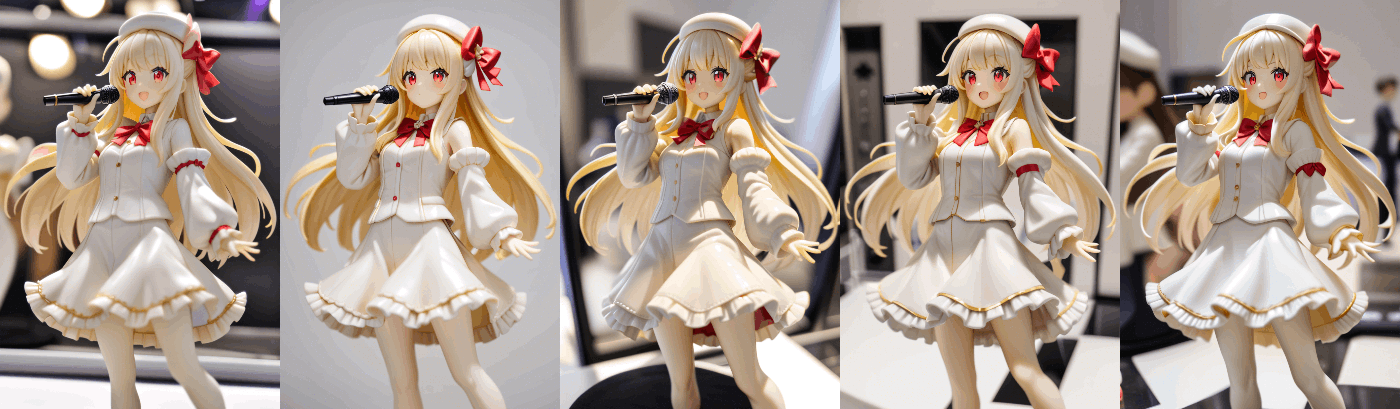
I think the composition is challenging, but it still managed to create a realistic figure-style image.
Prompts Used
Main Prompt
a photo of an anime character figure,Yellowish-white hair , red ribbon,red eyes,white hat, white costume, black microphone, bare legs,Skin color is white
Negative Prompt
nsfw, lowres, (bad), text, error, fewer, extra, missing, worst quality, jpeg artifacts, low quality, watermark, unfinished, displeasing, oldest, early, chromatic aberration, signature, extra digits, artistic error, username, scan, [abstract]
Partial Modification (Adding a Scarf)
Additionally, I tried modifying a part of the original image to add something new.
Input Image

Generated Image

It successfully displayed an image with a "scarf" added to the grayed-out area.
Prompts Used
Main Prompt
scarf, Yellowish-white hair , red ribbon,red eyes,white hat, white costume, black microphone, bare legs
Negative Prompt
nsfw, lowres, (bad), text, error, fewer, extra, missing, worst quality, jpeg artifacts, low quality, watermark, unfinished, displeasing, oldest, early, chromatic aberration, signature, extra digits, artistic error, username, scan, [abstract]
How to Use AnyTest with Diffusers
From here, I will explain the minimum necessary steps to use the "AnyTest" ControlNet with the Diffusers library.
Downloading the AnyTest Weight Files
AnyTest ControlNet model can be downloaded from the link below:
The recommended model is "CN-anytest_v4-marged.safetensors".
Alternatively, "CN-anytest_v3-50000_fp16.safetensors" is also good.
The other files with "dim" in their names are weight files called Control LoRA. This is an incredibly impressive technology that allows you to achieve effects similar to ControlNet simply by attaching them to the model as a LoRA.
By the way, "pn" is a LoRA for use with Pony-based models, and "am" is for use with "Animagine"-based models. It's great that it can be used with the two models commonly used in SDXL.
However, I could not find an easy way to use Control LoRA with the Diffusers library.
As seen below, there are efforts within the Diffusers library to enable the use of Control LoRA, but it doesn't seem to be usable in an effective way yet.
(There seem to be ways to force it, but since we can just use ControlNet normally, we will ignore that for now.)
Therefore, please download the "CN-anytest_v4-marged.safetensors" weights for this tutorial.
Obtaining config.json from a Suitable ControlNet
Next, you need a config.json to use the "AnyTest" ControlNet, so please download the following file:
Storing Both Files in the Same Folder
Store the two downloaded files in the same folder.
For example, store them in a folder like this:
./inputs/AnyTest-v4/
When storing them, rename the model weights as follows:
./inputs/CN-anytest_v4/diffusion_pytorch_model.safetensors
Also save the config file as follows:
./inputs/CN-anytest_v4/config.json
Writing the Code
At a minimum, writing code like the following should make it work.
However, please make sure to store the reference image to be input into ControlNet at ./inputs/control_image.png.
from diffusers import StableDiffusionXLControlNetPipeline, ControlNetModel
from diffusers.utils import load_image
import torch

cnet_path = "./inputs/AnyTest-v4/"
base_model_path = "cagliostrolab/animagine-xl-3.1"
image_path = "./inputs/control_image.png"

controlnet = ControlNetModel.from_pretrained(cnet_path,torch_dtype=torch.float16)

base = StableDiffusionXLControlNetPipeline.from_pretrained(
            base_model_path,
            controlnet=controlnet,
            torch_dtype=torch.float16,
            use_safetensors=True
        )

base.to("cuda")

control_image = load_image(image_path)
prompt = "a cute girls"
negative_prompt = "bad"

image = self.base(
            prompt=prompt,
            negative_prompt=negative_prompt,
            image=control_image,
            cfg_scale=7.0,
            controlnet_conditioning_scale=0.7,
            num_inference_steps=28,
            output_type=pil,
            width = 832,
            height = 1216,
            ).images[0]

image.save("./outputs/output_image.png".format(i))
Why do we have to use such a troublesome method?
To begin with, why do we have to bother downloading config.json?
Many people probably feel, "Can't we just link and load the Hugging Face ControlNet safetensor normally?"
I think many of you feel that way.
I would like to provide a supplementary explanation on this point here.
Those familiar with the Diffusers library probably know about the method for loading a model from a single safetensor weight file.
That’s right, the from_single_file method.
For example, it seems like we should be able to load it by writing something like this:
cnet_path="./inputs/CN-anytest_v4-marged.safetensors"
controlnet = ControlNetModel.from_single_file(cnet_path, torch_dtype=torch.float16)
However, specifying it this way causes the following error:
Full error message
OSError                                   Traceback (most recent call last)
<ipython-input-8-fed346bff60b> in <cell line: 1>()
----> 1 sdxl = SDXL()
      2 # If files like "./inputs/refer_prepared/0.png" that can be used with the specified ControlNet already exist, the following can be commented out
      3 sdxl.prepare_multi_referimage(input_refer_image_folder = input_refer_image_folder,output_refer_image_folder = output_refer_image_folder, low_threshold = 100, high_threshold = 200, noise_level=25, blur_radius=5)
      4

<ipython-input-4-3d4e3265793f> in __init__(self, device, config_ini_path)
    211
    212
--> 213         self.base = self.preprepare_model()
    214
    215

<ipython-input-4-3d4e3265793f> in preprepare_model(self, controlnet_path)
    235                 if cnet_path is not None:
    236                     if self.single_controlnet_bool_list[model_step]:
--> 237                         controlnet = ControlNetModel.from_single_file(cnet_path, torch_dtype=torch.float16)
    238                     else:
    239                         if self.controlnet_variant_bool_list[model_step]:

/usr/local/lib/python3.10/dist-packages/huggingface_hub/utils/_validators.py in _inner_fn(*args, **kwargs)
    112             kwargs = smoothly_deprecate_use_auth_token(fn_name=fn.__name__, has_token=has_token, kwargs=kwargs)
    113
--> 114         return fn(*args, **kwargs)
    115
    116     return _inner_fn  # type: ignore

/content/diffusers/src/diffusers/loaders/single_file_model.py in from_single_file(cls, pretrained_model_link_or_path_or_dict, **kwargs)
    266                 )  # some configs contain a subfolder key, e.g. StableCascadeUNet
    267
--> 268             diffusers_model_config = cls.load_config(
    269                 pretrained_model_name_or_path=default_pretrained_model_config_name,
    270                 subfolder=subfolder,

/usr/local/lib/python3.10/dist-packages/huggingface_hub/utils/_validators.py in _inner_fn(*args, **kwargs)
    112             kwargs = smoothly_deprecate_use_auth_token(fn_name=fn.__name__, has_token=has_token, kwargs=kwargs)
    113
--> 114         return fn(*args, **kwargs)
    115
    116     return _inner_fn  # type: ignore

/content/diffusers/src/diffusers/configuration_utils.py in load_config(cls, pretrained_model_name_or_path, return_unused_kwargs, return_commit_hash, **kwargs)
    404                 )
    405             except EntryNotFoundError:
--> 406                 raise EnvironmentError(
    407                     f"{pretrained_model_name_or_path} does not appear to have a file named {cls.config_name}."
    408                 )

OSError: Lykon/dreamshaper-8 does not appear to have a file named config.json.
This error is caused by the inability to retrieve the config.json file.
As a basic premise, safetensor weights store model weights in a dictionary format.
In other words, the file contains model layer names (e.g., "model.diffusion_model.input_blocks.2.1.transformer_blocks.0.attn2.to_k.weight") and their corresponding weight values (matrices) as a set.
You can actually look inside the safetensor weights with code like the following:
Code to view the contents of the weight file
import safetensors
from safetensors import safe_open

# Specify the path to the safetensor file
safetensor_file_path = 'inputs/CN-anytest_v3-45000_fp16.safetensors'

# Load the safetensors file
with safe_open(safetensor_file_path, framework="pt") as f:
    tensors = {key: f.get_tensor(key) for key in f.keys()}

# Display the weights for each key
for key, tensor in tensors.items():
    print(f"Key: {key}")
    #print(f"Tensor: {tensor}")
    print(f"Shape: {tensor.shape}")
    print(f"Dtype: {tensor.dtype}")
    print("="*50)
Results (Partial, omitted due to length)
Key: add_embedding.linear_1.bias
Shape: torch.Size([1280])
Dtype: torch.float16
==================================================
Key: add_embedding.linear_1.weight
Shape: torch.Size([1280, 2816])
Dtype: torch.float16
==================================================
Key: add_embedding.linear_2.bias
Shape: torch.Size([1280])
Dtype: torch.float16
==================================================
・・・・・・
==================================================
Key: time_embedding.linear_1.weight
Shape: torch.Size([1280, 320])
Dtype: torch.float16
==================================================
Key: time_embedding.linear_2.bias
Shape: torch.Size([1280])
Dtype: torch.float16
==================================================
Key: time_embedding.linear_2.weight
Shape: torch.Size([1280, 1280])
Dtype: torch.float16
==================================================
Furthermore, the Diffusers library identifies the type of model for the loaded weights based on the layer names (Keys) stored within them.
The relevant code is as follows:
Relevant part
...

CHECKPOINT_KEY_NAMES = {
    "v2": "model.diffusion_model.input_blocks.2.1.transformer_blocks.0.attn2.to_k.weight",
    "xl_base": "conditioner.embedders.1.model.transformer.resblocks.9.mlp.c_proj.bias",
    "xl_refiner": "conditioner.embedders.0.model.transformer.resblocks.9.mlp.c_proj.bias",
    "upscale": "model.diffusion_model.input_blocks.10.0.skip_connection.bias",
    "controlnet": "control_model.time_embed.0.weight",
    "playground-v2-5": "edm_mean",
    "inpainting": "model.diffusion_model.input_blocks.0.0.weight",
    "clip": "cond_stage_model.transformer.text_model.embeddings.position_embedding.weight",
    "clip_sdxl": "conditioner.embedders.0.transformer.text_model.embeddings.position_embedding.weight",
    "clip_sd3": "text_encoders.clip_l.transformer.text_model.embeddings.position_embedding.weight",
    "open_clip": "cond_stage_model.model.token_embedding.weight",
    "open_clip_sdxl": "conditioner.embedders.1.model.positional_embedding",
    "open_clip_sdxl_refiner": "conditioner.embedders.0.model.text_projection",
    "open_clip_sd3": "text_encoders.clip_g.transformer.text_model.embeddings.position_embedding.weight",
    "stable_cascade_stage_b": "down_blocks.1.0.channelwise.0.weight",
    "stable_cascade_stage_c": "clip_txt_mapper.weight",
    "sd3": "model.diffusion_model.joint_blocks.0.context_block.adaLN_modulation.1.bias",
    "animatediff": "down_blocks.0.motion_modules.0.temporal_transformer.transformer_blocks.0.attention_blocks.0.pos_encoder.pe",
    "animatediff_v2": "mid_block.motion_modules.0.temporal_transformer.norm.bias",
    "animatediff_sdxl_beta": "up_blocks.2.motion_modules.0.temporal_transformer.norm.weight",
    "animatediff_scribble": "controlnet_cond_embedding.conv_in.weight",
    "animatediff_rgb": "controlnet_cond_embedding.weight",
    "flux": [
        "double_blocks.0.img_attn.norm.key_norm.scale",
        "model.diffusion_model.double_blocks.0.img_attn.norm.key_norm.scale",
    ],
}

...

def infer_diffusers_model_type(checkpoint):
    if (
        CHECKPOINT_KEY_NAMES["inpainting"] in checkpoint
        and checkpoint[CHECKPOINT_KEY_NAMES["inpainting"]].shape[1] == 9
    ):
        if CHECKPOINT_KEY_NAMES["v2"] in checkpoint and checkpoint[CHECKPOINT_KEY_NAMES["v2"]].shape[-1] == 1024:
            model_type = "inpainting_v2"
        elif CHECKPOINT_KEY_NAMES["xl_base"] in checkpoint:
            model_type = "xl_inpaint"
        else:
            model_type = "inpainting"

    elif CHECKPOINT_KEY_NAMES["v2"] in checkpoint and checkpoint[CHECKPOINT_KEY_NAMES["v2"]].shape[-1] == 1024:
        model_type = "v2"

    elif CHECKPOINT_KEY_NAMES["playground-v2-5"] in checkpoint:
        model_type = "playground-v2-5"

    elif CHECKPOINT_KEY_NAMES["xl_base"] in checkpoint:
        model_type = "xl_base"

    elif CHECKPOINT_KEY_NAMES["xl_refiner"] in checkpoint:
        model_type = "xl_refiner"

    elif CHECKPOINT_KEY_NAMES["upscale"] in checkpoint:
        model_type = "upscale"

    elif CHECKPOINT_KEY_NAMES["controlnet"] in checkpoint:
        model_type = "controlnet"

    elif (
        CHECKPOINT_KEY_NAMES["stable_cascade_stage_c"] in checkpoint
        and checkpoint[CHECKPOINT_KEY_NAMES["stable_cascade_stage_c"]].shape[0] == 1536
    ):
        model_type = "stable_cascade_stage_c_lite"

    elif (
        CHECKPOINT_KEY_NAMES["stable_cascade_stage_c"] in checkpoint
        and checkpoint[CHECKPOINT_KEY_NAMES["stable_cascade_stage_c"]].shape[0] == 2048
    ):
        model_type = "stable_cascade_stage_c"

    elif (
        CHECKPOINT_KEY_NAMES["stable_cascade_stage_b"] in checkpoint
        and checkpoint[CHECKPOINT_KEY_NAMES["stable_cascade_stage_b"]].shape[-1] == 576
    ):
        model_type = "stable_cascade_stage_b_lite"

    elif (
        CHECKPOINT_KEY_NAMES["stable_cascade_stage_b"] in checkpoint
        and checkpoint[CHECKPOINT_KEY_NAMES["stable_cascade_stage_b"]].shape[-1] == 640
    ):
        model_type = "stable_cascade_stage_b"

    elif CHECKPOINT_KEY_NAMES["sd3"] in checkpoint:
        model_type = "sd3"

    elif CHECKPOINT_KEY_NAMES["animatediff"] in checkpoint:
        if CHECKPOINT_KEY_NAMES["animatediff_scribble"] in checkpoint:
            model_type = "animatediff_scribble"

        elif CHECKPOINT_KEY_NAMES["animatediff_rgb"] in checkpoint:
            model_type = "animatediff_rgb"

        elif CHECKPOINT_KEY_NAMES["animatediff_v2"] in checkpoint:
            model_type = "animatediff_v2"

        elif checkpoint[CHECKPOINT_KEY_NAMES["animatediff_sdxl_beta"]].shape[-1] == 320:
            model_type = "animatediff_sdxl_beta"

        elif checkpoint[CHECKPOINT_KEY_NAMES["animatediff"]].shape[1] == 24:
            model_type = "animatediff_v1"

        else:
            model_type = "animatediff_v3"

    elif any(key in checkpoint for key in CHECKPOINT_KEY_NAMES["flux"]):
        if any(
            g in checkpoint for g in ["guidance_in.in_layer.bias", "model.diffusion_model.guidance_in.in_layer.bias"]
        ):
            model_type = "flux-dev"
        else:
            model_type = "flux-schnell"
    else:
        model_type = "v1"

    return model_type
Looking at the code above, the model type is determined by the infer_diffusers_model_type function when it matches a model layer name listed in CHECKPOINT_KEY_NAMES.
Here, if none of the layer names specified in CHECKPOINT_KEY_NAMES exist in the loaded safetensor file, "v1" is selected as the model_type.
Furthermore, this model_type is referenced in the following part of the same file:
Relevant part
...
DIFFUSERS_DEFAULT_PIPELINE_PATHS = {
    "xl_base": {"pretrained_model_name_or_path": "stabilityai/stable-diffusion-xl-base-1.0"},
    "xl_refiner": {"pretrained_model_name_or_path": "stabilityai/stable-diffusion-xl-refiner-1.0"},
    "xl_inpaint": {"pretrained_model_name_or_path": "diffusers/stable-diffusion-xl-1.0-inpainting-0.1"},
    "playground-v2-5": {"pretrained_model_name_or_path": "playgroundai/playground-v2.5-1024px-aesthetic"},
    "upscale": {"pretrained_model_name_or_path": "stabilityai/stable-diffusion-x4-upscaler"},
    "inpainting": {"pretrained_model_name_or_path": "Lykon/dreamshaper-8-inpainting"},
    "inpainting_v2": {"pretrained_model_name_or_path": "stabilityai/stable-diffusion-2-inpainting"},
    "controlnet": {"pretrained_model_name_or_path": "lllyasviel/control_v11p_sd15_canny"},
    "v2": {"pretrained_model_name_or_path": "stabilityai/stable-diffusion-2-1"},
    "v1": {"pretrained_model_name_or_path": "Lykon/dreamshaper-8"},
    "stable_cascade_stage_b": {"pretrained_model_name_or_path": "stabilityai/stable-cascade", "subfolder": "decoder"},
    "stable_cascade_stage_b_lite": {
        "pretrained_model_name_or_path": "stabilityai/stable-cascade",
        "subfolder": "decoder_lite",
    },
    "stable_cascade_stage_c": {
        "pretrained_model_name_or_path": "stabilityai/stable-cascade-prior",
        "subfolder": "prior",
    },
    "stable_cascade_stage_c_lite": {
        "pretrained_model_name_or_path": "stabilityai/stable-cascade-prior",
        "subfolder": "prior_lite",
    },
    "sd3": {
        "pretrained_model_name_or_path": "stabilityai/stable-diffusion-3-medium-diffusers",
    },
    "animatediff_v1": {"pretrained_model_name_or_path": "guoyww/animatediff-motion-adapter-v1-5"},
    "animatediff_v2": {"pretrained_model_name_or_path": "guoyww/animatediff-motion-adapter-v1-5-2"},
    "animatediff_v3": {"pretrained_model_name_or_path": "guoyww/animatediff-motion-adapter-v1-5-3"},
    "animatediff_sdxl_beta": {"pretrained_model_name_or_path": "guoyww/animatediff-motion-adapter-sdxl-beta"},
    "animatediff_scribble": {"pretrained_model_name_or_path": "guoyww/animatediff-sparsectrl-scribble"},
    "animatediff_rgb": {"pretrained_model_name_or_path": "guoyww/animatediff-sparsectrl-rgb"},
    "flux-dev": {"pretrained_model_name_or_path": "black-forest-labs/FLUX.1-dev"},
    "flux-schnell": {"pretrained_model_name_or_path": "black-forest-labs/FLUX.1-schnell"},
}

...

def fetch_diffusers_config(checkpoint):
    model_type = infer_diffusers_model_type(checkpoint)
    model_path = DIFFUSERS_DEFAULT_PIPELINE_PATHS[model_type]

    return model_path
In other words, within the fetch_diffusers_config function, the infer_diffusers_model_type function is used, the model_type is determined to be "v1", and by using "v1" as the key for the DIFFUSERS_DEFAULT_PIPELINE_PATHS dictionary, the result becomes model_path={"pretrained_model_name_or_path": "Lykon/dreamshaper-8"}.
Going one step deeper, we can see that the fetch_diffusers_config function is used within the from_single_file method as follows.
Relevant part
The relevant code is as follows:
...
class FromOriginalModelMixin:
    """
    Load pretrained weights saved in the `.ckpt` or `.safetensors` format into a model.
    """

    @classmethod
    @validate_hf_hub_args
    def from_single_file(cls, pretrained_model_link_or_path_or_dict: Optional[str] = None, **kwargs):
...
             if config:
                if isinstance(config, str):
                    default_pretrained_model_config_name = config
                else:
                    raise ValueError(
                        (
                            "Invalid `config` argument. Please provide a string representing a repo id"
                            "or path to a local Diffusers model repo."
                        )
                    )

            else:
                config = fetch_diffusers_config(checkpoint)
                default_pretrained_model_config_name = config["pretrained_model_name_or_path"]
...

            diffusers_model_config = cls.load_config(
                pretrained_model_name_or_path=default_pretrained_model_config_name,
                subfolder=subfolder,
                local_files_only=local_files_only,
            )

...
And there it is—the cls.load_config class method appears here. The error message was as follows.
Looking at line 268 in the third block from the bottom, cls.load_config is being used, and this is where the error occurs.
...
/content/diffusers/src/diffusers/loaders/single_file_model.py in from_single_file(cls, pretrained_model_link_or_path_or_dict, **kwargs)
    266                 )  # some configs contain a subfolder key, e.g. StableCascadeUNet
    267
--> 268             diffusers_model_config = cls.load_config(
    269                 pretrained_model_name_or_path=default_pretrained_model_config_name,
    270                 subfolder=subfolder,

/usr/local/lib/python3.10/dist-packages/huggingface_hub/utils/_validators.py in _inner_fn(*args, **kwargs)
    112             kwargs = smoothly_deprecate_use_auth_token(fn_name=fn.__name__, has_token=has_token, kwargs=kwargs)
    113
--> 114         return fn(*args, **kwargs)
    115
    116     return _inner_fn  # type: ignore

/content/diffusers/src/diffusers/configuration_utils.py in load_config(cls, pretrained_model_name_or_path, return_unused_kwargs, return_commit_hash, **kwargs)
    404                 )
    405             except EntryNotFoundError:
--> 406                 raise EnvironmentError(
    407                     f"{pretrained_model_name_or_path} does not appear to have a file named {cls.config_name}."
    408                 )

OSError: Lykon/dreamshaper-8 does not appear to have a file named config.json.
This error stems from the fact that model_path={"pretrained_model_name_or_path": "Lykon/dreamshaper-8"} was determined within the fetch_diffusers_config function.
Now, let's look for the "Lykon/dreamshaper-8" repository on Hugging Face.
As you can see, config.json does not exist in this repository.
Consequently, it results in the error: OSError: Lykon/dreamshaper-8 does not appear to have a file named config.json.
The cause of the error is now clear.
Recalling what the root cause was at the very beginning, it started with the Diffusers library determining the model type based on the layer names stored within the safetensor weights.
The problem was that the layer names stored in the "AnyTest" weights were not listed in CHECKPOINT_KEY_NAMES.
However, in truth, this is not limited to the "AnyTest" model.
Even common official models used as SDXL ControlNets, like the one below, are actually saved with the same layer names (I confirmed that they match).
In other words, even for officially implemented ControlNets, from_single_file will not work correctly.
Therefore, the cause is that SDXL's ControlNet is structured in such a way that it cannot properly utilize the from_single_file method (whether this is a bug or a specification).
So, in this case, we bypassed the error by forcing the use of the config file from the diffusers/controlnet-canny-sdxl-1.0 repository together with the "AnyTest" model.
(Since I confirmed that the layer names and the number of layers in each model perfectly match, I believe there is no issue.)
By storing both the model weight file and the config file in the same folder (repository) and specifying that folder using the from_pretrained method, the config file within the folder is adopted, and loading becomes possible.
Usage Precautions
I have written a lot so far, but there is one point I found a bit difficult when using "AnyTest." That is,
colors are not carried over.
It might be because of how I use it, but at least with the method above, while the composition input to ControlNet is preserved, colors are not carried over unless they are specified quite accurately in the prompt.
So, if you want to make minor corrections based on the original image, I thought it would be better to honestly use StableDiffusionXLInpaintPipeline.
The power of StableDiffusionXLInpaintPipeline is explained in the following article.
Conversely, if you don't require that much accuracy in color changes (i.e., if the color reproducibility shown in the generation examples is enough), it is a high-performance model that stands out from other models.
(If anyone knows a way to improve color reproducibility, please let me know. I probably just don't know about it.)
Summary
So far, I have explained how to use the super-powerful general-purpose ControlNet "AnyTest" with the Diffusers library.
Although you have to specify the colors in the prompt, I felt it was a very high-performance ControlNet model in terms of shape transformation.
(In the first place, it's amazing that you can perform all kinds of tasks with just one ControlNet. It seems like it will be the first model to try for now.)
Thank you for reading this far!
From here on, I will explain the code I actually used, so please take a look if you are interested.
Detailed Content
From here, I will explain the experiments I conducted and the actual code for this article. The content is quite detailed, so please read it only if you are interested (it's mostly for my own reference).
Deliverables
Please see the repository below.
Preparation
Downloading the AnyTest Weight Files
Mentioned above.
Obtaining config.json from a Suitable ControlNet
Mentioned above.
Preparing Reference Images
Reference Image for Figurization

Save this image as ./inputs/refer/figre/tile.png.
Reference Image for Partial Modification (Adding a Scarf)

Save this image as ./inputs/refer/scarf/tile.png.
Expected Directory Structure
The directory structure in Google Drive is expected to be as follows:
MyDrive/
    └ colab_AI_sample/
          └ colab_SDXLControlNet2_sample/
                  ├ configs/
                  |    └ config.ini
                  ├ inputs/
                  |    ├ CN-anytest_v4/
                  |    |        ├ diffusion_pytorch_model.safetensors
                  |    |        └ config.json
                  |    ├ refer/
                  |    |    ├ figre/
                  |    |    |   └ tile.png
                  |    |    └ scarf/
                  |    |    |   └ tile.png
                  |    └ refer_prepared/
                  ├ outputs/
                  ├ module/
                  |    └ module_sdxl.py
                  └ SDXLControlNet_sample.ipynb
How to Use
Open SDXLControlNet_sample.ipynb in the Google Colaboratory app.
Right-click the file, and you will see the "Open with" option; select Google Colaboratory from there.
If you don't have it, go to the app store from "Connect more apps," search for "Google Colaboratory," and install it.
Once opened in Google Colaboratory, after setting the parameters and prompts described later, refer to the notes in SDXLControlNet_sample.ipynb and execute the cells in order starting from the top. Five images will be generated in the "outputs" folder.
Also, if you want to change parameters and run it again after executing everything to the end, click "Runtime" -> "Restart session and run all."
Changing Parameters
This corresponds to the 5th and 8th cells of SDXLControlNet_sample.ipynb.
Parameter Settings (5th cell)
# Configure model settings.

config_text = """
[SDXL]
device = auto
n_steps=28
seed=42

;from_single_file = True
;base_model_path = stabilityai/stable-diffusion-xl-base-1.0
base_model_path = Asahina2K/Animagine-xl-3.1-diffuser-variant-fp16
;base_model_path = ./inputs/pony/ponyDiffusionV6XL_v6StartWithThisOne.safetensors
;base_model_path = ./inputs/fudukiMix_v20.safetensors
;from_single_vae_file = True
;base_vae_model = ./inputs/pony/sdxl_vae.safetensors

use_controlnet = True

;controlnet_path0 = ./inputs/CN-anytest_v3-45000/
;from_single_controlnet_file0 = False
;use_controlnet_variant0 = True
controlnet_path0 = ./inputs/CN-anytest_v4/
from_single_controlnet_file0 = False
use_controlnet_variant0 = False
;controlnet_path1 = diffusers/controlnet-depth-sdxl-1.0
;from_single_controlnet_file1 = False
;use_controlnet_variant1 = True
;controlnet_path2 = xinsir/controlnet-openpose-sdxl-1.0
;from_single_controlnet_file2 = False
;use_controlnet_variant2 = True
;controlnet_path3 = diffusers/controlnet-canny-sdxl-1.0
;from_single_controlnet_file3 = False
;use_controlnet_variant3 = True
;controlnet_path4 = diffusers/controlnet-zoe-depth-sdxl-1.0
;from_single_controlnet_file4 = False
;use_controlnet_variant4 = True

; Unfortunately, the following does not work
;controlnet_path0 = https://huggingface.co/2vXpSwA7/iroiro-lora/blob/main/test_controlnet2/CN-anytest_v4-marged.safetensors
;controlnet_config_repo0 = diffusers/controlnet-canny-sdxl-1.0
;from_single_controlnet_file0 = True
;use_controlnet_variant0 = False

; Assume a reference image with the same name as the mode is stored (e.g., tile.png).
control_mode0 = tile
;control_mode1 = depth
;control_mode2 = openpose_full
;control_mode3 = canny
;control_mode4 = zoe_depth

; Below is for standby
;control_mode0 = blur
;control_mode0 = gray
;control_mode0 = lq
;control_mode0 = openpose_face
;control_mode0 = openpose_faceonly
;control_mode0 = openpose


;lora_weight_repo0 = erohinem/LoRA
;lora_weight_path0 = Dreamyvibes-lora.safetensors
;lora_weight_repo1 = xxx
;lora_weight_path1 = xxx.safetensors
;lora_scale0 = 1.0
;lora_scale1 = 1.0
;trigger_word0 = "Dreamyvibes Artstyle"
;trigger_word1 = "xxx"

;select_solver = LCM
select_solver = DPM
;select_solver = Eulera
;select_solver = FMEuler

use_karras_sigmas = True
scheduler_algorithm_type = dpmsolver++
solver_order = 2

cfg_scale = 7.0
width = 832
height = 1216
output_type = pil
aesthetic_score = 6
negative_aesthetic_score = 2.5

save_latent_simple = False
save_latent_overstep = False
save_latent_approximation = False
save_predict_skip_x0 = False


"""

with open("configs/config.ini", "w", encoding="utf-8") as f:
  f.write(config_text)
Just for clarification, ; is a comment-out symbol. I have kept past settings so that experimental configurations can be restored.
-
n_steps- Number of denoising steps for the diffusion model.
- Appropriate values vary depending on the model, so please check them.
-
from_single_file- Set to True if loading the model from a single safetensors file.
-
base_model_path- Specifies the model to use.
- In the current implementation, if not loading from a single file, you need to use a model that supports
variant = fp16. - You can determine support by whether
fp16is mentioned in the filename.
-
from_single_vae_file,base_vae_model- Set these if you are specifying a VAE.
- Refiner cannot be set in this implementation. I have discarded it as I don't use it.
-
use_controlnet- Flag for whether to use ControlNet.
-
controlnet_path0tocontrolnet_path4- Model paths of the ControlNets to use.
- You can specify multiple.
-
control_mode0tocontrol_mode4- Modes for the ControlNets to be used.
- Describe them according to the numbers corresponding to the specified
controlnet_path.
-
use_controlnet_variant0touse_controlnet_variant4- Whether to adopt
variant=fp16. - Basically,
Falseis fine since few models support it.
- Whether to adopt
-
lora_weight_repo0tolora_weight_repo9- Repository specification for the LoRA to use. Multiple LoRAs can be applied by listing them.
- When using a LoRA from Hugging Face, specify the repository name here as well.
-
lora_weight_path0tolora_weight_path9- Specify the path for the LoRA to use. Multiple LoRAs can be applied.
- When using a LoRA from Hugging Face, specify only the filename used for the LoRA here.
- For LoRA files downloaded from Civitai, etc., describe the relative path to where the file is saved (set
lora_weight_repoto None).
-
lora_scale0tolora_scale9- The degree of application for the LoRA to be used.
-
trigger_word0totrigger_word9- Trigger word settings recommended for the LoRA being used.
-
select_solver- Specification of the sampler to use.
-
widthandheight- Dimensions of the image to be generated.
-
save_latent_simple,save_latent_overstep, andsave_latent_approximation- Flags for whether to output intermediate results during generation and in what format.
-
save_latent_simpleoutputs the process of generating from noise. -
save_latent_overstepoutputs the process where relatively clean images transition. -
save_latent_approximationoutputs using a first-order approximation from the latent representation.
-
save_predict_skip_x0- https://zenn.dev/asap/articles/7940b17be86da7
- As described in the article above, this can be used by modifying the code using a forked version of Diffusers.
- Basically not available.
- I plan to implement this soon by creating a new custom pipeline that inherits from the parent class.
The 8th cell is as follows:
for i in range(5):
      start = time.time()
      image = sdxl.generate_image(main_prompt,neg_prompt = neg_prompt, image_path = output_refer_image_folder, controlnet_conditioning_scale = [0.8])
      print("generate image time: ", time.time()-start)
      image.save("./outputs/SDXL_result_{}.png".format(i))
The controlnet_conditioning_scale = [0.8] part here is a parameter that can be changed.
controlnet_conditioning_scale is a parameter that sets how much to reflect the ControlNet when using it. A higher value results in stronger control.
Changing Prompts
This corresponds to the 6th cell of SDXLControlNet_sample.ipynb.
# Set the prompts.

# figure
main_prompt = """
a photo of an anime character figure,Yellowish-white hair , red ribbon,red eyes,white hat, white costume, black microphone, bare legs,Skin color is white
"""

# scarf
#main_prompt = """
#scarf, Yellowish-white hair , red ribbon,red eyes,white hat, white costume, #black microphone, bare legs
#"""


neg_prompt="""
nsfw, lowres, (bad), text, error, fewer, extra, missing, worst quality, jpeg artifacts, low quality, watermark, unfinished, displeasing, oldest, early, chromatic aberration, signature, extra digits, artistic error, username, scan, [abstract]
"""

# Please match the name of the reference image input to ControlNet with the ControlNet mode (e.g., tile.png, depth.jpeg).
input_refer_image_folder = "./inputs/refer/figre"
# Folder to store the converted reference images input to ControlNet. The naming convention is the same as above.
output_refer_image_folder = "./inputs/refer_prepared/figre"
By changing the main_prompt in the 6th cell and executing the 8th cell, the updated prompt will be reflected in the generation.
Also, please correctly specify the path to the folder containing the reference images according to your task.
If you place the source images in input_refer_image_folder, they will be converted into the appropriate images and saved in output_refer_image_folder after execution.
Additionally, the filenames of the reference images must match the Control_mode.
For example, depth.png or openpose-full.webp.
Execution Results
Please see the images at the top of the article.
No other experiments were conducted.
Code Explanation
From here, I will explain the experiments conducted and the actual code used for this article. The content is quite detailed, so please read it only if you are interested (it is mostly for my own reference).
SDXLControlNet_sample.ipynb
This section explains SDXLControlNet_sample.ipynb.
You can view the code here:
1st Cell
# Mount Google Drive folder (authentication required)
from google.colab import drive
drive.mount('/content/drive')
This mounts My Drive.
Authentication is required, and since it will error out if not authenticated within a certain time, I put it at the top so that execution and authentication can be handled together.
2nd Cell
# Install necessary modules for SDXL
!pip install -U bitsandbytes diffusers optimum-quanto peft tensorflow-metadata transformers scikit-learn ftfy accelerate invisible_watermark safetensors controlnet-aux mediapipe timm
This installs the necessary modules.
3rd Cell
# Change the current directory to the directory where this file exists.
import glob
import os
pwd = os.path.dirname(glob.glob('/content/drive/MyDrive/colabzenn/colab_SDXLControlNet2_sample/SDXLControlNet_sample.ipynb', recursive=True)[0])
print(pwd)

%cd $pwd
!pwd
This sets the current directory to the directory where the notebook is located.
4th Cell
# Import modules
from module.module_sdxl import SDXL
import time
This imports the modules.
The implementation code for SDXL is written in module/module_sdxl.py.
I will describe that later as well.
5th Cell
# Configure model settings.

config_text = """
[SDXL]
device = auto
n_steps=28
seed=42

;from_single_file = True
;base_model_path = stabilityai/stable-diffusion-xl-base-1.0
base_model_path = Asahina2K/Animagine-xl-3.1-diffuser-variant-fp16
;base_model_path = ./inputs/pony/ponyDiffusionV6XL_v6StartWithThisOne.safetensors
;base_model_path = ./inputs/fudukiMix_v20.safetensors
;from_single_vae_file = True
;base_vae_model = ./inputs/pony/sdxl_vae.safetensors

use_controlnet = True

;controlnet_path0 = ./inputs/CN-anytest_v3-45000/
;from_single_controlnet_file0 = False
;use_controlnet_variant0 = True
controlnet_path0 = ./inputs/CN-anytest_v4/
from_single_controlnet_file0 = False
use_controlnet_variant0 = False
;controlnet_path1 = diffusers/controlnet-depth-sdxl-1.0
;from_single_controlnet_file1 = False
;use_controlnet_variant1 = True
;controlnet_path2 = xinsir/controlnet-openpose-sdxl-1.0
;from_single_controlnet_file2 = False
;use_controlnet_variant2 = True
;controlnet_path3 = diffusers/controlnet-canny-sdxl-1.0
;from_single_controlnet_file3 = False
;use_controlnet_variant3 = True
;controlnet_path4 = diffusers/controlnet-zoe-depth-sdxl-1.0
;from_single_controlnet_file4 = False
;use_controlnet_variant4 = True

; Unfortunately, the following does not work
;controlnet_path0 = https://huggingface.co/2vXpSwA7/iroiro-lora/blob/main/test_controlnet2/CN-anytest_v4-marged.safetensors
;controlnet_config_repo0 = diffusers/controlnet-canny-sdxl-1.0
;from_single_controlnet_file0 = True
;use_controlnet_variant0 = False

; Assume a reference image with the same name as the mode is stored (e.g., tile.png).
control_mode0 = tile
;control_mode1 = depth
;control_mode2 = openpose_full
;control_mode3 = canny
;control_mode4 = zoe_depth

; Below is for standby
;control_mode0 = blur
;control_mode0 = gray
;control_mode0 = lq
;control_mode0 = openpose_face
;control_mode0 = openpose_faceonly
;control_mode0 = openpose


;lora_weight_repo0 = erohinem/LoRA
;lora_weight_path0 = Dreamyvibes-lora.safetensors
;lora_weight_repo1 = xxx
;lora_weight_path1 = xxx.safetensors
;lora_scale0 = 1.0
;lora_scale1 = 1.0
;trigger_word0 = "Dreamyvibes Artstyle"
;trigger_word1 = "xxx"

;select_solver = LCM
select_solver = DPM
;select_solver = Eulera
;select_solver = FMEuler

use_karras_sigmas = True
scheduler_algorithm_type = dpmsolver++
solver_order = 2

cfg_scale = 7.0
width = 832
height = 1216
output_type = pil
aesthetic_score = 6
negative_aesthetic_score = 2.5

save_latent_simple = False
save_latent_overstep = False
save_latent_approximation = False
save_predict_skip_x0 = False


"""

with open("configs/config.ini", "w", encoding="utf-8") as f:
  f.write(config_text)
This is where the experimental settings are described.
Note that even if you manually rewrite configs/config.ini, it will be overwritten when you run this cell.
You can comment out lines using ;, so I recommend commenting out experimental settings that are not needed for the current run but that you want to keep for later.
6th Cell
# Set the prompts.

# figure red
# main_prompt = """
# a photo of an anime character figure,Yellowish-white hair , red ribbon,red eyes,white hat, white costume, black microphone, bare legs,Skin color is white
# """

# scarf scketch
main_prompt = """
scarf, Yellowish-white hair , red ribbon,red eyes,white hat, white costume, black microphone, bare legs
"""


neg_prompt="""
nsfw, lowres, (bad), text, error, fewer, extra, missing, worst quality, jpeg artifacts, low quality, watermark, unfinished, displeasing, oldest, early, chromatic aberration, signature, extra digits, artistic error, username, scan, [abstract]
"""

# Please match the name of the reference image input to ControlNet with the ControlNet mode (e.g., tile.png, depth.jpeg).
input_refer_image_folder = "./inputs/refer/sketch2"
# Folder to store the converted reference images input to ControlNet. The naming convention is the same as above.
output_refer_image_folder = "./inputs/refer_prepared/sketch2"
This describes the prompts for generation and the storage location for the reference images used in ControlNet.
7th Cell
sdxl = SDXL()
# If files like "./inputs/refer_prepared/tile.png" that can be used with the specified ControlNet already exist, the following can be commented out
sdxl.prepare_multi_referimage(input_refer_image_folder = input_refer_image_folder,output_refer_image_folder = output_refer_image_folder, low_threshold = 100, high_threshold = 200, noise_level=25, blur_radius=5)
This obtains a class instance of the SDXL class.
In addition, it executes the prepare_multi_referimage method.
This method converts and re-saves images based on the specified control_mode.
For example, if you are using a depth ControlNet, specifying control_mode as depth will convert a normal image (depth.png) into a depth map (depth.png).
8th Cell
for i in range(5):
      start = time.time()
      image = sdxl.generate_image(main_prompt,neg_prompt = neg_prompt, image_path = output_refer_image_folder, controlnet_conditioning_scale = [0.8])
      print("generate image time: ", time.time()-start)
      image.save("./outputs/SDXL_result_{}.png".format(i))
This generates five images sequentially from the specified seed value and also measures the time taken for generation.
The generated images are stored in the outputs folder.
module/module_sdxl.py
I will explain module/module_sdxl.py.
Please view the code from the link below.
A brief explanation is provided below. I have not explained parts that overlap with previous articles.
Constructor of the FLUX Class
class SDXL:
    def __init__(self,device = None, config_ini_path = './configs/config.ini'):
    ・・・
        self.use_controlnet = config_dict.get("use_controlnet", "False")
        if self.use_controlnet == "False":
            self.use_controlnet = False
        else:
            self.use_controlnet = True

        self.controlnet_path_list = []
        for i in range(5):
            if config_dict.get(f"controlnet_path{i}", "None") != "None":
                self.controlnet_path_list.append(config_dict[f"controlnet_path{i}"])
            else:
                self.controlnet_path_list.append(None)

        self.single_controlnet_bool_list = []
        for i in range(5):
            if config_dict.get(f"from_single_controlnet_file{i}", "False") != "False":
                self.single_controlnet_bool_list.append(True)
            else:
                self.single_controlnet_bool_list.append(False)

        self.controlnet_variant_bool_list = []
        for i in range(5):
            if config_dict.get(f"use_controlnet_variant{i}", "False") != "False":
                self.controlnet_variant_bool_list.append(True)
            else:
                self.controlnet_variant_bool_list.append(False)

        self.controlnet_config_list = []
        for i in range(5):
            if config_dict.get(f"controlnet_config_repo{i}", "None") != "None":
                self.controlnet_config_list.append(config_dict[f"controlnet_config_repo{i}"])
            else:
                self.controlnet_config_list.append(None)

        if not self.use_controlnet and self.controlnet_path_list == []:
            raise ValueError("controlnet_path is not set")
        if len(self.controlnet_path_list) != len(self.single_controlnet_bool_list):
            raise ValueError("controlnet_path and from_single_controlnet_file is not match")
        if len(self.controlnet_path_list) != len(self.controlnet_variant_bool_list):
            raise ValueError("controlnet_path and use_controlnet_variant is not match")
        if len(self.controlnet_path_list) != len(self.controlnet_config_list):
            raise ValueError("controlnet_path and controlnet_config_repo is not match")

        # Specify one ControlMode for each ControlNet specified
        self.control_modes_list = []
        for i in range(5):
            if config_dict.get(f"control_mode{i}", "None") != "None":
                self.control_modes_list.append(config_dict[f"control_mode{i}"])
            else:
                self.control_modes_list.append(None)

        if len(self.controlnet_path_list) != len(self.control_modes_list):
            raise ValueError("controlnet_path and control_mode is not match")
In order to be able to apply multiple ControlNets, I have made it possible to prepare multiple configuration settings as well.
If they are not specified, they will be set to None, so specifying just one is also fine.
Up to five can be specified, and there is no problem regardless of which of the five locations you specify.
Loading the Model
    def preprepare_model(self, controlnet_path = None):
・・・
if self.use_controlnet:
            controlnets = []
            for model_step, cnet_path in enumerate(self.controlnet_path_list):
                if cnet_path is not None:
                    if self.single_controlnet_bool_list[model_step]:
                        if self.controlnet_config_list[model_step] is not None:
                            print(model_step, self.controlnet_config_list[model_step])
                            controlnet = ControlNetModel.from_single_file(cnet_path, config = self.controlnet_config_list[model_step], torch_dtype=torch.float16)
                        else:
                            controlnet = ControlNetModel.from_single_file(cnet_path, torch_dtype=torch.float16)
                    else:
                        if self.controlnet_variant_bool_list[model_step]:
                            controlnet = ControlNetModel.from_pretrained(cnet_path,
                                        torch_dtype=torch.float16,
                                        variant="fp16",
                                        use_safetensors=True
                                        )
                        else:
                            controlnet = ControlNetModel.from_pretrained(cnet_path, torch_dtype=torch.float16)
                    controlnets.append(controlnet)

            print("loaded controlnet")

            if not self.SINGLE_FILE_FLAG:
                if self.VAE_FLAG:
                    base = StableDiffusionXLControlNetPipeline.from_pretrained(
                        self.base_model_path,
                        vae=vae,
                        controlnet=controlnets,
                        torch_dtype=torch.float16,
                        variant="fp16",
                        use_safetensors=True
                        )
・・・
We have made it possible to configure multiple ControlNets. Additionally, the process is branched because the loading method differs depending on whether the weights are retrieved from a single file, specified by a folder, or whether they support fp16.
As a prerequisite, the configuration is written with the assumption that using the same number refers to the same ControlNet setting.
Summary (Part 2)
Thank you very much for reading this far!
Discussion