iTranslated by AI
Teaching Programming to a Middle School Student with AtCoder #5: ABC081A - Placing Marbles




Content of this Article
I am recording how a software engineer teaches programming to a junior high school student. This is the 5th article in the series. Last time, the student wrote code by hand and went through the process until their first submission. This time, we will follow the same procedure for a different problem.
【Previous Article】 A session where we solved one past question (ABC086A - Product) and submitted it for the first time.
Goals for this Session
This session's task is ABC081A - Placing Marbles. Using this task as a theme, we will review the same workflow as last time.
- Get accustomed to writing code by repeating the cycle of writing, running, and verifying.
- Get used to the submission procedure.
Problem Overview
Marbles are placed in three squares. The state is represented by numbers: 0 for no marble, and 1 for a marble present.
010
This is provided as a single-line input, and the task is to output how many marbles are placed in the squares.
1
Solving the Problem
1. Verifying Input Acquisition
Me: "Let's start by writing the code to get the input."
Child: "Are you going to get the input and ignore it again?"
Me: "Suit yourself. You've already confirmed that what you wrote last time works, right? You can just bring that over."
Child: "Then I'll start with the echo."
a = input()
print(a)
010
Me: "Nice, you've really made this your own now."
Child: "Yeah. Now... what should I do? I can't split it by spaces."
2. Thinking About the Approach
Normally, this is where the student would think through the logic themselves, but this person simply doesn't have enough tools at their disposal yet. For a while, I'll think through the approach, provide the necessary tools, and have them use them.
Since they had experience splitting by spaces, converting to numbers, and calculating last time, I'll go with a similar method this time.
- Get the input.
- Split it character by character into a list.
- Convert those into numbers.
- Add them up.
- That will give the number of marbles, so output it.
I decided to give them the tool to "split character by character into a list."
3. Trying Out the Provided Tool
Me: "Alright, I'll give you a helpful tool. It's list(string)."
Child: "What's this?"
Me: "What do you think it is?"
Child: "Even if I have a tool, I can't use it if I don't know how! You're going to say 'Just try it' anyway, right? Fine."
Me: "Bingo!"
Child: "Since the input I got is a string, I'll try putting it into this."
a = input()
print(a)
l = list(a)
print(l)
010
['0', '1', '0']
Child: "What does this mean?"
Me: "It's a tool that breaks a string apart character by character and turns it into a list of single-character strings."
Child: "I see, so that's how it works. Then, can't I just use that map to turn them into numbers and add them all together?"
4. Outputting the Result Using the Tool
Child: "Since it's the same as before, I just need to create three variables and assign them, right?"
a = input()
print(a)
l = list(a)
print(l)
x, y, z = map(int, l)
print(x, y, z)
print(x+y+z)
010
['0', '1', '0']
0 1 0
1
Me: "That went way too smoothly! There's no suspense!"
Child: "What, I'm being scolded! lmao"
5. First Refactoring
Me: "Lols aside, next, please pass the tests."
[FAILURE] test failed: 0 AC / 3 cases
Child: "What? It says it's no good."
Me: "You fell for it! Wahahaha."
Child: "Please don't try to set me up! It's just because of the debug output."
Me: "Tsk, you noticed."
a = input()
l = list(a)
x, y, z = map(int, l)
print(x+y+z)
1
Child: "Like this, right? Can I run the tests?"
Me: "Before you run the tests, don't you think you can reduce the number of lines? There's a good way, interested?"
Child: "You sound like a scammer."
Me: "You're putting it into the variable l after splitting it into a list, but you don't actually have to put it into a variable; you can write it directly as an argument for map."
Child: "Stop it, it's funny how you sound like a scammer while saying something useful."
a = input()
x, y, z = map(int, list(a))
print(x+y+z)
Child: "Oh, I see. Fewer variables and it's easy to understand."
Me: "Wait, I don't actually know if that works. Can you trust me?"
Child: "You keep trying to trick me like that lol. Just tell me to try it lol."
Me: "It's parental love, wanting my child to grow up to be someone who doesn't get deceived by bad people."
1
Child: "It worked perfectly. Phew. I should've done this from the start."
Me: "It's not always better to do it this way. Putting it into a variable earlier was necessary for the debug output to check the operation. Now that we've confirmed it works, it's fine to write it like this."
Child: "I see, writing it like this from the beginning would be that 'getting into trouble because I wrote it all at once and it didn't work' thing."
Me: "Exactly. Professionals also start by writing code and checking the operation, then they organize the code to be readable while maintaining the same behavior. This is called 'Refactoring'."
Child: "Refactoring! That sounds cool."
Me: "That was your first refactoring. Achievement unlocked! 🏆"
Child: "Today is full of 'firsts' lol."
6. Code Readability
Child: "Wait, can I just put input() right in this line too?"
Me: "Sure. Give it a shot."
x, y, z = map(int, list(input()))
print(x+y+z)
Child: "It got shorter."
1
Child: "It worked."
Me: "It works in just two lines. Amazing. Alright, take another look at the shortened code. The number of lines decreased, but do you see how it gets a bit harder to read when things are nested like this?"
Child: "Oh, true... if I were shown this out of the blue, I might not be able to read it..."
Me: "It's fine for something this size, but code is read by others and by your future self, so it's good to write with readability in mind. Putting everything into separate variables can be hard to read, but writing everything in one line is also hard to read."
Child: "Ehh, but I don't know what 'readable' is."
Me: "True lol. For now, it's competitive programming, so as long as it works, it's okay! Let's pass the tests now."
[SUCCESS] test success: 3 cases
Child: "It passed!"
Me: "Wonderful, well done! Shall we try submitting it?"
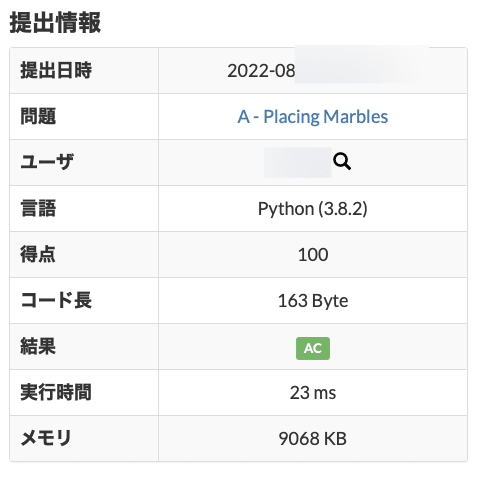
Child: "I did it!"
Summary of What We Did Today
- Coding while verifying the behavior
- Reviewing the submission process
- Trying out the new tool
list(string) - Learning that you can pass a function call as an argument to another function call
- Performing refactoring for the first time
- Learning that some code is readable and some is not
【Next Article】 Next, it says to move on to ABC081B - Shift Only, but since it felt a bit difficult, we will prepare by creating alternative solutions for previous problems using arrays (lists) and for loops.
Discussion