Raspberry Piで初めてのEPD - Waveshare 1.54inch e-Paper Module




e Paper Display
兎角呼称の揺れが大きいので、何と呼ぶのが適切なのか未だに分からないこのディスプレイ。電子ペーパーとか
本記事では、epd_***.pyなどと出てくるから丁度良いだろう。
使用デバイス
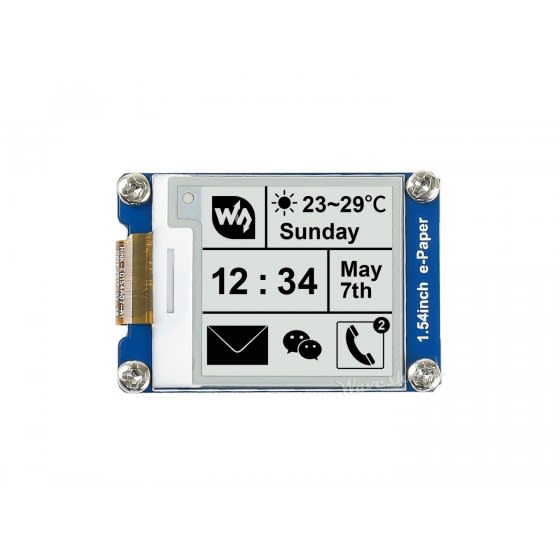
引用:https://www.waveshare.com/1.54inch-e-paper-module.htm
私は
本題:Raspberry Pi
プログラムは
事前準備
殆ど
- 配線

引用:https://www.waveshare.com/wiki/1.54inch_e-Paper_Module_Manual
配線はこの通り。間違わないように注意する。
-
SPI
今回使用するraspi-configコマンドで設定を変更し、有効にする。
bookwormである。

今回trixieとなった環境でこの設定を行ったところ、再起動を求められなかった。しかし不安なので一応再起動しておいた。
実行方法
どう考えても
- 環境
実行環境を示しておく。
# OS environment
$ cat /etc/os-release
PRETTY_NAME="Debian GNU/Linux 13 (trixie)"
NAME="Debian GNU/Linux"
VERSION_ID="13"
VERSION="13 (trixie)"
VERSION_CODENAME=trixie
DEBIAN_VERSION_FULL=13.3
ID=debian
HOME_URL="https://www.debian.org/"
SUPPORT_URL="https://www.debian.org/support"
BUG_REPORT_URL="https://bugs.debian.org/"

# default python version
$ python3 -V
Python 3.13.5
- プログラムをダウンロードする
上に示した
# clone repository
$ git clone https://github.com/waveshareteam/e-Paper.git
-
Python
numpy、PIL、spidev、gpiozeroをインストールするとある。既に揃っていれば、わざわざインストールする必要はない。実際にimport文を実行して確認すれば確実に分かる。
# check if some modules are installed
$ python3
Python 3.13.5 (main, Jun 25 2025, 18:55:22) [GCC 14.2.0] on linux
Type "help", "copyright", "credits" or "license" for more information.
>>> import numpy
>>> import PIL
>>> import spidev
>>> import gpiozero
>>>
私の環境では既に全て揃っていたので、何もインストールしていない。
インストールする場合
aptでインストールしているが、本記事では仮想環境を使う方法を紹介する。
epdenvという名前で仮想環境を作る。なおオプション--system-site-packagesを付けており、既存のモジュールを包含している。
$ python3 -m venv epdenv --system-site-packages
$ source epdenv/bin/activate
(epdenv) $ python
(epdenv) $ pip install numpy pillow spidev gpiozero
- デバイスに対応したプログラムの選択
今回のデバイスは「epd_1in54_V2_test.pyとなる。
サイズは基板にも1.54inchとあるので、迷うことはないだろう。「
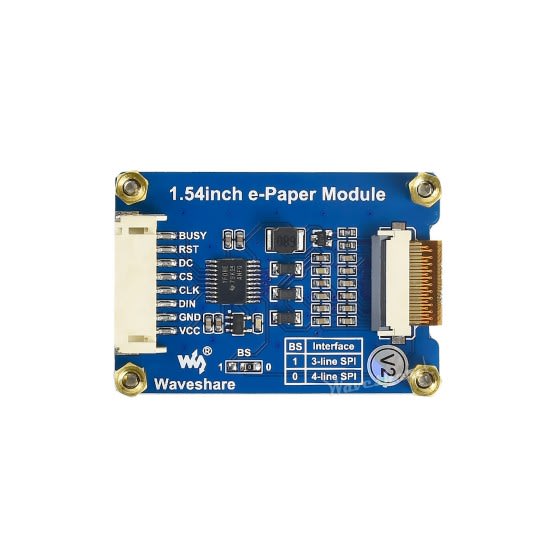
V2というシールがある
引用:https://www.waveshare.com/1.54inch-e-paper-module.htm
問題は表現色だが、白黒のみのものは無印、赤白黒のものは「
対応色の推定
極のようなもの
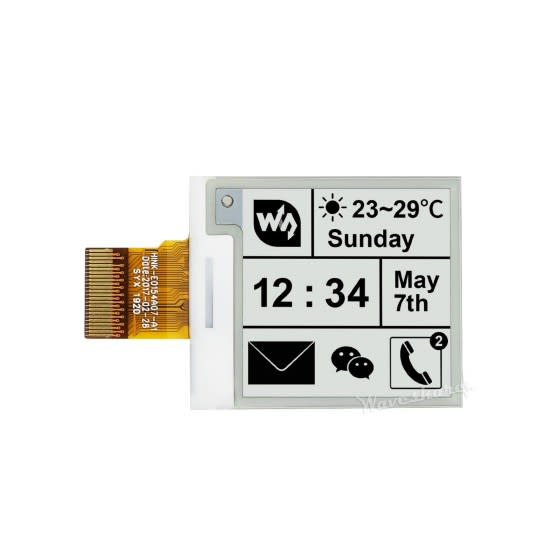
引用:https://www.waveshare.com/product/1.54inch-e-paper.htm
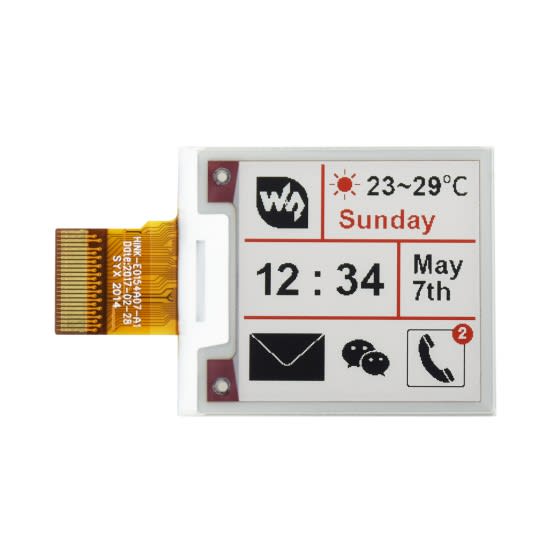
引用:https://www.waveshare.com/product/1.54inch-e-paper-b.htm
按ずるに電極だろうか。ケーブル(
しかし「白黒赤黄」のものは一つらしい。
引用:https://www.waveshare.com/1.54inch-e-paper-g.htm?sku=30441
更には白黒赤のものであっても一つしかない画像も見られるため、確実な判定方法とは言えない。
挙動
一つ、
平易には、白色と黒色のみを制御すればよいのか、更に赤色も制御せねばならぬか、という理屈である。制御対象が多い程、時間も掛かるだろう。
但し、「白黒のみを扱う場合」という同条件下での比較は見られないため、その真偽は定かでない。
1.54inch e-Paper Module (B)のプログラムは1.54inch e-Paper Module (G)のプログラムは見当たらない。別途専用の
- 実行
プログラムを特定したら実行する。
# run a script
$ python3 epd_1in54_V2_test.py
# venv:
(epdenv) $ python epd_1in54_V2_test.py
動作の様子
取り敢えず返品の必要がないことを確認できた。


ターミナルの表示
実行すると、今何が起こっているのか表示される。
INFO:root:epd1in54_V2 Demo
INFO:root:init and Clear
DEBUG:waveshare_epd.epd1in54_V2:full refresh
DEBUG:waveshare_epd.epd1in54_V2:e-Paper busy
DEBUG:waveshare_epd.epd1in54_V2:e-Paper busy release
DEBUG:waveshare_epd.epd1in54_V2:e-Paper busy
DEBUG:waveshare_epd.epd1in54_V2:e-Paper busy release
DEBUG:waveshare_epd.epd1in54_V2:e-Paper busy
DEBUG:waveshare_epd.epd1in54_V2:e-Paper busy release
DEBUG:waveshare_epd.epd1in54_V2:e-Paper busy
DEBUG:waveshare_epd.epd1in54_V2:e-Paper busy release
INFO:root:1.Drawing on the image...
DEBUG:waveshare_epd.epd1in54_V2:Horizontal
DEBUG:waveshare_epd.epd1in54_V2:e-Paper busy
DEBUG:waveshare_epd.epd1in54_V2:e-Paper busy release
INFO:root:2.read bmp file...
DEBUG:waveshare_epd.epd1in54_V2:Horizontal
DEBUG:waveshare_epd.epd1in54_V2:e-Paper busy
DEBUG:waveshare_epd.epd1in54_V2:e-Paper busy release
INFO:root:3.read bmp file on window...
DEBUG:waveshare_epd.epd1in54_V2:e-Paper busy
DEBUG:waveshare_epd.epd1in54_V2:e-Paper busy release
DEBUG:waveshare_epd.epd1in54_V2:Horizontal
DEBUG:waveshare_epd.epd1in54_V2:e-Paper busy
DEBUG:waveshare_epd.epd1in54_V2:e-Paper busy release
INFO:root:4.show time...
DEBUG:waveshare_epd.epd1in54_V2:Horizontal
DEBUG:waveshare_epd.epd1in54_V2:e-Paper busy
DEBUG:waveshare_epd.epd1in54_V2:e-Paper busy release
DEBUG:waveshare_epd.epd1in54_V2:partial refresh
DEBUG:waveshare_epd.epd1in54_V2:e-Paper busy
DEBUG:waveshare_epd.epd1in54_V2:e-Paper busy release
DEBUG:waveshare_epd.epd1in54_V2:e-Paper busy
DEBUG:waveshare_epd.epd1in54_V2:e-Paper busy release
DEBUG:waveshare_epd.epd1in54_V2:Horizontal
DEBUG:waveshare_epd.epd1in54_V2:e-Paper busy
DEBUG:waveshare_epd.epd1in54_V2:e-Paper busy release
DEBUG:waveshare_epd.epd1in54_V2:Horizontal
DEBUG:waveshare_epd.epd1in54_V2:e-Paper busy
DEBUG:waveshare_epd.epd1in54_V2:e-Paper busy release
DEBUG:waveshare_epd.epd1in54_V2:Horizontal
DEBUG:waveshare_epd.epd1in54_V2:e-Paper busy
DEBUG:waveshare_epd.epd1in54_V2:e-Paper busy release
DEBUG:waveshare_epd.epd1in54_V2:Horizontal
DEBUG:waveshare_epd.epd1in54_V2:e-Paper busy
DEBUG:waveshare_epd.epd1in54_V2:e-Paper busy release
DEBUG:waveshare_epd.epd1in54_V2:Horizontal
DEBUG:waveshare_epd.epd1in54_V2:e-Paper busy
DEBUG:waveshare_epd.epd1in54_V2:e-Paper busy release
DEBUG:waveshare_epd.epd1in54_V2:Horizontal
DEBUG:waveshare_epd.epd1in54_V2:e-Paper busy
DEBUG:waveshare_epd.epd1in54_V2:e-Paper busy release
DEBUG:waveshare_epd.epd1in54_V2:Horizontal
DEBUG:waveshare_epd.epd1in54_V2:e-Paper busy
DEBUG:waveshare_epd.epd1in54_V2:e-Paper busy release
DEBUG:waveshare_epd.epd1in54_V2:Horizontal
DEBUG:waveshare_epd.epd1in54_V2:e-Paper busy
DEBUG:waveshare_epd.epd1in54_V2:e-Paper busy release
DEBUG:waveshare_epd.epd1in54_V2:Horizontal
DEBUG:waveshare_epd.epd1in54_V2:e-Paper busy
DEBUG:waveshare_epd.epd1in54_V2:e-Paper busy release
DEBUG:waveshare_epd.epd1in54_V2:Horizontal
DEBUG:waveshare_epd.epd1in54_V2:e-Paper busy
DEBUG:waveshare_epd.epd1in54_V2:e-Paper busy release
DEBUG:waveshare_epd.epd1in54_V2:Horizontal
DEBUG:waveshare_epd.epd1in54_V2:e-Paper busy
DEBUG:waveshare_epd.epd1in54_V2:e-Paper busy release
DEBUG:waveshare_epd.epd1in54_V2:Horizontal
DEBUG:waveshare_epd.epd1in54_V2:e-Paper busy
DEBUG:waveshare_epd.epd1in54_V2:e-Paper busy release
DEBUG:waveshare_epd.epd1in54_V2:Horizontal
DEBUG:waveshare_epd.epd1in54_V2:e-Paper busy
DEBUG:waveshare_epd.epd1in54_V2:e-Paper busy release
DEBUG:waveshare_epd.epd1in54_V2:Horizontal
DEBUG:waveshare_epd.epd1in54_V2:e-Paper busy
DEBUG:waveshare_epd.epd1in54_V2:e-Paper busy release
DEBUG:waveshare_epd.epd1in54_V2:Horizontal
DEBUG:waveshare_epd.epd1in54_V2:e-Paper busy
DEBUG:waveshare_epd.epd1in54_V2:e-Paper busy release
DEBUG:waveshare_epd.epd1in54_V2:Horizontal
DEBUG:waveshare_epd.epd1in54_V2:e-Paper busy
DEBUG:waveshare_epd.epd1in54_V2:e-Paper busy release
DEBUG:waveshare_epd.epd1in54_V2:Horizontal
DEBUG:waveshare_epd.epd1in54_V2:e-Paper busy
DEBUG:waveshare_epd.epd1in54_V2:e-Paper busy release
DEBUG:waveshare_epd.epd1in54_V2:Horizontal
DEBUG:waveshare_epd.epd1in54_V2:e-Paper busy
DEBUG:waveshare_epd.epd1in54_V2:e-Paper busy release
DEBUG:waveshare_epd.epd1in54_V2:Horizontal
DEBUG:waveshare_epd.epd1in54_V2:e-Paper busy
DEBUG:waveshare_epd.epd1in54_V2:e-Paper busy release
DEBUG:waveshare_epd.epd1in54_V2:Horizontal
DEBUG:waveshare_epd.epd1in54_V2:e-Paper busy
DEBUG:waveshare_epd.epd1in54_V2:e-Paper busy release
INFO:root:Clear...
DEBUG:waveshare_epd.epd1in54_V2:full refresh
DEBUG:waveshare_epd.epd1in54_V2:e-Paper busy
DEBUG:waveshare_epd.epd1in54_V2:e-Paper busy release
DEBUG:waveshare_epd.epd1in54_V2:e-Paper busy
DEBUG:waveshare_epd.epd1in54_V2:e-Paper busy release
DEBUG:waveshare_epd.epd1in54_V2:e-Paper busy
DEBUG:waveshare_epd.epd1in54_V2:e-Paper busy release
DEBUG:waveshare_epd.epd1in54_V2:e-Paper busy
DEBUG:waveshare_epd.epd1in54_V2:e-Paper busy release
INFO:root:Goto Sleep...
DEBUG:waveshare_epd.epdconfig:spi end
DEBUG:waveshare_epd.epdconfig:close 5V, Module enters 0 power consumption ...
跋
今回はサンプルプログラムが動いたというだけで、特に何かしたわけではない。次は自分で制御する方法を調べなければならない。
Discussion