iTranslated by AI
Adding a Chatbot to a Website with Agents for Amazon Bedrock




Introduction
What I am trying to do here is an attempt to easily implement a chatbot on a website using generative AI.
For this project, I've decided to use a service called Agents for Amazon Bedrock.
I will quote from the "FAQ" to introduce what this service does.
Agents for Amazon Bedrock is a fully managed capability that makes it easier for developers to create generative AI-based applications that can complete complex tasks for a wide range of use cases and deliver up-to-date answers based on proprietary knowledge sources.
Sounds wonderful. It seems like it will be very effective as a chatbot.
New Staff Member, Immediate Storefront Debut
Let's put it to use right away. I'll quickly add a simple Q&A interface to the screen. By the way, this website is a homepage for a fictional Japanese confectionery shop that does not exist in reality.

Note that the character was drawn by Microsoft Copilot Designer, and the content text and product names were generated by ChatGPT. Generative AI is just too convenient.
Here is the underlying architecture. It is a very simple website configuration—hooray for Serverless!
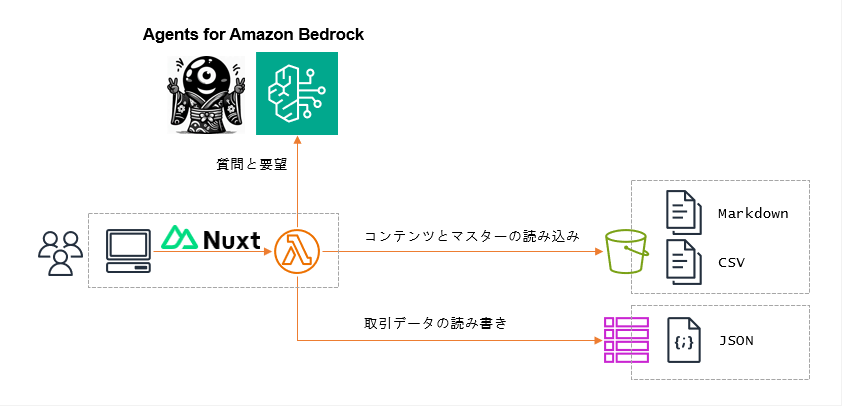
The code to send questions to the Agent is implemented as a Nuxt 3 server-side API. This is also kept simple, just enough to call the service.
import { BedrockAgentRuntimeClient, InvokeAgentCommand } from '@aws-sdk/client-bedrock-agent-runtime';

const client = new BedrockAgentRuntimeClient({
    region: 'us-east-1',
});

interface RequestParams {
    sessionId: string;
    question: string;
}

const runtimeConfig = useRuntimeConfig();
const agentId = runtimeConfig.agent_id;
const agentAliasId = runtimeConfig.agent_alias_id;

export default defineEventHandler(async (event): Promise<string | undefined> => {

    const { sessionId, question } = await readBody<RequestParams>(event);
    const command = new InvokeAgentCommand({
        agentId, agentAliasId, sessionId,
        endSession: false,
        enableTrace: false,
        inputText: question,
    });

    return await client.send(command).then(async response => {
        if (!response.completion) {
            return undefined;
        }

        const decorder = new TextDecoder('utf-8');
        const answer = [] as string[];
        for await (const stream of response.completion) {
            if (stream.chunk && stream.chunk.bytes) {
                const chunk = decorder.decode(stream.chunk.bytes)
                answer.push(chunk);
            }
        }
        return answer.join('');
    });
})
Giving it a Try
Now, let's finally try asking a question.

I don't quite understand what you're saying
Is generative AI not that smart? I decided to investigate how it arrived at such a response. First, let's ask the Agent the same question with the trace option enabled.

The trace is shown on the right, but since the text is a bit hard to read, I'll quote it below:
A customer asked about the store's location. First, I need to confirm the store's address.
I see. It seems the thought process was as follows:
- Was asked for the store's location,
- Didn't know the store's location,
- Asked the person who asked for the store's location,
- About the store's location.
What a straightforward child. It's almost endearing, but as a staff member handling customers at a storefront, they've failed. It seems necessary to have them properly acquire knowledge about the store's location.
Studying Necessary Knowledge for a Re-debut
To add knowledge to the Agent, we use a feature called Knowledge Base. Briefly explained, it is a database where data is formatted and stored in a way that the large language model behind the generative AI can use. The generative AI queries this database for sentences or content that seem relevant to the user's question and can generate a response based on the results obtained.
Now, Knowledge Bases for Amazon Bedrock is provided as a fully managed feature. Users can quickly set up a Knowledge Base simply by specifying the S3 bucket where the source data to be stored in the database is located and the large language model for converting the source data into a format usable by generative AI.
If you're interested, I recommend reading through this.
OpenSearch Service is selected as the data storage destination for a Knowledge Base set up with default settings. You don't need to be conscious of its existence because the Bedrock service uses it behind the scenes, but you can check its existence from the Management Console.
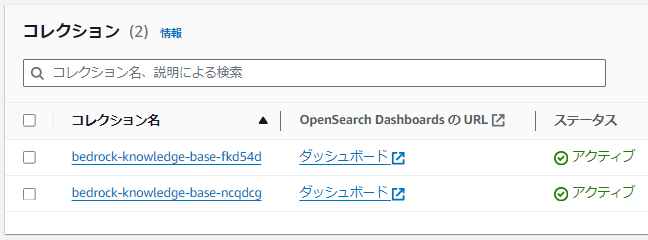
Dashboard for OpenSearch Service (Serverless)
In this case, I used two types of files as separate sources: the Markdown files that serve as the source for documents published on the website, and a CSV file containing master data such as product lists. As a result, two OpenSearch Service collections were created. Note that since Knowledge Base supports multiple sources, both sources are registered to the same Knowledge Base.
As a result, the architecture looks like this.
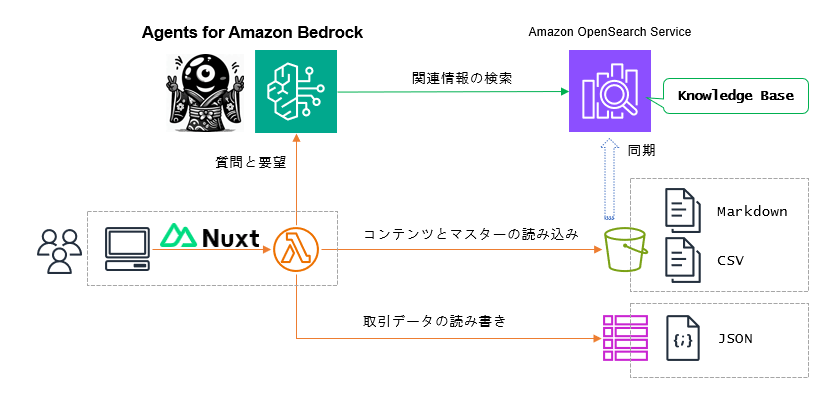
Serverless only!
Trying the Question Again
Since it seems that the knowledge about the store has been successfully acquired, I will try asking the same question again.
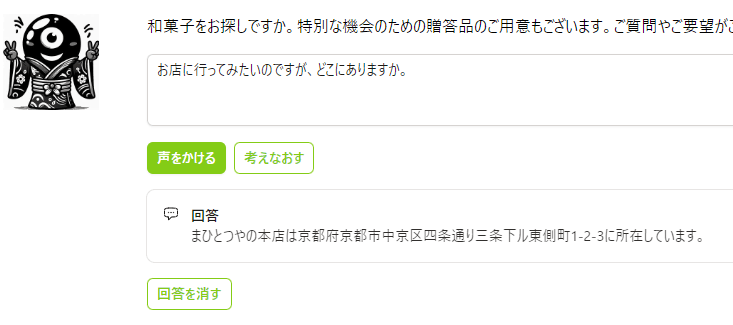
Well-studied!
A perfect answer. The strange address is because this Japanese confectionery shop is a fictional store. For comparison, I'll show the page where the correct answer is written.

Let's check the thought process again with a trace. Since the trace is quite large, I will quote parts of the output instead of using screenshots. While there was only one step last time, there were three steps this time.
Step 1
Correcting the "If I don't know the store location, I'll ask the person who asked me" attitude, it is now pulling information from the Knowledge Base to solve it on its own. It seems it queried the Knowledge Base using store location (店舗の場所) as a keyword. It's surprisingly impressive that it can autonomously determine the keyword for the query. Generative AI wasn't so dumb after all.
Although I only quoted one search result here, multiple results were actually returned. It's great that the returned results include not only the text but also the location identifying the source file.
  "rationale": {
    "text": "お客様の質問に回答するために、まずは店舗の場所を確認する必要があります。",
    "traceId": "16d3ff60-d45e-4186-ba27-6c2b5d634e70-0"
  },
  "invocationInput": {
    "invocationType": "KNOWLEDGE_BASE",
    "knowledgeBaseLookupInput": {
      "knowledgeBaseId": "4TYP5E01QQ",
      "text": "店舗の場所"
    },
    "traceId": "16d3ff60-d45e-4186-ba27-6c2b5d634e70-0"
  },
  "observation": {
    "knowledgeBaseLookupOutput": {
      "retrievedReferences": [
        {
          "content": {
            "text": "# お問い合わせ情報  |          |                             | |----------|-----------------------------| | **郵便** | 京都府京都市中京区四条通り三条下ル東側町1-2-3 | | **電話番号** | 0123-456-7890             | | **電子メールj** | info@mahitotsuya.co.jp |"
          },
          "location": {
            "s3Location": {
              "uri": "s3://mahitotsuyastack-contentsbucket571b0902-qaeh4b9lrhtf/public/contents/help/contact.md"
            },
            "type": "S3"
          }
        },
Step 2
I couldn't precisely decipher what was being done in this step. It looked like a task to compile multiple search results obtained in the previous step so they could be used in the next step.
Step 3
In this step, it finally considers what to answer. It seems that after examining the results from the Knowledge Base, it determined that the store's location was confirmed. It generates a response based on the content compiled in the previous step and returns the answer to the questioner.
  "rationale": {
    "text": "お客様の質問に対して、知識ベースから店舗の所在地を確認できました。これを回答として提供します。",
    "traceId": "16d3ff60-d45e-4186-ba27-6c2b5d634e70-1"
  },
  "observation": {
    "finalResponse": {
      "text": "まひとつや株式会社の本店は京都府京都市中京区四条通り三条下ル東側町1-2-3に所在しています。"
    },
    "traceId": "16d3ff60-d45e-4186-ba27-6c2b5d634e70-1",
    "type": "FINISH"
  }
It's heartening to see the effects of the learning coming through so clearly.
Finally, Challenging Sales
Now, let's have the newcomer try helping customers with their shopping. Here is the task:
Q. Please give me two Mizuito.
Now, this is simple but difficult. The newcomer already knows the product "Mizuito," but they don't know the means to put it into the customer's shopping cart. So, first, we have to teach them that. When you want an Agent to perform a specific task, you use a feature called Action Group. Briefly, it is a feature where the Agent intelligently determines the operation to call and the arguments to use, and then calls a Lambda function.
This time, I decided to have the product added to the shopping cart by executing a function already prepared on the website via an Action Group Lambda function. The final architecture will look something like this:
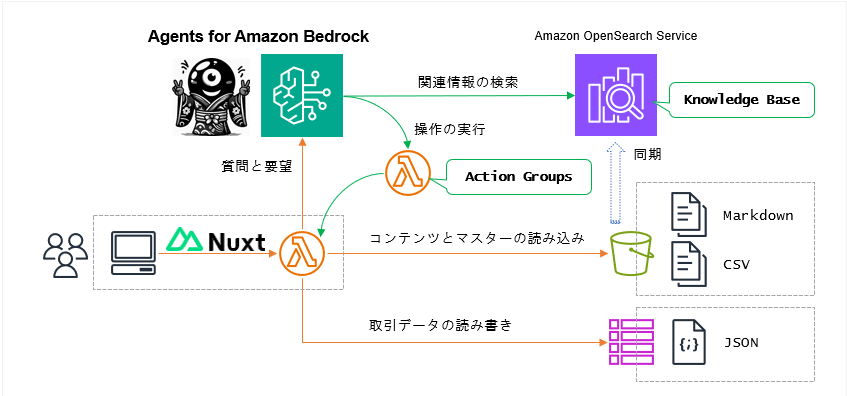
Now, let's register the Lambda function in the Action Group.
Prepare a Lambda Function to Register in an Action Group
For the request and response structure of the Lambda function to be registered, please refer to this documentation. You need to prepare a Lambda function that follows this content.
Here is what I created this time. It's a simple one that takes the request issued by the Agent, transforms it slightly, sends it to the website's API endpoint ${baseUrl}api/shopping/add-items-to-cart, and then formats the result again to return it to the Agent.
import { Handler } from "aws-lambda";

const toMap = (kvArray: {
    name: string;
    type: string;
    value: string;
}[]) => {
    return kvArray.reduce((obj, kv) => {
        obj[kv.name] = kv.value;
        return obj;
    }, {} as { [key: string]: string })
}

const baseUrl = process.env.API_BASE_URL;
export const handler: Handler = async (event, context) => {

    const params = toMap(event.parameters);
    const requestBody = {
        sessionId: event.sessionId,
        item: {
            giftId: params.giftId,
            count: Number.parseInt(params.count),
        }
    };

    const responseBody = await fetch(`${baseUrl}api/shopping/add-items-to-cart`, {
        method: 'POST',
        headers: {
            'Content-Type': 'application/json'
        },
        body: JSON.stringify(requestBody),
    }).then(res => res.text());

    const response = {
        messageVersion: '1.0',
        response: {
            actionGroup: event['actionGroup'],
            apiPath: event['apiPath'],
            httpMethod: event['httpMethod'],
            httpStatusCode: 200,
            responseBody: {
                'application/json': {
                    body: responseBody,
                }
            },
        },
        sessionAttributes: event['sessionAttributes'],
        promptSessionAttributes: event['promptSessionAttributes']
    };

    return response
}
Define How the Agent Calls the Lambda Function
Now that the Lambda function to be registered is ready, let's define how to call it. For the registration method, you can choose between a simple custom JSON format or an OpenAPI definition.

The Management Console layout changes frequently...
This time, I'll go with the OpenAPI definition. While defining parameters is important, the Agent uses the content of the description to determine which function to call and what values to set, so be sure to define this thoroughly.
openapi: 3.0.0
info:
  title: Shopping API
  version: 1.0.0
  description: An API that allows operations related to shopping carts.
paths:
  /api/shopping/add-items-to-cart:
    get:
      description: An operation that adds a specified quantity of a user-specified item to the shopping cart. Use this when a user wants to purchase a product.
      operationId: addItemsToCart
      parameters:
        - name: giftId
          in: query
          description: The ID of the item to add to the shopping cart. Do not specify the product name.
          required: true
          schema:
            type: string
        - name: count
          in: query
          description: The number of items to add to the shopping cart. An integer of 1 or more can be specified. 0 and negative numbers cannot be specified.
          required: true
          schema:
            type: integer
      responses:
        "200":
          description: Result of the operation
          content:
            application/json:
              schema:
                type: boolean
Communicating Important Details Clearly
With this, the means to put products into the shopping cart has been communicated to the Agent. However, there is one more problem. The value specified when calling the Lambda function defined in the Action Group is the product code, but the customer specifies the product name. It would be better to also teach it how to convert between these two values.
In this instance, I've decided to explicitly state the steps in the instructions for the Agent. Here are the final instructions:
You are a salesperson at a long-established Japanese confectionery shop. Respond to questions and requests from users.
Please answer questions politely.
If you find an available tool, execute it immediately and report the results to the user.

When purchasing a product, the product name must be replaced with a Product ID. Look for the Product ID as follows:
<steps>
- Get a list of product names and IDs from the knowledge base.
- Find the row where the value in the 'name' column matches the product name.
- Use the value from the 'id' column in that row. Confirm that it is a string starting with GFT_YKN_.
</steps>

Please respond to users in Japanese.
You might notice some other instructions besides the product name and ID conversion; consider these the result of some quiet trial and error behind the scenes of writing this article. In this way, it is necessary to clearly instruct the Agent on what to do and what not to do in the prompt while observing its actual behavior. For example, the instruction to respond "in Japanese" at the end of the prompt was added just in case, after a situation occurred where it suddenly started responding in English during a test run. Thinking "they'll understand without me saying it" is actually quite risky...
Anyway, the preparations are now complete.
Fully Prepared, Let's Take on the Challenge
After finishing the registration of the Action Group and completing the preparation and deployment of the Agent, it's time to tackle the challenge.

An answer already like a veteran

The contents of the shopping cart are also perfect
It feels like I've skipped over quite a bit, but it was a great success. Let's check the trace as well. This time, it was completed in 6 steps. It’s amazing how it has become capable of such complex tasks. Again, I’m not quoting the full trace, but only excerpts I’d like to introduce.
Step 1
It seems to understand what it needs to do. That's wonderful. I'm happy to see that my instructions have been conveyed.
  "rationale": {
    "text": "ユーザーから「瑞糸を2つください」との要求がありました。瑞糸という商品名から、知識ベースを検索して商品IDを特定する必要があります。",
    "traceId": "0815d0eb-56f5-4850-97af-23d4b4ab8add-0"
  },
  "invocationInput": {
    "invocationType": "KNOWLEDGE_BASE",
    "knowledgeBaseLookupInput": {
      "knowledgeBaseId": "4TYP5E01QQ",
      "text": "瑞糸"
    },
    "traceId": "0815d0eb-56f5-4850-97af-23d4b4ab8add-0"
  },
Step 2
Unfortunately, I couldn't decipher what it was doing. It looks like it continues to search the Knowledge Base, but I can't be certain.
Step 3
Now that it has acquired knowledge about the product itself, it seems to be trying to find the product ID in the Knowledge Base. The search keyword has changed from "瑞糸" (Mizuito) to "product id for "瑞糸"". By the way, this newcomer seems to think in English when it comes to complex reasoning.
  "rationale": {
    "text": "The search results indicate that 瑞糸 is a type of gold leaf yokan (a traditional Japanese confection) offered by the company. It has 4 pieces and costs 3,600 yen. The description states that it is a gold leaf yokan that imagines the moist and lush threads, and wishes for happiness from all directions and brings joy to the recipient.\n\nTo add this item to the cart, I will need to look up the product ID in the knowledge base.",
    "traceId": "0815d0eb-56f5-4850-97af-23d4b4ab8add-1"
  },
  "invocationInput": {
    "invocationType": "KNOWLEDGE_BASE",
    "knowledgeBaseLookupInput": {
      "knowledgeBaseId": "4TYP5E01QQ",
      "text": "product id for 瑞糸"
    },
    "traceId": "0815d0eb-56f5-4850-97af-23d4b4ab8add-1"
  },
Step 4
It seems that, similar to Step 2, it is continuing to query the Knowledge Base from the previous step, or continuing the processing of the search results.
Step 5
Finally, we reach the main processing. It appears the product ID was identified as GFT_YKN_04. Having determined that the item can be added to the cart, it is actually executing the Action Group. At this point, the actual parameter values passed to the Lambda function and the return value from the Lambda function can also be retrieved from the trace.
  "rationale": {
    "text": "Okay, I have the product ID for 瑞糸 as GFT_YKN_04. Now I can add 2 of these items to the cart.",
    "traceId": "0815d0eb-56f5-4850-97af-23d4b4ab8add-2"
  },
  "invocationInput": {
    "actionGroupInvocationInput": {
      "actionGroupName": "shopping-apis",
      "apiPath": "/api/shopping/add-items-to-cart",
      "parameters": [
        {
          "name": "count",
          "type": "integer",
          "value": "2"
        },
        {
          "name": "giftId",
          "type": "string",
          "value": "GFT_YKN_04"
        }
      ],
      "verb": "get"
    },
    "invocationType": "ACTION_GROUP",
    "traceId": "0815d0eb-56f5-4850-97af-23d4b4ab8add-2"
  },
  "observation": {
    "actionGroupInvocationOutput": {
      "text": "true"
    },
    "traceId": "0815d0eb-56f5-4850-97af-23d4b4ab8add-2",
    "type": "ACTION_GROUP"
  }
Step 6
The final step, as usual, involves composing the wording to be returned to the customer based on the preceding content.
Please Wait a Moment...
Incidentally, in this specific process, the time spent waiting for the response from the server side was approximately 15 seconds.
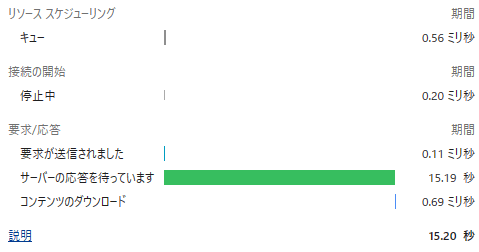
While one might wish for prompter processing, considering that several tens of seconds was common back in the days of Claude 2.1, the performance improvement since Claude 3 is remarkable.
There will likely be many opportunities to choose a generative AI by weighing the accuracy of the response against its speed.
Conclusion
By integrating Agents for Amazon Bedrock into an application, we have seen that it is possible to easily implement a chatbot capable of flexible interactions.
However, there are concerns about whether it will always respond as intended. There are many factors that influence the final answer provided, such as instructions to the Agent, the OpenAPI definitions of Action Groups, and the user's conversation history. There is always the possibility that the Agent will exhibit responses or behaviors unintended by the developer. It seems necessary to accumulate expertise on how to avoid or suppress such risks.
Then there's the cost. Well, if you think of it as being able to build as many apps using generative AI as you want for a few dozen dollars a month, maybe it's cheap... I will continue to enjoy this playground while remaining grateful for it!
Discussion