iTranslated by AI
Committing changes in GitHub Actions


Introduction
There are cases where you want to run changeset or lint on GitHub Actions and commit those changes. This time, I implemented it using changeset, so I am documenting the process here.
Workflow Implementation
You don't need to change any specific GitHub settings; it can be handled entirely within the workflow's YAML file. The key point is setting permissions. By specifying contents: write, you grant this job permission to commit changes.
name: Version

on:
  push:
    branches:
      - main

concurrency: ${{ github.workflow }}-${{ github.ref }}

jobs:
  version:
    name: Version
    permissions:
      contents: write
    runs-on: ubuntu-latest
    steps:
      - name: Checkout
        uses: actions/checkout@v4

        # Setup pnpm
        # Change this if you use npm or yarn
      - name: Setup PNPM
        uses: pnpm/action-setup@v3.0.0
        with:
          version: 8  # Not required if version is specified in package.json

        # Setup Node.js
      - name: Setup Node.js
        uses: actions/setup-node@v4
        with:
          node-version: "20"

        # Git user configuration for committing and pushing
        # Please replace xxx@example.com and user with your own
      - name: Setup Git user
        shell: bash
        run: |
          git config --global user.email "xxx@example.com"
          git config --global user.name "user"

        # Install dependencies
        # Change this if you use npm or yarn
      - name: Install dependencies
        run: pnpm install

        # Change, commit, and push
        # Run changeset, stage the changes with git add .,
        # and if there are changes, perform commit and push.
      - name: Version Update
        run: |
          pnpm changeset version
          git add .
          git diff --staged --exit-code || (git commit -m 'ci(changelog): update version' && git push)
Supplementary Information
I set it up manually this time, but since a GitHub Action for changesets is available, it's probably better to use that.
Workflow permissions can be configured in the Settings → Actions → General section of your repository. By default, it is set to read-only, but you can grant write access by checking Read and write permissions.
However, I recommend not using this setting, as it grants write permissions beyond just contents: write.
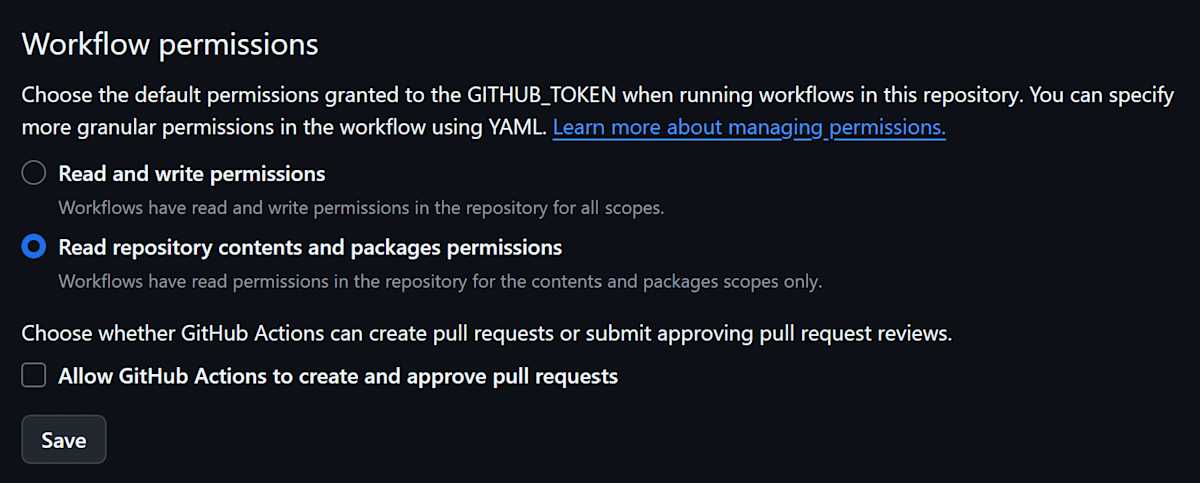
Repository used for this verification
Discussion